
swagger-combine-ui
v0.1.3
Published
Combines multiple Swagger schemas into one site

Maintainers
 levonet
Readme
Swagger Combine UI


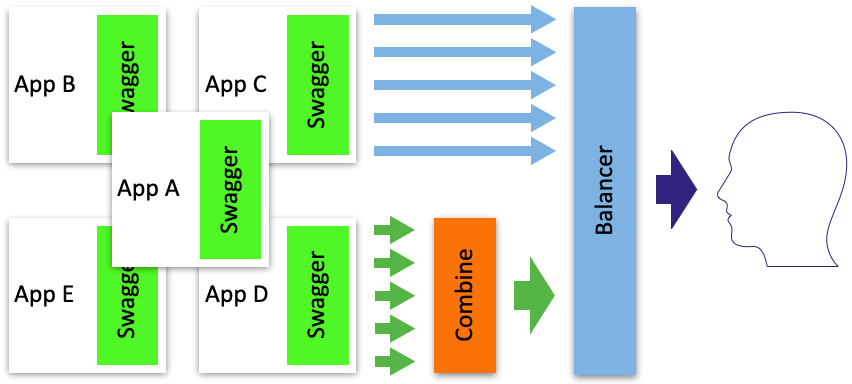
The service is used to combine the documentation of various services and display it.
When you should use swagger-combine-ui:
- You have a certain number of microservices and you need to combine their Swagger into one interface
Usage
Checkout this repository locally, then:
npm i
npm start
Now you can visit http://localhost:3000 to view your server.
Docker
Run swagger-combine-ui with a custom config file:
docker run -d -p 3000:3000 -v /path/to/swagger.yaml:/app/swagger.yaml swaggerql/swagger-combine-uiConfiguration
The default path for the configuration file is ./swagger.yaml
Swagger Combine UI requires one configuration schema which resembles a standard Swagger schema except for an additional apis field.
For informations about configuration have a look at the documentation of swagger-combine.
Configuration example
swagger.yaml
swagger: '2.0'
info:
  title: Basic Swagger Combine Example
  version: 1.0.0
apis:
- url: http://petstore.swagger.io/v2/swagger.json
- url: https://api.apis.guru/v2/specs/medium.com/1.0.0/swagger.json
- url: https://api.apis.guru/v2/specs/deutschebahn.com/betriebsstellen/v1/swagger.json
  paths:
    base: /bahn
APIs difference
url field
URL or query path to swagger apidocs.
If the url field contains a path, then the full url is formed from the request headers:
Hostheader is used as the domain.X-Forwarded-Protoheader is used as a schema. Schema ishttpby default.