
swagger-sentinel
v1.1.2
Published
Opinionated OpenAPI 3.x validator and test generator with a 130-point checklist

Maintainers
 mustafasercansak
Readme
swagger-sentinel
Opinionated OpenAPI 3.x validator and test generator with a 130-point checklist.
Available as a VS Code Extension, NPM Package, and GitHub Action.
Despite the name, swagger-sentinel works with any OpenAPI 3.x spec — "Swagger" is just the legacy term that stuck.
Installation
VS Code Extension
Search for "Swagger Sentinel" in the VS Code Extensions view, or install it from the Marketplace.
- Real-time Validation: Instant feedback as you type.
- Diagnostics: Errors and warnings highlighted directly in your editor.
- Commands: Generate tests or validate manually via the Command Palette or context menu.
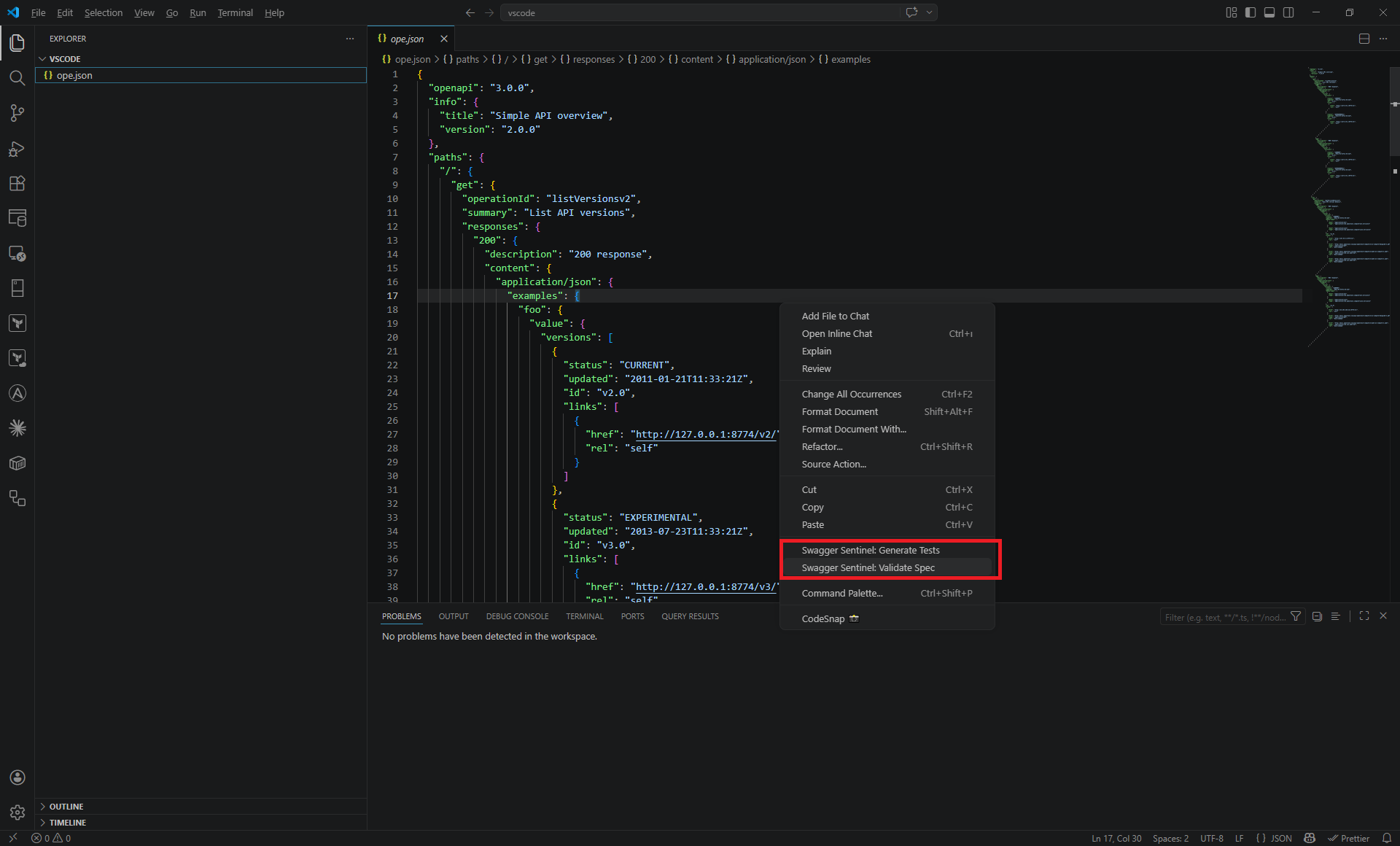
CLI (NPM)
npm install -g swagger-sentinel
# or use directly with npx
npx swagger-sentinel validate your-api.yaml
Commands
Validate
Run the 130-point checklist against your spec:
swagger-sentinel validate your-api.yaml
swagger-sentinel validate your-api.yaml --strict       # warnings = errors
swagger-sentinel validate your-api.yaml --format json   # CI-friendly output
swagger-sentinel validate your-api.yaml --category paths # validate one category
swagger-sentinel validate your-api.yaml --rules ./rules # load custom rules
Rules Registry
Explore the 130-point checklist directly from your terminal:
swagger-sentinel rules                 # List all rules by category
swagger-sentinel rules --category security # Filter by category
swagger-sentinel rules P16             # Show details for a specific rule
Generate Tests
Generate TypeScript Vitest test suites from your spec. Now includes Faker.js integration for realistic, schema-driven test data:
swagger-sentinel generate your-api.yaml --output ./tests/
swagger-sentinel generate your-api.yaml --tag Pets           # specific tag only
swagger-sentinel generate your-api.yaml --base-url http://localhost:8080
swagger-sentinel generate your-api.yaml --seed 123          # consistent random data
The generator automatically maps semantic field names (like email, firstName, birthDate) to realistic mock data.
Watch Mode
Re-validate on every file change:
swagger-sentinel watch your-api.yaml
swagger-sentinel watch your-api.yaml --strict
Breaking Change Detector
Compare two versions of a spec and detect breaking changes with a semver bump recommendation:
swagger-sentinel breaking old-api.yaml new-api.yaml
swagger-sentinel diff old-api.yaml new-api.yaml                 # alias
swagger-sentinel breaking old-api.yaml new-api.yaml --format json
swagger-sentinel breaking old-api.yaml new-api.yaml --fail-on any
swagger-sentinel breaking old-api.yaml new-api.yaml --summary breaking-summary.md
swagger-sentinel breaking old-api.yaml new-api.yaml --risk-high-threshold 25 --risk-medium-threshold 10
--fail-on values:
breaking(default): Exit non-zero only when breaking changes are found.any: Exit non-zero when any change is detected.none: Always exit zero (reporting mode only).
Risk score tuning:
- Defaults:
breaking=10,non-breaking=3,informative=1,high=15,medium=6 - Override weights:
--risk-breaking-weight,--risk-non-breaking-weight,--risk-informative-weight - Override thresholds:
--risk-high-threshold,--risk-medium-threshold
Example: Old vs New Spec
To help teams quickly understand the output categories, use the example files in this repo:
swagger-sentinel breaking \
  docs/examples/breaking-change/old-api.yaml \
  docs/examples/breaking-change/new-api.yaml \
  --summary docs/examples/breaking-change/report.md
This example intentionally includes all three change types:
- Breaking:
GET /petsparameterlimitbecame required. - Breaking:
GET /pets/{petId}endpoint was removed. - Non-breaking:
GET /healthendpoint was added. - Informative:
operationIdchanged frompets_listtopets_list_v2.
AI Enrich (Documentation Auto-Fill)
Automatically detect missing summary and description fields across your operations and schemas, and fill them in using AI — powered by Google Gemini or OpenAI:
# Preview changes (dry run)
swagger-sentinel enrich api.yaml --provider gemini --lang tr

# Write changes back to file
swagger-sentinel enrich api.yaml --provider gemini --lang tr --write
Also available as a one-click action in the VS Code Extension!
Utilities
Spectral Export
Export your sentinel rules to a Spectral-compatible YAML ruleset:
swagger-sentinel export-spectral > .spectral.yamlValidation Categories
| Category | Checks | Automated | |----------|--------|-----------| | Structure & Metadata | 15 | 11 | | Path Design | 20 | 13 | | Operations | 25 | 15 | | Request Validation | 18 | 12 | | Response Design | 25 | 12 | | Security | 15 | 12 | | Documentation | 12 | 8 | | Total | 130 | 83 |
See docs/CHECKLIST.md for the full checklist.
GitHub Actions
Swagger Sentinel is available on the GitHub Marketplace. Add it to any workflow to validate your OpenAPI spec on every push or pull request:
- name: Validate OpenAPI spec
  uses: mssak/swagger-sentinel@v1   # replace with your published tag
  with:
    spec-path: api.yaml
Inputs
| Input | Required | Default | Description |
|-------|----------|---------|-------------|
| spec-path | ✅ | — | Path to the OpenAPI spec file (.yaml or .json) |
| strict | | false | Treat warnings as errors |
| category | | (all) | Validate only one category (Structure, Paths, Operations, Request, Response, Security, Documentation) |
| generate-tests | | false | Generate Vitest TypeScript tests from the spec |
| output-dir | | generated-tests | Output directory for generated tests |
| base-url | | http://localhost:3000 | Base URL used in generated tests |
Outputs
| Output | Description |
|--------|-------------|
| passed | Number of checks that passed |
| errors | Number of failed error-level checks |
| warnings | Number of failed warning-level checks |
| suggestions | Number of failed suggestion-level checks |
| total | Total number of checks run |
Full workflow example
name: API Contract
on:
  pull_request:
    paths: ['**/*.yaml', '**/*.json']
jobs:
  validate:
    runs-on: ubuntu-latest
    steps:
      - uses: actions/checkout@v4

      - name: Validate OpenAPI spec
        id: sentinel
        uses: mssak/swagger-sentinel@v1
        with:
          spec-path: api.yaml
          strict: true

      - name: Print summary
        if: always()
        run: |
          echo "Passed   : ${{ steps.sentinel.outputs.passed }}"
          echo "Errors   : ${{ steps.sentinel.outputs.errors }}"
          echo "Warnings : ${{ steps.sentinel.outputs.warnings }}"
          echo "Total    : ${{ steps.sentinel.outputs.total }}"
CI Integration
Swagger Sentinel is built for CI/CD. It natively supports GitHub Actions Annotations (to show errors directly on your PR code) and Job Summaries.
name: API Contract
on:
  pull_request:
    paths: ['specs/**']
jobs:
  validate:
    runs-on: ubuntu-latest
    steps:
      - uses: actions/checkout@v4
      - name: Sentinel Validate
        run: |
          npx swagger-sentinel validate specs/api.yaml \
            --strict \
            --github-annotations \
            --summary results.md
      - name: Upload Summary
        if: always()
        run: cat results.md >> $GITHUB_STEP_SUMMARY
The --github-annotations flag will automatically highlight issues on the exact lines of your YAML file in the GitHub PR view.
For a ready-to-run comparison demo, see docs/examples/breaking-change/README.md.
This repository also includes a PR template with a breaking-check section at .github/pull_request_template.md.
Custom Rules
You can extend swagger-sentinel with your own domain-specific rules. Create a directory (e.g., ./sentinel-rules) and add .js or .mjs files:
// ./sentinel-rules/no-internal-paths.js
export default function validate(spec) {
  const results = [];
  for (const path in spec.paths) {
    if (path.startsWith('/internal')) {
      results.push({
        id: 'CUSTOM01',
        category: 'Custom',
        severity: 'error',
        passed: false,
        message: `Internal path detected: ${path}`
      });
    }
  }
  return results;
}
Then run with the --rules flag:
swagger-sentinel validate api.yaml --rules ./sentinel-rulesProgrammatic Usage (TypeScript/ESM)
import { loadSpec, validate, generate } from 'swagger-sentinel';

const spec = loadSpec('your-api.yaml');
const results = validate(spec);
const testFiles = generate(spec, { output: './tests' });
Development
If you are contributing to swagger-sentinel, use the following scripts:
npm run build: Compiles TypeScript (important for updating thedist/binary used bynpx).npm run validate <file>: Runs the validator directly from source (usingtsx).npm test: Runs the Vitest suite.npm run test:coverage: Runs tests with coverage thresholds (CI gate).npm run build:watch: Automatically recompiles on every file change.
[!IMPORTANT] When testing the CLI locally via
npx ., always runnpm run buildfirst to ensure the distributed files are up to date!
Configuration
You can customize swagger-sentinel using a .sentinelrc file (JSON or YAML) in your project root.
{
  "strict": true,
  "ignore": ["R50", "P15"],
  "overrides": {
    "SEC101": "error",
    "DOC119": "suggestion"
  },
  "generate": {
    "seed": 12345,
    "baseUrl": "https://api.staging.com",
    "output": "./generated-tests"
  }
}
Options
strict: Treat warnings as errors (equivalent to--strict).ignore: An array of Rule IDs to completely skip during validation.overrides: A map of Rule IDs to their desired severity (error,warning, orsuggestion).generate: Default options for thegeneratecommand.
License
MIT