
synapse-map
v0.1.1
Published
Map a codebase by what it depends on: a ranked 3D graph of its files and functions, with questions answered from cited sources. Runs locally.

Maintainers
 atharva125
Readme
Synapse turns a repository into a graph of its files and functions, ranks every file by how much the rest of the code relies on it, and lets you explore the result in 3D or ask questions whose answers cite their sources. It runs on your machine: parsing, ranking and retrieval are local, and summaries and answers come from a local model through Ollama unless you choose Gemini or Claude. It reads JavaScript, TypeScript, Python, Java and Go.
| Time | Chapter | | --- | --- | | 0:00 | Day one at a new job | | 0:27 | What Synapse does | | 1:02 | One command, about eight seconds | | 1:25 | Reading the 3D map | | 2:18 | How files are ranked: PageRank and git churn | | 2:56 | Running a local model with Ollama | | 3:32 | Asking questions with cited sources | | 3:47 | Big repositories: the folders view | | 4:18 | Your own project, and privacy | | 5:05 | Installing it |
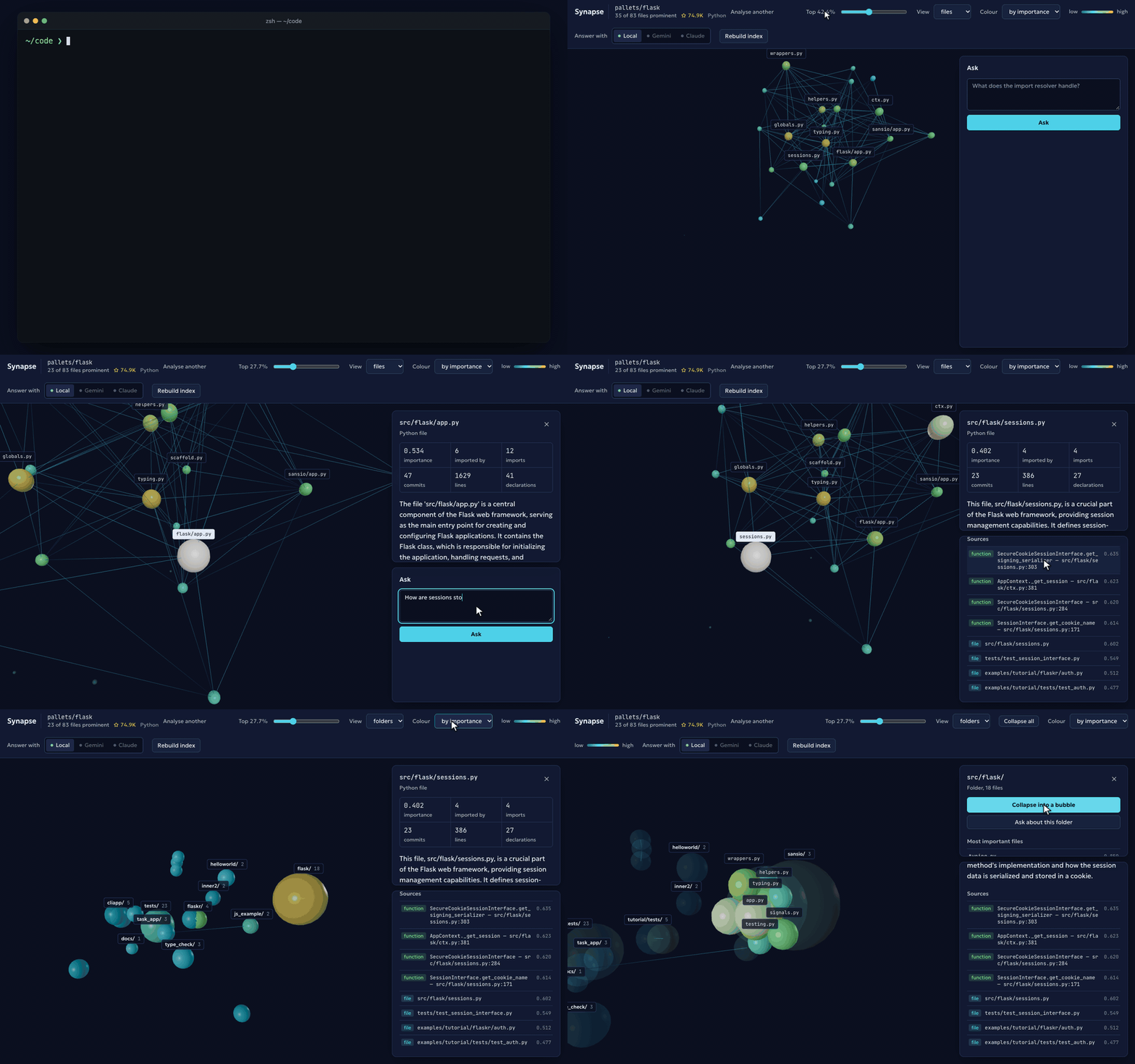
Recorded from a real run of the packaged CLI on pallets/flask with a local model
(qwen2.5:14b-instruct through Ollama). The terminal replays that run's output with its
6 minutes of summarising sped up and the working directory shortened to ~/code. The
explorer plays at about 1.4× speed, and the 12 seconds the model took to answer are
sped up 8×.
Getting started
1. See a map in seconds. No install, no model, no API key:
npx synapse-map serve https://github.com/pallets/flask --skip-summarizeSynapse clones the repository, ranks its files and opens the explorer in your browser. On Flask the analysis takes about 8 seconds. You need Node.js 20 or later and git.
2. Try it on your own project. From the project's folder:
npx synapse-map serve .The explorer opens on the files that matter most. Click a file to see what imports it,
what it imports and its main functions; switch View to folders on a large repository;
drag the slider to show more or fewer files. Results are cached in .synapse/, so the
next run opens instantly. Add .synapse/ to your .gitignore.
3. Add summaries and questions. Pick one:
Local and private, with Ollama. Nothing leaves your machine.
ollama pull qwen2.5-coder:14b
ollama pull nomic-embed-text
npx synapse-map serve .
Cloud, with Gemini. Faster, and no model to download.
export GEMINI_API_KEY=your-key
npx synapse-map serve . --provider gemini
Synapse summarises the 50 most important files, then answers questions in the Ask
panel with links to the files it used. Summaries are the slow part with a local model:
on Flask they took 21 minutes on an M2 Pro. --summarize-top 10 makes it much faster.
4. Install it for good.
npm install -g synapse-map
synapse serve .
The command installs as both synapse and synapse-map.
Other ways to use it
synapse analyze .                                   # print the most important files
synapse ask "where is authentication handled?" --show-sources
synapse serve https://github.com/owner/repo         # any public GitHub repository
Once serve is running you can open more repositories from the page itself: paste a
GitHub URL or a local folder into the box on the start page, pick who summarises, and
the explorer opens on it when the analysis finishes. Repositories opened that way are
cached in ~/.synapse-map/repos/, so reopening one is instant.
A local folder is read in place and never modified. Your code only leaves your machine if you choose Gemini or Claude, and then only the slices sent for summaries and answers.
Requirements
Node.js 20 or later, and git on your PATH for cloning and history. Node 20 reached end of life in April 2026 and one transitive dependency now declares Node 22; it runs on 20, but 22 is the safer choice.
Ollama, for summaries and questions. Pull the two default models once:
ollama pull qwen2.5-coder:14b      # summaries and answers
ollama pull nomic-embed-text       # embeddings for questions
Any chat model you already have works instead: add
--model qwen2.5:14b-instruct, for example. Without Ollama you still get the full graph and rankings: the analysis reports how to fix it and carries on without summaries, and the explorer disables only questions.Or
GEMINI_API_KEY, to summarise, answer and embed with Gemini instead, with no Ollama needed at all; see Providers.Or
ANTHROPIC_API_KEY, to summarise and answer with Claude. Ollama is still needed forindexandask, because Anthropic has no embeddings endpoint.A C++ toolchain only on uncommon platforms. tree-sitter ships prebuilt binaries for macOS (arm64 and x64), Linux x64 and Windows x64. Anywhere else, such as Linux on ARM, npm compiles it on install, which needs Python, make and a C++ compiler.
Commands
synapse analyze <path-or-github-url> [options]   Build the graph
synapse index [path] [options]                   Build/refresh the embedding index
synapse ask "<question>" [options]               Ask a question about the codebase
synapse serve [path-or-github-url] [options]     Serve the 3D UI and API

analyze:
  --out <dir>            Where to write graph.json (default: <target>/.synapse)
  --depth <n>            Clone depth when given a URL (default: 200)
  --token <token>        Credential for a private repository. Prefer the GITHUB_TOKEN
                         environment variable, which keeps it out of shell history.
  --top <n>              How many files to list in the summary (default: 10)
  --skip-churn           Skip the git history pass
  --skip-github          Skip fetching the repository's details from GitHub
  --skip-summarize       Skip LLM summarisation entirely
  --summarize-top <n>    How many top files to summarise (default: 50)
  --json                 Print the graph to stdout instead of writing a file

index:
  --path <dir>           Repo root, for recovering function signatures (default: .)

ask:
  --path <dir>           Repo root (default: .)
  --top-k <n>            How many chunks to retrieve (default: 8)
  --show-sources         List the files and functions the answer drew on
  --global-rank          Rank purely by similarity, without reserving seats per
                         chunk kind (file vs function). Off by default.

serve:
  --path <dir>           Repo root (default: .)
  --token <token>        Credential for a private repository, as for analyze
  --port <n>             Port to listen on (default: 4317)
  --host <addr>          Address to bind (default: 127.0.0.1)
  --no-open              Do not open a browser window
  --skip-summarize       Skip summarisation if a graph has to be built first
  --skip-github          Skip fetching the repository's details from GitHub

Shared:
  --out <dir>            Where .synapse artefacts live (default: <path>/.synapse)
  --provider <name>      ollama | gemini | anthropic  (default: ollama)
                         Chooses what summarises and answers.
                         gemini embeds with Gemini too, so it needs no Ollama; it
                         reads GEMINI_API_KEY from the environment only.
                         anthropic has no embeddings endpoint, so `ask` still embeds
                         with Ollama; it reads ANTHROPIC_API_KEY from the environment only.
  --model <name>         Chat model (default: qwen2.5-coder:14b,
                         gemini-3.8-flash with gemini, claude-opus-5 with anthropic)
  --embed-model <name>   Embedding model (default: nomic-embed-text,
                         or gemini-embedding-001 with --provider gemini)
  --ollama-url <url>     Ollama base URL (default: http://localhost:11434)
  -h, --help             Show this message
  -v, --version          Print the installed version
A local path is read in place and never modified. A URL is cloned shallowly into a
temporary directory, analysed, and removed; its artefacts land in .synapse/ in the
directory you ran the command from.
For a repository on GitHub, whether a URL or a local folder whose origin points
there, the analysis also asks GitHub's API for its description, stars, forks, language,
topics, licence and default branch, alongside the parse so it adds no time. The explorer
and start page show them. It is decoration, never a requirement: offline, rate-limited
(60 requests an hour without a token) or private without a token, the analysis notes
why and carries on. A token given for a private clone also authenticates this one
request; --skip-github turns the lookup off.
Providers
Three backends can write summaries and answer questions, chosen with --provider on
analyze, ask and serve, or with the Local / Gemini / Claude switch in the page:
| Provider | Chat model | Embeddings | Key |
| --- | --- | --- | --- |
| ollama (default) | qwen2.5-coder:14b | nomic-embed-text, local | none |
| gemini | gemini-3.8-flash | gemini-embedding-001, so no Ollama needed | GEMINI_API_KEY |
| anthropic | claude-opus-5 | nomic-embed-text via Ollama | ANTHROPIC_API_KEY |
The default is ollama, and nothing leaves your machine on that path. With gemini or
anthropic, each prompt goes to that provider's API, and summarisation prompts include
up to the first 6,000 characters of each summarised file.
export GEMINI_API_KEY=...
npx synapse-map serve ~/code/your-project --provider gemini
Keys are read from the environment and nowhere else, never a flag, a file or the web page, so they cannot land in shell history, a commit or a browser. In the page, a provider whose key is not set, or a stopped Ollama, shows as disabled with the reason on hover. An unset key fails up front with the command that fixes it.
All three receive byte-identical prompts: the summarisation prompt, its JSON schema and the retrieval context are built by the same code, and tests assert it. Only the transport differs.
Embeddings follow the provider where they can. Gemini has an embeddings endpoint, so
Gemini mode needs no Ollama at all. Anthropic has none, so index and ask keep
embedding with Ollama under --provider anthropic, and Synapse says so rather than
quietly swapping in another model. Each embedding model keeps its own index files, so
switching providers in the page reuses the index already built for each one instead of
re-embedding.
Private repositories
analyze and serve clone private repositories with a token from the GITHUB_TOKEN
environment variable, or from --token. Prefer the variable: a flag lands in shell
history and in the process's own argument list. In the page, the start-page form has a
"Private repository?" field: its token goes to the local server once, is used for that
clone, and is never stored, logged or returned.
export GITHUB_TOKEN=ghp_...
npx synapse-map serve https://github.com/your-org/private-repo
The token reaches git through the child process's environment, read by an inline
credential helper, so it never appears in argv (where ps would show it to other users),
is never written to the clone's .git/config, and cannot be answered by your system
keychain instead. A credential pasted into the URL itself is stripped before the URL is
printed, returned by the server, or written to graph.json, and git's own error output
is scrubbed the same way. GitHub answers an unauthenticated request for a private
repository with "not found", the same as a typo, so a failed clone explains both
possibilities rather than guessing.
The explorer
serve starts a local server and opens the explorer at /graph. It listens
immediately and, if the repository has no graph yet, analyses it in the background
while the page shows live progress, then swaps to the graph without a reload.
- Nodes are files, sized and coloured by importance, from dim cyan through green to amber. Edges are imports, drawn dim at the importer and bright at the file imported.
- The slider keeps the top percentage of files prominent. Larger repositories open on their most important few hundred files, and every file stays clickable.
- Clicking a file shows its summary, metrics (importance, imports each way, commits, lines) and top functions, with a button that pre-fills a question about it.
- Ask answers from the index and lists its sources; clicking a source flies the camera to that file. Answer with switches between Local, Gemini and Claude.
- Labels name the dozen most important files on the map, and the selected one. Labels that would overlap give way, files before folders.
- View switches between files and folders. Repositories over 400 files open in the
folders view: each folder is one bubble, sized by its file count and coloured by its
most important file, with lines for the imports between folders. Big folders split
into their subfolders until there are about 40 bubbles; a folder with hundreds of
subfolders, like
homeassistant/components, keeps its largest few and groups the rest as one "+N more" bubble. - Clicking a folder lists its most important files, with Show its files to open it in place and Ask about this folder to pre-fill a question. Collapse all closes every open folder. Opening a file from an answer's sources opens its folder.
/ is the start page: paste a GitHub URL or a local folder there to analyse another
repository, or follow "Analyse another" from the explorer's toolbar.
The server binds to 127.0.0.1 by default and only answers requests addressed to
localhost, which stops a website you visit from reaching it through DNS rebinding. Every
response carries a strict Content-Security-Policy and no-framing headers. Binding to
another address with --host is an explicit choice to be reachable, and prints a warning:
the API has no authentication, and questions run the model, which costs money on a
cloud provider.
Output
Everything is written to .synapse/ beside the analysed project, or in the current
directory for a URL:
| File | What it holds |
| --- | --- |
| graph.json | The ranked graph: files, functions, imports, calls, metrics and summaries |
| summaries.json | Cached summaries, keyed by a hash of each file's path and contents |
| embeddings.json, embeddings.bin | The question index: chunk metadata and unit-length vectors |
A trimmed graph.json:
{
  "version": 2,
  "source": "https://github.com/owner/repo",
  "stats": { "fileCount": 12, "edgeCount": 28, "externalImports": 21, … },
  "repository": { "fullName": "owner/repo", "description": "…", "stars": 1200,
                  "language": "TypeScript", "license": "MIT", … },   // GitHub repos only
  "nodes": [
    {
      "id": "src/hub.ts",
      "path": "src/hub.ts",
      "language": "typescript",
      "importance": 0.85,
      "metrics": { "loc": 102, "churn": 3, "inDegree": 7, "outDegree": 0,
                   "centrality": 1, "churnScore": 0.5 },
      "summary": "Defines the shared helpers the rest of the package builds on.",
      "functions": [ "src/hub.ts#sharedHelper" ]   // ids into functionNodes
    }
  ],
  "edges": [ { "from": "src/app.ts", "to": "src/hub.ts", "type": "import", "weight": 1 } ],
  "functionNodes": [ { "id": "src/hub.ts#sharedHelper", "name": "sharedHelper",
                       "kind": "function", "startLine": 1, "importance": 1,
                       "summary": "Doubles the value it is given." } ],
  "functionEdges": [ { "from": "src/util.ts#double", "to": "src/hub.ts#sharedHelper",
                       "type": "call", "weight": 1 } ],
  "summarization": { "ran": true, "model": "qwen2.5-coder:14b", "selected": 50,
                     "fromCache": 47, "generated": 3, "failed": 0 }
}
functionNodes is the single source of truth for declarations; nodes[].functions
holds ids into it.
How it works
Ingestion. Walks the tree honouring .gitignore at every level, including nested
ignore files and negation patterns. node_modules, .git, virtualenvs, Go's vendor
and build output (dist, build, target, .gradle) are always skipped.
Parsing. tree-sitter parses JavaScript, TypeScript, TSX, Python, Java and Go,
extracting imports (ESM, require, dynamic import(), Python's import and
from … import including relative forms, Java's single-type, static and wildcard
imports, Go's import specs with their aliases), function, class and method declarations
(Java's interfaces, enums and records, Go's types and methods under their receiver), and
call sites attributed to their enclosing function. Source is fed through tree-sitter's callback
input, which has no size limit; handing the Node binding a string silently fails above
32KB, which once dropped the largest and most-depended-on files from the graph. A file
that cannot be parsed is recorded in parseFailures and reported, never dropped quietly.
Resolution. Imports are matched only against files that exist: TypeScript's NodeNext
./foo.js meaning ./foo.ts, directory imports resolving to index.*, Python relative
imports with several leading dots, absolute imports under a src/ layout, and bare
specifiers naming sibling workspace packages. A Java class import finds
com/acme/Foo.java under any source root (src/main/java, src/test/java, a module's
own). A Go import finds its package's directory through the module line of go.mod.
Java wildcard imports and Go packages name several files, so they link only to the files
that declare a name the importer uses, and files of one Java or Go package are linked
through the names they share, without an import. Anything left is counted as external,
never invented as a node.
Scoring. Two signals, blended 70/30. Centrality is PageRank over the import graph,
edges pointing from importer to imported, so importance flows to what everything depends
on. Churn counts the commits touching each file with git log --follow, so a renamed
file keeps its history; counts are log-compressed, so one 400-commit config file cannot
flatten everything else. Without git history, centrality takes the full weight.
Functions are ranked the same way over the call graph.
Summarisation. The top --summarize-top files get a 1-3 sentence summary, plus one
sentence for each file's three most-called functions, from one structured-output request
per file. The prompt carries the file's path, the metrics that made it significant, its
real declaration signatures and the first 6,000 characters of source. Function names the
file does not declare are dropped, so a hallucinated name cannot reach the graph. Results
are cached by content hash and model, so a re-run only pays for files that changed.
Retrieval. ask embeds the question locally, retrieves the closest chunks, and has
the model answer only from them, saying so when they fall short. There are two chunk
granularities: one per file (summary, declarations, metrics) for "where does X live",
and one per summarised function (summary, real signature, calls) for specific
behaviour. Half the results are reserved for each kind, because the broader file chunks
otherwise crowd out the function chunk holding the answer; --global-rank turns that
off. Chunks are keyed by a hash of their text, so re-indexing embeds only what changed.
Vector store. Brute-force cosine similarity over a flat Float32Array of unit-length
vectors, deliberately. Even a large repository lands in the low tens of thousands of
chunks, where a query takes 3ms at 1,000 chunks, 6ms at 5,000, 24ms at 20,000 and 60ms at
50,000. An embedded vector database would have pulled in 134 packages, including other
vendors' SDKs, for no gain at this size. The store sits behind a VectorStore
interface, so swapping in an approximate index later is a contained change.
Rendering. The whole graph is two draw calls, one instanced mesh for the nodes and one line buffer for the edges, whatever its size. The force layout runs to completion in a Web Worker before the first frame, so the page stays responsive and shows progress while a large graph settles. The camera frames the important files rather than the whole cloud: it orbits their importance-weighted centre and frames the 90th percentile of their spread. The layout centres the mass of all files, which in a real repository is mostly tests, examples and docs, so framing the cloud put the core off to one side at a fraction of the screen. Node sizes scale with that frame, so a node looks the same size on a 20-file repository and an 18,000-file one, and the view is offset to sit beside the panels rather than behind them.
Known limits
- Large repositories work, slowly. On home-assistant/core (18,932 files, 118MB of source) parsing takes about 42 seconds and peaks around 1.1GB of memory, churn adds about 2.5 minutes, the explorer's layout about 40 seconds, and building the question index about 10 minutes.
- Churn is one git process per file.
git log --followaccepts a single path, so the history pass runs one process per file, 16 at a time. It is the slowest analysis step on large repositories;--skip-churndrops it and ranks on centrality alone. - The vector store is brute force. Query time grows linearly: 60ms at 50,000 chunks is fine, but a monorepo far beyond that would want an approximate index.
- Very large graphs are dense at the core. On home-assistant/core the folders view gives about 65 bubbles, but folders sit where the layout put their files, so the core's folders overlap, and the two "+N more" bubbles hold most of the files. Opening a folder, the files view's slider, and following the sources of an answer are the useful ways in.
- Call resolution is by name, not scope. Two same-named functions in one file collapse into the first, and dynamic dispatch and re-exported names are not traced.
- Only JavaScript, TypeScript, TSX, Python, Java and Go are parsed. Other files are ignored. Java and Go uses are matched by name: a Java wildcard import or a Go package links to the files declaring the names used, and in Go a constant or variable is not a declaration Synapse tracks, so an import used only for one links to the whole package.
- Summaries describe the head of a file. The prompt includes the first 6,000 characters, so a summary of a very large file describes its beginning, and summaries are only as good as the model writing them.
- Questions search summaries and declarations, not raw source. An answer that lives in
an unsummarised function body will not be found, whatever the ranking. Raising
--summarize-topwidens what is answerable. - Repositories analysed from a URL lose their source afterwards. The clone is deleted once the graph is built, so the question index falls back to the signatures stored in the graph instead of reading them from source. Clone the repository and analyse the local path when question quality matters.
- Embeddings need an embedding model. A chat model cannot embed;
indexdetects the mistake and names the fix. --provider anthropicsends code to Anthropic. Local remains the default for exactly that reason.
Development
Synapse is an npm-workspaces monorepo built with Turborepo:
| Package | What it is |
| --- | --- |
| packages/core | The analysis engine: ingestion, parsing, graph, scoring, providers, retrieval |
| packages/server | The Fastify API over core, and the security headers and host guard |
| packages/cli | The synapse command |
| packages/web | The React and react-three-fiber explorer and overview page |
npm install
npm run build          # every package in dependency order, cached by Turborepo
npm test               # every package's tests
node packages/cli/dist/src/index.js serve .
The tests build real git repositories in temporary directories and run the actual walker,
parser and git log against them, with no mocks for any of that. Summarisation and
retrieval run against a fake model backend and a deterministic bag-of-words embedder, so
the suite never starts a model or touches the network.
To work on the UI, run the API and the Vite dev server side by side; Vite proxies /api:
node packages/cli/dist/src/index.js serve . --no-open   # API on :4317
npm run dev --workspace @synapse/web                    # UI on :5317
The overview page's live graph renders packages/web/src/landing/sample-graph.json, a
trimmed analysis of this repository; regenerate it with
npm run sample-graph --workspace @synapse/web -- <path/to/graph.json>. The GitHub URL
the pages link to lives in packages/web/src/site.ts, and the package's own links in
scripts/pack.mjs. Before hosting the overview on a
domain, add a canonical link, og:url, og:image and a sitemap, which all need the
absolute URL.
Packaging
npm run release:packThis builds everything and assembles the publishable synapse-map package in
release/: the compiled CLI, core and server with their internal imports made relative,
the built web app, and THIRD_PARTY_NOTICES.md for everything bundled into it. The
internal @synapse/* names are never published. The script refuses to pack if any
shipped import is not a declared dependency, and it only packs; publishing is a separate,
deliberate step.
Contributing
Bug reports, ideas and pull requests are welcome. CONTRIBUTING.md covers setting up, running the tests and adding a language; please also read the code of conduct. Report security problems privately, as described in SECURITY.md.
License
MIT, see LICENSE. The package also ships THIRD_PARTY_NOTICES.md for the
libraries and fonts bundled into the web app.