
synartesis
v0.9.2
Published
An undo layer for AI agents.

Maintainers
 synartesis
Readme
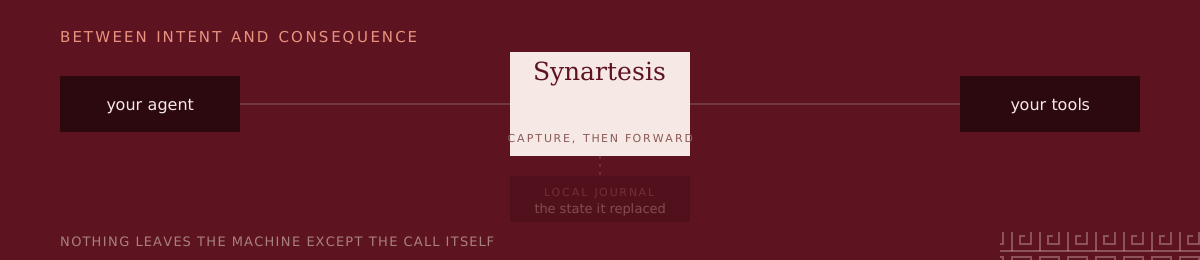
Give AI agents a way back. Synartesis sits between your MCP client and the servers it talks to, records every tool call with the state that call replaced, and can put that state back. What cannot be put back, it refuses to let an agent do unsupervised.











An agent with write access to a real system runs twenty steps, misreads step seven, and applies the rest to the wrong records. Today your options are to reverse it by hand from the transcript, restore a backup and lose every legitimate change made in the same window, or accept the damage.
It is not a sandbox: the container your agent runs in is disposable, but the
CRM row it updated over the network is not. It is not a tracing tool: a trace
tells you update_customer ran forty times, not what the values were before.
If this is a problem you have, a star helps other people find it. It is a young project, and that is most of how anybody learns it exists.
Choose your path
Your first result, in the order they take the least time:
- Undo a real write: run the filesystem demo — it makes a file, has an agent overwrite it, and puts it back, in about a minute and without touching anything of yours.
- Cover the agents on this machine:
synartesis install, thensynartesis statusto see what is now covered and what is not. - Watch one happen:
synartesis watchprints each call as it goes out, and lets you answer an approval where you are standing. - Ask what an agent already did:
synartesis show <id> --livereads every resource a session touched, as it is now, and says which still match.
Nothing above sends anything anywhere. The journal is a SQLite file on your machine, and the proxy talks only to the servers your policy names.
See it in action
The order is the whole design. The value is kept before the write, which is what makes putting it back possible at all — and it is the one thing a screenshot cannot show:
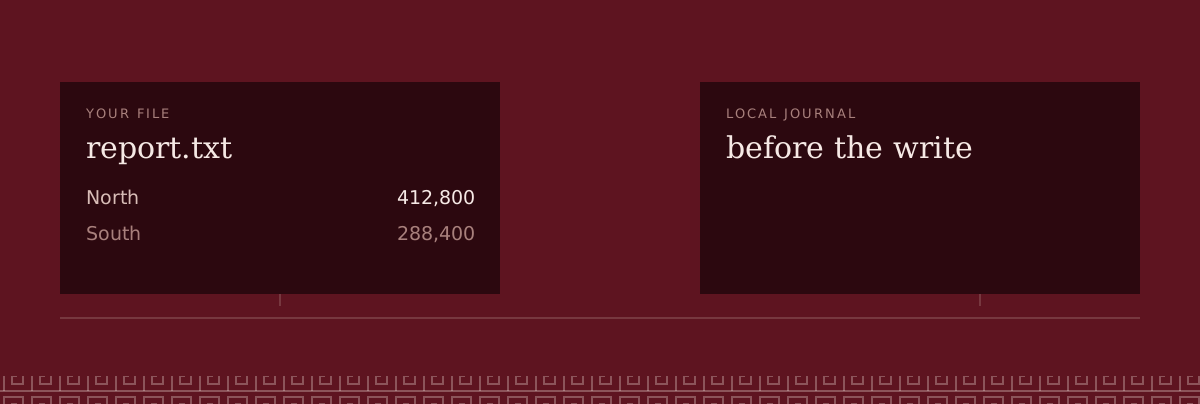
Both shots below are real output from ./demo/filesystem-demo.sh,
pasted rather than typeset. An agent overwrote a file and tried to move another.
One command puts the first back and reports that the second never happened:

skip is the interesting row. move_file is irreversible on that server, so it
was never applied in the first place — there is nothing to undo.
Now the same damage, except a colleague edited the file before you got to the undo. Writing the old contents back would destroy their work, so it does not:

It stops at the record that moved and exits non-zero. Anything already put back
stays put back, and it prints the three ways on: leave it, restore the resource
and --replan, or --force to overwrite deliberately.
Next: the desktop window · what it can and cannot do · what it does not do · the full guide
Install
Three steps, if you have never used a terminal. Open the Terminal app (on a Mac: press ⌘ Space, type Terminal, press Return), then:
If
npm --versionsays command not found, install Node.js from nodejs.org first (the LTS button), and open a new Terminal window.Install Synartesis:
npm install -g synartesisStart it:
synartesisIt lists the AI apps on your computer and the tools they use. Press a to cover all of them, then quit and reopen those apps (it names them).
That is the whole setup. From then on:
- Something needs your OK. A notification says a call is waiting. Open
Terminal, type
synartesis: it opens on that call. a approves, d denies, A approves and stops asking about that tool for an hour. - Undo what an agent did. Type
synartesis, press r if it is showing waiting calls, move to the session with the arrow keys, press u, then y. Press p first to see what it would do without changing anything. - Too many old sessions.
synartesis cleanclears the finished ones and keeps anything you could still undo or still need to decide. - Take it all back out.
synartesis uninstallrestores every app's settings exactly as they were.
The same thing without the screen: synartesis install. It finds what Claude
Code, Claude Desktop, Cursor, Codex, Gemini CLI, Copilot CLI, Antigravity or
Devin Desktop (Windsurf) already list, writes one policy covering all of it,
and points each entry at the proxy. Servers it recognises get the policy that
ships for them and work immediately; the rest are drafted with every tool held
until you say how to undo it. Your config is copied aside first,
synartesis uninstall puts it back, and synartesis status says what is
covered.
Each server keeps its own entry and its own proxy, so no tool is renamed — the agent sees exactly the names it saw before. Your agent needs nothing installed.
Needs Node 22 or newer. npm ships a prebuilt SQLite binding, so no toolchain is required unless you build from a clone.
Setting it up by hand: the walkthrough · Claude Desktop · Claude Code · any other client
The screen
Then just:
synartesisOne screen: what agents have done, what is held for approval, every AI on the
machine, and undo — all on the arrow keys. enter opens a session, u undoes
it, p previews that undo without running it, l reads the world as it is now,
f expands every argument, c lists every AI on the machine, g shows what is
held. Nothing in it is a second implementation: it is the same journal and the
same planner the commands below use, so a session undone in the
screen and one undone in a script end the same way.
There is no mode in it that acts without telling you what it is about to do. An undo shows you the plan first, and a held call shows you why it is held.
The desktop window
The same engine, with a conversation in front of it. You talk to a model — any model — and every tool it calls goes through the proxy on its way out, so the undo is not a feature the window implements. It is one it can already offer.
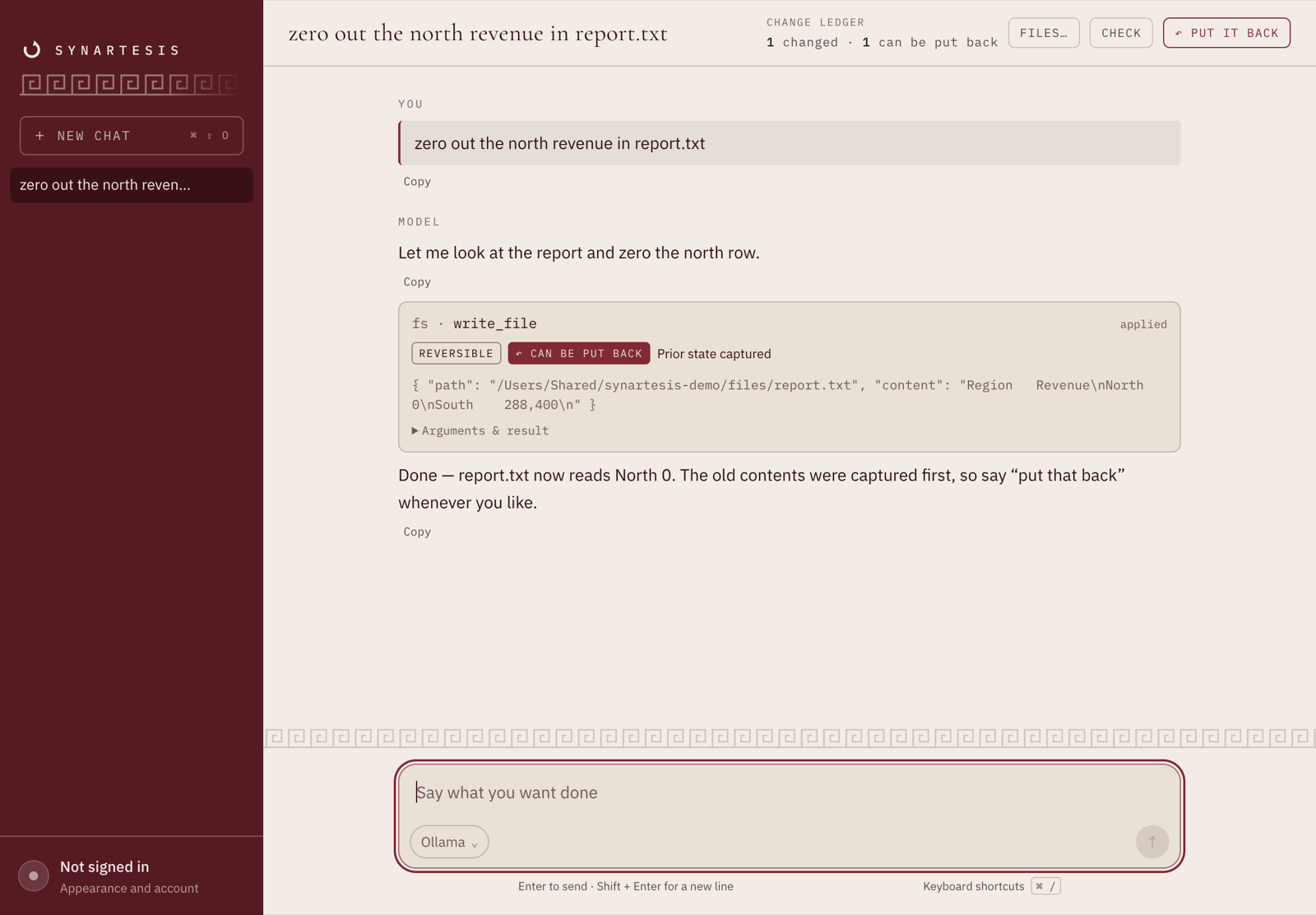
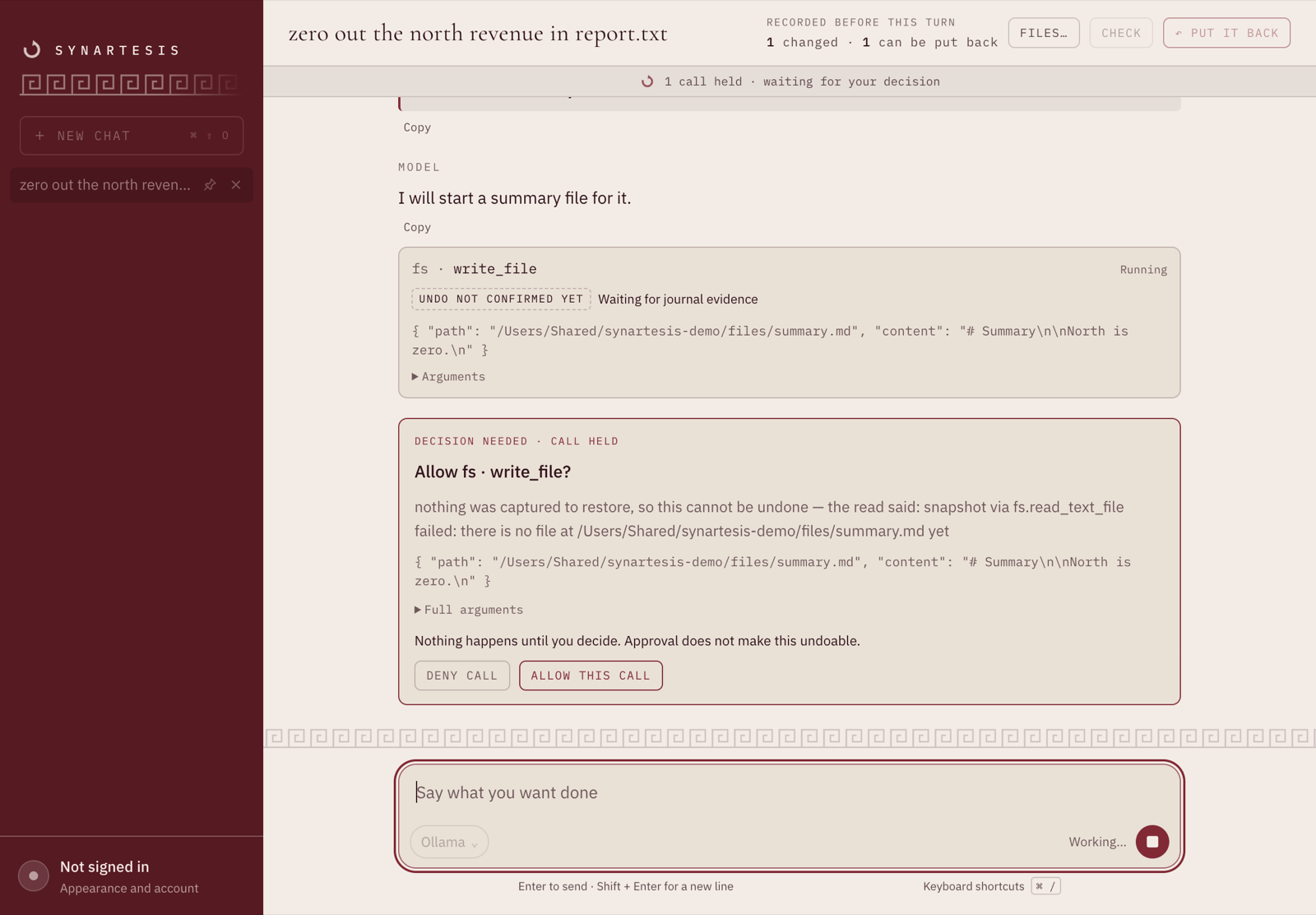
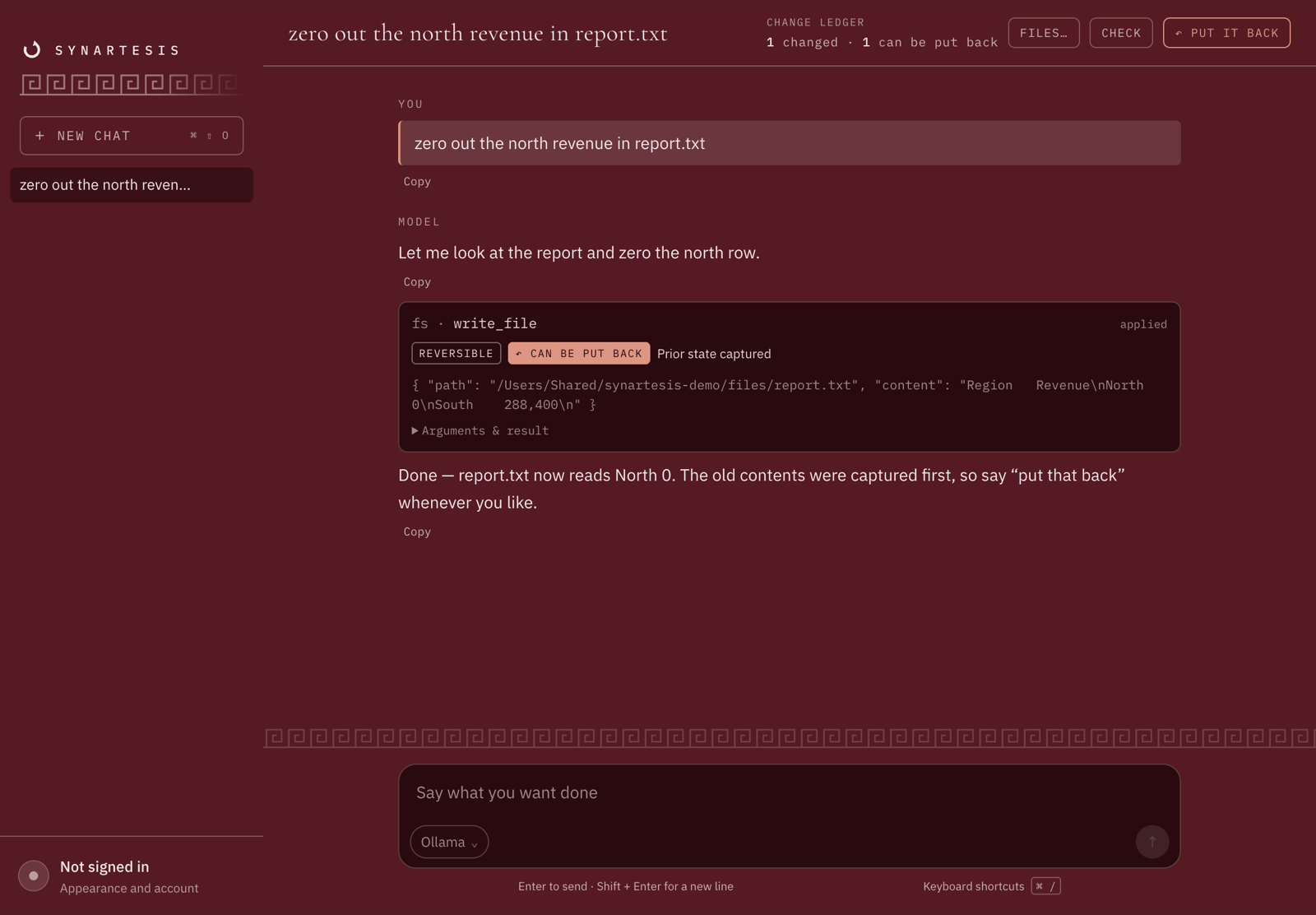
Every call gets a card: which server, which tool, the class Synartesis gave it, and whether the state it replaced was captured. The ledger at the top counts the same thing for the whole conversation. Nothing there is a promise about what should have happened — it is read back out of the journal after the fact.
A call that cannot be undone does not happen behind your back. It stops, and waits for you, with the reason it cannot be reversed written out:
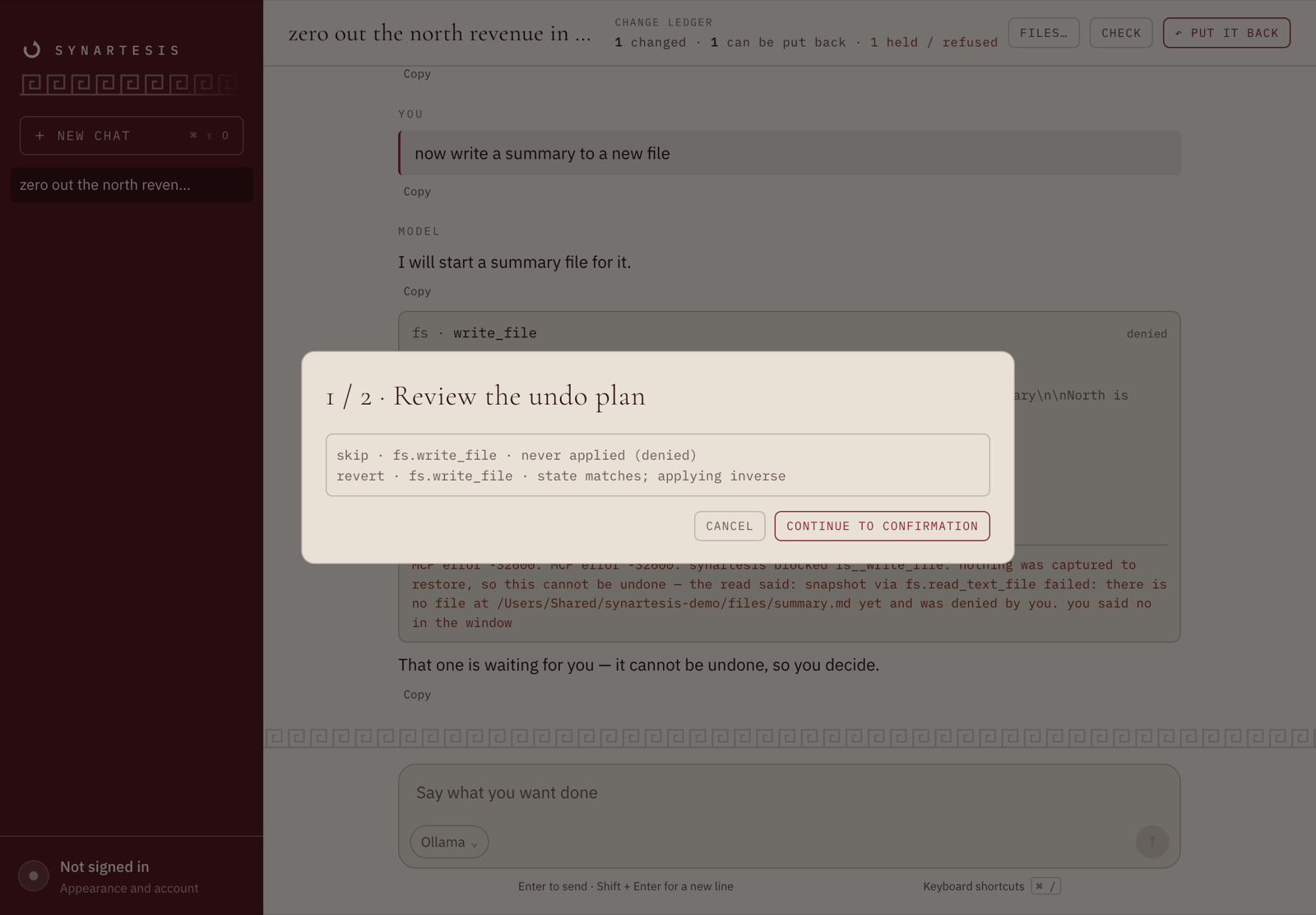
And putting it back is the same two steps the CLI takes: the real plan first, built from the journal, then the confirmation.
It talks to Claude, Gemini, Mistral, OpenAI, or anything speaking
/v1/chat/completions — including Ollama, LM Studio and vLLM on your own
machine, which cost nothing and send nothing anywhere. Keys are pasted by you,
kept in the OS keychain through Electron's safeStorage, and never written to
the journal or a log. There is a parchment and a dark setting:
Getting it. synartesis desktop opens it, and says where to get it if it is
not installed. It is a separate download on purpose: shipping a browser engine
inside a CLI would put 200 MB into every install of a command that is a few
hundred kilobytes.
On macOS it installs the way anything does — open the .dmg, drag Synartesis to
Applications — and on Windows the .exe installer puts it where the Start menu
can find it. After that, either the icon or synartesis desktop opens it; the
command looks where each platform actually installs things rather than asking
you to remember a path.
The builds are not signed yet, and the first launch says so. macOS refuses
an application it cannot check with Apple: open System Settings → Privacy &
Security and press Open Anyway, or xattr -dr com.apple.quarantine
/Applications/Synartesis.app to say the same thing in one line. Windows shows
a SmartScreen warning, behind More info. Both of those are the operating
system telling you the truth — nobody has vouched for this binary — and the
honest fix is a Developer ID certificate rather than a page telling you to
click past it. Building from the clone below avoids the question entirely,
since an application you built is one you have already vouched for.
To build it yourself instead:
pnpm install && pnpm app:distThat writes an installer for the machine it runs on to app/release — a .dmg
and a .app on macOS, an .exe on Windows, an AppImage and a .deb on Linux.
It is unsigned, so it runs where it was built and Gatekeeper refuses it
anywhere it has been downloaded to: signing and notarisation need an Apple
developer account, and app/README.md lists exactly what they
want. The release workflow builds all three platforms on their own machines
and attaches the installers to the release for a tag. Both the window and the terminal share
one journal, so either can undo what the other did.
What it can and cannot do
Every tool gets one of four classifications, written down in a manifest:
| Class | Meaning | Example | What happens |
|---|---|---|---|
| readonly | Changes nothing | get_customer | Recorded, forwarded |
| reversible | Prior state can be restored exactly | update_customer | State captured before the write; written back on undo |
| compensable | Cannot be reversed, but can be offset | create_charge | A different call neutralises it |
| irreversible | Neither | send_email | Suspended until a human approves it, or recorded without asking where the policy says gate: never |
A tool your manifest does not mention is treated as irreversible. That is
deliberate: silently forwarding an unknown destructive call is the one failure
worth avoiding most. The one exception is a tool its own server marks
read-only: that is read as a read, and check lists every tool let through that
way, so you can see exactly what was trusted. (trust_annotations: false on a
server turns it off, and a pinned server never gets it.) synartesis check
names the rest, so you meet that decision before your agent does.
A few calls are reversible only when nothing is in the way — moving a file onto
a free path is undone by moving it back, moving it onto an existing file
destroys what was there. For those, expect: absent on the pre-read swaps the
two: finding nothing is the reversible case, finding something is held for a
person and recorded with no inverse, so undo says it cannot be undone rather
than putting half of it back and calling that success.
Being asked less, and told when it matters
You hear about a held call when it happens. On macOS and Linux a desktop
notification names the server and the tool, never the arguments, since they can
carry secrets and notification history is kept. synartesis notify --test
checks it reaches you; SYNARTESIS_NOTIFY=0 turns it off. Windows has none yet,
and watch shows every held call on every platform.
Stop being asked, for a while or for good.
synartesis allow crm.send_email --for 1h      # a row in the journal; next call on
synartesis allow crm.send_email --always      # edits the policy; next client restart
synartesis allow crm.send_email --stop        # held again from the next call
synartesis allow                              # what is let through right now
--for goes up to a day and runs out by itself. --always changes only that
tool's gate, in place, keeping every comment in the file. A tool that cannot be
undone stays marked that way everywhere it shows up: it is recorded, just no
longer held. For those you type the tool's name to confirm. In watch and the
console, A approves the call in front of you and stops asking about that tool
for an hour. The desktop card has the same button.
A no reaches the agent. When you deny a call and the agent tries the same
call again, it is told who said no, when, and why. It does not see a fresh
"waiting for approval". approve on the denied call takes the denial back.
The agent is never handed the way to approve itself. Nothing it reads
contains an approve or allow command, and both refuse to run without a
person at a terminal unless given --unattended, which is recorded as such.
Hosted servers and browsers
Hosted servers. A server your client reaches at a url with a token in its
headers is covered directly. install moves the header values into the
client entry's env, where the client already keeps secrets, and the policy
names the variables rather than holding the token. The proxy speaks Streamable
HTTP, falls back to SSE only where the server says it does not speak the newer
one, and refuses redirects. A request the server refuses at the door (an
expired token, say) is recorded as never sent, not as an outcome nobody knows.
A server that signs you in through a browser instead is covered with
install --remote, through mcp-remote,
which does the sign-in and keeps the token itself.
Browsers. Nothing a browser does can be undone, and holding every click made Playwright and Chrome DevTools unusable behind this. Their shipped policies read reads as reads and record every interaction, arguments included, without holding it. Running code the agent wrote, and uploading files from your disk, are still held.
Policies that ship: filesystem, memory, git, github, Playwright, Chrome DevTools, and a read-only set for fetch, Brave Search, Exa, Tavily and the AWS documentation server. Each was written from the server's real tool list.
Writing a policy for your own server
Four servers ship with a policy. For anything else — a database, a ticketing system, the MCP server you wrote last week — start by asking the server what it has:
synartesis init crm -- ./crm-mcpThat connects, lists every tool, and writes a manifest drafted from what the server says about itself. If it recognises the server as one that already ships with a policy, it adopts that one instead — but only when every tool the policy calls is actually there, because a policy whose inverses cannot be called is worse than a file of TODOs: it looks finished.
Drafted, not decided. A tool the server marks read-only is written readonly
with a comment telling you to check, since that hint is a statement of intent
and not a guarantee; everything else lands irreversible and gated. The draft
is fail-closed on purpose, and you open it up one tool at a time as you work
out how each of them is undone.
Then check it against the running server:
synartesis checkIt loads the manifest, connects to every server it names, and says which tools your policy covers, which it does not, and where the two disagree. A policy that names a tool the server no longer has is an error, not a warning.
Going further: writing a manifest · the four classes · checking it · pinning a tool's shape · the cookbook
Has anybody touched it since?
Synartesis records what an agent does, not what happens to a file. Nothing you do by hand goes through the proxy — which is exactly what makes the drift check work: when undo reads a file and finds bytes it never recorded, it knows somebody else has been there.
To ask before you find out the hard way:
synartesis show <session> --liveIt reads every resource the session touched as it is now and says which still
match. Nothing is written, no reversing call is sent, and unlike
undo --dry-run it does not stop at the first conflict — five writes get five
answers. l in the screen does the same.
If you decide the recorded value is the one worth keeping, undo --force prints
every line it would write over and stops; --force --yes goes ahead.
What each policy has actually been tested against
A policy that has met a real server and one written from its documentation are not the same kind of claim, and the difference only shows up at the moment somebody needs undo to work. So a policy can say which it is:
servers:
  gh:
    command: github-mcp-server
    provenance: documented   # or: live
Of the four that ship, three say live — they were written against the real
server and corrected where it disagreed with its own docs. github says
documented: it has never been run against a real account, and its own header
has always said so. Now check says it, the proxy says it at every start, and
install says it at the moment the policy is adopted — rather than leaving it in
a file for you to find afterwards.
Absent means no claim either way, which is the right default for a policy you wrote yourself: the tool has no business grading your work. Nothing is inferred from silence, and all three states are printed, because if silence meant "fine" then an ungraded policy and a known-untested one would look identical.
Undoing something that was never read first
Most undo rides on a pre-read: the value before the write is captured, and before putting it back, undo reads the world again and refuses if it has moved.
A compensable action has no such read. create_entities makes something that
did not exist a moment earlier, so there is nothing to capture — it has a
compensating action instead, a delete that offsets the create. Which means undo
had nothing to compare against and compensated regardless. If you had added to
that record in the meantime, the delete took your work with it and the run
reported success.
A policy can now declare a read used only for that check:
- match: "memory.create_entities"
  class: compensable
  inverse:
    tool: "memory.delete_entities"
    args: { entityNames: "$result.entities[].name" }
  verify:
    tool: "memory.open_nodes"
    args: { names: "$result.entities[].name" }
It is resolved after the call, so $result is available and it can name a
resource the call itself created. Undo then halts on drift the same way it does
everywhere else, and shows you the diff.
It is consulted only where there is no read already, so it can never displace a working pre-read with a differently shaped one — which would make the post-state and the snapshot incomparable and every later comparison meaningless.
When the server changes underneath you
A policy is a claim about what a tool does, and a tool's name is a weak place to
anchor that claim. A server upgrade can keep write_file and add an argument to
it. The policy still says reversible, the snapshot still reads a field that has
moved, and the before-image captured no longer matches the write. Nothing fails.
The undo is produced on request, confidently, and is wrong — which is worse than
having no undo, because somebody acted on it.
So you can pin the shape a tool had when you wrote its policy:
synartesis pinIt prints a block. Paste it into the manifest:
pins:
  fs:
    write_file: "sha256:ce17c85e8a5883552a11555f9b893de497fadab965a5c7935c0cb8f3c55b91d6"
    edit_file: "sha256:88459ef670b139a12a3e0335ae0a4584dd892f60f45f565b545e1004d7565dd5"
From then on, a tool whose shape has moved stops the proxy at startup and names
both fingerprints, instead of quietly serving the old policy. Re-run pin when
you have looked at what changed and decided the policy still holds.
It prints rather than writes on purpose: pinning is you vouching for what a tool does today, and a command that silently rewrote your policy would let that happen without anyone reading it.
Pinning is per server and all-or-nothing. A server with no pins is not checked, so every manifest written before this existed keeps working. A server with any pins is checked in full — a half-pinned server is the worst of both, because it reads as protected and is not. Tools that no policy matches need no pin: they are already fail-closed as irreversible and gated, so there is no classification for a schema change to corrupt.
Commands
synartesis desktop opens the window, and says where to
get it if it is not installed.
| Command | Does |
|---|---|
| synartesis | The screen. Everything below can be done from it |
| install / uninstall / status | Cover the clients on this machine, put them back, say what is covered |
| install --remote | Also cover hosted servers that sign in through a browser, via mcp-remote |
| init <server> -- <cmd> | Introspect a server and draft a manifest |
| check | Load a manifest and verify it against the servers it names |
| pin | Print the pins: block for the servers you have now |
| list | Every recorded session |
| show <id> | One session's timeline, with the undo for each step |
| show <id> --live | The same, plus what has changed in the world since |
| show <id> --full | Every argument, snapshot and inverse, nothing elided |
| gates / approve <id> / deny <id> | What is waiting, and answering it |
| allow <server.tool> --for 1h \| --always \| --stop | Stop being asked about one tool, for a while or for good |
| notify --test | Send one notification, to see whether they reach you |
| resolve <id> --applied\|--failed | Settle a call whose outcome nothing established |
| undo <id> | Reverse a session, newest action first |
| undo <id> --dry-run | Plan it and change nothing |
| undo <id> --replan | Rebuild each undo from the current manifest |
| undo <id> --force [--yes] | Print what it would write over; --yes goes ahead |
| watch | Live activity, with approvals answerable in place |
| clean | Clear finished sessions; keep anything you could undo or still need to decide |
| prune | Delete sessions older than 30 days and reclaim the space |
| close [id] | End a session a killed proxy left open |
Every one of those can also be done from the screen, on the arrow keys.
--manifest and --journal are found rather than typed, from the current
directory upwards the way a version control tool finds its root, then from
~/.synartesis. SYNARTESIS_HOME moves that. --json works on list, show
and gates. Exit codes: 0 succeeded, 1 halted or refused, 2 bad usage.
Full walkthrough, writing a manifest, and serving over HTTP for clients that cannot start a process: see the user guide.
What it does not do
- It cannot un-send what has been seen. An email that has been read, a posted message, a file deleted with no backup. This is why the gate exists.
- Compensable actions can only be checked for drift if their policy declares a
verifyread. They have no pre-read — the thing they made did not exist before the call — so without one, undo compensates them and marks them[unverified]. With one, the resource is read back after the write and undo halts rather than compensating over somebody else's edit. - Undo halts on uncertainty, and steps over the merely permanent. Drift, an
unknown outcome, or a failed reversing call stop it. An action that simply
cannot be undone is reported and left in place while everything else is
reverted. Either way the session is marked
partial. - An error is not proof that nothing happened. A timeout or a tool-level
error after a write leaves the outcome unknown, not failed, and undo will
not step past it. Where a pre-read exists it is consulted to settle the
question instead of guessing, and where none can settle it,
resolveis how a person who looked says which way it went -- an action resolved as applied still has no inverse, so undo reports it as something it cannot put back rather than pretending otherwise. - An undo is only as good as the policy that recorded it. Inverses are
resolved when the call happens, so a mistake in a manifest is baked into every
run made under it.
undo --replanrebuilds them from a corrected one.
Three bundled policies are tested against the real server, by making the change and undoing it. filesystem: exact byte-for-byte restoration, drift refusal, and absence told apart from a read that failed. memory: the graph is put back as it was, entities the agent only tried to create are left alone, and a delete of an entity is held rather than approximated.
git is the narrowest of the three, because the policy is: this server
exposes nothing that can restore content, so there is no restoration to prove.
What is proven is what it does claim — staging is taken back off the index and
the working tree is left alone; a commit is held rather than approximated; a
branch switch goes through and is reported as something undo cannot take back.
And the overreach is pinned too: this server's reset unstages everything, so
undoing the agent's git_add also unstages work a person staged by hand. That
is why it is recorded as a compensation and not an undo, and there is now a
test that fails if it ever gets described as one.
github is checked only for tool existence — its recovery guarantees are not proven.
All three of filesystem, memory and git declare provenance: live, and that
word is narrower than it looks: it says the policy has met its server and the
tools take the arguments it passes them, not that undo has been round-tripped.
synartesis check says so under the server list rather than leaving live to
stand for both.
A tool no policy mentions is irreversible and held for a person the first
time it is called. That is the safe end of the trade, and it means a server
that gains a tool in an update does not quietly get a free pass — but it also
means an agent stopping mid-task on a call nobody expected. synartesis check
names every such tool, and the proxy warns about them at startup, so you can
write a policy before meeting one rather than after.
Trust
A manifest names commands and Synartesis runs them. Treat one you did not write the way you would treat a shell script from the same source: read it first.
The journal is a copy of your data, not a log. Putting a file back means
having kept what was in it, so the contents of every resource before it was
written are in there in plain text — including any key that was sitting in a
file your agent touched. That is not a leak to be closed; it is the thing that
makes undo work. It is created 0600 in a 0700 directory, and nothing is
encrypted: full-disk encryption answers a stolen laptop, permissions answer
another account on a machine you share.
It grows at roughly four times the bytes your agent writes and never shrinks
on its own — thirty edits of one 200 kB file came to 24 MB. synartesis prune
deletes whole sessions and VACUUMs. It will not touch one still active, or one
holding a call waiting on a person, or one whose undo halted on a conflict. A
pruned session cannot be undone afterwards, which is the whole of the trade.
Nothing prunes on a timer.
What needing a terminal protects against. approve and allow refuse to
run without a person at a terminal, and nothing an agent reads names them. That
stops an agent following its instructions, or making a mistake, into approving
its own calls. It does not stop a process working to defeat it while running as
you: anything with your permissions can write the journal directly. For a
boundary the agent cannot cross, deny it those commands in its own permission
settings.
Durability. The journal runs synchronous = NORMAL. A crash of the process
or of the CLI mid-undo loses nothing; only the machine losing power can cost the
tail of the write-ahead log. SYNARTESIS_SYNC=full asks for an fsync per commit
instead — worth it where fsync is cheap, and measurably not where it is not.
Development
pnpm testpnpm checkEvery push runs that on Linux and macOS across Node 22 and 24, plus both demos, the installer, and a build of the desktop app.
pnpm stressThe same three attacks check runs lightly, at full strength: 500 random agent
sessions, each undone and checked byte for byte against where it started (also
undone to a random step, and with a person's edit made afterwards that must
survive); synartesis undo killed with SIGKILL at random points 25 times over
and run again; and eight agents racing one approval, ten times, which must send
exactly one email. A failure names its seed, and SYNARTESIS_STRESS_SEED
replays it. pnpm coverage reports what the suite reaches.
Windows is built and not tested. The release attaches a Windows installer,
and no CI job compiles or exercises it — the test matrix is Linux and macOS. It
is expected to work, the code has no platform-specific paths outside
src/locate.ts and src/install/clients.ts, and nobody has proved it. If you
run Windows and something is wrong there, that is worth an issue.
Contributing
The most useful thing you can send is a policy. Four servers ship with one;
there are hundreds that do not. If you run one — a database, a ticketing
system, your own — synartesis init <name> -- <command> drafts a
manifest by introspecting it, and a pull request adding that draft under
manifests/ makes the tool cover a server it could not cover
before. Say in the description whether you ran it against the real thing; that
is what provenance: records, and an honest documented is worth more than an
optimistic live.
Also wanted, in rough order of how much they help:
- Windows. The installer is built and never tested — see Development. A report either way is worth an issue.
- A case where undo got it wrong. The failure this project cares about most is a confident wrong answer. If undo told you it reverted something and it had not, that is the bug report to open.
- A server whose tools do not fit the four classes. The model has held so far, and the first case it cannot express is worth knowing about.
CONTRIBUTING.md has the setup, and one command runs the
same gate a pull request has to pass:
pnpm checkWhere each thing goes. A bug is an issue. A question, an
idea, or something you built with it is a
discussion. A policy you wrote for a server that does not
ship with one, a symptom you worked out, or an answer worth keeping goes in the
wiki, which anybody can edit — it holds the things that are
better off community-maintained, and deliberately does not repeat the
documentation. A vulnerability goes in none of those:
SECURITY.md says where.
And if it saved you an afternoon, star the repo; it costs you a click and is most of how a project this size gets found. If it saved you more than that, there is a tip jar — entirely optional, and nothing here is behind it.
Licence
MIT. See LICENSE.