
tabby-sftp-panel
v0.1.2
Published
A standalone SFTP file browser panel for Tabby with resizable/sortable columns, overlay-or-dock positioning, multi-select, and edit-on-open. Coexists with the built-in panel.


Readme
SFTP Panel for Tabby
A standalone SFTP file browser that lives on the edge of every SSH tab in Tabby. It mounts its own panel into each SSH pane and reuses Tabby's SFTP services, so it coexists with Tabby's built-in SFTP panel rather than replacing it.
Features
- Edge-strip panel — a permanent strip on every SSH pane that expands on hover. Pin it to dock (terminal shrinks to make room) or leave it unpinned to overlay the terminal on hover. Works per-pane in split tabs.
- File browser — right-click context menu (Tabby's SFTP items + ours), live filter, and sortable / reorderable / resizable columns: name, size, modified, owner, group, permissions. Configurable start directory and a show-hidden toggle.
- Transfer / activity log — an embedded, toggleable list of file transfers and panel messages (chmod/copy/move results). Draggable + persisted height, per-line Stop, folder-upload aggregation, auto-show on transfer.
- Permissions — a chmod dialog with an rwx grid, plus chown owner/group when connected as root. Live progress + cancel on recursive changes.
- Copy / move on server — duplicate or relocate selected items to a destination path, executed server-side (no round-trip through your machine).
- Edit locally — download a file to a temp dir, open it in your configured editor (or the OS default), and auto re-upload on save.
- Drag-out — drag files and folders straight out of the panel to your desktop or file manager.
- i18n — ships German plus 6 additional languages (zh-CN, ru-RU, es-ES, fr-FR, ja-JP, pt-BR), merged on top of Tabby's own catalog.
Install
From the Tabby plugin manager: search for SFTP Panel in Tabby's Settings → Plugins and install.
Manually: drop the built plugin into Tabby's plugin directory and restart Tabby (plugins are scanned only at startup):
%APPDATA%\tabby\plugins\node_modules\tabby-sftp-panel   (Windows)
~/.config/tabby/plugins/node_modules/tabby-sftp-panel   (Linux/macOS)
Usage
Open an SSH tab. The SFTP Panel strip appears on the configured edge — hover to expand, or press the hotkey to reveal and focus it.
| Action | Default |
|--------|---------|
| Focus / reveal the panel | Ctrl-Shift-X (toggle-sftp-panel) |
| Collapse a hover-opened panel | Esc |
Rebind the hotkey under Tabby → Settings → Hotkeys.
Configuration
All settings live under Tabby → Settings → SFTP Panel (config key sftpPanel):
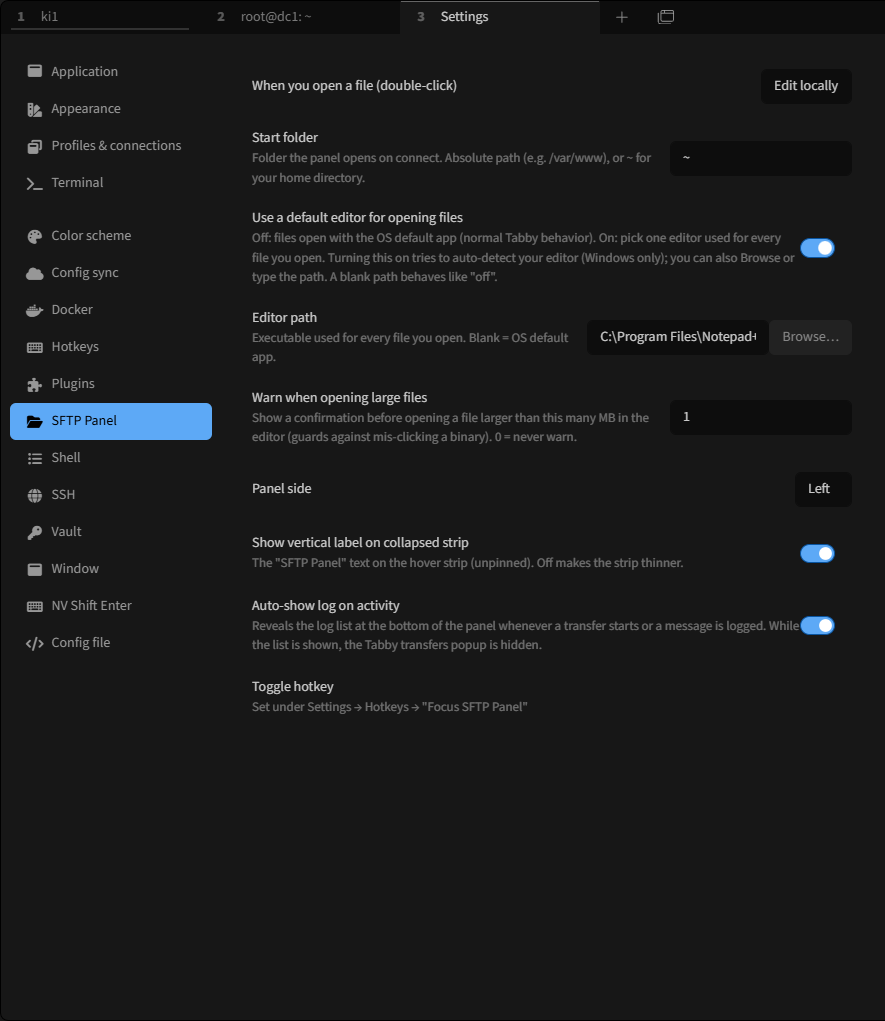
| Setting | Default | Notes |
|---------|---------|-------|
| side | left | Which edge the strip docks to (left / right). |
| pinned | false | true docks the panel (terminal shrinks); false overlays on hover. |
| spineLabel | true | Show the vertical "SFTP Panel" label on the collapsed strip. |
| width | 420 | Expanded panel width, in px. |
| startDirectory | ~ | First-open folder — absolute path or ~ for the remote home. |
| showHidden | true | Show dotfiles. |
| fileClickAction | edit | Double-click behavior: edit or download. |
| editorEnabled | false | Master switch for "edit locally". Off = OS default app. |
| editorPath | '' | Editor executable when enabled; blank = OS default. |
| editorMaxSizeMB | 1 | Warn before opening a file larger than this; 0 = never. |
| transfersAutoShow | true | Auto-open the transfer list on an upload/download. |
Columns, sort order, column order/widths, and transfer-list height are all adjustable in the UI and persisted automatically.
Build from source
npm install      # .npmrc sets ignore-scripts=true (see below)
npm run build    # webpack → dist/index.js
npm test         # tsx --test src/*.test.ts
npm run build transpiles only (no type check); run npx tsc --noEmit for
types. On Windows, install requires ignore-scripts=true (already set in
.npmrc) — a dependency's postinstall hard-fails on win32, and all runtime
deps are webpack-externalized, so lifecycle scripts aren't needed anyway.
Contributor notes and Tabby internals live in AGENTS.md.
License
MIT © Robert Lieback