
tabby-windy-quick-commands
v1.2.4
Published
快速命令|local quick-command drawer for Tabby terminal.
Downloads
1,685

Maintainers
 nngx
nngxReadme
Tabby Windy Quick Commands
一个面向 Tabby 终端的本地快速命令管理插件。
插件在 Tabby 右上角提供快速命令按钮,并从右侧展开抽屉,用于集中管理、搜索和执行常用命令。支持快捷键、多会话发送、逐行执行、输出触发器,以及命令库导入导出。
没有仔细的测试过,就纯觉得没有好用点好看点的相关快速命令的插件,用AI辅助写了一个。可能存在大量的bug还有一些没考虑的,见谅🫨可以提issue,慢慢改~
项目链接
- GitHub 源码仓库:windyy0/tabby-windy-quick-commands
- 问题反馈:GitHub Issues
- npm 包:tabby-windy-quick-commands
截图
预览
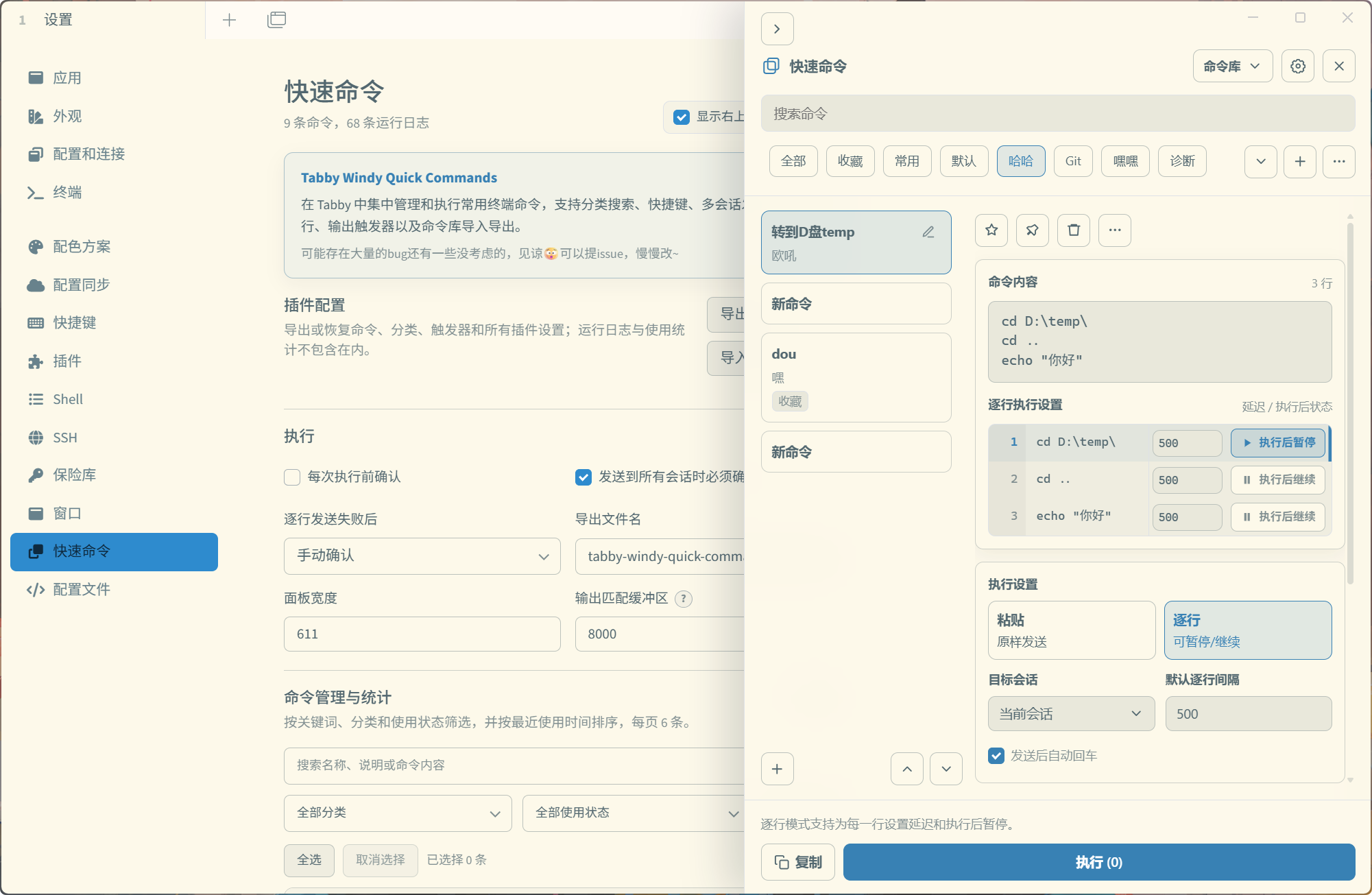
功能
- 通过工具栏按钮或快捷键开关抽屉
- 搜索、新建、编辑、删除、复制、收藏和置顶命令
- 为单条命令录制快捷键
- 整段粘贴和逐行执行两种模式
- 输出触发器可在整个命令发送后运行,也可绑定到逐行模式中的指定命令行
- 发送到当前终端,或广播到所有已打开的终端会话
- 导入、导出命令库和插件配置
- 中文界面与英文界面自动切换
安装
从 Tabby 插件管理器安装
发布到 npm 后,在 Tabby 中打开 设置 -> 插件,搜索:
windy-quick-commands安装完成后请完整重启 Tabby。
从源码安装
仓库提供了适用于Windows本地安装脚本。准备好下方开发环境后,在仓库目录执行:
npm ci
npm run install:tabby
脚本会构建插件,将最小运行文件复制到 Tabby 的用户插件目录,并重启 Tabby。也可以只安装、不重启:
使用
点击 Tabby 右上角的快速命令按钮打开抽屉。全局开关快捷键可在 设置 -> 快捷键 中搜索“快速命令”或 “Quick Commands” 后配置。
输出触发器
简单点说就是 匹配条件->成功匹配->规则->成功匹配动作->匹配后动作->超时动作
输出触发器会等待终端输出指定内容,再决定是否继续执行。适合登录提示、构建完成、部署结果等需要等待终端反馈的场景。
- 在命令的“输出触发器”中添加规则。
- 选择触发时机:整个命令发送后,或逐行模式下的指定命令行执行后。
- 填写“成功匹配”或“错误匹配”,可选择普通文本或正则表达式。
- 设置成功或错误后的动作、“匹配后流程”和超时时间;等待超时后会执行单独的“超时后”动作。
成功匹配和错误匹配可分别选择不执行、发送自定义命令或执行已有命令;动作完成后,再进入统一的“匹配后流程”:
- 整个命令规则:继续下一条规则,或停止该会话自动化。
- 指定行规则:继续下一条规则、跳过该行剩余规则并继续下一行,或停止后续逐行执行。
同一触发时机下的多条规则按顺序执行;发送到多个终端时,每个会话独立匹配输出。
适配了各种配色主题,应该没啥问题。
开发
环境和工具准备
- Tabby 官网:安装 Tabby 客户端;建议使用当前稳定版。
- Tabby 最新版本:下载安装包和查看发布说明。
- Node.js:需要 Node.js 18 或更高版本,npm 随 Node.js 安装。
- Git:用于克隆仓库和版本管理。
- PowerShell 7:Windows 本地安装/重启脚本需要
pwsh;单纯测试和构建不依赖 Windows。 - 可选编辑器:Visual Studio Code 及其内置 TypeScript 支持。
- NPM 账号。
Tabby 当前依赖 Angular 15,因此项目使用其兼容的 TypeScript 4.9。仓库已配置 VS Code/Cursor 使用
node_modules/typescript中的工作区版本;若编辑器仍显示新版 TypeScript 的弃用提示,请重载窗口或执行TypeScript: Restart TS Server。
本地安装
安装依赖,安装到本机tabby插件目录下:
npm ci
npm run install:tabby
推荐使用
npm ci;锁文件缺失、不可用或需要更新依赖时,可改用npm install。
运行测试和构建:
npm test
npm run build
安装到本机 Tabby并重启:
npm run install:tabby:restart卸载时直接在 Tabby 插件管理器中点击卸载即可。
Tabby 开发相关资料:
常用开发命令:
| 命令 | 说明 |
| --------------------------------- | ------------------------------- |
| npm run typecheck | 检查 TypeScript 类型 |
| npm test | 编译并运行测试 |
| npm run clean | 清理 dist 和 dist-tests |
| npm run build | 清理并构建 dist |
| npm run watch | 监听源码变化并持续构建 |
| npm run install:tabby | 构建并安装到本机 Tabby |
| npm run install:tabby:restart | 构建、安装并重启 Tabby |
| npm run publish:check | 完整执行发布前检查并预览 npm 包 |
| npm pack | 生成本地 npm 安装包 |
| npm run clean:pack | 清理本地 .tgz 安装包 |
插件入口为 dist/index.js。dist 不提交到 Git,而是在构建和 npm 发布前生成。
发布到 npm
在 NPM 上发布插件,包名前缀为"tabby-"并使用 tabby-plugin 关键词,就会出现在tabby客户端的插件管理器中。
发布流程:
1. npm login # 登录
2. npm whoami # 查看当前账号
3. 更改版本号,三选一
  npm version patch --no-git-tag-version # 1.0.0 -> 1.0.1,修bug、小改动
  npm version minor --no-git-tag-version # 1.0.0 -> 1.1.0,新增功能、小版本
  npm version major --no-git-tag-version # 1.0.0 -> 2.0.0,不兼容改动、大版本
4. npm run publish:check  # 发布前检查
5. npm publish # 发布
当前包名可用性可用下面的命令再次确认。若返回 E404,表示 npm 上尚无这个包名;包名可能随时被其他人注册,因此应在正式发布前复查。
npm view tabby-windy-quick-commandsLicense
本项目采用 MIT License。