
table-field
v1.0.9
Published
Show/hide table columns with sortable fields(vue3 + element-plus)
Downloads
52

Maintainers
 fq_dev
Readme
English | 中文
表格列操作
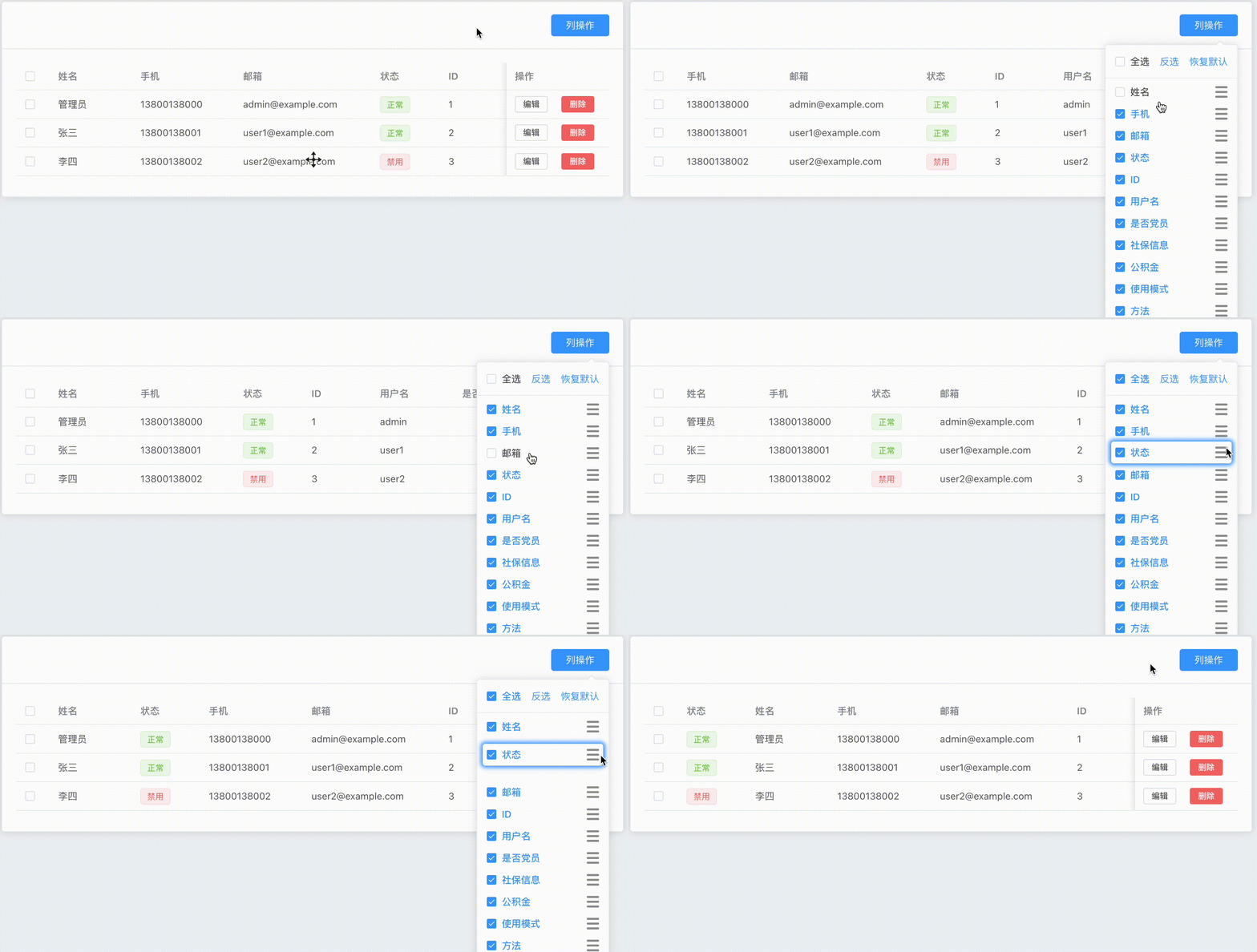
地址:功能演示-demo
这是一个操作表格列显示、隐藏、排序的组件。 基于vue3 + element-plus + ts 开发。 主要功能包括:
- 显示/隐藏列
- 拖拽排序列
- 全选列
- 反选列
- 恢复默认列
- 列状态存入浏览器中(localStorage)。
注:不支持多级表头
安装
npm i table-field或者
yarn add table-field页面引入
import { TableField } from "table-field";

// 1.0.7版本开始,不需要引入css文件了。
// import "table-field/dist/table-field.css";
OR 或者全局安装
在main.ts中:

import { Table_Field } from "table-field";
// 1.0.7版本开始,不需要引入css文件了。
// import "table-field/dist/table-field.css";

app.use(Table_Field);
使用说明
<template>
  <table-field
    v-model="columns"
    tableName="user"
  />

  <el-table>
    <el-table-column
      v-for="item in columns" :key="item.prop"
      v-bind="item"
    >
      ... ... ...
      ... ... ...
    </el-table-column>
  </el-table>
</template>

<script>
  import { TableField } from "table-field";


  const columns = ref([
    {type: "selection", width: 50, fixed: "left"},
    {label: "ID", prop: "id", width: 100, fixed: "left"},
    {label: "用户名", prop: "username", width: 120},
    {label: "姓名", prop: "name", width: 120},
    {label: "手机", prop: "phone", width: 150},
    {label: "邮箱", prop: "email", width: 200},
    ... ...
    ... ...
    {label: "操作", prop: "action", width: 150, fixed: "right", render: ({row}) => {
      return h('div', { }, [
        h(ElButton, {}, () => '编辑'),
        h(ElButton, {}, () => '删除'),
      ])
    }}
  ]);
</script>
组件属性(props)
/** 表头 */
modelValue: ColumnType[];
/** 表名,当前表格在 localStorage 中的标识  */
tableName: string;
/** 反选 */
reverseSelect?: boolean;
/** 默认展示的字段 */
defaultFields?: string[];
/** 操作列标识,默认prop: 'action' (操作列不会显示) */
actionField?: string;
/** popper-class样式名 */
popClass?: string;
/** 拖拽字段样式名 */
dragClass?: string;
插槽(slot)
head:自定义显示内容,默认内容 “列操作”更新日志
[1.0.9] - 2026-03-07
更新内容
- 增加英文文档。
[1.0.8] - 2025-11-30
更新内容
- README文件内容更新。
[1.0.7] - 2025-11-16
更新内容【Breaking Change】
- 移除"table-field/dist/table-field.css"文件的引入。
- README文件内容更新。
[1.0.6] - 2025-09-19
更新内容
- README文件内容更新。
[1.0.5] - 2025-09-14
更新内容
- 增加弹出层自动变更位置功能。
- 优化弹出层全局唯一性。
- 优化head插槽元素实例。
[1.0.4] - 2025-06-29
更新内容
- README文件增加更新日志
[1.0.3] - 2025-06-28
更新内容
- 更新README文件内容
[1.0.2] - 2025-06-28
更新内容
- 命名规范:属性defaultfields 改为:defaultFields
[1.0.1] - 2025-06-28
更新内容
- 增加日志文件
- 更新组件功能描述