
tadcode-wpsjs
v3.8.2
Published
在部署远程代码的情况下,可以远程调用`WpsjsGlobal`,实现对支持`AirScript`的多维表,智能表格等远程操作。如果你对`AirScript`,感兴趣,也能帮助你学习`AirScript`。


Readme
tadcode-wpsjs
介绍
在部署远程代码的情况下,可以远程调用WpsjsGlobal,实现对支持AirScript的多维表,智能表格等远程操作。如果你对AirScript,感兴趣,也能帮助你学习AirScript。
设计哲学:一切皆是Proxy,一切返回皆是lazy promise。
项目地址:https://gitcode.com/caisijian/tadcode-wpsjs
When deploying remote code, you can remotely invoke WpsjsGlobal to perform remote operations on multi-dimensional tables, smart tables, and other supported features with AirScript. If you're interested in AirScript, it can also assist you in learning it.
原理是使用代理收集调用信息,之后让远程代码进行调用并且返回结果。
远程代码在tadcode-wpsjs/remoteCode目录的index.js文件中。
将其复制粘贴到对应webhook的脚本中才能支持WpsjsGlobal对象的调用。
目前已经实现对多维表的基本操作,实现了全类型支持。
如果对你有用请在gitcode给个star,谢谢。
联系我
如你有业务需要wps代码,可以点此联系我,三个工作日内必定回复。
如您公司存在敏感信息业务,需要长期人才,亦可来讯商谈。

安装
npm install tadcode-wpsjs 或 bun install tadcode-wpsjs
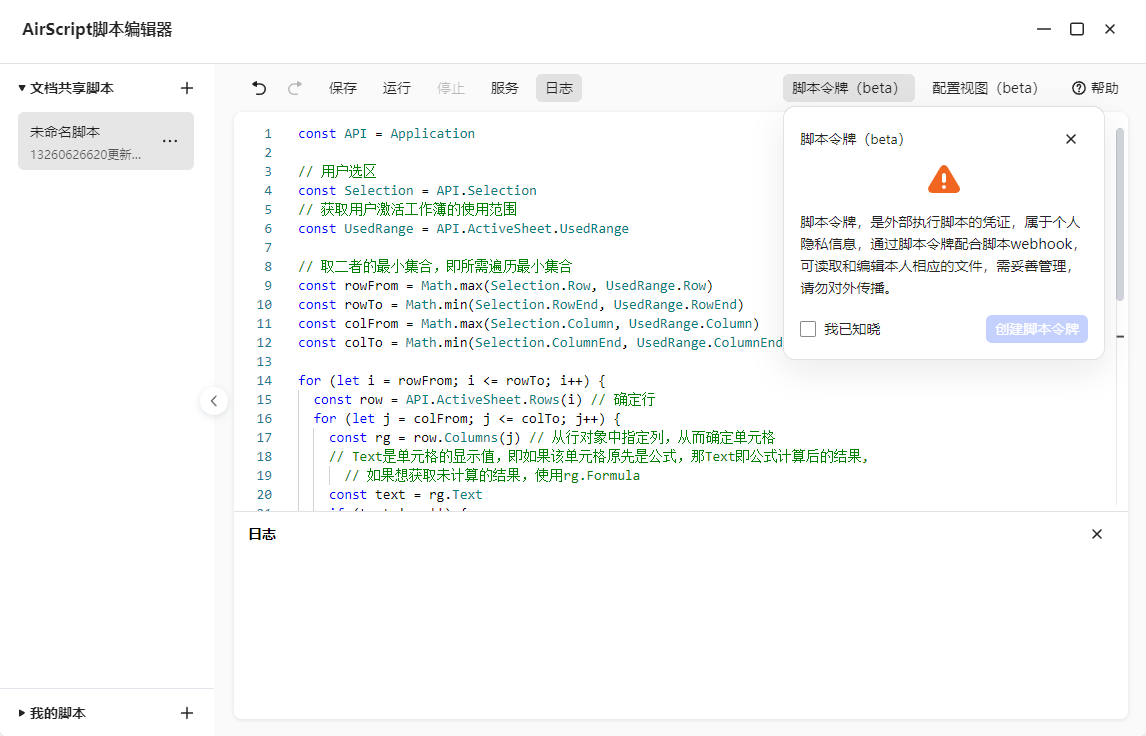
获取脚本令牌和webhook链接
获取脚本令牌
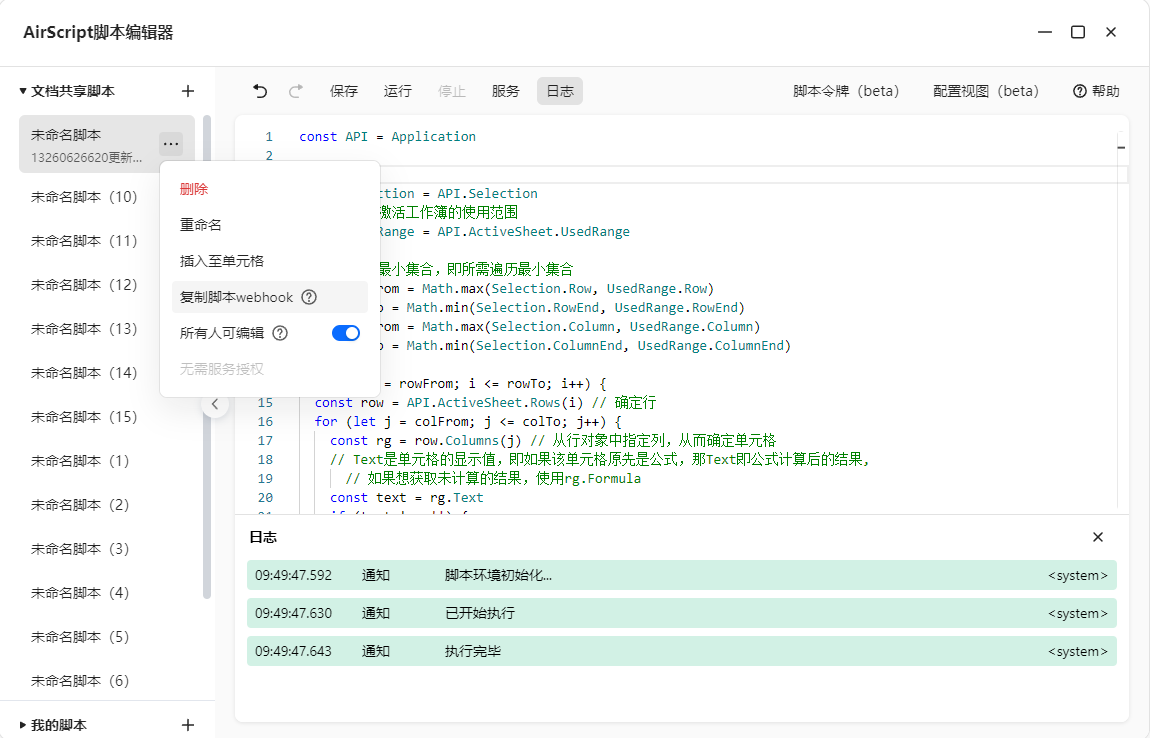
webhook链接
!!!webhook链接的脚本内容必须部署为tadcode-wpsjs/remoteCode/index.js中的脚本内容。
案例
详细案例请看项目test目录的例子
准备
// expect 是断言函数
const { TOKEN: token, WEBHOOK: webhook } = import.meta.env
const DGlobalThis = initDGlobalThis({ token, webhook })
取值
const result = await DGlobalThis.undefined
expect(result).toBeOneOf([undefined, '[Undefined]'])
赋值
const result = await ReflectAsync.set(DGlobalThis, 'ok', 'ok')
expect(result).toBeTrue()
执行函数
const result = await DGlobalThis.Number(1)
expect(result).toBe(1)
获取表信息
const { Sheet } = DGlobalThis.Application
const infoArray = await Sheet.GetSheets()
const info = infoArray[0]
const coreInfo = infoArray.map(({ id, name }) => ({ id, name }))
console.table(coreInfo)
const keys = [
  'id',
  'fields',
  'name',
  'primaryFieldId',
  'views',
]
expect(Object.keys(info)).toEqual(expect.arrayContaining(keys))
添加表
const id = await DGlobalThis.Application.Sheets.Add({
  Type: 'xlEtDataBaseSheet', Config: {
    fields:
      [
        { fieldType: 'SingleLineText', args: { fieldName: '文本', fieldWidth: 15 } },
        { fieldType: 'MultiLineText', args: { fieldName: '多行文本', fieldWidth: 15 } },
        { fieldType: 'Date', args: { fieldName: '日期', numberFormat: 'yyyy/mm/dd;@', fieldWidth: 15 } },
        {
          fieldType: 'SingleSelect', args: {
            fieldName: '单选项', fieldWidth: 15,
            listItems: [{ value: '选项1', color: 4283466178 }, { value: '选项2', color: 4281378020 }]
          }
        },
        { fieldType: 'Number', args: { fieldName: '数字', fieldWidth: 15 } },
        { fieldType: 'Rating', args: { fieldName: '等级', maxRating: 6, fieldWidth: 15 } },
      ],
    name: 'Data table',
    views:
      [
        { name: '表格视图', type: 'Grid' },
        { name: 'Form View', type: 'Form' }
      ]
  }
}).Id
console.log(id)
expect(id).toBeNumber()
基于wps官方文档
支持
如果对你有用请在gitcode给个star