
tape-eslint
v1.2.1
Published
Lint files in tape tests


Readme
tape-eslint
Integrate eslint into your tape tests
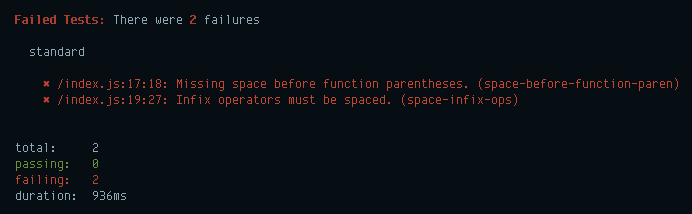

Rationale
This offers a finer alternative to adding the eslint command as a separate test step in your npm test.
- Runs in the same node process as tape, removing maybe 500ms of startup time.
- Painlessly integrate eslint into your travisci.org tests.
- You can get fast realtime linting feedback with tape-watch.
(Your speed gains may be a bit different from my Pentium II, of course.)
Usage
Install it:
npm install --save-dev tape-eslint eslintThen add this test file to your tape suite:
test('eslint', require('tape-eslint')())Then create an .eslintrc in your project:
{
  "rules": {
    "semi": [2, "never"]
  }
}
Customization
files
tape-eslint scans **/*.js and **/*.jsx by default. To configure what files to consume, use:
test('eslint', require('tape-eslint')({
  files: [ 'index.js', 'test/*.js' ]
}))
ignore
Some files are ignored by default. To add more files to ignore, use:
test('eslint', require('tape-eslint')({
  ignore: [ 'app/**' ]
}))
eslint
To specify options to pass onto eslint.CLIEngine, add them here. See eslint's source for details.
// to specify a different config file
test('eslint', require('tape-eslint')({
  eslint: {
    configFile: path.join(__dirname, 'eslintrc.json')
  }
}))
// to specify your eslint config inline
test('eslint', require('tape-eslint')({
eslint: {
baseConfig: { extends: ['standard', 'standard-react'] }
}
}))Standard
Here's an example of using standard.
npm i --save-dev tape-eslint eslint
npm i --save-dev eslint-plugin-standard eslint-config-standard
npm i --save-dev eslint-plugin-react eslint-config-standard-react
/* .eslintrc */
{
"extends": ["standard", "standard-react"]
}test('eslint', require('tape-eslint')())Browserify
If you use Browserify on your tests (eg: smokestack, tape-run, budo, hihat, zuul, and so on), doing require('tape-eslint')() is a noop. In practice, this means you can use tape-eslint even if your tests are powered by browserify, and your test will now work in both the browser and Node.
Thanks
tape-eslint © 2016+, Rico Sta. Cruz. Released under the MIT License. Authored and maintained by Rico Sta. Cruz with help from contributors (list).
ricostacruz.com · GitHub @rstacruz · Twitter @rstacruz