
tapwire
v0.1.1
Published
Local HTTP mock/proxy tool for Node.js — capture, replay, and inspect traffic

Maintainers
 luisete
Readme
Tapwire
The Chrome DevTools Network tab for your Node.js APIs.
WIP — early release. Core workflow is functional, rough edges expected.
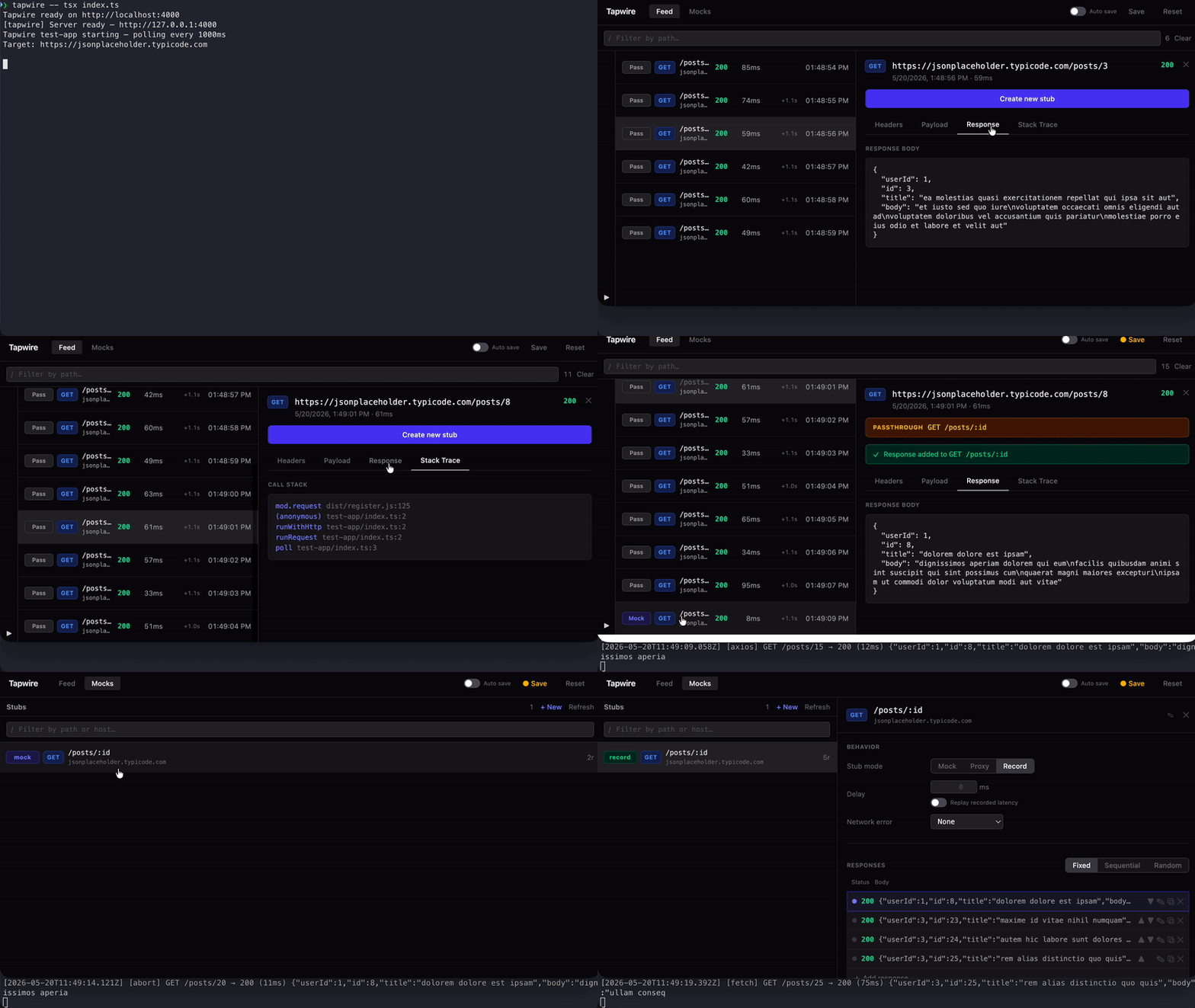
Tapwire intercepts every outbound HTTP call your service makes, shows it in a live web UI, and lets you turn real traffic into reusable mocks — without changing a single line of code.
npx tapwire -- node src/index.jsYour app runs normally. Every HTTP call appears in the dashboard at http://localhost:4000. When you see a request you want to mock, click Promote — Tapwire saves it as a fixture, and from that point on it replays the captured response instead of hitting the real server.
Why Tapwire?
Every mock tool assumes you already know what to mock. Tapwire assumes you don't.
- Onboarding onto an unfamiliar codebase? See exactly which APIs it calls before you write a single mock.
- No access to dependent services? Capture real traffic once, replay it forever locally.
- Tired of writing mocks by hand? Tapwire builds them from real responses — correct by default.
How it works
Your app makes an HTTP call
        │
Tapwire intercepts it transparently (via @mswjs/interceptors)
        │
Request forwarded to the real server
        │
Request + response captured in memory
        │
Appears in the live UI feed
        │
You promote it to a stub (optional)
        │
Next time: served from the fixture, real server never contacted
Tapwire runs as a single CLI command that orchestrates two processes:
- Your app — with Tapwire's HTTP interceptor injected via
--requirebefore your code loads - Tapwire server — holds all state, serves the REST API and the web UI
The interceptor patches http, https, fetch, and undici at the Node.js level using @mswjs/interceptors. Resolution happens over localhost — your app never knows it's being observed.
Quick start
With npx (no install)
npx tapwire -- node src/index.jsInstalled in your project
npm install --save-dev tapwireAdd a script to package.json:
{
  "scripts": {
    "dev": "tapwire -- node src/index.js",
    "dev:mock": "tapwire --mode mock -- node src/index.js"
  }
}
Works with any Node.js runner:
tapwire -- tsx src/index.ts
tapwire -- npx nodemon src/index.js
CLI options
tapwire [options] -- <command>

Options:
  --port <n>         Server port (default: 4000)
  --fixtures <path>  Fixtures directory (default: .tapwire/fixtures)
  --mode <mode>      Server mode: default, mock, proxy, record (default: default)
Environment variables TAPWIRE_PORT and TAPWIRE_FIXTURES_DIR can also be used to set port and fixtures path.
Features
Transparent interception
Captures outbound HTTP calls from http, https, fetch, and undici — no code changes, no proxy configuration. Call stack frames are captured so you can see exactly where each request originates.
Live web UI
Real-time request feed via Server-Sent Events. Inspect full request/response detail including headers, body, latency, and initiator stack trace. Promote captures to stubs directly from the browser.
Pattern matching with specificity
Stubs use Express-style route patterns (/users/:id) and match on method + host + pathname. When multiple patterns match, the most specific one wins — /users/me always beats /users/:id.
Server modes
The --mode flag sets a global override for how all matched requests are handled:
| Mode | Behaviour |
|------|-----------|
| default | Each stub's own mode is respected |
| mock | All matched stubs serve mock responses |
| proxy | All matched stubs forward to the real server |
| record | All matched stubs forward and capture the response |
In mock or record mode, enabling strict mode via the settings API rejects unmatched requests with 501 instead of letting them pass through.
Per-stub configuration
Each stub can be independently configured at runtime:
- Stub mode: mock / proxy / record
- Response mode: fixed (always the same response), sequential (cycle through), random
- Failure injection: set a failure rate (0–100%) to randomly serve from the faults pool
- Latency simulation: add artificial delay (ms) to responses
- Forced status code: override the response status
- Network error simulation: connection reset, timeout, DNS failure, connection refused, connection aborted
Committable fixtures
Fixtures are human-readable JSON files in .tapwire/fixtures/. Commit them to git — one developer's capture work becomes the whole team's mock library.
Automatic header scrubbing
When a capture is promoted to a stub, sensitive headers (authorization, cookie, set-cookie, x-api-key, x-auth-token, x-session-token) are automatically replaced with [REDACTED]. Raw traffic in the UI always shows full detail.
Fixture format
Promoted stubs are stored as individual JSON files:
{
  "id": "550e8400-e29b-41d4-a716-446655440000",
  "method": "GET",
  "host": "api.example.com",
  "pattern": "/users/:id",
  "mode": "mock",
  "config": {
    "failureRate": 0
  },
  "responses": {
    "mode": "sequential",
    "cursor": -1,
    "responses": [
      {
        "id": "a1b2c3",
        "statusCode": 200,
        "body": { "id": 1, "name": "Jane Doe" },
        "headers": { "content-type": "application/json" },
        "capturedAt": "2026-01-15T14:32:00Z",
        "host": "api.example.com"
      }
    ]
  },
  "faults": {
    "mode": "fixed",
    "cursor": -1,
    "responses": [
      {
        "id": "d4e5f6",
        "statusCode": 500,
        "body": { "message": "Internal Server Error" },
        "headers": { "content-type": "application/json" }
      }
    ]
  }
}
Add multiple responses to the responses pool and set mode: "sequential" to cycle through them. Set failureRate: 30 to inject errors 30% of the time from the faults pool.
REST API
Tapwire exposes a full REST API at http://localhost:4000 for managing captures, stubs, responses, and server settings. Everything the web UI does is available programmatically.
Requirements
- Node.js >= 18.0.0
License
MIT