
taro-modal-form
v1.0.0
Published
A powerful and flexible modal form component for Taro.

Maintainers
 phaoer
Readme
taro-modal-form
增强
taro的Form表单能力
🌐 切换语言
⚡功能
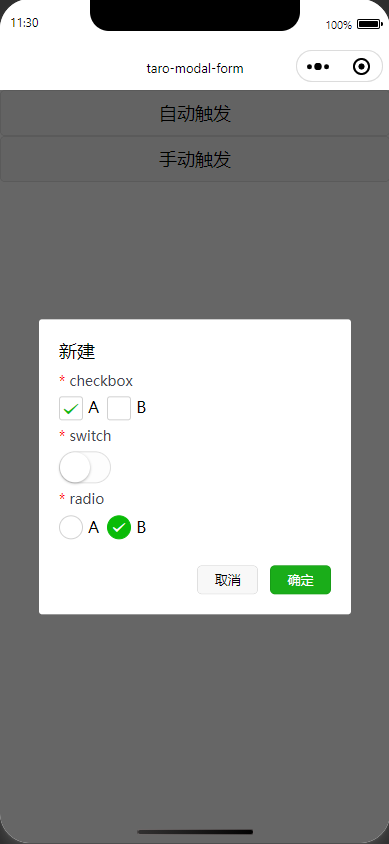
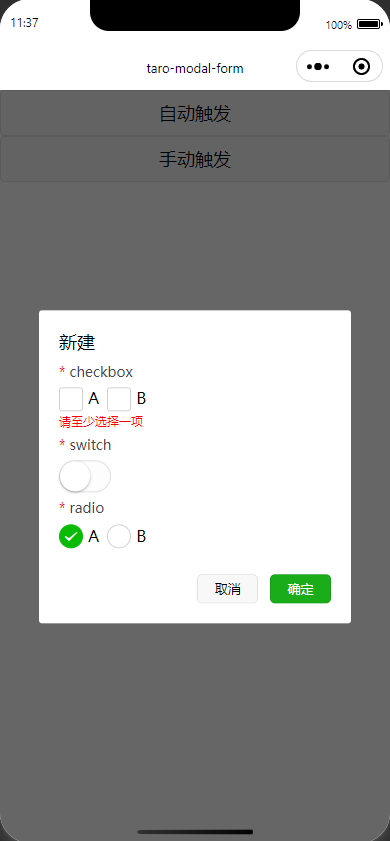
ModalForm组件用于在模态框中创建表单。表单支持表单项校验、动态打开/关闭、表单提交等功能。
- 自动打开/关闭
<View>
	<ModalForm
		title="新建"
		trigger={<Button>自动触发</Button>}
		onFinish={async() => {
			try {
				return true; // 返回true关闭
			} catch (error) {
				return false; // 你的错误处理逻辑
			}
		}}
	>
	//children
	</ModalForm>
</View>- 手动控制
<View>
	<ModalForm
		title="新建"
		open={open}
		onOpenChange={(isOpen)=> setOpen(isOpen)}
	>
	//children
	</ModalForm>
</View>
⚙️ 选项
ModalForm
| 属性 | 类型 | 是否必填 | 说明 |
| --------------- | --------------------------------------------------- | -------- | ------------------------------------------------------------------------- |
| trigger | React.ReactNode | 否 | 用于触发打开模态框的元素,例如按钮。 |
| children | React.ReactNode | 是 | 表单项,应该包含在 ModalFormItem 中。 |
| open | boolean | 否 | 控制模态框是否打开。 |
| onOpenChange | (isOpen: boolean) => void | 否 | 当模态框状态变化时触发。 |
| title | string | 否 | 模态框的标题。 |
| width | number | 否 | 模态框的宽度,单位为像素。 |
| zIndex | number | 否 | 模态框的 z-index。 |
| onFinish | (values: Record<string, any>) => Promise<boolean> | 否 | 表单提交时触发的回调函数,返回一个 Promise,true关闭,false不关闭。 |
| formProps | Omit<FormProps, "onSubmit""onReset"> | 否 | 表单的其他属性,onSubmit 和 onReset 会被自动处理。 |
| cancelBtnText | string | 否 | 取消按钮的文本。 |
| finishBtnText | string | 否 | 完成按钮的文本。 |
| footer | React.ReactNode | 否 | 自定义模态框底部区域的内容。 |
| rules | RuleItem[] | 否 | 表单项的校验规则,RuleItem 数组。 |
ModalFormItem
| 属性 | 类型 | 是否必填 | 说明 |
| ---------- | ----------------- | -------- | --------------------------------------------------- |
| name | string | 是 | 表单项的名称,必须唯一。 |
| children | React.ReactNode | 是 | 表单项的内容,支持 Form 绑定的表单组件。 |
📦 安装
使用npm直接安装,包含Typescript的类型声明
npm install taro-modal-form🔨 使用
import {
	Button,
	Checkbox,
	CheckboxGroup,
	Radio,
	RadioGroup,
	Switch,
	View,
} from "@tarojs/components";
import ModalForm, { ModalFormItem } from "taro-modal-form";

export default function App() {
	return (
		<View>
			<ModalForm
				title="新建"
				trigger={<Button>自动触发</Button>}
				onFinish={async (values) => {
					try {
						console.log(values);
						return true;
					} catch (error) {
						return false;
					}
				}}
				rules={[
					{
						name: "checkbox",
						required: true,
						message: "请至少选择一项"
					},
					{
						name: "switch",
						required: true,
					},
					{
						name: "radio",
						required: true,
					},
				]}
			>
				<ModalFormItem name="checkbox">
					<CheckboxGroup
						style={{
							display: "flex",
							gap: 8,
						}}
					>
						<Checkbox value="a">A</Checkbox>
						<Checkbox value="b">B</Checkbox>
					</CheckboxGroup>
				</ModalFormItem>

				<ModalFormItem name="switch">
					<Switch />
				</ModalFormItem>

				<ModalFormItem name="radio">
					<RadioGroup
						style={{
							display: "flex",
							gap: 8,
						}}
					>
						<Radio value="a">A</Radio>
						<Radio value="b">B</Radio>
					</RadioGroup>
				</ModalFormItem>
			</ModalForm>
		</View>
	);
}
预览
📜 许可证
本项目基于MIT license