
tco-ui
v1.5.8
Published
基于iview3.0封装UI组件


Readme
tco-ui
基于iview3封装多功能组件(搜索表单、单个元素变化触发表单、可编辑、合并、分页表格、组织结构树、支持【xlsx(合并),csv,txt】导出组件)
# 使用效果
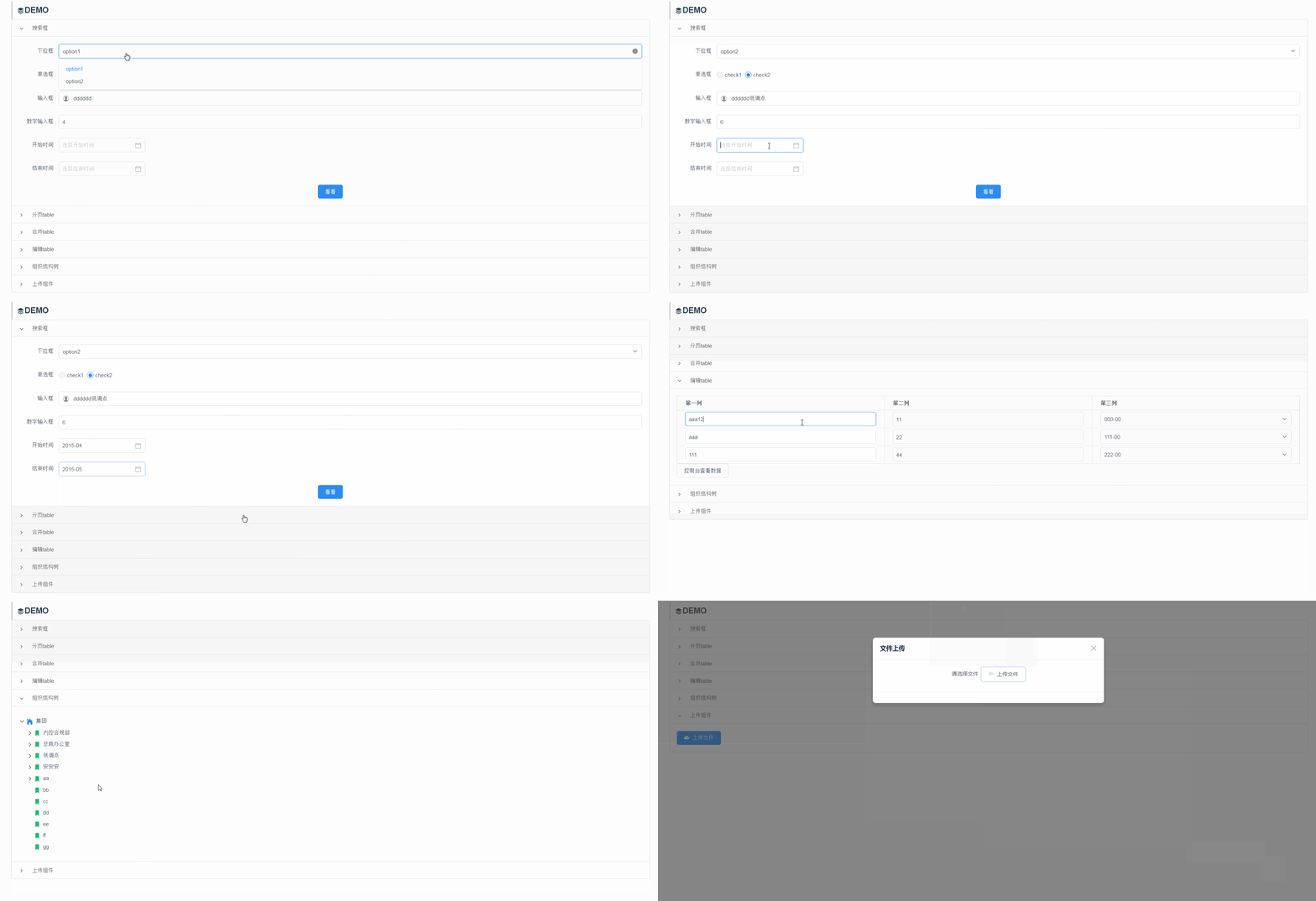
使用方法
npm install tco-ui
import tcoUi from 'tco-ui';
Vue.use(tcoUi);
- 搜索表单 支持下拉框、输入框、数字输入口、单选框、时间日期选择框搜索功能
<tco-form
    vertical
    :objData="aSearch"
    :objDefault="objDefault"
    :labelWidth="120"
    :bhidLable="false"
    btnName="试试"
    @handleFormSubmit="handleSearch"
    >
</tco-form>
tco-form prpps
属性 | 说明 | 类型 | 默认值 ---|---|---|--- objData | 显示的结构化数据 | Array | [] bhidLable | 是否显示label | Boolean | true vertical | 是否竖排 | Boolean | false objDefault | 表单默认值 | Object | {} btnName | 按钮文本 | String | '提交' labelWidth | label宽度 | Number | 100
objData
==下拉框==
 {
    type: 'select',
    label: '下拉框',
    value: 'select',
    disabled:true,//是否禁用
    clearable: true,//是否可清除
    filterable: true,//是否可搜索
    //defaultValue: '1',//默认value
    required: true,//是否必须项
    placeholder: '请选择',
    data: [
        {
            name: 'option1',
            disabled:true,//是否禁用
            value: '1'
        },
        {
            name: 'option2',
            value: '2'
        }
    ]
}
==单选框==
 {
    type: 'radio',
    label: '单选框',
    value: 'radio',
    //defaultValue: '1',//默认value
    required: true,//是否必须项
    clearable:true//是否可清除
    placeholder: '请选择',
    data: [
        {
            name: 'check1',
            disabled:true,//是否禁用
            value: '1'
        },
        {
            name: 'check2',
            value: '2'
        }
    ]
}
==输入框==
 {
    type: 'input',
    value: 'input',
    label: '输入框',
    disabled:true,//是否禁用
    prefix: 'ios-contact',//输入框头部图标
    suffix: 'ios-search',//	输入框尾部图标
    required: true,//是否必须项
    placeholder: '请输入'
}
==数字输入框==
 {
    type: 'inputNumber',
    value: 'inputNumber',
    disabled:true,//是否禁用
    label: '数字输入框',
    required: true,//是否必须项
    placeholder: '请输入'
}
==时间、日期选择器==
{
    type: 'date',
    label: '时间/日期',
    disabled:true,//是否禁用
    dateType: 'month',//date、daterange、datetime、datetimerange、year、month  当类型为范围时 加默认值:defaultRange:['a','b']
    value: 'end',//当type为datarange是value为数组[value1,value2]
    format: 'yyyy-MM',//date | daterange:yyyy-MM-dd、datetime | datetimerange:yyyy-MM-dd
    required: true,//是否必须项
    placeholder: '选择结束时间',
    limit: {//时间范围
        up: '2018-01-01 00:00:00',
        down: '2015-01-01 00:00:00'
    }
}
tco-form events
事件名 | 说明 | 返回值 ---|---|--- handleSearch | 搜索 | search:搜索参数 2. 分页table 支持iview中table、page原有api
<table-paging
    :columns="aTableColumns"
    :data="aTableData"
    :pagination="objPageControl"
    :loading="false"
    :show-header="true"
    :stripe="true"
    :border="true"
    :disHover="false"
    :height="false"
    :width="false"
    :size="size"
    @selectChange="selectChange"
    @changePage="changePage"
    @changePageSize="changePageSize">
</table-paging>
API
Table props
属性 | 说明 | 类型 | 默认值 ---|---|---|--- data | 显示的结构化数据 | Array | [] columns | 表格列的配置描述 | Array | [] pagination | 分页 | Object | - loading | 表格是否加载中 | Boolean | false show-header | 是否显示表头 | Boolean | true stripe | 是否显示间隔斑马纹 | Boolean | false border | 是否显示纵向边框 | Boolean | false disHover | 禁用鼠标悬停时的高亮 | Boolean | false height | 表格高度,单位 px,设置后,如果表格内容大于此值,会固定表头 | Number/String | - width | 表格宽度,单位 px | Number/String | 自动 size | 表格尺寸,可选值为 large、small、default 或者不填 | String | -
Table events
事件名 | 说明 | 返回值 ---|---|--- selectChange | 在多选模式下有效,只要选中项发生变化时就会触发 | selection:已选项数据 changePage| 分页模式下有效,页码发生变化触发 | page:页码数 changePageSize| 分页模式下有效,每页条数发生变化触发 | pageSize:每页条数
3.合并table
==columns增加属性==
属性 | 说明 | 类型 | 默认值 ---|---|---|--- combine | 是否向下合并 | Boolean | false
<table-combine
    :columns="aTableColumns"
    :data="aTableData"
    :pagination="objPageControl"
    :loading="false"
    :show-header="true"
    :stripe="true"
    :border="true"
    :disHover="false"
    :height="false"
    :width="false"
    :size="size"
    @selectChange="selectChange"
</table-combine>
4.编辑table
==columns增加属性==
属性 | 说明 | 类型 | 默认值 ---|---|---|--- edit | 编辑参数 | obj | null
<table-edit
    :columns="aTableColumns"
    :data="aTableData"
    :pagination="objPageControl"
    :loading="false"
    :show-header="true"
    :stripe="true"
    :border="true"
    :disHover="false"
    :height="false"
    :width="false"
    :size="size"
</table-edit>
edit: {
    type: 'input',//必填input、inputNumber、select
    key: 'key3',//必填
    option: []//可填:select必填时option下拉框数据
}
5.组织结构树
属性 | 说明 | 类型 | 默认值 ---|---|---|--- objData | 组织结构数组 | Array | [] objDefaultKey | 默认key | Object | 见下方
<tco-tree
    :objData="aTreeData" :objDefaultKey="objDefaultKey" @selectNode="selectNode">
</tco-tree>
Table events
事件名 | 说明 | 返回值 ---|---|--- selectNode | 选中组织结构 | node包含节点所有信息
默认key

{
    id: 'id',
    pId: 'pId',
    path: 'path',
    pPath: 'pPath',
    name: 'name',
    fullName: 'fullName',
    level: 'level',
    expand: 'expand'
}


aTreeData: [
    {
        deptFullname: '京东集团',
        deptName: '京东集团',
        deep: 0,
        parentCode: '',
        deptCode: '333',
        expand:true
    },
    {
        deptFullname: '资产管理-资源池',
        deptName: '资源池',
        deep: 3,
        parentCode: 'ttt',
        deptCode: '222'
    },
    {
        deptFullname: 'CCO体系',
        deptName: 'CCO体系',
        deep: 1,
        parentCode: 'eeee',
        deptCode: 'dddd'
    },
]

objDefaultKey: {
    id: 'deptCode',
    pId: 'parentCode',
    path: 'path',
    pPath: 'pPath',
    name: 'deptName',
    fullName: 'deptFullname',
    level: 'deep',
    expend: null
},
6.上传组件
属性 | 说明 | 类型 | 默认值 ---|---|---|--- name | 上传的文件字段名 | String | file_key action | 上传的地址,必填 | String | --- format | 支持的文件类型 | Array | []
<tco-upload
    name="uploadName" action="//jsonplaceholder.typicode.com/posts/"
    :format="['csv']"
    :on-success="uploadSuccess"
></tco-upload>
upload events
事件名 | 说明 | 返回值 ---|---|--- uploadSuccess | 上传成功 | (event,file)
// 上传成功
uploadSuccess(evnet, file) {
    console.log('event', event);
    console.log('file', file);
    this.$Notice.success({
        title: '文件上传成功',
        desc: '文件 ' + file.name + ' 上传成功。'
    });
}- 搜索表单-单个触发 支持下拉框、输入框、数字输入口、单选框、时间日期选择框搜索功能
<tco-form-single
:labelWidth="65"
:objDefault="objDefaultSingle"
:objData="objSearchSingle"
@fetchParams="handleFetchData"
/>
tco-form-single prpps
属性 | 说明 | 类型 | 默认值 ---|---|---|--- objData | 显示的结构化数据 | Array | [] objDefault | 表单默认值 | Object | {} labelWidth | label宽度 | Number | 100
objData
==下拉框==
{
  type: "select",
  label: "下拉框",
  value: "select",
  clearable: true, //是否可清除
  filterable: true, //是否可搜索
  placeholder: "请选择",
  data: [
    {
      name: "option1",
      value: "1"
    },
    {
      name: "option2",
      value: "2"
    }
  ]
}
==单选框==
 {
  type: "radio",
  label: "单选框",
  value: "radio",
  placeholder: "请选择",
  data: [
    {
      name: "check1",
      value: "1"
    },
    {
      name: "check2",
      value: "2"
    }
  ]
}
==输入框==
 {
    type: 'input',
    value: 'input',
    label: '输入框',
    disabled:true,//是否禁用
    prefix: 'ios-contact',//输入框头部图标
    suffix: 'ios-search',//	输入框尾部图标
    placeholder: '请输入'
}
==数字输入框==
 {
    type: 'inputNumber',
    value: 'inputNumber',
    disabled:true,//是否禁用
    label: '数字输入框',
    placeholder: '请输入'
}
==时间、日期选择器==
{
    type: 'date',
    label: '时间/日期',
    disabled:true,//是否禁用
    dateType: 'month',//date、daterange、datetime、datetimerange、year、month 当类型为范围时 加默认值:defaultRange:['a','b']
    value: 'end',//当type为datarange是value为数组[value1,value2]
    format: 'yyyy-MM',//date | daterange:yyyy-MM-dd、datetime | datetimerange:yyyy-MM-dd
    placeholder: '选择结束时间',
    limit: {//时间范围
        up: '2018-01-01 00:00:00',
        down: '2015-01-01 00:00:00'
    }
}
tco-form-dynamic events
事件名 | 说明 | 返回值 ---|---|--- fetchParams | 搜索 | search:搜索参数7. 搜索表单-单个触发 支持下拉框、输入框、数字输入口、单选框、时间日期选择框搜索功能
<tco-form-dynamic
:labelWidth="65"
:dynamicList="aSearch"
:objDefault="objDefaultSingle"
:objData="objSearchSingle"
@fetchParams="handleFetchData"
/>
tco-form-dynamic prpps
属性 | 说明 | 类型 | 默认值 ---|---|---|--- objData | 显示的结构化数据 | Array | [] dynamicList | 动态搜索数据 {label:'名',value:'ss'}| Array | [] objDefault | 表单默认值 | Object | {} labelWidth | label宽度 | Number | 100
objData
==下拉框==
{
  type: "select",
  label: "下拉框",
  value: "select",
  clearable: true, //是否可清除
  filterable: true, //是否可搜索
  placeholder: "请选择",
  data: [
    {
      name: "option1",
      value: "1"
    },
    {
      name: "option2",
      value: "2"
    }
  ]
}
==单选框==
 {
  type: "radio",
  label: "单选框",
  value: "radio",
  placeholder: "请选择",
  data: [
    {
      name: "check1",
      value: "1"
    },
    {
      name: "check2",
      value: "2"
    }
  ]
}
==输入框==
 {
    type: 'input',
    value: 'input',
    label: '输入框',
    disabled:true,//是否禁用
    prefix: 'ios-contact',//输入框头部图标
    suffix: 'ios-search',//	输入框尾部图标
    placeholder: '请输入'
}
==数字输入框==
 {
    type: 'inputNumber',
    value: 'inputNumber',
    disabled:true,//是否禁用
    label: '数字输入框',
    placeholder: '请输入'
}
==时间、日期选择器==
{
    type: 'date',
    label: '时间/日期',
    disabled:true,//是否禁用
    dateType: 'month',//date、daterange、datetime、datetimerange、year、month 当类型为范围时 加默认值:defaultRange:['a','b']
    value: 'end',//当type为datarange是value为数组[value1,value2]
    format: 'yyyy-MM',//date | daterange:yyyy-MM-dd、datetime | datetimerange:yyyy-MM-dd
    placeholder: '选择结束时间',
    limit: {//时间范围
        up: '2018-01-01 00:00:00',
        down: '2015-01-01 00:00:00'
    }
}
tco-form-dynamic events
事件名 | 说明 | 返回值 ---|---|--- fetchParams | 搜索 | search:搜索参数
9.下载组件
属性 | 说明 | 类型 | 默认值 ---|---|---|--- id | 组件唯一标识 | String | "" type | 按钮样式 | String | "primary" name | 按钮名称 | String | "下载" icon | 图标 | String | "md-cloud-download" exportData | 导出数据 | Object | {}
//支持行列合并
exportData={

        type: "xlsx",//csv、txt
        file_name:'下载',
        method:'json'//table(默认) table方法仅支持xlsx格式导出
        column: [
          {
            key: "item",
            combine:true,//是否合并此列,注:csv导出不支持合并功能
            title: "aa",
            align: "center"
          },
          {
            key: "col_1",
            title: "201901",
            align: "center"
          }
        ],
        data: [
          {
            item: "故障数量",
            col_1: 35
          },
          {
            item: "保内故障数量",
            col_1: 35
          }
        ]
}
<tco-export type="default" name="test" icon="md-archive" :exportData="objExport"/>