
tenon-naive-pro-table
v0.3.1
Published
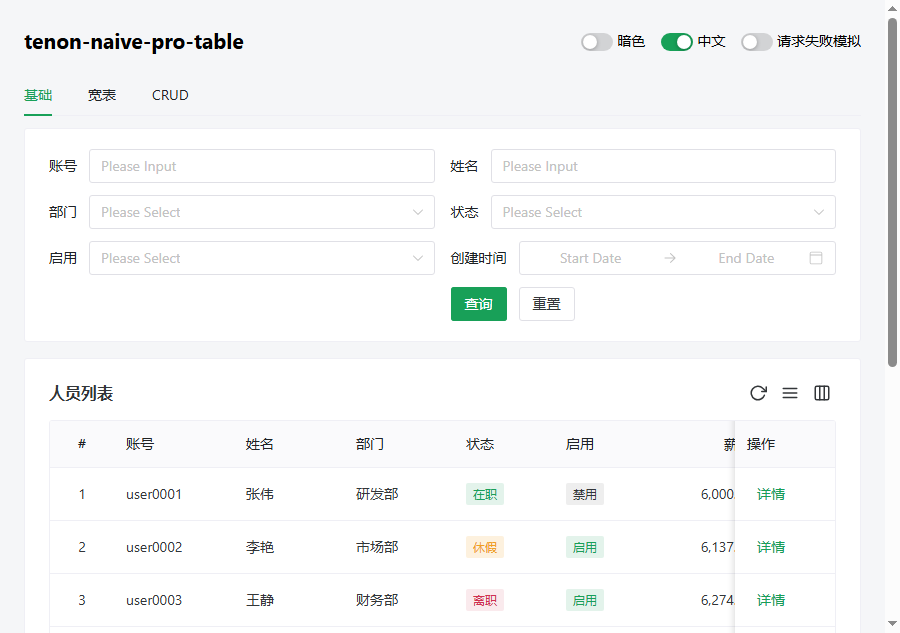
Columns-driven pro table for Vue 3 + Naive UI: auto search form, remote pagination adapter, dict cell rendering, persistent column settings, density toggle, i18n via labels.
Downloads
577

Maintainers
 hu531035580
Readme
tenon-naive-pro-table
English | 简体中文
面向 Vue 3 + Naive UI 的列驱动 Pro 表格。一个 columns 数组同时驱动搜索表单、字典单元格渲染和列设置面板;一个 fetcher 函数适配任意后端。所有能力渐进可忽略——不用的功能不会碍事。
特性
- 列驱动一切 —— 列上声明
search即成为搜索项;声明options后单元格翻译与搜索下拉共用同一份字典。 - 单函数后端契约 ——
(params: {page, pageSize, ...搜索项}) => Promise<{items, total}>,任何请求/响应结构都在 fetcher 里映射,无其他配置。 - 列设置 + 持久化 —— 显隐、拖拽排序、左右固定;按
storage-key存 localStorage,列定义演进时安全合并(删掉的列剔除、新增列按声明位插入)。 - 密度切换 —— 舒适/紧凑,跟随宿主 Naive 主题(包内零 CSS)。
- 请求竞态守卫 —— 快速翻页时乱序返回的过期响应直接丢弃。
- 文案语言响应 —— 列标题/label 支持
() => string,切换语言所有单元格、标题、按钮即时更新;组件自身文案走labelsprop(内置英文默认)。 - 声明式格式化 ——
format: 'date' | 'datetime' | 'money'或自定义函数。 - 异步字典 ——
options: () => Promise<...>,带 loading 态、在途去重与reloadOptions()。 useProTable/useTableCrud—— UI 无关数据核与可选的 CRUD 弹窗状态机,独立导出。- 零运行时依赖,peer 仅
vue ^3.3+naive-ui ^2.34,ESM only。
安装
npm i tenon-naive-pro-table快速开始
<script setup lang="ts">
import { ProTable, type ProTableColumn } from 'tenon-naive-pro-table'

interface User { id: number; account: string; name: string; enabled: boolean; createTime: string }

const columns: ProTableColumn<User>[] = [
  { type: 'index' },
  { key: 'account', title: '账号', search: true },
  { key: 'name', title: '姓名', search: true },
  {
    key: 'enabled', title: '状态', tag: true, search: true,
    options: [
      { label: '启用', value: true, tagType: 'success' },
      { label: '禁用', value: false },
    ],
  },
  { key: 'createTime', title: '创建时间', format: 'datetime' },
]

// 唯一的后端契约 —— 任意 API 在这里适配
async function fetcher({ page, pageSize, ...query }) {
  const res = await fetch(`/api/users?page=${page}&size=${pageSize}&...`).then(r => r.json())
  return { items: res.list, total: res.total }
}
</script>

<template>
  <ProTable :columns="columns" :fetcher="fetcher" storage-key="users" />
</template>
必须渲染在宿主的 <n-config-provider> 内部——表格跟随其主题、locale 与密度。
列定义
数据列继承 Naive UI 列属性(width、minWidth、fixed、align、ellipsis、sorter 等全部透传),外加:
| 字段 | 类型 | 说明 |
|---|---|---|
| key | string | 行字段名;同时是搜索参数默认键、列设置 id、#cell-{key} 插槽名。必填。 |
| title | string \| () => VNodeChild | 函数形式渲染期求值——切语言即时生效。 |
| render | (row, rowIndex) => VNodeChild | 自定义单元格,优先级最高。 |
| format | 'date' \| 'datetime' \| 'money' \| (value, row) => string | 声明式格式化。 |
| options | Option[] \| Ref<Option[]> \| () => Promise<Option[]> | 字典:一处声明,单元格翻译 + 搜索下拉两处使用。 |
| tag | boolean | 翻译值渲染为 NTag(type 取命中项的 tagType)。 |
| hide | boolean | 初始隐藏,列设置里可勾回。 |
| hideInTable | boolean | 仅作搜索项,不渲染为列。 |
| hideInSetting | boolean | 渲染,但不进列设置面板(典型:操作列)。 |
| search | boolean \| SearchConfig | true = 全默认(有 options 用 select,否则 input)。 |
| children | ProTableDataColumn[] | 多级表头。 |
特殊列:{ type: 'selection' | 'expand' | 'index', ... }——显式 type,无魔法 key。操作列就是普通列 + render + fixed: 'right' + hideInSetting: true。
SearchConfig:type(input | number | select | date | daterange | switch)、key(参数名覆盖)、label、placeholder、defaultValue、order、span、props(透传 Naive 控件)、render(完全自定义控件)。
单元格优先级:render → #cell-{key} 插槽 → options 翻译(+tag)→ format → 原始值。
Props
| Prop | 类型 | 默认 | 说明 |
|---|---|---|---|
| columns | ProTableColumn<T>[] | — | 必填 |
| fetcher | (params) => Promise<{items, total}> | — | 远程模式 |
| data | T[] | — | 静态模式(客户端分页) |
| row-key | string \| (row) => key | 'id' | |
| params | object | — | 外部附加参数;深监听 → 回第 1 页重查(树筛选联动) |
| immediate | boolean | true | 挂载即请求 |
| default-page-size | number | 10 | |
| pagination | false \| PaginationProps | — | 与内置默认合并 |
| search | false \| { layout, cols, labelPlacement, labelWidth } | — | false 隐藏搜索卡片;layout: 'inline' 无卡片单行换行,适配窄栏/主从栏 |
| toolbar | false \| { refresh, density, columnSettings } | 全开 | |
| title | string | — | 或用 #title 插槽 |
| storage-key | string | — | 开启列设置 + 密度的 localStorage 持久化 |
| default-density | 'comfortable' \| 'compact' | 全局默认 | |
| labels | Partial<ProTableLabels> | 全局默认/英文 | 传 computed 即随语言切换 |
| active-row-key | string \| number \| null | — | 命中行加 .pro-table-row--active 高亮(用 row-key 比对),配合 @row-click 做主从选中 |
| row-draggable | boolean | false | 行拖拽排序(sortablejs 懒加载);拖完 emit row-drag-sort,落库由宿主 |
| drag-handle | string | — | 拖拽手柄 CSS 选择器(如 .drag-handle);缺省整行可拖 |
其余属性(如 striped、max-height、checked-row-keys、virtual-scroll)原样透传给 n-data-table。
事件:search(清洗后参数)、reset()、loaded(rows, total)、error(err)、row-click(row, index)、row-drag-sort({ from, to, reordered })——组件自身不弹任何消息,宿主在 @error 里处理。
插槽:#title、#toolbar(工具栏左侧)、#toolbar-right(工具栏右侧,内置按钮之前)、#cell-{key}({ row, index })、#header-{key}({ column },自定义列表头)、#empty(空数据)、#pagination-prefix(分页栏左侧,如批量信息)。
实例(模板 ref):refresh()、search()、reset()、loading、rows、params、pagination、reloadOptions(key?)、tableRef(原生 NDataTable 实例)。
全局默认(provide/inject)
不想每处都传相同的 labels、align、page-sizes?在宿主根组件 provide 一次,所有 ProTable 继承。优先级恒为 实例 prop / 列显式值 > 全局默认 > 内置兜底。
// main.ts
import { createProTableDefaults, PRO_TABLE_DEFAULTS } from 'tenon-naive-pro-table'
import { computed } from 'vue'

app.provide(
  PRO_TABLE_DEFAULTS,
  createProTableDefaults({
    align: 'left',                 // 单元格默认左对齐(内置兜底 'center')
    pageSizes: [10, 20, 50, 100],
    emptyText: '-',
    // labels 传 ref/getter → 随 locale 响应,各页面不必再传 :labels
    labels: computed(() => ({ search: t('common.search'), reset: t('common.reset') /* ... */ })),
  }),
)可注入字段:align / titleAlign / emptyText / tag / pageSizes / showSizePicker / fixedFallbackWidth / indexWidth / density / dateValueFormat / searchCols / activeRowBg / labels。
树形 / 可展开行
树形行 = 静态数据模式:行数据带 children 字段,配 row-key 即自动渲染为可展开树(Naive 原生能力)。列设置、密度、工具栏照常可用。
<ProTable
  :columns="columns"
  :data="tree"
  row-key="id"
  :pagination="false"
  default-expand-all
/>
单行可展开详情用特殊列 { type: 'expand', renderExpand: (row) => h(...) }。
排序(接入 fetcher)
列上写 sorter: true(Naive 原生),点表头即把排序并进 fetcher 参数走服务端排序:
const columns = [{ key: 'createTime', title: '创建时间', sorter: true }]
// fetcher 收到 { page, pageSize, ...搜索项, sortField: 'createTime', sortOrder: 'asc' | 'desc' }
// 无排序时不带 sortField/sortOrder;api 层把它们映射成后端字段(同 page → Current)。
箭头受控回显、切排序回第 1 页。多列排序未内置(单列足够绝大多数后台)。
搜索折叠
搜索项多时折叠(仅 layout: 'grid'):
<ProTable :search="{ collapsible: true, collapsedRows: 1 }" ... />超出 collapsedRows 行的搜索项收起,附"展开/收起"(文案走 labels 的 expand/collapse)。
行拖拽排序
<ProTable row-draggable drag-handle=".drag-handle"
  @row-drag-sort="(e) => api.reorder(e.reordered.map(r => r.id)).then(() => tableRef.refresh())" />
基于 sortablejs(唯一运行时依赖,懒加载——不拖拽的表零额外体积)。包只重排响应式行数组 + emit { from, to, reordered },落库由宿主(调重排 api 后 refresh())。远程分页下只重排当前页可见行。
已能用能力(attrs / 列透传,零额外 API)
这些经 n-data-table 属性或列字段透传,直接可用:
- 列宽拖拽:列
resizable: true。 - 虚拟滚动(万行不分页):
:virtual-scroll+max-height(scroll-x自动值仍生效)。 - footer 合计行:
:summary="(pageData) => ...)"。 - 合并单元格:列 render 里 Naive
rowSpan/colSpan。 - 跨页保持勾选:宿主持有并回传
checked-row-keys。
国际化
const labels = computed<Partial<ProTableLabels>>(() => ({
  search: t('common.search'),
  reset: t('common.reset'),
  // ...refresh、density、columnSettings 等
}))
列标题/选项 label 用函数形式:title: () => t('user.account')。两者都在渲染期求值,切换语言自动重渲,无需任何手动刷新。
useProTable / useTableCrud
import { useProTable, useTableCrud } from 'tenon-naive-pro-table'

// 组件内部使用的同一个 UI 无关数据核:loading/rows/params/pagination、
// 竞态守卫、search/reset/onPage/onPageSize
const { loading, rows, params, pagination, search, reset } = useProTable(fetcher, { initParams: {} })

// 可选的 CRUD 弹窗状态机
const crud = useTableCrud({
  form: () => ({ name: '' }),
  create: api.create, update: api.update, remove: api.remove,
  onSuccess: () => tableRef.value?.refresh(),
})
行为约定
- 每次请求前清洗搜索参数:字符串 trim、空串/
null/undefined/空数组丢弃,false与0保留。 - 重置把每个搜索字段赋为
defaultValue ?? null(绝不赋undefined——Naive 受控组件会退回非受控残留旧值)。 fixed列没写width时自动补minWidth ?? 120(Naive 固定列必须有具体宽度)。scroll-x默认为可见列宽合计,显式传入则以你的为准。- 持久化的列设置带版本校验并安全合并:已删除的列剔除,新增列按声明位置插入。
License
Apache-2.0