
term-grid
v0.1.8
Published
Create grid in the terminal, config color,width,align for each column


Readme
term-grid
term-grid create grid in the terminal, you can config color,width,align for each column.
Install
$ npm install term-gridUsage
  var Grid = require("term-grid");
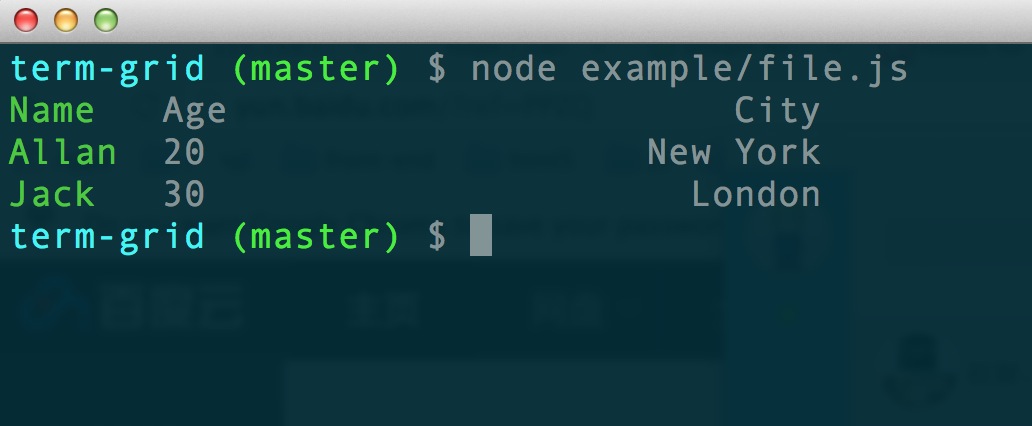
  var grid = new Grid([["Name","Age","City"],["Allan",20,"New York"],["Jack",30,"London"]]);
  grid.setColor(0,"green");
  grid.setWidth(1,10);
  grid.setAlign(2,"right");
  grid.draw();
API
- setWidth(column,width)
set width for column . width 0(and is default) means auto
  grid.setWidth(0,10); //set the first column with width 10
  grid.setWidth([10,20,5,10]); //set each column
- setColor([column,]color)
set color for column.
if the first param column not set, all column will be set to color .
color could be a string or a function returns string.
colors string support : black red green yellow blue magenta cyan white
  grid.setColor(0,"red"); //set the first column red
  grid.setColor(["red","yellow","green"]); //set each column
  set the second column data `red` when it's greater than 10
  grid.setColor(1,function(content,row,column){
    if(content > 10){
        return "red";
    }
  });
  //equals setColor("red")
  grid.setColor(function(content,row,column){
     return "red";
  });
Notice that colors are managed group by column , and each column could has only one color ever a string or a function.
setColor to the same column will overwrite the color set before.
setColor without param column will overwrite all column color.
- setAlign(column,width)
set width for column , left right,center and left by default.
  grid.setAlign(0,"center"); //set the first column align center
  grid.setAlign(['left','center' ,'left','right']); //set each column
- draw()
draw grid to the terminal
output grid to file
Default output stream is process.stdout. You can set 'grid.stream' to other Stream;
grid.stream = require("fs").createWriteStream("grid.txt");
grid.draw();
license
MIT