
termfolio
v2.1.5
Published
A terminal-style portfolio component for React, perfect for creating interactive personal introductions and developer portfolios


Readme
👀目录
🎉简介
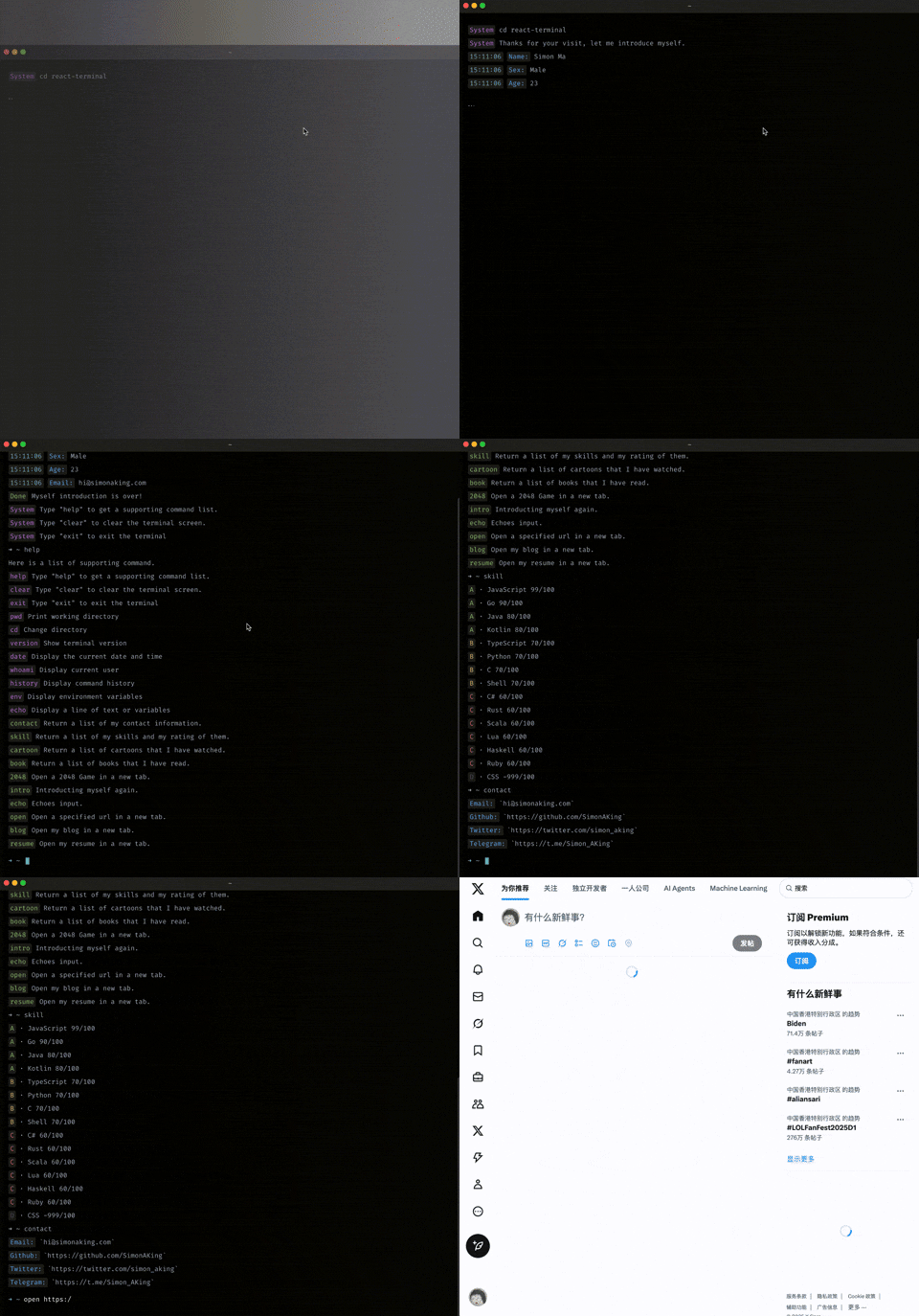
TermFolio 是一款终端风格的个人作品集展示组件,专为开发者打造的独特展示平台。其灵感来源于 vue-terminal 开源项目。
如果你正在寻找一种独特的方式来展示你的个人信息、项目经历或技术技能,那么 TermFolio 会是你的不二之选。它将终端的极客风格与个人展示完美结合,创造出独特的交互体验。
TermFolio 特性:
- 内置系统命令:
ls,cd,pwd,echo等,让访客像使用真实终端一样浏览你的信息 - 智能命令补全:支持
tab自动补全命令 - 历史记录:可使用方向键回溯历史命令
- 高度可定制:支持自定义命令样式和展示内容
- 灵活扩展:可以通过JS自定义任何展示命令
使用场景推荐:
- 个人主页:创建独特的个人介绍页面
- 在线简历:以交互式终端的方式展示你的职业经历
💡安装
npm i termfolioOR
yarn add termfolio此应用依赖于react, 请确保你已经安装。
✨使用
import Terminal from 'termfolio'

// 可参考: https://github.com/SimonAKing/termfolio/blob/master/demo/src/commands
import staticList from 'command/static'
import dynamicList from 'command/dynamic'

const cmd = {
  dynamicList,
  staticList
}

const config = {
  prompt: '➜  ~ ',
  version: '1.0.0',
  initialDirectory: 'workspace',
  bootCmd: 'intro'
}

function App() {
   return <Terminal cmd={cmd} config={config} />
}
数据结构
PropTypes
{
    cmd: PropTypes.shape({
      dynamicList: PropTypes.object,
      staticList: PropTypes.object
    }).isRequired,

    config: PropTypes.shape({
      initialDirectory: PropTypes.string,
      prompt: PropTypes.string,
      version: PropTypes.string,
      bootCmd: PropTypes.string
    }),

    className: PropTypes.string,
}
Command
Command是一个对象,用于定义终端中显示的消息格式:
interface ICommand {
    time?: string; // time to show time before command body
	type?: string; // label to show a label before command body
	label?: string; // type to set command's type, will set a class to command's label part, there is 7 builtin types: error, success, info, warning, system, black, time
    content?: string; // the main text showed in terminal.
    [propName: string]: any;
}
type command = ICommand | string
Props
className
termfolio 根节点的类名, 可用来自定义样式,默认值:termfolio
config
prompt
终端的命令提示符, 默认值:
➜ ~.initialDirectory
终端默认打开的目录,默认值:
srcversion
终端的版本号, 可执行
version命令查看, 默认值:1.0.0bootCmd
终端初始化时, 所要执行的命令,默认值:
intro
cmd
dynamicList
可进行交互的命令列表
{
  命令名称: {
  	description: 命令描述,
    run(print, input) {
      // print: 打印函数
      // input: 当前输入的命令参数
      // eg: echo HelloWorld, input 传入的值便是HelloWorld
      return new Promise((resolve,reject) => {
        // do something
      })
    }
  }
}
eg: 定义一个
open命令, 来打开输入的网址export default { open: { description: 'Open a specified url in a new tab.', run(print, input) { return new Promise((resolve,reject) => { if (!input) { return reject({ type: 'error', label: 'Error', content: 'a url is required!' }) } if (!input.startsWith('http')) { return reject({ type: 'error', label: 'Error', content: 'Please add `http` prefix!' }) } print({ type: 'success', label: 'Success', content: 'Opening' }) window.open(input, '_blank') resolve({ type: 'success', label: 'Done', content: 'Page Opened!' }) }) } } }staticList
只展示数据的命令列表
{
  命令名称: {
  	description: 命令描述,
    list: [ <command> ]
  }
}
eg: 定义一个
skills命令, 用来显示个人所掌握的技能skill: { description: 'Return a list of my skills and my rating of them.', list: [ { type: 'success', label: 'A', content: '· JavaScript 99/100' }, { type: 'success', label: 'A', content: '· Go 90/100' }, { type: 'success', label: 'A', content: '· Java 80/100' }, { type: 'success', label: 'A', content: '· Kotlin 80/100' } ]}
内置命令
System命令
clear | cls- clears the screenhelp | ls- list all the commandsexit | back- exit the current sessionpwd- print name of current directorycd- change the current directoryversion- print the version of current app
提示命令
跳转页面时 -
Jumping page...命令未找到时
command => `Command '${command}' not found`help 命令的提示语 -
Here is a list of supporting command.出错时 -
'Something went wrong!'
🎨TODO
- 增加终端左上角按钮点击功能
- 增加更多系统命令
- 使终端主题可定制
- 增加多行输入功能
- 增加插件系统支持
🎯开发
项目使用的脚手架是nwb。
git clone https://github.com/SimonAKing/termfolio
cd termfolio
npm install
npm start
如果你有任何问题,欢迎提交 Issues 或 PR!