
termochi
v0.1.15
Published
A virtual companion that lives in your shell — tracks your GitHub, reads your calendar, and gets sad if you ignore it.

Maintainers
 xydisorder
Readme
termochi 🌸
A tamagotchi for developers. Lives in your terminal. Knows your GitHub. Has feelings.
Adopt a companion, name them, care for them from your shell. They track your PRs, remember your todos, chat with you via AI — and get sad if you neglect them.


What is this?
Termochi is a virtual pet that lives in your terminal. It's not a toy demo — it's a fully-featured companion with real mechanics:
- Stats that degrade over time (based on how long you're away)
- Actions with cooldowns — you can't just spam feed
- A playable mini-game when you want to play or feed
- Mood-reactive avatars — your pet's face changes when they're sick, hungry, grumpy, or euphoric
- Random events that happen while you're gone (nightmares, found snacks, made friends...)
- Shell prompt integration and a tmux watch mode so your pet is always visible
- AI companion chat — talk to your companion powered by Claude or OpenAI
- GitHub & Linear integration — your work tasks and PR load affect your companion's mood
- Evolution stages — your companion grows over time as you spend days together
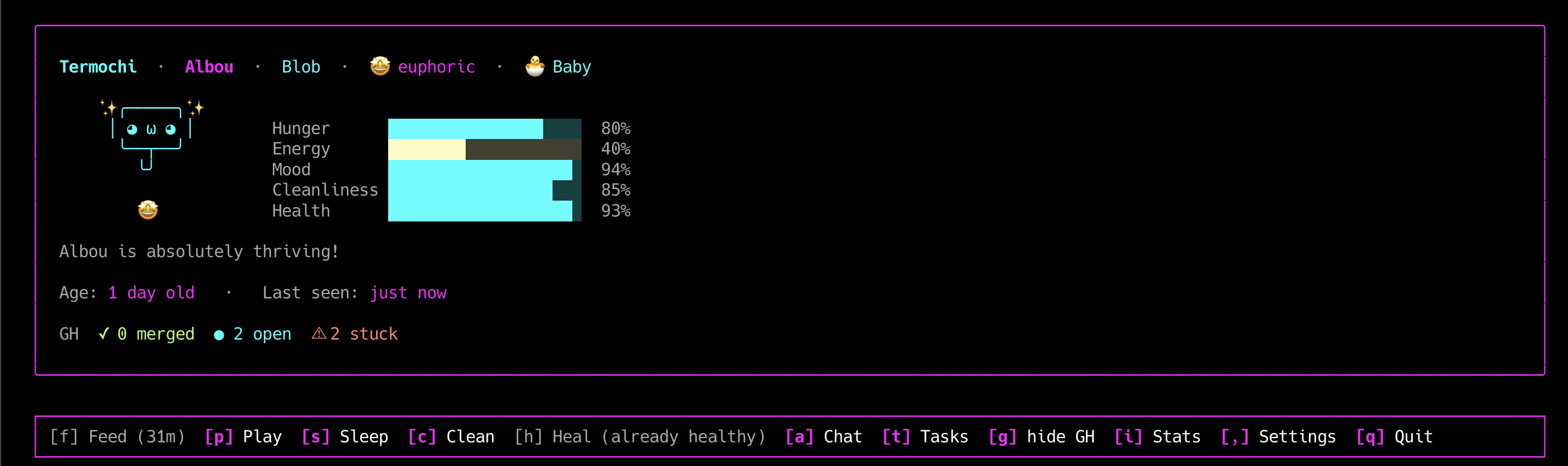
Preview
╭─── Termochi · Mochi · Blob · 🤩 euphoric · 🌱 Young ───────╮
│                                                              │
│  ✨╭─────╮✨         Hunger      ████████░░  82%            │
│   │ ◕ ω ◕ │          Energy      ██████████ 100%            │
│    ╰──┬──╯           Mood        █████████░  91%            │
│       ╰╯             Cleanliness ████████░░  80%            │
│                      Health      ██████████ 100%            │
│  Mochi is absolutely thriving!                              │
│                                                             │
│  Age: 12 days old  ·  Last seen: 2 minutes ago              │
│  📅 Stand-up  in 8min                                       │
│  GH  ✓ 3 merged  ● 5 open  ⚠ 2 stuck                       │
╰─────────────────────────────────────────────────────────────╯

[m] Pet  [a] Chat  [t] Tasks  [,] Settings  [q] Quit
Press m to open the pet actions submenu:
[f] Feed [p] Play [s] Sleep [c] Clean [h] Heal [esc] backAction availability (cooldowns, stat blocks) is shown live in the submenu.
Install
npm install -g termochi
termochi
First launch starts the onboarding. Just follow along.
Companions
Pick one of 4 species — each with a visual preview and distinct personality:
[1] Blob                        [2] Neko
    ╭─────╮                      /\_/\
   │ ◕ ‿ ◕ │                   ( o.o )
    ╰──┬──╯                     > ^ <
       ╰╯
Round, squishy, and hungry.    Curious cat. Needs attention.
Forgiving. Loves eating.       High energy. Very playful.

[3] Bot                         [4] Sprout
 ┌──────┐                          \|/
 │ ◉  ◉ │                       ──╼*╾──
 │  ──  │                          /|\
 └──┬───┘                          ╰╯
Calm and disciplined.          Gentle digital seedling.
Stable stats, stays tidy.      Loves rest and cleanliness.
Game Modes
Chosen during onboarding. Each mode shows a concrete example of what changes:
| Mode | Degradation | After 8h away | |------|-------------|---------------| | 🍵 Cozy | 0.5× | Mild hunger, mood slightly down — very forgiving | | ⚖️ Normal | 1× | Notable hunger, low energy, needs attention | | 💀 Hardcore | 2× | Very hungry, poor mood, messy space |
Themes
5 visual themes, configurable at any time with termochi config:
| Theme | Vibe | |-------|------| | 🌸 Pastel | Soft pinks and lavender | | 💚 Terminal Green | Classic hacker green | | ⚡ Cyber Neon | Cyan and magenta | | 🌅 Sunset | Warm orange and gold | | ◻ Mono | Clean white on black |
Evolution Stages
Your companion evolves as you spend time together. Their badge updates in the header.
| Stage | Badge | Unlocks at | |-------|-------|------------| | Egg | 🥚 | Day 0 | | Baby | 🐣 | Day 1 | | Young | 🌱 | Day 7 | | Adult | ✦ | Day 30 | | Veteran | ★ | Day 90 |
The Stats screen shows the current stage, days alive, and days until next evolution.
Actions
Press m on the main screen to open the pet actions submenu.
All actions have cooldowns and stat gates — no infinite feeding.
| Key | Action | Cooldown | Blocked when |
|-----|--------|----------|--------------|
| f | Feed | 45 min | Hunger ≥ 88% ("already full") |
| p | Play | 30 min | Energy ≤ 15% ("too tired") |
| s | Sleep | 2 hours | Energy ≥ 88% ("not tired yet") |
| c | Clean | 90 min | Cleanliness ≥ 88% ("already clean") |
| h | Heal | 3 hours | Health ≥ 88% ("already healthy") |
🎮 Mini-game: Catch the Treats
When you press p to play (and your pet has energy), a real mini-game launches:
╭─── 🎮 Catch the treats! ──────── ✦ 4  ⏱ 12s ╮
│                                               │
│ │          ✦                                │ │
│ │    ✦                    ✦                 │ │
│ │                  ✦                        │ │
│ │                                           │ │
│ │        ✦                    ✦             │ │
│ │                                           │ │
│ │                   ╰─◉─╯                  │ │
│                ← → or A D to move            │
╰───────────────────────────────────────────────╯- Treats fall from the top at random columns
- Move your pet with
←→orAD - 20 seconds, catch as many as you can
- Your score directly affects the mood bonus — a perfect run gives a huge happiness boost
💬 AI Companion Chat
Press a to open a chat with your companion, powered by Claude or OpenAI.
Your companion never breaks character — they respond as themselves, with full awareness of their current mood, species, and stats. But they're also genuinely helpful: ask for code help, ideas, or just have a conversation.
╭─── Chat with Mochi ──────────────────────────────╮
│                                                   │
│  Mochi  Heyyyy! I'm feeling pretty good today ~  │
│         My hunger's at 82% but I'm managing :3   │
│                                                   │
│  You   can you help me write a git commit message │
│                                                   │
│  Mochi  Sure! What did you change? Tell me and   │
│         I'll write something good for you ✦      │
│                                                   │
╰───────────────────────────────────────────────────╯
  > _
  /remember …   /forget   /todo …   esc back
Persistent Memory
Your companion remembers things across sessions:
/remember I prefer TypeScript over Python
/remember my project is called termochi
/forget        ← clears all memories
Memories are injected into every conversation — your companion won't ask the same questions twice.
Todo list from chat
Type /todo <task> during a conversation to add an item to your todo list. Your companion will suggest it when you mention something you need to do.
/todo review the auth PR before FridayThe item appears instantly in the Tasks → Todo tab.
Talking to your companion applies the Talk action, boosting mood.
Setup
Go to Settings (,) → configure your AI provider and API key.
Supported: Claude (Anthropic) and OpenAI (GPT-4o and friends).
📋 Tasks & Integrations
Press t to open the Tasks view. It has up to 4 tabs depending on what's configured:
╭─── Tasks ───────────────────────────────────────────────╮
│  [1] GitHub (5) ⚠2   [2] Linear (3)   [3] Todo (2/4)   │
│                       [4] Calendar (3)                   │
│                                                          │
│  ✓ 3 merged  ●  5 open  ⚠ 2 stuck (>2d open)           │
│  ──────────────────────────────────────────────────────  │
│  ● fix: auth token expiry         xydisorder/app         │
│  ● feat: dark mode toggle         xydisorder/app         │
│  ● ⚠ fix: race condition          xydisorder/api  2d     │
│  ⊙ review: add pagination         colleague/app          │
╰──────────────────────────────────────────────────────────╯
↑↓ navigate ↵ open in browser 1/2/3/4/tab switch esc back1/2/3/4/tabto switch tabs↑↓to navigate items,↵to open in browser- PRs open more than 2 days are flagged
⚠
GitHub tab
Open PRs, review requests, merged today. PRs open for 2+ days get a red ⚠.
Linear tab
Assigned issues from your Linear workspace.
Todo tab (always visible)
A personal checklist, always present even without any integration.
space/↵to check/uncheckdto delete- Add items with
/todo <text>from the AI chat
Calendar tab
Today's meetings from any iCal URL (Google Calendar, Outlook, Apple Calendar). Shows start time, how many minutes away, and a meeting link indicator ⬡ if a URL is detected.
Events within 30 minutes are highlighted yellow; ongoing meetings are red.
Mood impact
Your companion reacts to your workload:
- 5+ PRs awaiting your review, or urgent Linear issues → mood malus applied
Widgets on main screen
A compact summary line can be shown on the home screen for GitHub and Calendar. Toggle them from Settings → GitHub/Calendar → Show widget on home.
GH  ✓ 3 merged  ● 5 open  ⊙ 2 review  ⚠ 1 stuck
📅 Stand-up  in 23min
When a meeting has a link and is coming up soon, pressing ↵ on the main screen opens it in the browser.
Setup
Go to Settings (,) → navigate to the relevant section and enter:
- GitHub token — personal access token with
repo+read:userscope - Linear API key — from Linear settings → API
- Calendar iCal URL — the "secret address in iCal format" from your calendar provider
For Google Calendar: Settings → the calendar → "Secret address in iCal format".
API keys are stored locally at ~/.termochi/integrations.json (same approach as gh, aws, npm).
Mood-Reactive Faces
Your companion's face changes based on their current mood:
euphoric    happy/calm   tired        hungry       sick
✨╭────╮✨   ╭────╮      ╭────╮      ╭────╮      ╭────╮
 │◕ ω ◕│    │◕ ‿ ◕│     │≧ _ ≦│     │◕ ᗙ ◕│     │× ᵕ ×│
  ╰──┬──╯    ╰──┬──╯     ╰──┬──╯     ╰──┬──╯     ╰──┬──╯
Critical stat bars pulse red. Stat bars animate smoothly when they change.
Random Events
Things happen while you're away. When you open termochi after a long absence, a notification may appear:
✨ Made a new friend! — Met someone interesting in the digital world!
☔ Cozy rainy day — Stayed indoors and watched the rain. Very cozy.
😰 Nightmare... — Tossed and turned all night. Not a great sleep.
🍪 Found a snack! — Your companion discovered a hidden treat while you were away.
Probability scales with absence time. Rare for short sessions, common after long breaks.
Pin it to your shell
Shell prompt
Add your companion's status to your terminal prompt:
# ~/.zshrc or ~/.bashrc
termochi_prompt() { termochi prompt 2>/dev/null; }
PROMPT='$(termochi_prompt) → '
Output: 🫧 Mochi 😊 →
With a critical stat: 🐱 Pip 😾 ! →
Starship (~/.config/starship.toml):
[custom.termochi]
command = "termochi prompt --compact"
when = "termochi doctor 2>/dev/null"
format = "[$output]($style) "
style = "bold"
tmux side pane
Run termochi watch in a small persistent pane. It auto-refreshes every 5 minutes:
╭─ Mochi · Blob ────────────╮
│ Mochi is feeling good.     │
│ 🍖 ████████░░  80%        │
│ ⚡ ██████░░░░  60%        │
│ 💭 █████████░  91%        │
│ ✨ ████████░░  80%        │
│ ❤️ ██████████ 100%        │
│ cozy              22:09   │
│ [r] refresh  [q] quit     │
╰────────────────────────────╯
termochi watch # refresh every 5 min (default)
termochi watch --interval 2 # refresh every 2 minAll Commands
termochi              # Open interactive UI (or start onboarding)
termochi feed         # Feed your companion
termochi play         # Launch the mini-game
termochi sleep        # Put them to sleep
termochi clean        # Clean their space
termochi stats        # Detailed stats view
termochi config       # Change theme
termochi rename <n>   # Rename your companion
termochi reset        # Start over (with confirmation)
termochi doctor       # Check local config & state
termochi prompt       # One-line status for shell prompt
termochi prompt --compact   # Extra-short for tmux statusline
termochi watch        # Live compact view for tmux pane
termochi watch --interval 2  # Custom refresh interval (minutes)
termochi commit          # AI-generated summary of today's git commits
termochi notify-prs      # Desktop notification if any PRs are stuck (>48h)
termochi notify-meetings # Desktop notification for meetings in the next 10 min
termochi commit
Summarizes today's git commits using your AI companion:
termochi commit
# → Mochi: You fixed the auth flow and added dark mode today —
#          solid progress! The race condition fix especially 🌟
Useful as a daily standup helper or end-of-day recap. Requires AI configured in Settings.
termochi notify-prs
Checks GitHub for open PRs with no activity for 48+ hours and sends a macOS desktop notification. Silent if nothing is stuck. Designed to run as a cron job:
# ~/Library/LaunchAgents or crontab
0 9 * * * termochi notify-prs
termochi notify-meetings
Reads your iCal calendar and sends a desktop notification for meetings starting in the next ~10 minutes. Rings the terminal bell for NOW alerts. Requires Calendar configured in Settings.
# Run every minute via cron
* * * * * termochi notify-meetings
How time works
Termochi uses real elapsed time — not sessions. Close your terminal, come back tomorrow: your companion's stats will have degraded based on exactly how many hours passed, scaled by your game mode.
- Stats degrade per hour: hunger, energy, mood, cleanliness, health
- Stats also degrade live every 30 seconds while the app is open
- Critical stats (< 20%) cause extra health damage over time
- Critical stat bars pulse red and trigger a beep sound
- Long absences may trigger a random event on your next login
- No permadeath — your companion gets sad and neglected, but never disappears
State is stored locally at ~/.termochi/state.json.
Local storage
All data lives in ~/.termochi/:
| File | Contents |
|------|----------|
| state.json | Pet state (stats, name, species, timestamps) |
| ai-config.json | AI provider + API key |
| integrations.json | GitHub token, Linear key, Calendar URL, widget preferences |
| memory.json | Companion memories from /remember |
| todos.json | Todo list items |
Development
git clone <repo> && cd termochi
npm install
npm run dev       # Run directly with tsx (no build step)
npm run build     # Compile TypeScript → dist/
npm test          # Run unit tests
npm run lint      # ESLint
npm run format    # Prettier
Stack
| Layer | Technology | |-------|-----------| | Terminal UI | Ink (React for terminals) | | CLI parsing | Commander | | Validation | Zod | | Terminal colors | Picocolors | | Testing | Vitest | | Language | TypeScript (strict) |
Architecture
src/
  cli/            CLI entry + all commands
  app/            Top-level React component + screen router
  domain/         Pure business logic
    pet/          Stats, actions, degradation, mood, evolution
    species/      Species catalog (Blob, Neko, Bot, Sprout)
    game/         Game mode configs
    theme/        Theme catalog
    events/       Random event system
  infrastructure/
    storage/      JSON persistence (state, AI config, integrations, memory)
    clock/        Time utilities
    integrations/ GitHub API, Linear API, AI chat
  ui/
    screens/      Full-page Ink screens
    components/   Reusable Ink components
    ascii/        Mood-reactive ASCII art per species
  utils/          Math, formatters, terminal helpers
Roadmap
- [x] Evolution stages (egg → baby → young → adult → veteran)
- [x] macOS desktop notifications when PRs are stuck
- [x] AI companion chat with persistent memory
- [x] GitHub & Linear integration with mood impact
- [x] Calendar integration — iCal, next meeting widget, meeting notifications
- [x] Todo list with
/todocommand from AI chat - [x] Reorganized menu — pet submenu, widgets & stats in Settings
- [ ] Second mini-game
- [ ] Multiple companions
- [ ] Companion export / sharing as ASCII card
- [ ]
termochi export— snapshot as shareable JSON or image
Made with 🌸 for terminal dwellers.