
terraform-workspace-clone
v2.2.2
Published
Clone existing TF workspace

Maintainers
 sachin_rajput
Readme
NPM package to clone or duplicate extsting terraform workspace
Getting started
terraform-workspace-clone is a command-line module to clone terraform workspace
🏠 Homepage
Install
npm install -g terraform-workspace-cloneUsage
terraform-workspace-clone needs few details before cloning the workspace. Input can be provided using cli prompts or can pass pre-filled json file as command-line argument.
Cli prompts:
Run below command in cli.
terraform-workspace-cloneCan also use tf-ws-clone , It is a shorthand command.
Example:
✔ TF domain name?  https://app.terraform.io   // Terraform domain, can be cloud or enterprise
✔ Source workspace ID? ws-9xZ3c3iabcdefgh     // Workspace id which you need to clone
✔ New workspace name? 00-test-1               // New workspace name
✔ Destination TF organization name?  abc_org  // TF org name in which new workspace will be created.
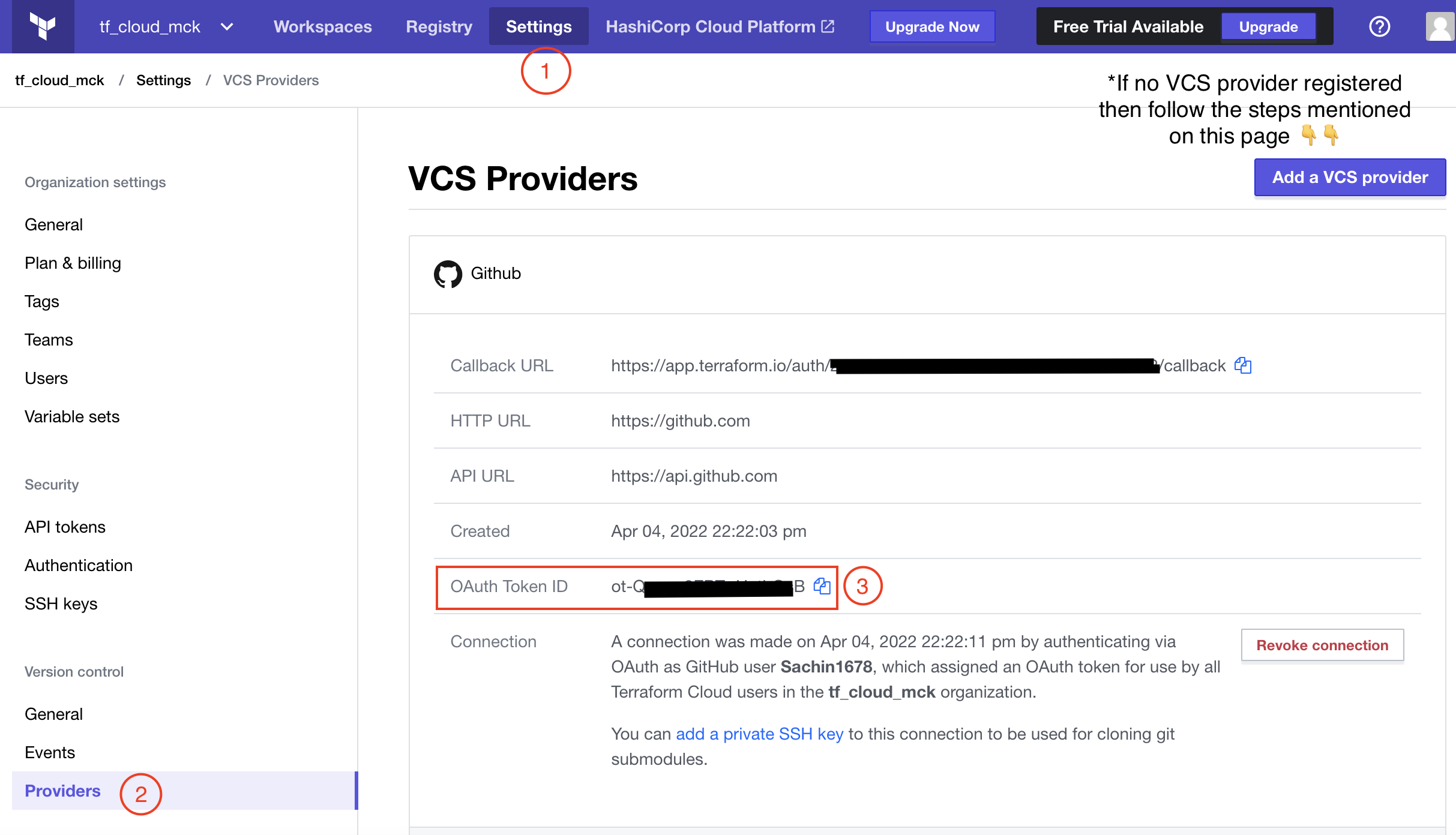
✔ (Optional) OAuth Token id from destinaton organization? // Required if want to clone VCS config. Refer 2nd screenshot.
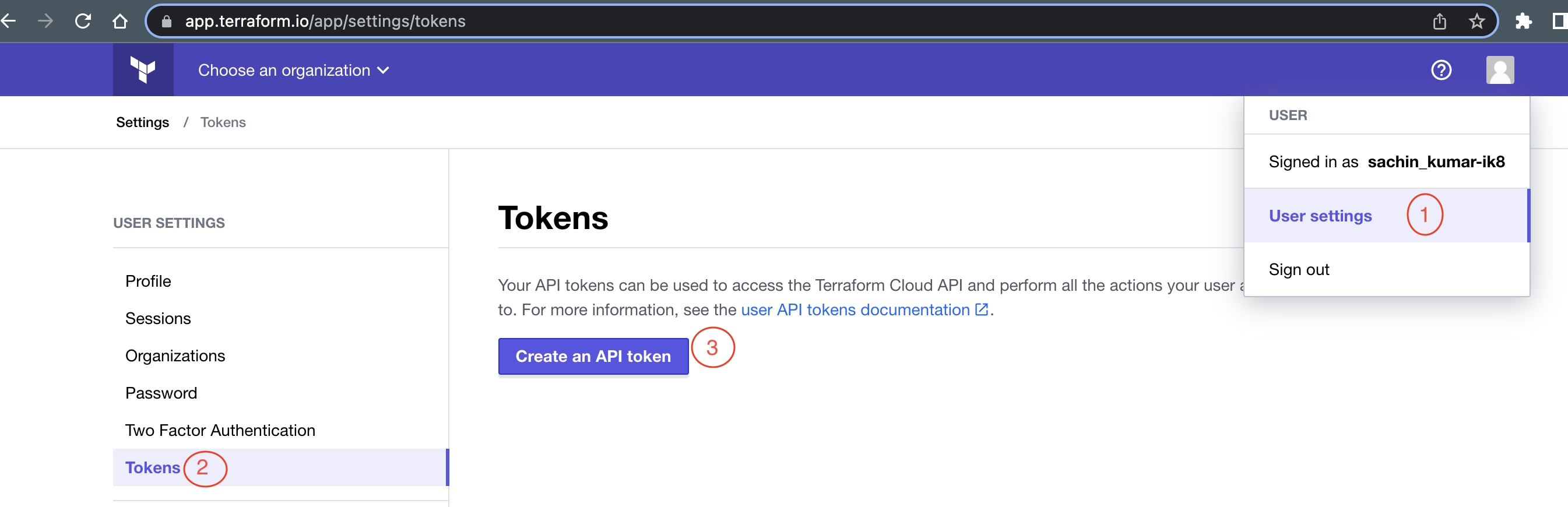
✔ User api token  ****************              // User api token. Screenshot 1. For more details go to `API Token` section of https://www.terraform.io/cloud-docs/users-teams-organizations/users.
✔ Do you want to clone with values? no / yes  // Yes, if want to clone variables with values.
NOTE: User should have permission to access source and destination org.
To generate user api token, go to User Settings -> Tokens -> click on "Create an API token" button -> Create API token -> Copy token -> Done.
To fetch VCS OAuth token ID, Select TF destination organization and go to Settings -> Providers -> Copy OAuth client id. Destination organization should be able to access VCS repo configured in source workspace. If VCS provider not configured then click on Settings -> Providers -> Add VCS provider.
Config file:
Input can be passed using pre-filled json file. JSON file should have below info:
{
    "baseUrl": "https://app.terraform.io",
    "sourceWorkspaceId": "ws-9xZ3c3iabcdefgh",
    "newWorkspaceName": "00-test-1",
    "destinationOrgName": "abc_org",
    "destinationOrgVcsOauthTokenId": "",
    "userApiToken": "Zxcvbnm..............sjhsmD",
    "isCloneValue": true or false
}
and then pass this file as a input.
tf-ws-clone --config=<path to json file>/<filename>.jsonThis template can be generated using cli command. It will create a config template file with all the required keys tf_ws_clone_config.json at same path from where tf-ws-clone command is executed.
tf-ws-clone initconfigExample:
tf-ws-clone --config=./tf_ws_clone_config.jsonRunning on-demand using npx:
Using npx you can run the script on-demand:
npx terraform-workspace-clonenpx terraform-workspace-clone --config=./tf_ws_clone_config.jsonRun tests
npm run testNew planned features
- Clone across multiple domains.
- Allow config file path also for the required details.
Author
👤 Sachin [email protected]
- Github: @Sachin1678
🤝 Contributing
Contributions, issues and feature requests are welcome!Feel free to check issues page. You can also take a look at the contributing guide.
Show your support
Give a ⭐️ if this project helped you!
📝 License
Copyright © 2022 Sachin [email protected]. This project is MIT licensed.