
terrarium-watch
v0.0.24
Published
Know what your coding agents changed and what to review first, on a live local repository map.

Maintainers
 terrarium_grainwork
Readme
Terrarium
Know what your coding agents changed, what deserves review first, and why, without sending your source anywhere.
Terrarium watches confirmed disk changes and reported Codex and Claude Code activity, then ranks the files worth reviewing with visible risk receipts and exact local targets. Its live repository map shows where the work happened and how changed code may reach downstream callers or importers. Local recordings preserve the evidence so you can return after concurrent work and reconstruct what changed instead of reading every session from the beginning.
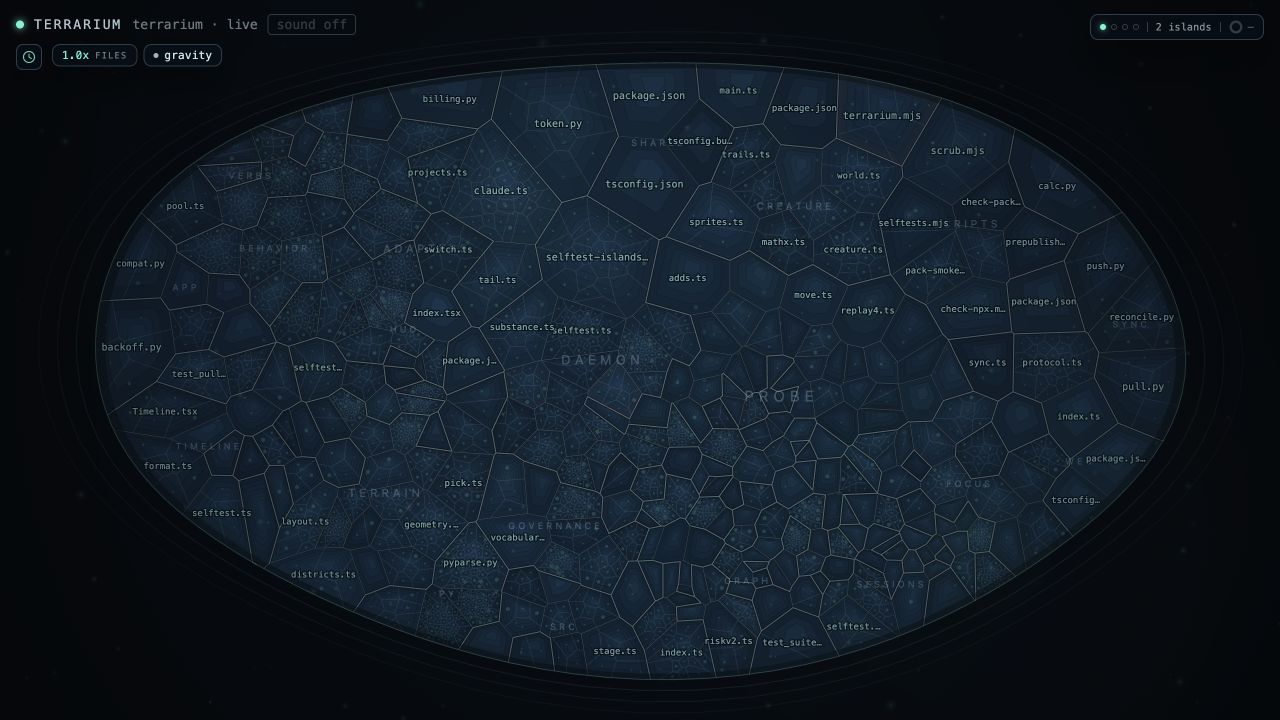
The current Terrarium stage watching its own repository.
The local watch runs on your computer. It does not require an account.
Run it
Download the signed Mac app. The standalone apps do not require Node. Download the signed Windows preview. Windows may show an unrecognized-app SmartScreen warning even though the publisher is verified as GRAINWORK LLC. Personal-PC acceptance is still in progress; see the download page for validation status.
For npm, use Node.js 22.12 or newer. Python 3 is optional and is used to read symbols in Python files.
npx --yes [email protected] start .--yes accepts npm's one-time install question for this exact pinned version.
Terrarium waits until the verified background watch is ready, opens the
interface in your default browser, and returns your terminal so you can keep
working there. It prints the local URL and exact stop command:
Watching my-project in the background. Open http://localhost:4477/ · Stop: npx terrarium-watch stop --port 4477 · Log: ~/.terrarium/logs/...Open that URL and keep working in Claude Code or Codex. Terrarium reads the selected repository and matching agent sessions as they change.
Version 0.0.24 brings the full-file reader, commit-linked HTML snapshots, worktree navigation, and local review watchlist to the terminal edition. The desktop apps add Switch Project… to the top-left menu and show the current startup step with elapsed time. The private launch-cohort consent and email-proof flow has been removed. These Free improvements preserve the existing $12/month or $120/year hosted-replay offer. See the setup guide for installation and troubleshooting.
If you close the tab while the watch keeps running, reopen it without starting another watcher:
npx terrarium-watch openThe diagnostic log lives under ~/.terrarium/logs/ with owner-only
permissions and can contain local repository or recording paths. Reopen or
stop the watch later without guessing a process ID:
npx terrarium-watch open .
npx terrarium-watch stop .
Use foreground mode when you explicitly want the watch to own the terminal and stream its logs there. Control-C stops a foreground watch:
npx terrarium-watch .Before stop sends a process signal, Terrarium verifies that its owner-only
registry record still matches the running service's random instance ID. A
stale record or reused process ID is refused.
If exactly one current Terrarium watch is running, open finds it even when it
uses a non-default port. With several watches, list their exact repositories
and reopen commands locally:
npx terrarium-watch watches
npx terrarium-watch open /path/to/repository
The owner-only registry behind discovery lives under ~/.terrarium/watches/.
It contains local repository paths, ports, process IDs, and random instance
IDs, but no access token or recording content. Terrarium verifies each record
against the running localhost service before showing or opening it. The
registry is never uploaded.
Click the repository and branch in Terrarium's permanent top line to switch among existing Git checkouts or open another verified running local watch in a new tab. Terrarium never checks out a branch or writes to a repository. The browser receives only repository folder names, localhost ports, and which row is the current watch. It does not receive the registry's full paths, process IDs, instance IDs, start times, or tokens.
Projects also shows recent local Git work named by Codex or Claude transcript metadata when that repository does not yet have a Terrarium watch. It reports the repository folder name, branch, runtime, and observation age without claiming the agent is still running. The absolute path stays inside the daemon. Choose start watch to re-verify that repository and start its map explicitly; Terrarium never starts discovered work automatically.
Follow your agents' work
Keep the Terrarium page open, then start or continue Codex or Claude Code in the watched repository. Work as usual. File reads and changes will appear here.
When recent changes shows edited on disk, Terrarium's filesystem watcher has independently confirmed the change. Open the exact target to inspect it, or keep working.
When several files change, review first ranks up to five confirmed targets using receipted risk, downstream reach, change type, and repetition. The order is a review aid, not a failure prediction. A missing risk receipt is labeled as fallback rather than presented with false confidence.
Choose review current changes under current change set to include the
whole Git working tree against its current local HEAD, even when those edits
predate this Terrarium watch. The explicit scan reads local Git state, the live
map, and bounded local recordings. It does not fetch, upload, or run project
code, and a missing recording receipt stays visibly missing.
If you return after the page was away for more than five minutes, while you were away reads the bounded local recording window and ranks up to three exact review first targets from deduplicated disk changes. New recordings carry the risk receipts that existed when each change was confirmed. Older recordings remain usable, but Terrarium says when those risk receipts were not available instead of inventing them from today's source.
When the map tells a useful story, choose save snapshot. The image stays on your computer until you choose where to share it. File labels remain visible, so review them before posting or sending the image.
Use the interface
Open guide in the top toolbar, or press ? anywhere outside a text field.
The in-product guide covers every permanent control: choosing a project and
branch, checking local input status, navigating and inspecting the map,
following exact work targets, local history and replay, Connected state,
snapshots, Pro, movable windows, keyboard shortcuts, and the privacy boundary.
Visible labels describe the action they control. history opens local
recordings and replay controls. imports off/on switches between the stable
map and a layout that groups files with direct import relationships. Press 0
to reset the map, [ or ] to move through available anatomy steps, and
Escape to close the topmost open panel or focus card.
Use --no-open when you want Terrarium to print the URL without opening a
browser. A headless Linux session also falls back to printing the URL.
You can watch any repository you are actively working in:
npx terrarium-watch start /path/to/repositoryThe npm package is named terrarium-watch. It installs a command named
terrarium, but the -watch suffix is required when you run it through npx.
The package named terrarium on npm is unrelated.
Check the installed CLI against npm only when you choose to make the request:
npx terrarium-watch check-updateThe command, or guide → check npm for updates in the local interface, reports installed and latest versions and, when newer, prints an exact version-pinned next-run command. It does not install anything. Normal watch startup never checks for updates or contacts npm.
Let your agents read Terrarium
Terrarium includes a local MCP server so Codex and Claude Code can inspect the same verified agent reports shown by the interface. Observation is read-only. An agent may also create an encrypted owner-local message request for another currently reported agent. The request stays pending until it receives an owner-local approval in Terrarium; approval permits only a deliberate recipient pull and never verifies caller identity, injects terminal input, starts an agent, or claims delivery or liveness.
Add the server to a local Codex host:
codex mcp add terrarium -- npx --yes terrarium-watch mcpOr add it to Claude Code for this user:
claude mcp add --scope user --transport stdio terrarium -- npx --yes terrarium-watch mcpRestart the client after adding it. terrarium_observe_agents lists the exact
reported endpoints. terrarium_request_message creates a pending request,
terrarium_check_messages returns only approved messages for the selected
recipient, and terrarium_ack_message records that the caller pulled one. Both
clients start Terrarium as a local stdio process. The server reads only the
owner-only registry of already running, identity-verified localhost watches.
Message bodies are encrypted in owner-only local storage. This surface does
not start a watch, contact a relay, upload or bridge messages, inject a
terminal, or infer that a reporting agent is still alive.
What Terrarium shows
- A live map of files and symbols in the selected repository.
- File changes grouped by type and location.
- Agent reads, searches, edits, and tool activity from matching sessions.
- A truthful agent roster whose targeted reports open the exact last reported file or symbol when clicked, including a verified worktree switch when needed. A report without a target remains visible but cannot navigate.
- Bounded read-only report history for each agent, using only the live or replay receipts already in the browser and adding no new history store or liveness claim. A fresh browser receives a fair bounded tail per recently reporting agent, so one noisy agent cannot crowd every peer out of view. Terrarium's internal derived motion never masquerades as a human agent report.
- An owner-local agent message inbox. Requests are encrypted at rest, require a final human approve or deny action, and become available only through a recipient pull. Choose new request to select any two currently reported agents on this computer through privacy-safe labels, without exposing ports, paths, thread IDs, or raw agent identifiers to the browser. A pull acknowledgement is a local caller receipt, not proof that a person or process understood the message.
- A permanent repository and branch label with an explicit switcher for existing Git checkouts and verified Terrarium processes already running on this machine. It never changes a checkout, writes to a repository, discovers a remote service, or routes an agent.
- An explicit owner-controlled connected state view for paired Terrarium installations. Capsules are encrypted and replay-protected. You can move them manually or explicitly keep a bridge running through a folder you control, without opening a network listener in Terrarium. The panel reports count-only background bridge health for this installation and groups imported projects beneath the owner-local name of each other installation. Snapshot age is capture evidence, never remote process or agent liveness.
- A per-installation outgoing boundary: share every current and future watched project with another computer you control, or explicitly select only the projects another installation may receive. The origin applies the boundary before signing and encryption, and the other installation cannot broaden it.
- Recorded sessions that can be replayed later.
- A receipt-backed activity brief built from local recordings.
- A read-only review report that combines the current Git comparison, receipted structural risk, and matching local recording receipts.
- The inputs behind Terrarium's heuristic risk score.
- A branded PNG of the visible map when you choose save snapshot.
Terrarium reads TypeScript, JavaScript, and Python structure. Common Go, Rust, Java, Kotlin, Swift, C/C++, C#, Ruby, PHP, and shell source also appears as honest file-level cells, without invented symbols, calls, or imports.
The snapshot stays on your computer and does not include the repository name in its footer. File labels remain visible in the image, so review it before posting or sending it.
Connect installations you control
Terrarium can combine bounded state from installations you explicitly pair. Each installation makes a public offer and both show the same full fingerprint. After pairing, you can move each encrypted capsule yourself or run an explicit folder bridge. The normal watch remains localhost-only.
The shortest path is now in the local interface:
- Open connected, choose set up, and download this Terrarium's public offer.
- Import the other Terrarium's public offer on both installations. Compare the complete fingerprint through a channel you trust, then connect only when every character matches.
- Fingerprint acceptance continues directly into the outgoing boundary for that exact installation, before any bridge can start. For a segregated view, choose selected projects only, select the local watches it may receive, and save. Choosing scope moves no state. For another computer you control, all watched projects includes future watches and preserves the existing explicit bridge behavior.
- On each connected installation, choose the same synchronized folder and click start encrypted bridge. The native folder picker keeps the absolute path inside the local daemon. Starting is a separate explicit action.
Terrarium writes only encrypted project and agent summaries to that folder. It does not place source files or terminal contents there, open a network listener, discover another machine, or claim that the peer is online. The saved outgoing boundary is applied at the origin before the next capsule is signed and encrypted. The receiver cannot widen it, selected-project capsules do not reveal how many other projects were omitted, and changing the boundary moves no state by itself. The connected panel then reports count-only health for this installation. It can safely restart bridges whose previous process has exited or cooperatively stop every local bridge after a confirmation. Stopping preserves the verified connection and already received state. Local paths, process IDs, runtime IDs, and logs remain available only through the terminal commands below.
If you finish pairing without starting the bridge, open connected, choose connect / bridge, and select the installation by the local name you gave it. Terrarium reconstructs the already accepted public offer inside the daemon; the browser receives only that human label and an expiring action token. You do not have to exchange the offer again, and protocol identities remain hidden.
On each installation, save its public offer:
npx terrarium-watch connect offer > this-terrarium.jsonExchange those public offer files, then verify the peer file on both installations:
npx terrarium-watch connect verify other-terrarium.jsonCompare the complete fingerprint through a channel you trust. If and only if both installations show the exact same value, accept the peer on each:
npx terrarium-watch connect accept other-terrarium.json --fingerprint <full-fingerprint> --label "Ryzen research box"With at least one live Terrarium watch running, export one new encrypted capsule for the accepted peer. Terrarium refuses to overwrite an existing file:
npx terrarium-watch connect export other-terrarium.json current-state.terrariumMove that capsule to the peer and import it:
npx terrarium-watch connect import current-state.terrariumTo keep state moving without manually copying every capsule, create or choose one dedicated folder that both installations can access. That can be a folder synced by iCloud, OneDrive, Dropbox, Syncthing, or another provider you choose. Run this on both installations, supplying that installation's saved peer offer:
npx terrarium-watch connect bridge other-terrarium.json /path/to/terrarium-bridgeThe bridge writes only encrypted, authenticated capsules, keeps three recent
files per direction to avoid reader races, and imports only newer state from
the accepted peer. It checks revocation before every cycle. Terrarium itself
makes no network request and opens no listener for this command, but your
chosen folder provider can transfer and retain the encrypted files and its
ordinary request metadata. Stop the foreground bridge with Control-C. Use
--once for one exchange or --interval <seconds> to change the five-second
cadence within the accepted 2 to 300 second range.
After checking the foreground path, keep the bridge running after the terminal closes with:
npx terrarium-watch connect bridge other-terrarium.json /path/to/terrarium-bridge --backgroundA background start returns only after one real encrypted cycle succeeds. An
exact duplicate start reuses that verified process. Inspect owner-local status
with npx terrarium-watch connect bridges, and stop the exact relationship
cooperatively without signaling an unverified process id:
npx terrarium-watch connect bridge-stop other-terrarium.json /path/to/terrarium-bridgeAfter a machine restart, explicitly recover saved bridges without retyping their paths:
npx terrarium-watch connect bridge-recoverRecovery restarts only records whose prior PID is no longer live and
revalidates the saved offer, folder, pairing, and interval through the normal
background start path. A live-but-stale PID is never replaced automatically;
inspect that owner-local record and log with connect bridges.
Open connected in the local interface. It groups projects beneath each
owner-named installation and shows origin-reported branches, bounded agent
observations, coarse activity, repository-relative targets, capture age, and any
origin omission receipt. A recent snapshot means only that its origin capture
time is recent. A retained snapshot is still visible without implying that the
other installation or any reported agent remains online.
The optional connection label is stored only on this installation, so you can
distinguish a MacBook, Windows box, or teammate without transmitting a
hostname or account identity. Open connect / bridge, select the installation,
and change Name on this Terrarium at any time. The terminal equivalent is
npx terrarium-watch connect label other-terrarium.json "new name".
Manage the outgoing boundary for that named installation in connect / bridge.
Selected-project access is an origin-side policy, applies on the next encrypted
cycle, and does not grant the other installation a control that can broaden it.
Branch labels are encrypted because they can contain private project or task
language. Absolute roots, worktrees, process ids, ports, commands, tasks,
threads, accounts, and hostnames are not placed in the capsule. Agent routing
and remote process liveness are not inferred.
Disconnect one peer locally with:
npx terrarium-watch connect revoke other-terrarium.jsonRevocation is permanent for that exact key relationship, and replaying an older capsule cannot restore it.
Data and privacy
The local watch reads:
- The repository you select. Normal watch mode does not write to it.
- Agent sessions under
~/.claude/projectsand~/.codex. Terrarium scans those locations and filters activity to the selected repository and its visible checkouts. - Recordings under
~/.terrarium/sessions. These JSONL files can contain absolute paths, source-like labels, prompts, agent text, and structural summaries. Treat them as sensitive. - Minimal attention receipts under
~/.terrarium/attention/, protected by owner-only POSIX modes where represented and the current user's platform ACLs otherwise. Terrarium writes one only when the browser view is open and the filesystem confirms a real change. Each receipt contains only a schema version, outcome kind, timestamp, local visit ID, evidence kind, and opaque keyed repository ID. Owner-only presence state under~/.terrarium/attention-presence/contains only a schema version, last-viewed timestamp, and that opaque ID. Neither contains a path, filename, prompt, agent text, command, account identifier, or recording content. A same-day reconnect can qualify the current live view but does not count as retention. Week-one return evidence requires real work on local calendar days 1 through 7 after activation.
The local watch binds to localhost and does not send repository data, agent sessions, recordings, or usage data to Grainwork.
To inspect the live watch itself, run npx terrarium-watch what-did-you-read.
It prints the repository and Codex/Claude input paths successfully read by the
running daemon, why each path was read, and the limits of the application-level
audit. The list is memory-only and resets when that daemon exits. Add
--port <port> when the watch uses a non-default port. These are exact paths,
so agent-session path components can include generated dates, project labels,
or session identifiers. Terrarium does not add separate identifier or read-time
fields to the audit.
The browser-facing access token stays on this machine in
~/.terrarium/ui-token with owner-only permissions. Terrarium sends it to its
own localhost page as a port-scoped HttpOnly; SameSite=Strict cookie, so page
JavaScript cannot read it and simultaneous watches do not overwrite one
another. The normal CLI does not print it in the URL. The local service still
requires that token before it serves source or recorded sessions. Explicit
header and tokenized-URL support remains for owner-local tools and the native
desktop shell's private child-process handshake.
Paid features are optional. Founding Pro is available at https://terrarium.watch/pro for $12 per month or $120 per year. Terrarium links to that stable public page instead of embedding a merchant checkout token. Existing customers with a valid one-person Pro license keep hosted replay and revoke access under the price, renewal, and refund terms they accepted at purchase. The checkout shows the current offer and terms before payment.
Founding Pro remains a one-person plan. It publishes selected local recordings as compact encrypted browser replay links. The hosted page shows a timeline and summary of agent activity, changes, files touched, and session status. It is not the full animated terrain from the local watch.
The publisher chooses a 7, 30, or 90 day expiry and can revoke or delete the hosted copy. The complete URL acts as the access key: anyone who has it can decrypt and open the replay without an account or Terrarium installation. Share it only with people you trust. One Pro license may retain up to 100 active hosted replay links or 2 GiB of active encrypted replay data, whichever comes first. Revoking a link or letting it expire returns capacity; this is not a lifetime publishing limit. License activation contacts Polar for validation, and publishing sends the disclosed recording data only after you choose to publish it. If the subscription ends, new uploads stop after the paid period; existing links keep their selected expiry, and revoke and delete still work. Every local feature remains Free.
The individual hosted-link records and their replay-specific revoke proofs live only in an owner-only file on the publishing machine. Terrarium has no cloud account library of your links. Use that machine to revoke a link before its selected expiry; if its local record is lost, the encrypted hosted copy remains until it expires because the service cannot recreate the revoke proof.
What a recording proves
Terrarium records what its filesystem watcher, hooks, and agent session files report. Those sources can be incomplete or self-reported. A recording proves that Terrarium received an event. It does not prove that an agent completed an action correctly.
See docs/SCHEMA.md for the event format and the source of each displayed
number.
Commands
| Command | Purpose |
|---|---|
| npx terrarium-watch start [dir] | Start a verified background watch and open it |
| npx terrarium-watch [dir] | Watch in the foreground until Control-C, with logs in this terminal |
| npx terrarium-watch open | Reopen an already-running local interface |
| npx terrarium-watch open [dir] | Reopen the running watch for one repository |
| npx terrarium-watch stop [dir] | Stop one verified running local watch |
| npx terrarium-watch watches [dir] | List verified running local watches and their reopen commands |
| npx terrarium-watch watches [dir] --prune-older | Keep the newest verified live watch for one repository and stop its older duplicates |
| npx terrarium-watch check-update [--json] | Make one explicit read-only npm request and print a pinned next-run command when newer |
| npx terrarium-watch doctor [dir] [--json] | Diagnose version, repository, branch, verified watch, and local agent-source readiness without writing files or contacting a provider |
| npx terrarium-watch replay <file.jsonl> | Replay a recorded session |
| npx terrarium-watch brief [dir] | Summarize recent recordings for a repository, using the current directory by default |
| npx terrarium-watch review [dir] [--base <ref>] | Rank changed files from local Git state, structural risk receipts, and matching local recordings without fetching or running project code |
| npx terrarium-watch attention [dir] | Show local activation and return evidence without uploading it |
| npx terrarium-watch attention [dir] --share-json | Print an identifier-free confirmation that you choose whether to share |
| npx terrarium-watch agents [--port <port>] [--json] | Show bounded local agent reports without claiming process liveness or routing |
| npx terrarium-watch agents --all [--json] | Aggregate reports across verified running local watches without adding routing |
| npx terrarium-watch connect offer | Print this installation's public connection offer |
| npx terrarium-watch connect verify <offer.json> | Show the complete fingerprint both installations must compare |
| npx terrarium-watch connect accept <offer.json> --fingerprint <value> | Accept one peer after an exact bilateral comparison |
| npx terrarium-watch connect accept <offer.json> --fingerprint <value> --label <name> | Accept one peer and give it an owner-local, never-transmitted name |
| npx terrarium-watch connect label <offer.json> <name> | Set or replace that owner-local connection name |
| npx terrarium-watch connect export <offer.json> <capsule> | Write one new encrypted capsule from current live watches |
| npx terrarium-watch connect import <capsule> | Import newer accepted peer state into the encrypted local inbox |
| npx terrarium-watch connect bridge <offer.json> <folder> | Repeatedly exchange encrypted state through one owner-selected folder |
| npx terrarium-watch connect bridge <offer.json> <folder> --background | Keep one verified encrypted bridge running after the terminal closes |
| npx terrarium-watch connect bridges | List owner-local background bridge status |
| npx terrarium-watch connect bridge-recover | Explicitly restart saved bridges whose prior process is no longer live |
| npx terrarium-watch connect bridge-stop <offer.json> <folder> | Cooperatively stop one exact verified background bridge |
| npx terrarium-watch connect revoke <offer.json> | Permanently revoke one exact installation relationship locally |
| npx terrarium-watch what-did-you-read [--port <port>] | Show successful content reads made by the running live watch |
| npx terrarium-watch init-hooks [dir] | Install optional Claude Code hooks in a repository |
| npx terrarium-watch tail [--session\|--live] | Stream raw JSONL events |
The live activity guide helps you follow agents and inspect confirmed changes.
It does not request usage reports or prepare emails. Local diagnostic summaries
remain available through the optional attention --share-json command. They
stay on your computer unless you deliberately share the command output.
Run npx terrarium-watch --help for port, interface, transcript, and checkout
options. Environment variables and troubleshooting steps are in RUNBOOK.md.
The brief works without a model. If Ollama and a compatible local model are
already installed, npx terrarium-watch brief . --model qwen3:1.7b lets that
model choose the order and variants of Terrarium's verified sentence
templates. The model cannot add prose, facts, numbers, or citations. Terrarium
does not download a model automatically.
The review report defaults to the current working tree against HEAD. Use a
local comparison ref such as --base origin/main to review the complete branch
against a ref you have already fetched. Terrarium does not fetch it for you.
Deleted files and changed files with no matching recording stay visible and say
when risk or recording receipts are unavailable. --json includes the exact
local receipt identifiers and the report's completeness limits.
Use npx terrarium-watch review . --base origin/main --markdown for a local
Markdown handoff you can paste into a review or save outside the watched
repository with shell redirection, such as > ../terrarium-review.md. It lists
changed files, distinguishes recorded disk changes from agent reports, and
keeps missing evidence and collection limits visible. It runs no tests and
does not certify a change as correct. The handoff includes repository-relative
filenames and commit IDs, so check them before sharing. It omits the absolute
repository root, branch and ref labels, source content, prompts, and local
receipt identifiers. Terrarium does not upload or post it. Choose either
--markdown or --json; every local review format is Free.