
text-to-audio-converter
v1.1.1
Published
This Node.js package is open source and uses ElevenLabs' Text to Speech API.

Maintainers
 vipin-singh
Readme

How to Use
1. Login to Eleven Labs
- Go to the Eleven Labs website: Eleven Labs
- If you already have an account, log in with your credentials.
- If you don't have an account, you’ll need to sign up by creating a new account.
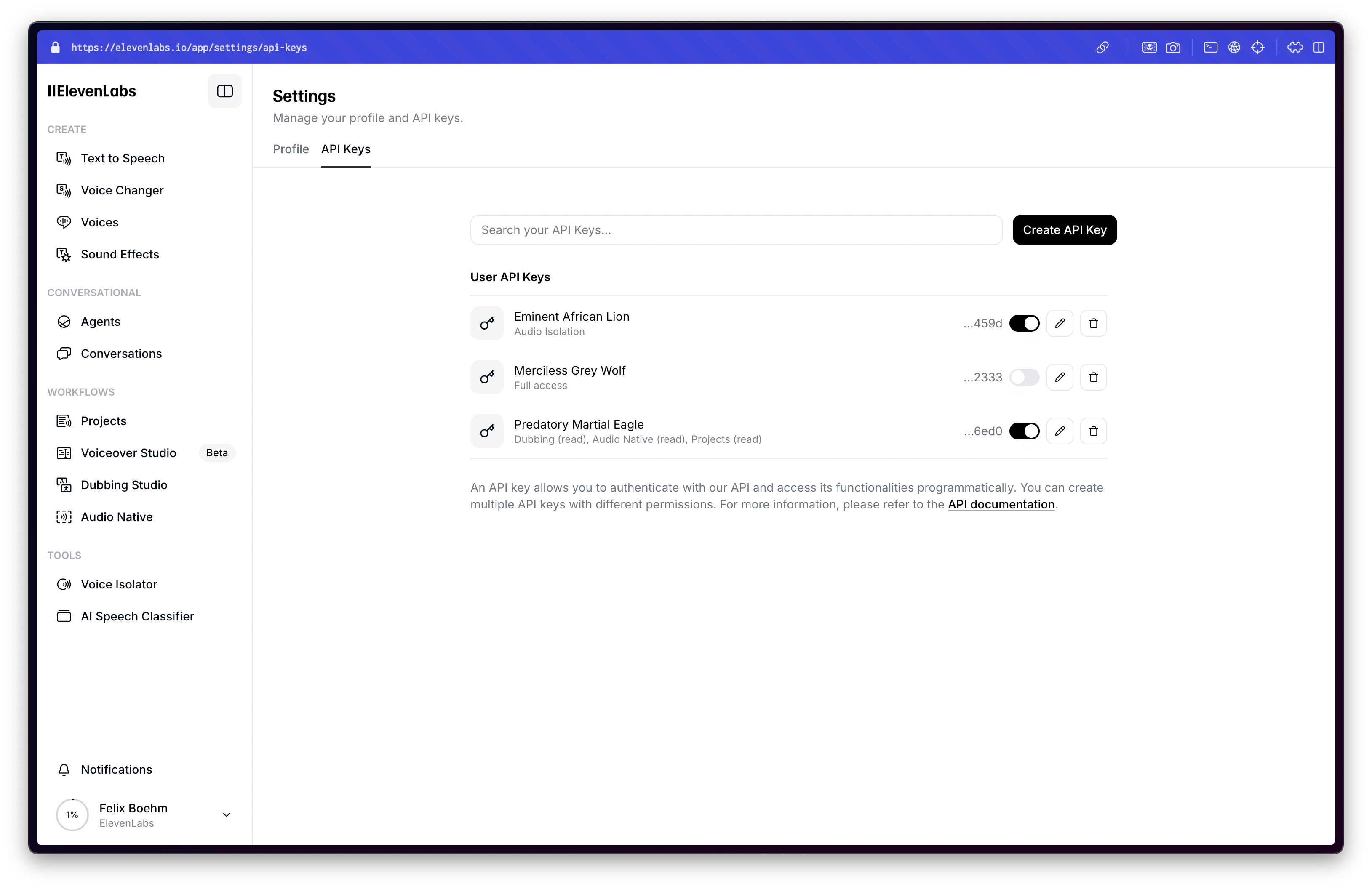
2. Get Your API Key
After logging in:
- Navigate to the Dashboard or API section (you may find it under your profile or in a developer section).
- You should find an option to generate an API key.
- Copy the generated API key (this key will be used in your code).
Dashboard Login Screenshot
Demo
https://elevenlabs.io/app/speech-synthesis/text-to-speech
Eleven Labs Text-to-Speech API Node.js Package
This open-source Node.js package provides a simple and efficient way to interact with the Eleven Labs Text-to-Speech API. It enables seamless integration of advanced text-to-speech functionality into your applications, making it easier to generate high-quality audio from text.
Installation
Install text-to-speech with npm
npm install text-to-audio-converter
Usage/Examples
import { setApiKey } from 'text-to-audio-converter';

// Set your API key for Eleven Labs Text-to-Speech
setApiKey('your_api_key_here');
import { textToSpeech } from 'text-to-audio-converter';

// Generate speech from text
textToSpeech("Voice_id", "Hello, world!", "eleven_multilingual_v2", "customPath")
  .then(async (res) => {
    console.log("Audio file saved at:", res); // Path to the generated audio file
  })
  .catch((err) => {
    console.error("Error:", err);
  });
import { VoiceListing } from 'text-to-audio-converter';
// Retrieve available voice listings
VoiceListing()
.then((voices) => {
console.log("Available Voices:", voices);
})
.catch((err) => {
console.error("Error fetching voice listings:", err);
});Features
- Text-to-Speech Conversion: Easily generate high-quality audio from text using the Eleven Labs API.
- Voice Listing: Retrieve and explore all available voices for text-to-speech generation, enabling customizable experiences.
Hi, I'm Vipin Singh! 👋
🔗 Links



🚀 About Me
I'm a passionate Full Stack Developer with 3 years of experience specializing in building high-performance web applications. I focus on both frontend and backend development, using modern technologies and best practices to deliver seamless, user-friendly experiences.
I’ve created this package to help developers like you integrate text-to-speech functionality with ease, utilizing the Eleven Labs API.
Skills & Expertise:
- Frontend Development: JavaScript, React.js, Next.js, TypeScript, HTML, CSS, Redux
- Backend Development: Node.js, NestJS, MySQL, MongoDB, Redis, Microservices
- DevOps & Tools: Docker, System Design, Debugging
- Specializations: Web Application Development, API Design, Performance Optimization
I'm dedicated to crafting scalable, maintainable, and innovative solutions that enhance user experience and improve application performance.