
text-to-format
v0.1.0
Published
convert any Plain text file to the X format
Downloads
55

Maintainers
 ismnoiet
Readme

textToFormat
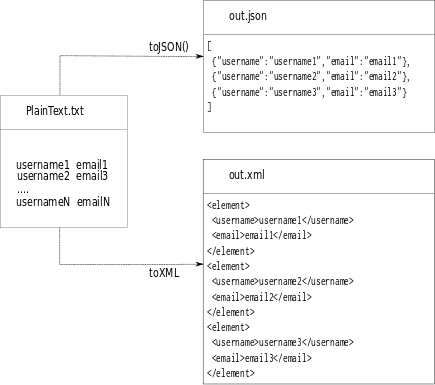
A Node.js Package to Convert any Plain text file to the X format(JSON,XML,SQL,CSV).
Installation
npm install -g text-to-formatNote : In some computers you need to be an administrator,
in this case add sudo before the previous command.
Configuration
Configuration Getters :
textToFormat --get separatortextToFormat --get sttributestextToFormat --get currentFormattextToFormat --get formatTabletextToFormat --get default // to get an object of the default configuration textToFormat --get tagNameConfiguration Setters
Here are some example of using setters :
textToFormat --set separator --value new_separatortextToFormat --set attributes --value attributeName1,attributeName2,etctextToFormat --set currentFormat XMLtextToFormat --set tagName userConvertion
In order to convert a text file to a standard Format(JSON,XML,CSV), we have to :
- Specify first the list of attributes, for example username,email,password
textToFormat --set attributes --value username,email,passwordThen specify the source text file(the
--srcparameter)Specify the format to convert to (the
--toparameter)Specify the destination file to save the converted data to (the
--destparameter), if the destination file doesn't exist it will be created otherwise overwritten
Example
A JSON example :
textToFormat --set attributes --value username,email,passwordtextToFormat --src source.txt --to json --dest output.jsonAn XML example :
textToFormat --set attributes --value username,email,passwordImportant: for XML we can set the tagName of the wrapper element, otherwirse the default tagName wrapper is used( by default it is 'element')
textToFormat --set tagName --value usertextToFormat --src source.txt --to xml --dest output.xml