
textexpander-to-raycast
v0.3.1
Published
Convert TextExpander snippets to Raycast snippets


Readme
textexpander-to-raycast
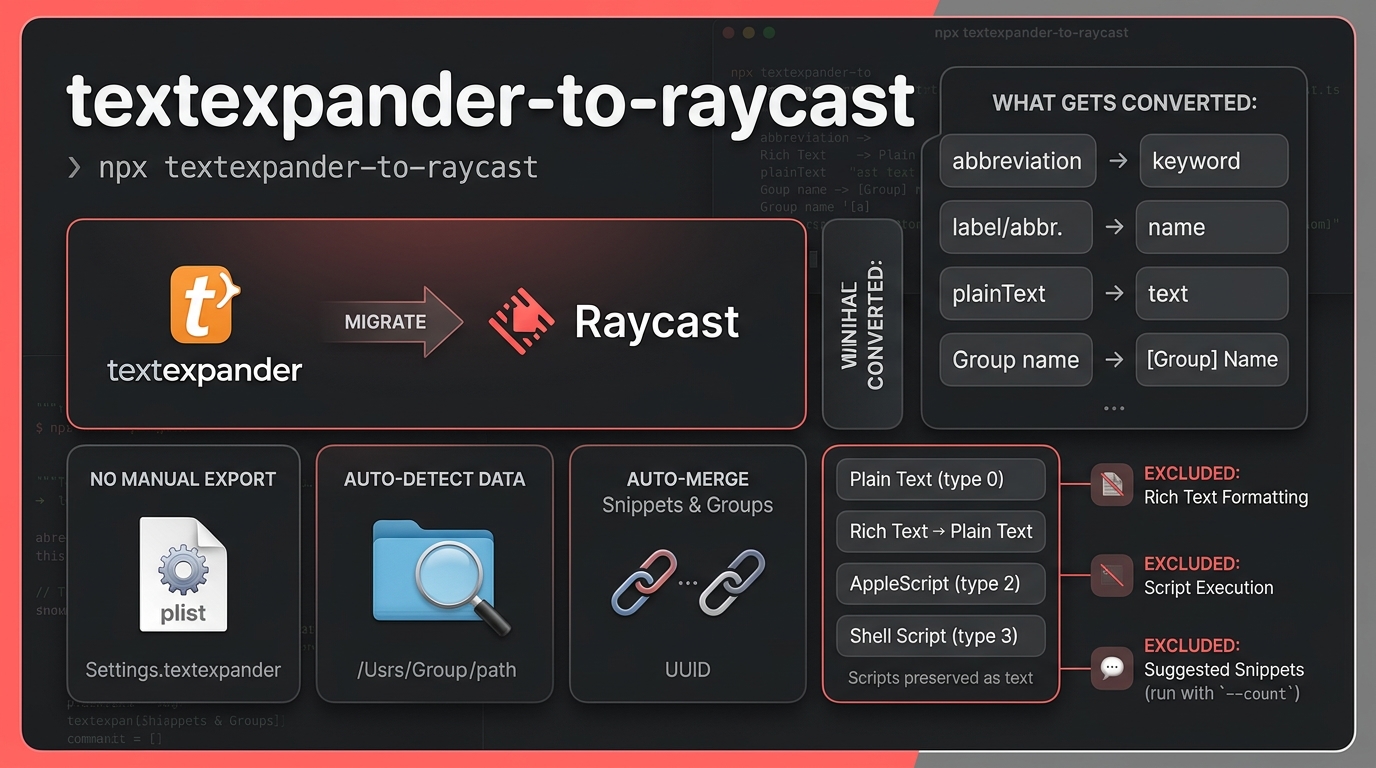
Convert TextExpander snippets to Raycast snippets.
Reads your TextExpander data directly from its macOS settings plist (no manual export needed), excludes auto-generated "Suggested Snippets", and outputs a snippets.json that Raycast can import.
Install
npx textexpander-to-raycastUsage
# Convert all snippets (auto-detects TextExpander data)
npx textexpander-to-raycast

# Custom output path
npx textexpander-to-raycast -o ~/Desktop/my-snippets.json

# Custom input (point to a specific .textexpander plist)
npx textexpander-to-raycast -i /path/to/Settings.textexpander

# View auto-generated Suggested Snippets (excluded from conversion)
npx textexpander-to-raycast suggested

# Just count suggested snippets
npx textexpander-to-raycast suggested --count

# Export suggested snippets as JSON
npx textexpander-to-raycast suggested --json
No Manual Export Needed
The CLI reads directly from TextExpander's live settings plist on your Mac (tested with TextExpander 5.1.7):
~/Library/Application Support/TextExpander/Settings.textexpanderThis single plist contains all your snippets (snippetsTE2) and groups (groupsTE2). The CLI joins snippets to their groups by UUID and excludes auto-generated "Suggested Snippets".
Why the count might differ from TextExpander
TextExpander's backup dialog shows a total that includes Suggested Snippets — auto-generated snippets based on your typing patterns. These are excluded because:
- They have no abbreviation/keyword (useless in Raycast)
- They're auto-generated noise ("have been", "for that", "Let me know")
- They can contain leaked passwords and tokens that TE captured from your typing
Run textexpander-to-raycast suggested to review them.
Importing into Raycast
- Open Raycast
- Search for "Import Snippets"
- Select the generated
snippets.json - Done
What Gets Converted
| TextExpander | Raycast | Notes |
|---|---|---|
| abbreviation | keyword | Auto-expansion trigger |
| label or abbreviation | name | Display name (label preferred) |
| plainText | text | Snippet content |
| Group name | Prepended to name | e.g. [Email] ;sig |
Snippet Types
| Type | Handling |
|---|---|
| Plain text (type 0) | Fully converted |
| Rich text (type 1) | Plain text content preserved. richText is NSKeyedArchiver binary — formatting can't be converted. |
| AppleScript (type 2) | Script source preserved as text. Won't auto-execute in Raycast. |
| Shell script (type 3) | Script source preserved as text. Won't auto-execute in Raycast. |
What's NOT Convertible
- Rich text formatting (bold, links, colors) — Raycast snippets are plain text only
- AppleScript/Shell auto-execution — Raycast doesn't run scripts in snippets
- TextExpander fill-in fields (
%filltext:...%) — exported as-is - Suggested Snippets — excluded by default (run
textexpander-to-raycast suggestedto view)
How to Verify
# Check output count
node -e "console.log(require('./snippets.json').length + ' snippets')"

# Search for a specific keyword
node -e "console.log(require('./snippets.json').filter(x => x.keyword === ';em'))"

# Count per group
node -e "
const s = require('./snippets.json');
const g = {};
s.forEach(x => { const m = x.name.match(/^\[(.+?)\]/)?.[1] || '(none)'; g[m] = (g[m]||0)+1; });
Object.entries(g).sort((a,b) => b[1]-a[1]).forEach(([n,c]) => console.log(c, n));
"
How It Works
Settings.textexpandersettings/     Settings.textexpander
  (newer sync format)                (legacy plist)
         │                                  │
         ▼                                  ▼
   Read per-group XMLs              Read snippetsTE2 +
   with snippetPlists               groupsTE2 arrays
         │                                  │
         └──────────┐    ┌──────────────────┘
                    ▼    ▼
              Merge by UUID
           (newer wins on conflict)
              Exclude Suggested
                    │
                    ▼
             Convert to Raycast
           { name, text, keyword }
                    │
                    ▼
              snippets.json
Development
git clone https://github.com/AhmadAwais/textexpander-to-raycast.git
cd textexpander-to-raycast
pnpm install
pnpm build
node dist/index.js
Requirements
- macOS (uses
plutilfor binary plist conversion) - TextExpander (tested with 5.1.7)
- Node.js >= 20
License
Apache-2.0 by Ahmad Awais built with Command Code.