
thefaceanalysis-embed
v0.3.1
Published
Add free face measurement widgets to any website: 11 tools (face shape, eye shape, canthal tilt, nose and lip proportions, thirds, fWHR, midface ratio, symmetry, golden ratio, pupillary distance) as a <face-analysis-widget> web component and a React compo

Maintainers
 fashiolabs
Readme
thefaceanalysis-embed
Add free face measurement widgets to your website. A visitor chooses a photo, the measurement runs in their browser, and your page shows their own result: face shape, eye shape, canthal tilt, nose and lip proportions, facial thirds, fWHR, midface ratio, symmetry, golden ratio or pupillary distance. Free, including on commercial sites, with no sign-up and no API key.
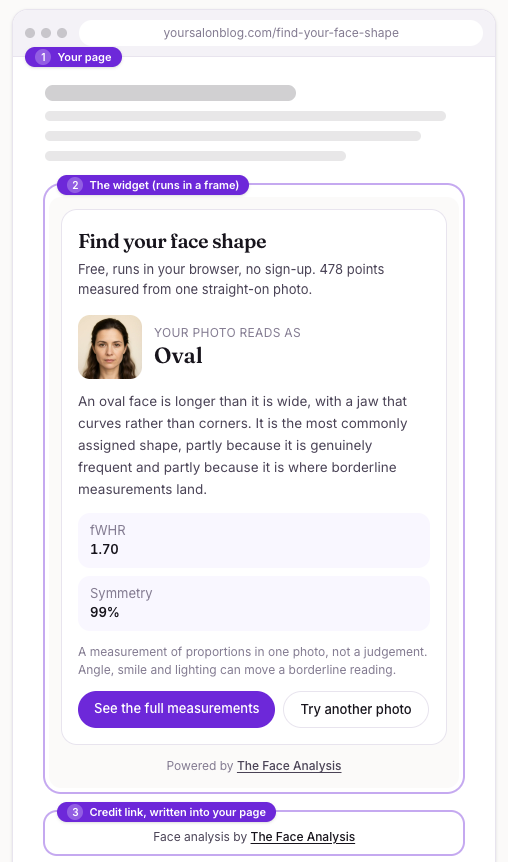
An example page with the widget (2) and the credit link (3) written into the page's HTML. Try it live, pick a widget and copy the code at thefaceanalysis.com/embed.
Quick start
Pick one of the three ways. They load the same widget.
1. Script tag (no build step). Two lines of HTML; resizes itself and writes the credit link into your page.
<div data-tfa-widget="face-shape" data-size="standard"></div>
<script async src="https://thefaceanalysis.com/embed.js"></script>
2. Web component (npm). Works in any framework.
npm install thefaceanalysis-embed<script type="module">import "thefaceanalysis-embed";</script>
<face-analysis-widget tool="eye-shape" size="wide"></face-analysis-widget>3. React.
import { FaceAnalysisWidget } from "thefaceanalysis-embed/react";

export default function Page() {
  return <FaceAnalysisWidget tool="fwhr" size="standard" />;
}
Widgets
| tool | Widget | What it measures | Full tool |
|---|---|---|---|
| face-shape | Face shape | Which of seven face shapes a front photo reads as, from the width and length of forehead, cheekbones and jaw. | /face-shape-detector |
| eye-shape | Eye shape | Eye shape (almond, round, hooded, upturned or downturned), eye spacing and canthal tilt from the eye landmarks. | /eye-shape |
| canthal-tilt | Canthal tilt | The angle of each eye's outer corner relative to the inner corner, in degrees, for each eye. | /canthal-tilt |
| nose-shape | Nose proportions | Nose width against the face, nose length against its width, and how it compares to the classic one-eye-width canon. | /nose-shape |
| lip-shape | Lip proportions | Lip fullness, the balance of upper to lower lip, the Cupid's bow and the angle of the mouth corners. | /lip-shape |
| facial-thirds | Facial thirds | How the face height splits into upper, middle and lower thirds, and the middle-to-lower comparison. | /facial-thirds |
| fwhr | fWHR | Facial width-to-height ratio: cheekbone width divided by the height from brow to upper lip. | /fwhr-calculator |
| midface-ratio | Midface ratio | The gap between the pupils divided by the height from the pupil line to the upper lip. | /midface-ratio |
| face-symmetry | Face symmetry | How closely the left and right halves of the face mirror each other, measured from paired landmarks. | /face-symmetry-test |
| golden-ratio | Golden ratio | How close three facial proportions sit to the golden ratio of 1.618, as a percentage fit. | /golden-ratio-face-calculator |
| pupillary-distance | Pupillary distance | The distance between the pupils in millimetres, using the iris as the ruler, with its honest error band. | /pupillary-distance |
TOOLS exports the ids this version supports: import { TOOLS } from "thefaceanalysis-embed". An unknown tool is ignored with a console warning
that lists the valid ids.
Options
| Option | Script tag | Web component and React | Values | Default |
|---|---|---|---|---|
| Which widget | data-tfa-widget | tool | one of the ids above | face-shape |
| Size | data-size | size | compact (360 px), standard (480 px), wide (720 px) | standard |
| Language | data-lang | lang | en, de, es, fr, pt-br, nl, tr, it, pl, ru, ja, ko, hi, id | en |
The frame is as wide as its container up to the size you choose, and its height follows its content.
Languages
The widget (its texts, labels and how numbers are written) and the credit sentence come in 14 languages: English (default), German, Spanish, French, Brazilian Portuguese, Dutch, Turkish, Italian, Polish, Russian, Japanese, Korean, Hindi and Indonesian.
<div data-tfa-widget="eye-shape" data-lang="de"></div>
<script async src="https://thefaceanalysis.com/embed.js"></script>

<face-analysis-widget tool="eye-shape" lang="de"></face-analysis-widget>
LANGS exports the codes: import { LANGS } from "thefaceanalysis-embed". An unknown lang falls back to English with a console warning. Only the
widget and the credit sentence are translated: thefaceanalysis.com itself is in English, so the credit link and the "full measurements" link open
English pages. Plain iframe users point src at https://thefaceanalysis.com/embed/<lang>/<tool> (for example /embed/de/face-shape; the
language-less address stays English) and write the credit sentence for that language themselves, as listed on the
embed page.
The lang option needs version 0.3.0 or newer.
The credit link
The script and the web component write a small visible link under the widget into your own page: Face analysis by The Face Analysis, pointing
to the page of the tool you embedded. This is on purpose. A link inside an iframe belongs to the iframe's own document, not to your page, so the
credit has to live in your HTML to count as a credit. The terms ask for it to stay visible; do not hide it, restyle it to invisibility or remove it.
If you use a plain iframe, add the same link yourself:
<iframe src="https://thefaceanalysis.com/embed/face-shape" title="Face shape detector by The Face Analysis" width="480" height="730"
        style="border:0;width:100%;max-width:480px" loading="lazy"></iframe>
<p style="text-align:center;font:12px system-ui,sans-serif">Face analysis by
  <a href="https://thefaceanalysis.com/face-shape" target="_blank">The Face Analysis</a></p>
Frameworks
- Next.js / React Server Components: use
thefaceanalysis-embed/reactinside a Client Component ("use client"). It loads the custom element in an effect, so it is safe to render on the server. - Vue: tell the compiler
face-analysis-widgetis a custom element (compilerOptions.isCustomElement = (tag) => tag === "face-analysis-widget"), then import the package once. - Svelte, Angular, Astro, plain HTML: import the package once and use the element. In Angular add
CUSTOM_ELEMENTS_SCHEMA.
Platforms
WordPress, Wix, Squarespace, Google Sites, Carrd, Notion and others each handle scripts and iframes differently, and some strip them on free plans. Step-by-step instructions taken from each platform's help pages are in the embed docs and on thefaceanalysis.com/embed.
How it works
The element creates an iframe to https://thefaceanalysis.com/embed/<tool>?h=<your hostname> (/embed/<lang>/<tool> for other languages) and keeps its height equal to its content. The frame
posts { source: "tfa-embed", type: "resize", height } to the parent window; the package handles it, and you can listen yourself if you use a plain
iframe. Only /embed/* pages allow being framed (Content-Security-Policy: frame-ancestors *) and they are noindex.
Privacy
The measurement runs in the visitor's browser: the widget is free, needs no sign-up, and loads its face landmark model only after a photo is chosen. The widget frame loads no analytics and sets no cookies. We only see ordinary server request logs, which include the address of the embedding page. No photo, measurement or result is sent to us.
Troubleshooting
- Nothing shows. Your platform may strip scripts. Use the plain iframe version above, and if iframes are stripped too, link to the tool page.
- The widget is cropped. Make the iframe
width:100%with amax-width(the script version does this). - Console says
unknown tool. The id is not one of the table above for this version. - Wix. Embed code runs inside Wix's own frame: also add the credit link as normal text on the page.
Terms
Free to use on any website, including commercial ones. Keep the credit link visible. Do not alter the widget or present its reading as a medical or cosmetic diagnosis: each widget measures proportions in one photo, and a borderline reading can change with angle, smile and lighting. We may change or retire a widget. How every number is made: methodology.
Links
Live examples and code generator · Docs · Source · Open dataset · MCP server
MIT.