
thing.js
v0.4.0
Published
Create thing objects with properties, actions, and events. Use for IoT devices or even living things like plants.

Maintainers
 common-garden
Readme
Thing.js



Thing.js exports a single class 'Thing,' which is an extension of the Node.js EventEmitter Class and basic methods for:
- Updating properties
- Calling methods
- Emiting events for either of the above.
Full documentation available here.
For example of how this can be used in an IoT stack, checkout Grow.js or the thing.js CoAP branch.
Install
npm install Thing.jsUsage
Include Thing.js:
const Thing = require('Thing.js');
Make a new thing and pass in an object.
const Light = new Thing({
  // Properties can be set by the API
  properties: {
    state: null,
  },

  turn_light_on: function () {
    console.log('light on');
    Light.set('state', 'on');
  },

  turn_light_off: function () {
    console.log('light off');
    Light.set('state', 'off');
  }
});

// Things are an extension of the node EventEmitter class
// Thus have the same API
Light.on('property-updated', function(key, value) {
  console.log('Light turned ' + value);
});

// Calling a method emits an event
Light.call('turn_light_on');
// light on
// Light turned on.
Initialize
Things can optionally have an initialize or start function which runs when the thing is constructed:
const testThing = new Thing({
  initialize: function () {
    console.log('testThing initialized');
  }
});
// testThing initialized
Connection options
The connect method takes a configuration object.
The host property is where the device will connect to a Grow-IoT instance. By default the host is set to localhost and the port is set to Meteor's standard of 3000. This works nicely for usb devices like Arduino.
For connecting over wifi, connect your device to wifi and set the host to the IP address where the Grow-IoT instance is running. Pass the options to the connect() method like so:
grow.connect({
    "host": "YOUR_IP_HERE"
})
Connecting over SSL
You can connect securely to our Grow-IoT alpha instance on https://grow.commongarden.org, or see the Grow-IoT repo to easily start your own IoT network locally or hosted on Meteor Galaxy.
SSL is supported though will require a bit more setup. If you are hosting your instance off a computer with a dedicated IP address pass the following the connect() method.
grow.connect({
    "host": "YOUR_IP_HERE",
    "port": 443,
    "ssl": true
})
If you are hosting on a cloud instance such as Meteor Galaxy, you might need specify the servername. The example below shows you how to connect securely to the instance at grow.commongarden.org:
grow.connect({
    "host": "grow.commongarden.org",
    "tlsOpts": {
        "tls": {
            "servername": "galaxy.meteor.com"
        }
    },
    "port": 443,
    "ssl": true
});
Connect to Grow-IoT Instance
In Grow-IoT, create a new device and take note of the device uuid and token.
In the examples folder checkout test-device.js. If you want to get started straight away with hardware, skip to the working with hardware section.
Replace the uuid and token properties of the config object with the credentials you generate.
// Import the latest build of the Grow.js library
var Thing = require('Grow.js');

// Create a new grow instance. Connects by default to localhost:3000
var testDevice = new Thing({
    // PUT YOUR UUID AND TOKEN HERE:
    uuid: 'PASTE_UUID_HERE',
    token: 'PASTE_TOKEN_HERE',

    // Specifies the component associated with the thing
    component: 'TestDevice',

    // Properties can be updated by the API
    properties: {
        state: 'off',
    },

    turn_on: function () {
        testDevice.set('state', 'on');
    },

    turn_off: function () {
        testDevice.set('state', 'off');
    },
});

// Connects to localhost:3000 by default.
testDevice.connect();
Run it with:
node examples/test-device.jsWorking with hardware.
Grow.js works very well with the Johnny-Five robotics library, which has plugins for a large number of devices.
Note, with boards like the Tessel 2, Johnny-five is not required, but we're including it to make it easier to get started and support a wide variety of devices, sensors, and actuators.
Wire up photo-resitor and led to arduino
Wire up your photo resistor and LED light like so:
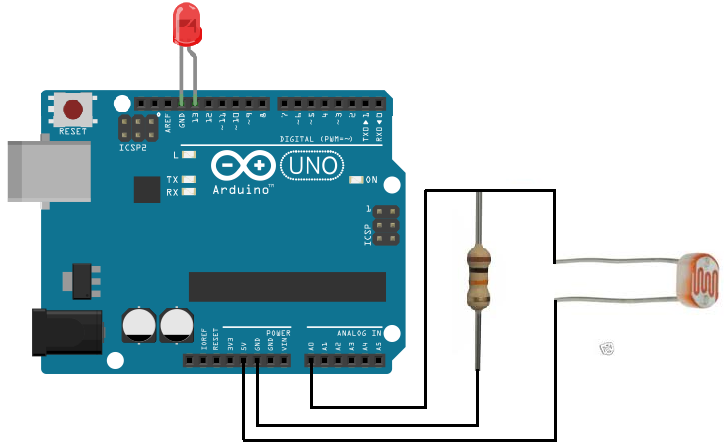
To use Johnny-Five, you need to make sure that your arduino is flashed with Standard Firmata. Instructions for doing so can be found here. Once that's done you're ready for the next step!
Take a look at the smart-light example in the examples/arduino/ folder.
Create a new thing in the Grow-IoT ui and copy and paste the UUID and Token into the example below.
// Require the Grow.js build and johnny-five library.
var Thing = require('Grow.js');
var five = require('johnny-five');

// See http://johnny-five.io/ to connect devices besides arduino.
var board = new five.Board();

var emit_and_analyze;

// When board emits a 'ready' event run this start function.
board.on('ready', function start() {
    // Define variables
    var LED = new five.Pin(13),
        lightSensor = new five.Sensor('A0');

    // Create a new thing.
    var light = new Thing({
        uuid: 'PASTE_UUID_HERE',
        token: 'PASTE_TOKEN_HERE',

        component: 'SmartLight',

        properties: {
            state: 'off',
            threshold: 300,
            interval: 1000,
            lightconditions: null
        },

        start: function () {
            var interval = this.get('interval');

            emit_and_analyze = setInterval(function () {
                light.call('light_data');
                light.call('check_light_data');
            }, interval);

            // Todo: implement clear interval function so we can adjust
            // the rate at which data is logged.
        },

        stop: function () {
            clearInterval(emit_and_analyze);
        },

        turn_on: function () {
            LED.high();
            light.set('state', 'on');
            console.log('light on');
        },

        turn_off:  function () {
            LED.low();
            light.set('state', 'off');
            console.log('light off')
        },

        light_data: function () {
            console.log(lightSensor.value);

            light.emit({
              type: 'light',
              value: lightSensor.value
            });
        },

        check_light_data: function () {
            var threshold = light.get('threshold');
            if ((lightSensor.value < threshold) && (light.get('lightconditions') != 'dark')) {
                light.set('lightconditions', 'dark');
            } else if ((lightSensor.value >= threshold) && (light.get('lightconditions') != 'light')) {
                light.set('lightconditions', 'light');
            }
        }
    });

    light.connect();
});
Run smart-light.js with:
node examples/arduino/smart-light/smart-light.jsNote: on certain opperating systems you may need to prefix that command with sudo to allow the script access to USB.
Things as modules
If you want to make more complex things you may want to organize them into modules. Here's an example for a hypothetical software-light.js:
const Thing = require('Thing.js');

module.exports = new Thing({
  metadata: 'We can include metadata like so',

  properties: {
    name: "Light"
  },

  initialize: function () {
    console.log('Light initialized');
  },

  turn_on: function () {
    console.log("Light on");
  },

  turn_off: function () {
    console.log("Light off");
  }
});
Then you can import them with require() and even use them inside other things!
const softwareLight = require('./software-light.js');
// Light initialized

const growRoom = new Thing({
  // Optional: you may want to do this if you want the properties of
  // softwareLight to be discoverable by Grow-IoT.
  light: softwareLight,

  initialize: function () {
    softwareLight.call('turn_on');
    this.light.call('turn_off');
  }
});
// Light on
// Light off
See the examples folder for more!
Developing
Code is written in ES6, and compiled using rollup. Full documentation is available here.
npm run build builds the library.
npm run test builds the library, and runs tests in the test folder.
The documentation is written in jsdoc, built using Mr-Doc, and kept on the gh-pages branch of this repo.