
threadbase
v0.4.0
Published
Repo-native AI memory with compact index-first context for low-token agent workflows.

Maintainers
 aniketrode
Readme
Threadbase
Threadbase makes the repository itself the memory layer for AI-assisted development.
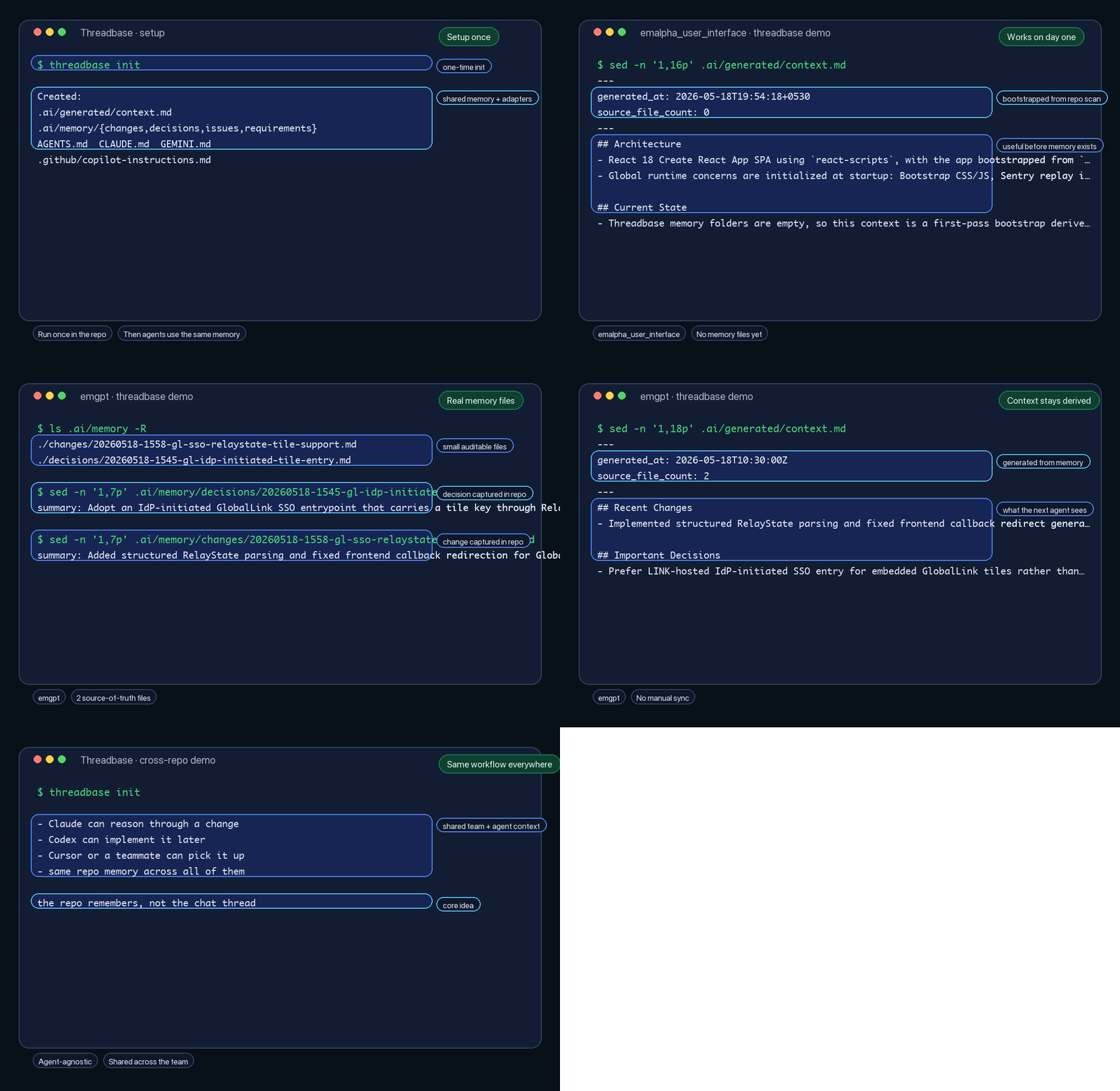
Instead of keeping project context trapped inside one chat thread, one IDE, or one vendor-specific memory system, Threadbase stores it in plain Markdown inside the repo. That means your architecture decisions, recent changes, requirements, and known issues live alongside the code, under version control, where any coding agent can use them.
In 20 Seconds
Pain:
- you explain the same repo to Claude
- then re-explain it to Codex
- then re-explain it again to Cursor or Copilot
Payoff:
- run
threadbase initonce in the repo - keep shared project memory in
.ai/under Git - let different agents read the same context instead of starting from zero
Why This Matters
Threadbase lets you switch from Claude to Codex to Cursor without re-explaining the project.
Example:
- Use Claude to reason through an auth refactor and record the decision in
.ai/memory/decisions/. - Switch to Codex to implement the code changes.
- Open Cursor later to polish the UI and fix follow-up issues.
Each agent reads the same .ai/generated/index.md, .ai/generated/context.md, and .ai/memory/* instead of relying on a private vendor-specific memory thread.
Inspect A Real Setup
Threadbase is dogfooded in this repository.
You can inspect a real setup here:
What Threadbase Is
Threadbase is:
- repo-native: project memory lives in the repository
- git-native: memory is stored as normal files and folders that work with commits, diffs, branches, and reviews
- agent-agnostic: the core memory is plain Markdown, and the tool-specific adapter files all point agents at the same shared context
- lightweight: no backend, database, daemon, browser UI, or cloud dependency
Threadbase is not:
- a SaaS memory product
- a vector database
- a workflow orchestrator
- a tool that only works with one coding assistant
Why This Exists
Teams repeatedly re-explain the same project context to different agents:
- what the architecture looks like
- what changed recently
- what constraints matter
- what issues are still open
Threadbase solves that by making those facts durable and versioned inside the codebase itself.
Core Idea
Threadbase creates a small .ai/ directory in a repository.
The important rule is simple:
.ai/memory/*is the source of truth.ai/generated/index.mdis a compact routing map into that memory and the codebase.ai/generated/context.mdis a compact operational summary derived from that memory- adapter files such as
AGENTS.md,CLAUDE.md, andGEMINI.mdtell different agents to read the same shared context
So the memory model is shared, even if the agents are different.
How It Works
- Run
threadbase initin a repository. Run it from the actual repository root or the agent's working directory for that project, not from a parent folder that contains multiple repos. - Threadbase creates the shared memory structure in
.ai/plus agent-specific adapter files. If common instruction files such asAGENTS.md,CLAUDE.md,GEMINI.md, or.github/copilot-instructions.mdalready exist, Threadbase merges its own managed guidance into them instead of skipping them. .ai/generated/index.mdand.ai/generated/context.mdstart empty on purpose.- On the first session, an agent should generate the first index from
.ai/prompts/generate_index.md, then generate the first context from.ai/prompts/generate_context.md. - Before deeper implementation work, the agent reads
.ai/generated/index.mdfirst, then opens only the relevant memory or source files on demand. - After meaningful work, the agent adds or updates memory entries in
.ai/memory/*. - When generated files become stale, the agent regenerates
.ai/generated/index.mdand.ai/generated/context.mdfrom the memory files.
This keeps the repo usable across sessions, branches, and different AI tools without changing the underlying memory model.
Why The Index Matters
Without an index, .ai/generated/context.md tends to keep growing because it has to do two jobs at once:
- summarize current state
- tell agents where to look next
Threadbase now separates those jobs:
.ai/generated/index.mdis a compact file-routing map.ai/generated/context.mdis a compact operational summary.ai/memory/*keeps the durable detail
That keeps always-read context smaller and lets agents pull in detail only when the task actually needs it.
Supported Agents
Threadbase currently generates adapter files for:
- Codex via
AGENTS.md - Claude Code via
CLAUDE.md - Gemini CLI / Gemini Code Assist via
GEMINI.md - GitHub Copilot via
.github/copilot-instructions.md - Cursor via
.cursor/rules/threadbase.mdc - Continue via
.continue/rules/threadbase.md - Windsurf via
.windsurf/rules/threadbase.md - Cline via
.clinerules/threadbase.md
These files are adapters, not separate memory systems. They all point back to the same repo-native Threadbase memory.
Codex Plugin
Threadbase now also includes a repo-local Codex plugin at plugins/threadbase-codex.
The plugin does not replace the CLI. It gives Codex a bundled Threadbase workflow skill so Codex can:
- initialize Threadbase in the current repo
- bootstrap the first
.ai/generated/context.md - regenerate stale context
- update shared memory after meaningful work
Install the plugin in Codex from a local checkout:
codex plugin marketplace add /absolute/path/to/threadbaseOr add the marketplace from GitHub:
codex plugin marketplace add ani3198/threadbase --ref main --sparse .agents/plugins --sparse pluginsThen restart Codex, open the plugin directory, and install Threadbase Codex.
Install
npm install -g threadbaseThen in any repository:
threadbase initImportant: run threadbase init inside the actual project repository or agent workspace directory you want to give memory to.
If you want the generated Threadbase files to stay local and untracked in your current working tree:
threadbase init --localAfter init, Threadbase prints a ready-to-paste bootstrap prompt you can give your coding agent to generate the first .ai/generated/context.md.
Commands
Initialize Threadbase in the current repository:
threadbase initRun this command from the project root or the agent workspace root for that repository.
If shared instruction files already exist, Threadbase merges in a managed Threadbase block instead of replacing the existing file.
threadbase init creates an intentionally empty .ai/generated/context.md and prints a bootstrap prompt for generating the first context from scratch.
Initialize Threadbase and add its generated files to .gitignore:
threadbase init --localOverwrite only Threadbase-managed starter files:
threadbase init --force--force is safe by design:
- it rewrites starter templates managed by Threadbase
- it refreshes Threadbase-managed blocks inside shared instruction files
- it recreates missing directories
- it does not delete unknown files
- it does not rewrite files under
.ai/memory/*
--local adds Threadbase-managed paths to .gitignore:
.ai/AGENTS.mdCLAUDE.mdGEMINI.md.cursor/rules/threadbase.mdc.github/copilot-instructions.md.continue/rules/threadbase.md.windsurf/rules/threadbase.md.clinerules/threadbase.md
Generated Structure
.ai/
├── config.yml
├── generated/
│   ├── index.md
│   └── context.md
├── memory/
│   ├── changes/
│   ├── decisions/
│   ├── issues/
│   └── requirements/
├── prompts/
│   ├── generate_index.md
│   └── generate_context.md
├── rules.md
└── schema.md

AGENTS.md
CLAUDE.md
GEMINI.md
.continue/rules/threadbase.md
.clinerules/threadbase.md
.cursor/rules/threadbase.mdc
.github/copilot-instructions.md
.windsurf/rules/threadbase.md
What matters most in that structure:
.ai/memory/*is the authoritative memory layer.ai/generated/index.mdis a compact routing layer for finding the right files fast.ai/generated/context.mdis a compact generated summary for current state and starts empty until an agent creates the first version- adapter files at the repo root or tool-specific folders help different agents discover the same memory
Example Workflow
- Open the actual project repository or agent workspace root.
- Run
threadbase init. - Paste the bootstrap prompt from
threadbase initinto your coding agent to generate the first.ai/generated/index.mdand.ai/generated/context.md. - Let your coding agent read
.ai/generated/index.mdfirst, then open only the relevant files it points to. - Read
.ai/generated/context.mdwhen the task needs broader project state, active constraints, or recent cross-cutting changes. - Make code changes.
- Record important changes, decisions, requirements, or issues in
.ai/memory/*. - Regenerate
.ai/generated/index.mdand.ai/generated/context.mdwhen they become stale.
See examples/workflow.md for a simple end-to-end example. See examples/sample-repo for a sample initialized repository snapshot.