
three-effects
v0.2.4
Published
Photoshop-style layer effects (drop shadow, stroke, glows, overlays) for Three.js WebGPU + TSL.

Maintainers
 kmk0
kmk0Readme
three-effects
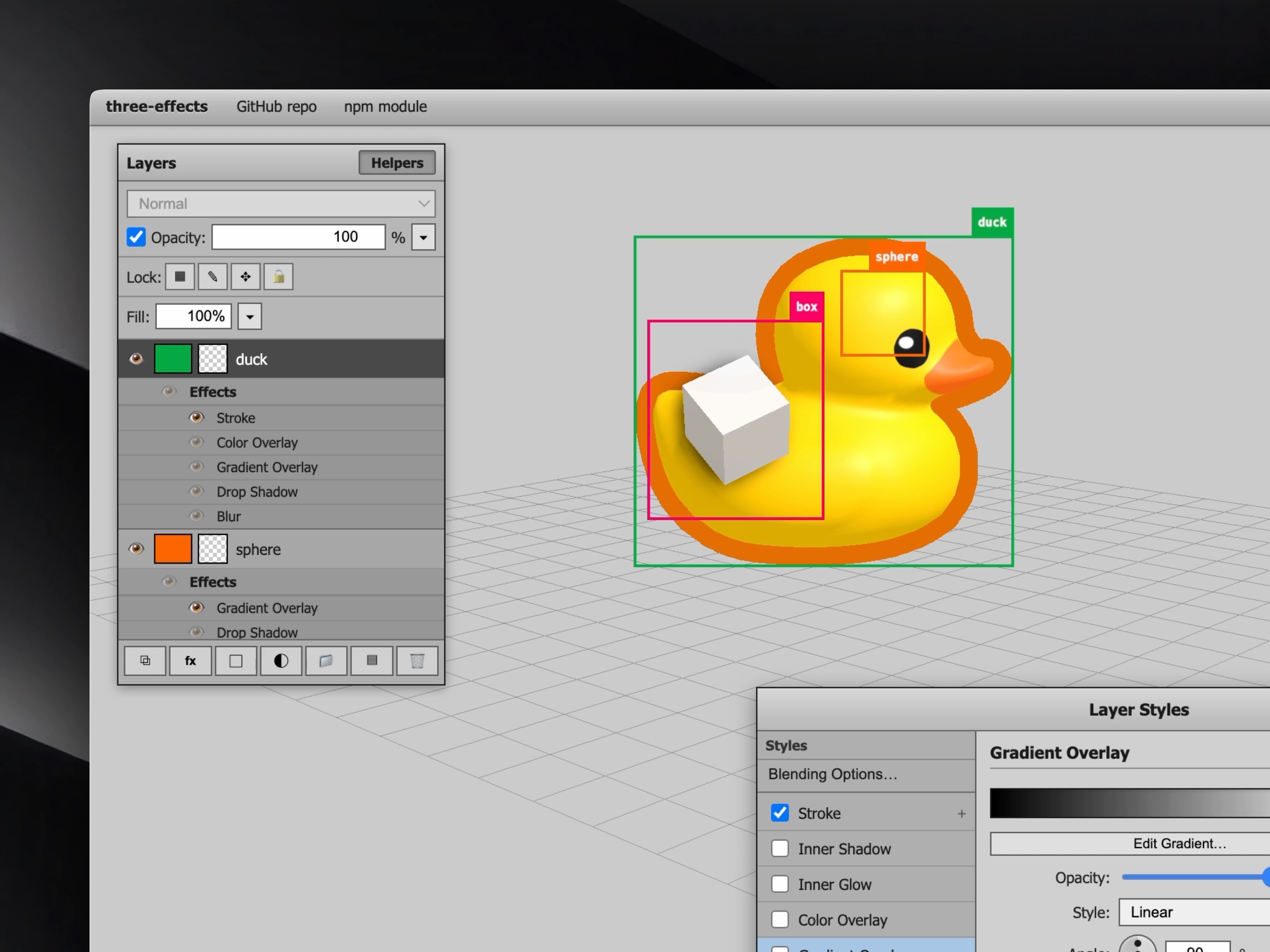
Add Photoshop-style layer effects to Three.js objects (stroke, shadows, glows, overlays and blur).
GitHub repo · npm Package · Live demo
Quick start
- Use
Groupfromthree-effectsas aTHREE.Groupreplacement. - Configure the
group.effects: each effect block needs to be manuallyenabled, and exposes parameters to be adjusted (see all below). - Call
preRenderEffects(renderer, scene, camera)once beforerenderer.render(scene, camera)each frame.
import { Group, preRenderEffects } from "three-effects";
// … WebGPURenderer, scene, camera …

const g = new Group();
g.add(yourMesh);

g.effects.dropShadow.enabled = true;
g.effects.dropShadow.distancePx = 12;
g.effects.dropShadow.sizePx = 20;

g.effects.stroke.enabled = true;
g.effects.stroke.sizePx = 4;
g.effects.stroke.color.set(0xffffff);

g.effects.blur.enabled = true;
g.effects.blur.sizePx = 8;

scene.add(g);

function animate() {
  preRenderEffects(renderer, scene, camera);
  renderer.render(scene, camera);
}
Requirements
- Three.js
>= 0.160.0 < 0.200.0(peer dependency) - A WebGPU renderer (
three/webgpu). This library targets the WebGPU + TSL stack, not WebGLShaderMaterial.
Install
npm install three-effectsThe interactive demo in this repo is under playground/ (see playground/README.md).
Group
Group extends THREE.Group. Add meshes (or other objects) as children; the library fits a billboard quad to their screen-space bounding box, draws them into a cropped render target each frame, and runs a built-in layer-style shader on that texture. You configure everything through g.effects: toggle blocks with enabled, set colors, blur sizes in pixels, and so on. effectsEnabled defaults to true.
g.effects.quality is optional. When it is omitted or undefined, Group uses GroupRaw.defaultQuality (default "fast"). Group.defaultQuality is an alias: reading or writing it updates the same static field, so you can set a global default once (e.g. Group.defaultQuality = "high") before creating groups. Changing the static after materials are built does not rebuild them; assign g.effects.quality per instance to override, or set the static at startup.
Call preRenderEffects(renderer, scene, camera) (or GroupRaw.preRenderEffects) once per frame before renderer.render. It syncs scene / camera world matrices for the offscreen pass. Billboard rotation tracks the camera in the quad’s onBeforeRender so orbit lag stays minimal. You may alternatively invoke preRenderEffects from scene.onBeforeRender; nested offscreen renderer.render calls skip re-entry automatically.
Changes that require a new shader graph are deferred: assigning to g.effects or calling applyEffects(fn) only marks the material stale. The graph is rebuilt at most once per frame inside preRenderEffects, after the group’s render-target size for that frame is known (so blur and distance math stay correct). You do not need to batch updates by hand for performance.
If you need the material updated before the next preRenderEffects (e.g. a test or a screenshot), call g.commitEffects().
Effects are composited in a fixed order (similar to a layer stack): drop shadow → outer glow → content and color/gradient overlays → inner shadow → inner glow → stroke → blur → layer opacity.
Blur (when enabled) runs a second pass: the full style stack (without blur and without layer opacity) is rendered into a temp target the same size as the crop, then Gaussian blur is applied to that texture; layer opacity multiplies the result. Use autoPadding (default) or paddingExtra so the crop has enough margin for the blur kernel.
Debug helpers
Effects groups composite inside a screen-space billboard (the crop that wraps your children’s footprint). For layout and capture debugging, Group and GroupRaw expose optional on-screen helpers:
| Property / field | Type | Purpose |
| ----------------------- | ------------------------- | --------------------------------------------------------------------------------------------------------------------------------------------------------------------------------------------------------------------------------------------------------------------------------------------------------------------------- |
| debug | boolean | When true, shows a screen-space border around the billboard quad. Thickness is debugStrokePixels (default 4) in pixels, independent of camera distance. Color follows debugColor. When false, the border and debugGroup are hidden. |
| debugColor | Color | Border color; also a natural tint when you add your own labels under debugGroup. |
| debugStrokePixels | number | Border width in screen pixels. |
| debugGroup | THREE.Group (read-only) | Anchored at the top-right of the billboard in screen space. Each frame its scale is set so one local unit ≈ one screen pixel, so you can position child objects (e.g. Sprite, Mesh planes with canvas textures) with predictable pixel offsets. Add custom helpers here; visibility tracks debug. |
Example:
const g = new Group();
g.debug = true;
g.debugColor.set(0xff6600);
g.debugGroup.add(myLabelSprite);
scene.add(g);
The playground (npm run dev) toggles debug for its demo groups from the Layers panel Helpers button; that preference is stored with the rest of the playground UI in localStorage.
If the effects quad ever looks wrong relative to the camera, typical checks are: call controls.update() (or equivalent) before preRenderEffects, and use a WebGPU frame capture tool (e.g. Spector.js) or temporary logging of camera.matrixWorld vs your expectations.
Layer effects
Each effect is a property on g.effects. Set enabled: true to turn it on. Field-by-field reference tables are in the g.effects reference section.
quality— optional"fast"or"high"; if unset,GroupRaw.defaultQuality/Group.defaultQualityapply. See quality. Affects drop shadow, outer glow, inner shadow, and inner glow (shared Kawase preset: passes + internal RT scale) and layer blur (Gaussian sigma).- stroke — outline around the silhouette; JFA distance field; width in screen pixels.
- dropShadow — offset, blurred shadow behind the layer (cost scales with
quality). - outerGlow — glow outside the alpha boundary (blur cost scales with
quality, same Kawase preset as drop shadow). - colorOverlay — solid tint over the layer (masked by alpha).
- gradientOverlay — linear or radial gradient over the layer; uses
stops(#rrggbb+ position); see also Gradients. - innerShadow — recessed shadow along the inside edge (blur cost scales with
quality). - innerGlow — glow from the inner edge or from the center (blur cost scales with
quality). - blur — blurs the fully composited result (after stroke); before layer opacity. Radius in screen pixels.
- opacity — multiplies final RGBA after the other styles.
Gradients
Build 1×N gradient DataTexture ramps for overlays:
createGradientTexture(stops, width?)— fromColorStop[]colorStopsFromSerialized/sampleSerializedGradient— for UI persistence (#rrggbb+ position)
Advanced
jfaOutsideStroke/jfaInsideStroke— JFA distance-field stroke nodes (used by the layer-style stroke; exposed for custom graphs).effectsMaterialCacheKey(effects, rtWidth)andRT_FALLBACK— stable cache keys forGroup’s internal material LRU (rarely needed outside the library). BlursizePxis driven by a uniform and is not part of the key.
TypeScript
Types are published under dist. Import from three-effects; types for effect blocks live under names like GroupEffects, GroupEffectsQuality, GroupEffectsBlur, DropShadowOptions, BlurOptions, etc.
Low-level API: GroupRaw and layerStyles
For full control, use GroupRaw: same billboard and render-target capture as Group, but you supply effectsMaterial yourself and read the captured texture from mapNode (and createOffsetSample for offsets). You still call preRenderEffects before the main render each frame.
layerStyles(group) returns a fluent LayerStylesBuilder: chain .dropShadow(), .outerGlow(), .stroke(), … and use .node as the vec4 color node on MeshBasicNodeMaterial. Group uses this internally; with GroupRaw you compose your own stack. Omitted methods stay off. Effect order matches the high-level pipeline above.
.blur({ radius, sigma? }) — blurs the captured layer texture before the rest of the stack (standalone use). Group does not chain .blur() on the builder: it uses g.effects.blur instead, which blurs the full composite after stroke via the extra pass described above.
import { GroupRaw, layerStyles, preRenderEffects } from "three-effects";
import { MeshBasicNodeMaterial } from "three/webgpu";

const group = new GroupRaw();
group.effectsEnabled = true;

const mat = new MeshBasicNodeMaterial({
  transparent: true,
  depthWrite: true,
  side: 2,
});
mat.colorNode = layerStyles(group)
  .dropShadow({ opacity: 0.5 })
  .stroke({ size: 10 }).node;
group.effectsMaterial = mat;

group.add(mesh);
scene.add(group);
Stroke size in layerStyles can be expressed in pixels (aligned with Group’s stroke) or in UV-style units depending on how you configure the builder; see TypeScript types on StrokeOptions.
Reference: g.effects property tables
Access fields as g.effects.<name>.<field>. Every block has enabled. color fields are THREE.Color (e.g. color.set(0xffffff)).
quality
Optional top-level field g.effects.quality: "fast" | "high". If omitted or undefined, the effective preset is GroupRaw.defaultQuality (writable static, default "fast"). Group.defaultQuality reads and writes that same value.
Drop shadow, outer glow, inner shadow, and inner glow share one Kawase multi-pass blur preset (not separable Gaussian): fast = fewer passes + half-resolution internal targets; high = more passes + full resolution. Blur radius in screen pixels still comes from each effect’s sizePx (and drop shadow’s sizePx), mapped with the same blurDenom scale per quality tier. Layer blur (g.effects.blur) stays Gaussian (two-pass); fast uses a smaller sigma than high. Stroke (JFA) runs fewer flood passes when fast (cap 8 vs 10) and fewer still on small effect textures (ceil(log2(max(w,h)))). Set high when you want maximum refinement at higher GPU cost.
effectsMaterialCacheKey resolves omitted quality the same way, so LRU entries stay consistent with Group.
stroke
g.effects.stroke
| Property | Type | Notes |
| ---------- | --------- | ----------------------------------------- |
| enabled | boolean | |
| sizePx | number | Stroke radius in screen pixels (JFA). |
| position | string | "outside", "inside", or "center". |
| opacity | number | |
| color | Color | |
dropShadow
g.effects.dropShadow
| Property | Type | Notes |
| ------------ | --------- | ---------------------------------------------------------------------------------- |
| enabled | boolean | |
| opacity | number | |
| angle | number | Lighting angle in degrees (shadow offset opposite). |
| distancePx | number | Offset length in pixels. |
| spread | number | 0…1, matte expansion before blur. |
| sizePx | number | Blur size in pixels (Kawase; pass count / internal RT scale follow quality). |
| color | Color | |
outerGlow
g.effects.outerGlow
| Property | Type | Notes |
| --------- | --------- | ----------------------------------------------------------------------- |
| enabled | boolean | |
| opacity | number | |
| spread | number | 0…1. |
| sizePx | number | Blur size in pixels (Kawase; same quality preset as drop shadow). |
| color | Color | |
colorOverlay
g.effects.colorOverlay
| Property | Type | Notes |
| --------- | --------- | ----- |
| enabled | boolean | |
| opacity | number | |
| color | Color | |
gradientOverlay
g.effects.gradientOverlay
| Property | Type | Notes |
| --------- | --------- | ---------------------------------------------------------------- |
| enabled | boolean | |
| opacity | number | |
| style | string | "linear" or "radial". |
| angle | number | Degrees. |
| scale | number | Repeat scale across the layer. |
| reverse | boolean | Flip gradient direction. |
| stops | array | { color, position }[] — color: #rrggbb; position: 0…1. |
innerShadow
g.effects.innerShadow
| Property | Type | Notes |
| ------------ | --------- | ----------------------------------------------------------------------- |
| enabled | boolean | |
| opacity | number | |
| angle | number | Degrees. |
| distancePx | number | Offset in pixels. |
| choke | number | 0…1, shrinks matte before blur. |
| sizePx | number | Blur size in pixels (Kawase; same quality preset as drop shadow). |
| color | Color | |
innerGlow
g.effects.innerGlow
| Property | Type | Notes |
| --------- | --------- | ----------------------------------------------------------------------- |
| enabled | boolean | |
| opacity | number | |
| source | string | "edge" or "center". |
| choke | number | 0…1. |
| sizePx | number | Blur size in pixels (Kawase; same quality preset as drop shadow). |
| color | Color | |
blur
g.effects.blur
| Property | Type | Notes |
| --------- | --------- | -------------------------------------------------------------------- |
| enabled | boolean | |
| sizePx | number | Blur radius in screen pixels (converted for TSL gaussianBlur). |
opacity
g.effects.opacity
| Property | Type | Notes |
| --------- | --------- | --------------------------------------------------- |
| enabled | boolean | Layer-wide multiply on RGBA after other styles. |
| value | number | 0…1. Updates without shader rebuild when enabled. |
License
MIT