
three-query
v0.11.0
Published
ID & Classname based querying for GLBs in ThreeJS from Blender

Maintainers
 orokro
Readme
🎯 ThreeQuery
https://orokro.github.io/ThreeQuery/
🥜 In a Nutshell
Imagine in Blender you build a scene hierarchy:
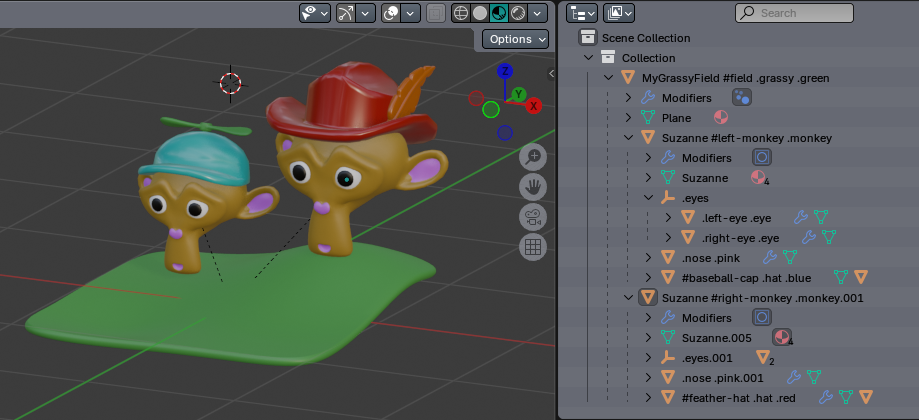
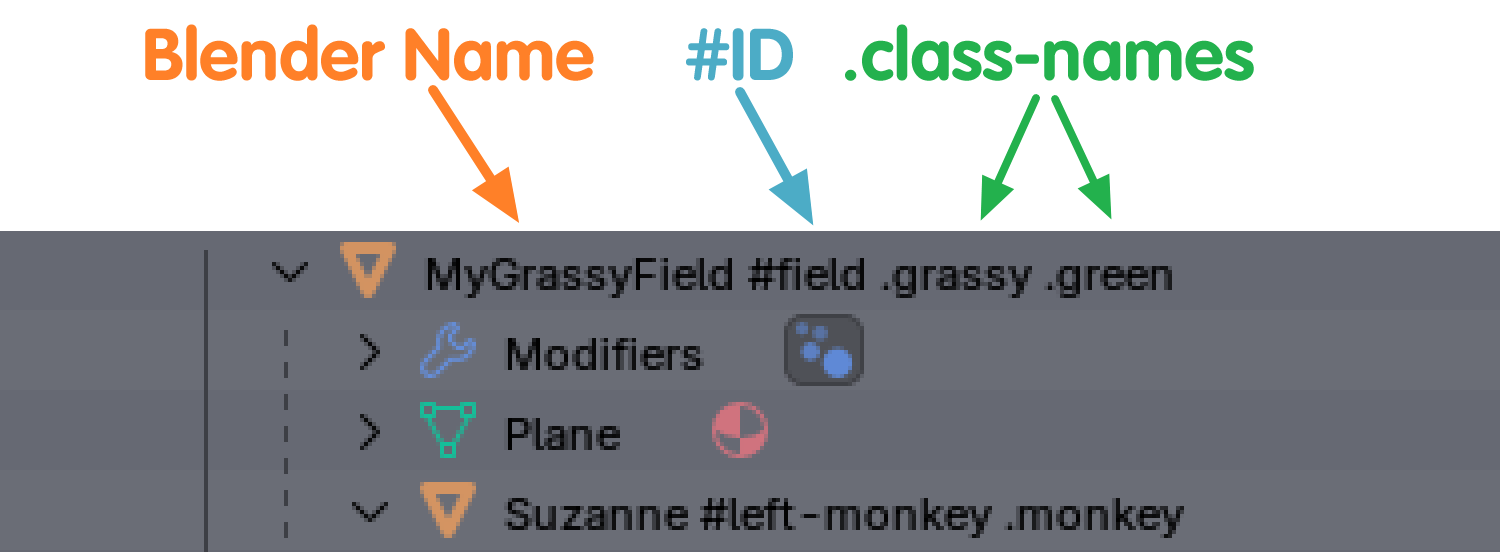
Notice how you can add #id-names and .class-names to objects, just by adding to their name in Blender:
(or your application of choice*)
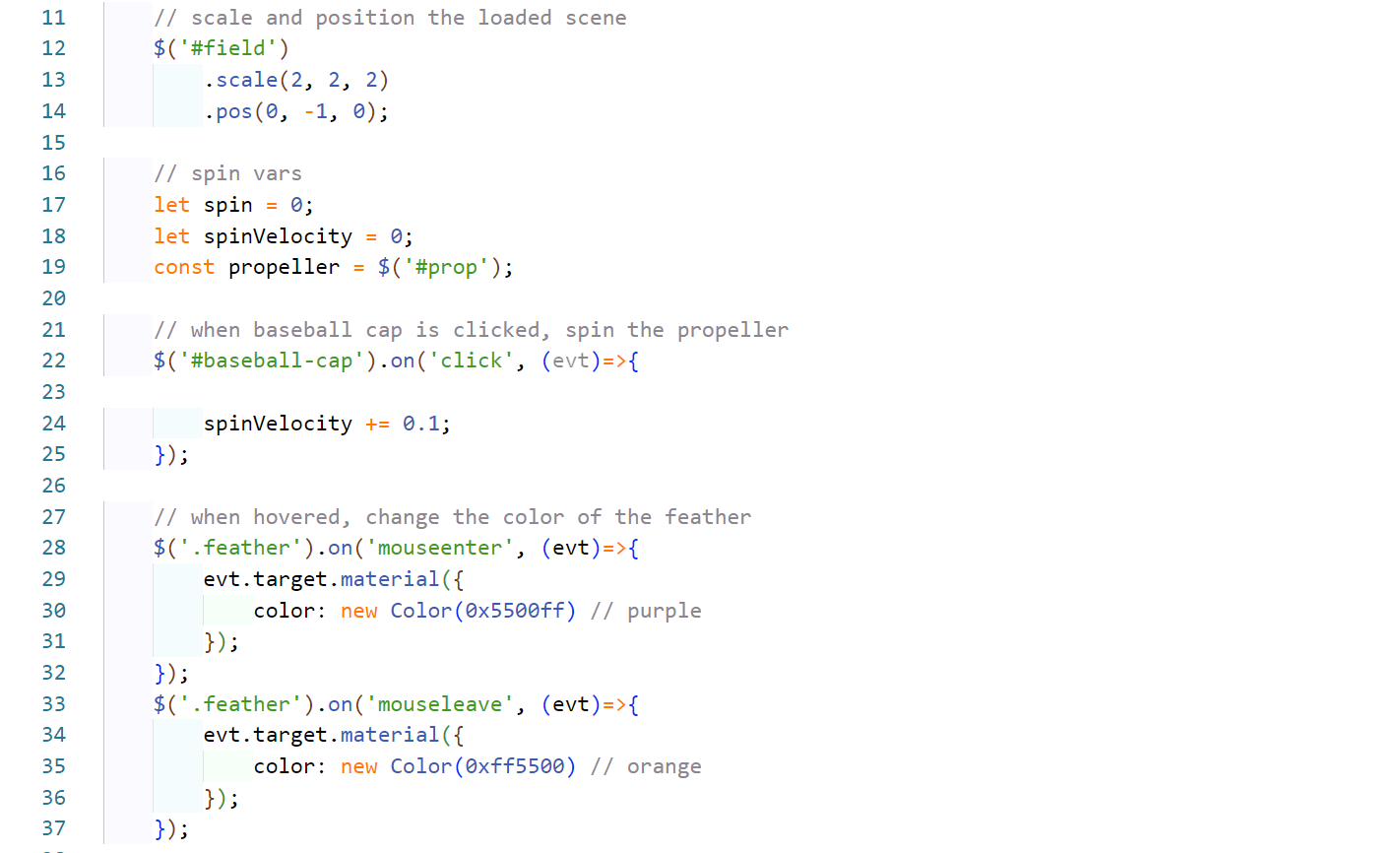
After you export the Blender scene as MonkeyScene.glb, you can then import using ThreeQuery, like so:

By using the .loadGeometry method, all the loaded objects are scanned for the #id-names and .class-names provided in the Blender scene hierarchy.
Now you can do easy & fun stuff, with jQuery like syntax:
*Note: in order for ThreeQuery to find the #id-names and .class-names in your scene, you need to add them to the name of the objects in your 3D application of choice. When you export the file, they must appear on the "userData.name" field of the imported ThreeJS model. Exporting a GLTF/GLB from Blender does this by default, other applications may or may not.
📋 Tutorial
Below is a YouTube video tutorial, showing how to build a scene in Blender & load it with ThreeQuery:

📖 Docs
ThreeQuery is a jQuery-inspired selector and utility library for Three.js, making it easier to load, query, and manipulate 3D objects in your scene using CSS-like syntax. This was built and tested using Blender to export GLTF/GLB files, other applications may not be compatible.
Built for developers and artists working with tools like Blender, it lets you attach selectors (#id, .class) to object names and control them in a fluent, chainable, and expressive way — just like jQuery, but in 3D.
In short, you can add #id-names and .class-names to the name field of your Blender objects and ThreeQuery will parse the geometry you import looking for said names.
🚀 Features
- Query Three.js objects using CSS-style selectors (
#id,.class1.class2) - Chain methods to manipulate objects (
.scale(),.material(),.pos(), etc.) - Auto-index scene on load and keep internal maps in sync
- Support for custom geometry loaders (
gltf,fbx, etc.) - Dynamic
.addClass(),.removeClass(),.toggleClass(), and.id()methods - Traverse and filter using
.find()and.each() - Avoid raycasting logic, and automatically add events like
click,mousedown,mouseenter,wheel, etc.
📦 Installation
Install via NPM (or use the CDN link)
npm i three-queryimport ThreeQuery from 'three-query';🧠 Scene Setup (Blender Naming Convention)
In Blender (or when authoring in code), assign object names like:
#player .enemy .charactersOr:
.bigBall#ball.playersObjectsThreeQuery will parse names using:
#id→ unique object ID.className→ class-like tag- Multiple IDs/classes can be combined in any order
✨ Usage
📋 Basic Setup
ThreeQuery comes with a static helper method, createScene which can make a boilerplate scene, with some options like handling if it's parent container resizes, or adding default lights or test cube.
import ThreeQuery from 'three-query';

// Use the built-in helper to create the scene
const container = document.getElementById('app');
const { scene } = ThreeQuery.createScene(container, {
	autoSize: true,
	autoRender: true,
	addCube: true,
	addLights: true,
	addControls: true,
});

const tq = new ThreeQuery(scene);

// optional, make global $ for the query method
window.$ = tq.$;- autoSize - adds a built-in resize observer to automatically adjust the cameras aspect ratio and renderers resolution.
- autoRender - sets up a
requestAnimationFrameloop for the scene - addCube - adds a red cube to test if the scene is working
- addLights - adds both a default ambient light and directional light to the scene
- addControls - adds an orbit controller to the scene
The createScene method will return the following items that can be destructured:
	return {
		scene,
		renderer,
		camera,
		controls,
		cube,
		lights,
		resizeObserver
	};
📁 Add Custom Loaders
Every ThreeJS model loader returns slightly different data, which can also vary depending on the file input. The names on the geometry may also vary slightly from the application it was export from.
Therefore, to help ThreeQuery do it's job, you must create at least one custom-loader that loads a modal from a path & returns the data you wish to add to the scene.
You can do anything you like in this method, including transforming the objects names, or filtering, flattening, or scaling geometry.
The loader must return a ThreeJS Object3D that can then be used in the scene.
tq.addLoader('fbx', async (filePath) => {
	const loader = new FBXLoader();
	const obj = await loader.loadAsync(filePath);
	return obj;
});
📦 Load & Auto-Scan Geometry
When you call tq.loadGeometry with the format for the loader you previously defined, it will run your loader and then scan all the imported geometry looking for #id-names and .class-names. This is where the magic happens. By using tq.loadGeometry the ThreeQuery system learns about the assets in your system, and makes them available for querying.
const obj = await tq.loadGeometry('fbx', '/models/enemy.fbx');
scene.add(obj);
🔎 Selectors
$('#player')           		// Object with ID 'player'
$('.enemy')            		// All objects with class 'enemy'
$('#boss.enemy.bosses')   	// ID with multiple class constraints
$('#player .hat')         	// Finds .hat under #player
$('.team .character')     	// Nested descendant search
🔧 Methods
🔁 Traversal
| Method | Description |
|-------------------|-------------|
| .each(fn) | Iterates over all results |
| .find(selector) | Finds matching children recursively |
| .object() | Returns raw Three.js objects |
📐 Transform Helpers
| Method | Usage |
|--------------------|-------|
| .pos(x, y, z) | Sets position |
| .pos() | Gets position of first result |
| .rot(x, y, z) | Sets rotation in Euler |
| .rot(quat) | Sets rotation using quaternion |
| .rot() | Gets rotation |
| .scale(x, y, z) | Sets scale |
| .scale() | Gets scale |
Notice how calling these without parameters returns their current value, and providing parameters sets their value.
🎨 Materials
| Method | Description |
|----------------------------------|-------------|
| .material(props, applyAll) | Set material properties (color, opacity, etc.) |
| .material() | Get material(s) of first object |
The material() method works similarly to the .css() method from jQuery.
If you pass in an object, you can directly set the properties of the Mesh's material instance:
$('.enemy').material({ color: '#ff0000', opacity: 0.5 });👀 Visibility
| Method | Description |
|---------------|-------------|
| .toggle() | Toggle visibility |
| .show(true) | Show |
| .show(false)| Hide |
| .show() | Get visibility of first object |
🏷 ID & Class Management
| Method | Description |
|-------------------------|-------------|
| .id() | Get ID of first result |
| .id('newId') | Set new ID |
| .class() | Get class list of first object |
| .addClass(name) | Add class |
| .removeClass(name) | Remove class |
| .toggleClass(name) | Toggle class on/off |
🌲 Scene Graph
| Method | Description |
|-------------------------|-------------|
| .parent() | Get parent of first object |
| .parent(obj) | Set parent |
| .clone() | Clone objects |
| .object() | Get raw Three.js objects |
📌 Example
import ThreeQuery from 'three-query';
import { GLTFLoader } from 'three/examples/jsm/loaders/GLTFLoader';

// Use the built-in helper to create the scene
const container = document.getElementById('app');
const { scene, lights, controls } = ThreeQuery.createScene(container, {
	autoSize: true,
	autoRender: true,
	addLights: true,
	addControls: true,
});

// make new instance of ThreeQuery
const tq = new ThreeQuery(scene);
window.$ = tq.$;

// Setup loader
$.addLoader('glb', async (path) => {
	const loader = new GLTFLoader();
	const obj = await loader.loadAsync(path);
	return obj;
});

// Load and add to scene
const obj = await tq.loadGeometry('glb', 'models/office_scene.glb');
scene.add(obj);

// Select and manipulate
$('.enemy')
  .find('.hat')
  .scale(1.5, 1.5, 1.5)
  .material({ color: 0xff0000 });

$('#boss')
  .pos(10, 0, 5)
  .toggle();
⚙️ Internals
Objects are tracked using userData.name (or name if userData.name is empty), parsed for:
#id.class1.class2
Matching results are wrapped in a ThreeQueryResult object that allows jQuery-style method chaining and consistent state sync between the scene and your selectors.
🖱️ Event System
ThreeQuery includes a built-in event handling system for 3D object interaction using mouse events. It's similar in concept to DOM .on() / .off() but mapped to 3D objects in your scene.
✅ Supported Events
clickdblclickmousedownmouseupmousemovemouseentermouseleavewheel
These events are detected using raycasting on the renderer's canvas. Handlers are only triggered for objects intersected by the mouse.
🧠 Usage
// in order to use events, you can pass renderer and camera to the constructor, or set them later (see below)
const tq = new ThreeQuery(scene, renderer, camera);
window.$ = tq.$;

$('#my-object').on('click', (evt) => {
	console.log(evt.target.object().name, 'was clicked!');
});
🧰 Event Object
Event callbacks receive a ThreeQueryEvent object with rich details:
| Property | Description |
|-----------------|-------------|
| target | ThreeQueryResult of the intersected object |
| originalEvent | Native mouse event |
| raycast | Raycast hit info (point, face, etc.) |
| x, y | Mouse coords relative to canvas (NDC) |
| button | Mouse button (0=left, 1=middle, 2=right) |
| deltaY | Wheel delta (if applicable) |
| time | Timestamp |
⚠️ Requirements
You must call:
const tq = new ThreeQuery(scene);
tq.setRenderer(renderer);
tq.setCamera(camera);
Or use the constructor with new ThreeQuery(scene, renderer, camera);
Without these, calling .on() or .off() will throw an error.
🧼 Cleanup
Call tq.destroy() to remove all listeners and free memory:
tq.destroy();This is especially useful when tearing down a scene or replacing canvases.
📣 TODO
- Support advanced CSS selectors (
>,:not(), etc.) - TypeScript typings
📃 License
MIT — open for all to use and extend.
🤝 Contributions
PRs, issues, and suggestions are welcome! Help turn ThreeQuery into the 3D DOM utility we all want.