
three-slicer
v0.3.4
Published
Browser/WASM 3D-printing slicer reverse-engineered from OrcaSlicer: slicing engine (Arachne walls, tree/grid supports, multi-material), SLA resin slicing with PrusaSlicer's ported support/pad chain and .sl1 export, React viewer with GPU toolpath preview,

Maintainers
 kimgh06
Readme
three-slicer
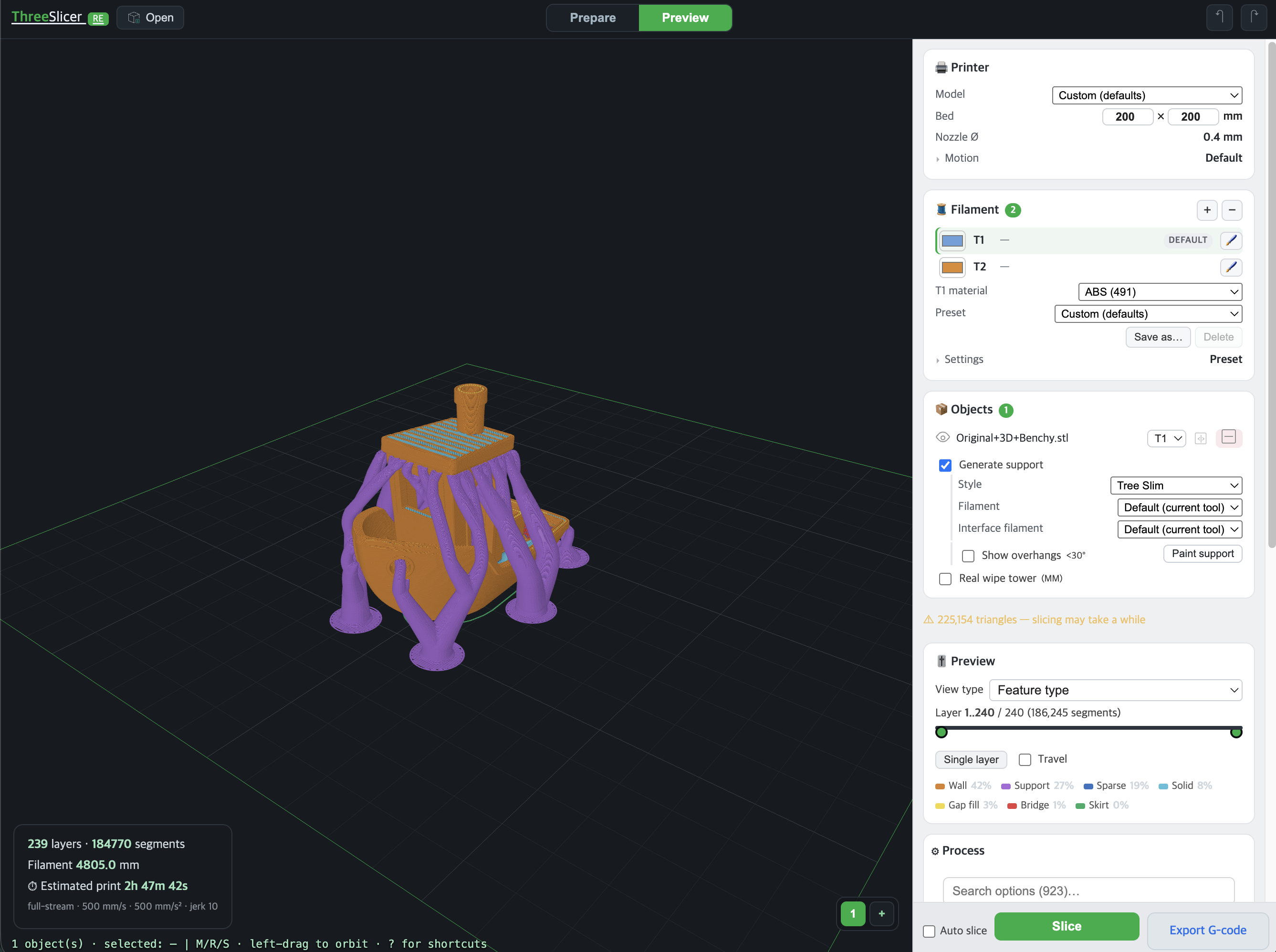
Browser/WASM 3D-printing slicer package derived from OrcaSlicer. It can slice binary STL files to G-code in Node or the browser, and it also ships React UI pieces for building a browser slicer: a three.js viewport, GPU toolpath preview, and a schema-driven settings panel. SLA (resin) printers are a second technology in the same kernel — supports and pad from PrusaSlicer's ported chain, previewed in the same viewer, exported as an .sl1 archive.
The package is published as a single npm package, three-slicer, with subpath exports for the engine, viewer, components, worker, and extracted OrcaSlicer data.
Links
Permissive viewer:
three-slicer-viewer(MIT) — the viewer, the settings form, G-code parsing and toolpath rendering without the slicer. This package plugs the kernel and OrcaSlicer's vendor presets into it;three-slicer/viewerandthree-slicer/componentsare that composition. Which code carries which licence, and why:PROVENANCE.md.Package: npmjs.com/package/three-slicer
Source: kimgh06/Three_Slicer
Demo: slicer.kimgh06.com
Start Here
Three ways in — pick the row that is your case. Each path is a working code block plus the one doc worth reading whole; everything else is lookup.
| Your case | Path | Copy this | Then read | | --- | --- | --- | --- | | "Just the numbers" — quotes, farms, automation. No UI, no React | Headless | Quick Start: Headless Slicing | engine/README (134 lines), params via PARAMS.md as lookup | | A slicer inside your existing page | Embed | Quick Start: React Viewer | viewer/README (330 lines — the props contracts live there) | | The full slicer UI — viewport + settings panel | Full UI | Full React Example | viewer/README + components/README |
Whichever path: read Before You Ship before deploying — those traps return plausible
results instead of errors, and the first two never show up in npm run dev.
Features
- WASM slicing engine with Arachne walls, infill patterns, supports, raft/brim/skirt, ironing, arc fitting, multi-material paths, and layer streaming.
- Headless SDK for Node or browser use with no
three.jsdependency. - Browser worker entry for off-main-thread slicing.
- React
<Viewport/>for model import, plate layout, transform controls, slicing, G-code export, and GPU toolpath preview. - React
<SettingsPanel/>generated from extracted OrcaSlicer metadata. - Vendor printer, print-process and filament preset catalogs, with one material assignable per extruder.
- Support painting and material painting, plus per-tool filament and purge statistics.
- 3MF project import in the viewer: a slicer-written
.3mf(OrcaSlicer/BambuStudio save, MakerWorld download) restores its plate layout, project settings, and painted facets — not just the meshes. - Extracted data files for custom UIs: config schema, UI tree, toggle rules, invalidation map, and the printer/process/filament catalogs.
- SLA (resin) slicing: PrusaSlicer 2.9.6's ported support-point generator, support tree and pad, a resin material catalog, and
.sl1mask export and import — routed byprinter_technology, with typed capability errors for what the port does not cover. - Preview move scrub: a position slider with a nozzle marker that walks the toolpath inside a layer (upstream's sequential view).
- Host injection props on the viewer:
fileshands models,.3mfprojects,.sl1archives and preset files in at mount;gcodeinjects a sliced result for preview-only use. - Automatic multithreaded WASM selection on cross-origin-isolated browser pages.
Installation
npm i three-slicerreact, react-dom, and three are optional peer dependencies. They stay peers rather than dependencies because React and three must be single instances — a duplicate copy breaks hooks and instanceof — and optional because only the UI half needs them: a headless consumer installs none of the three.
Install them yourself when you use the viewer or the settings panel:
npm i three-slicer react react-dom three| Import path | Needs react/three |
| --- | --- |
| three-slicer, /settings, /toggle, /client, /worker, /wasm, /data, /viewer/gcode, /viewer/toolpath | no — makeToolpath(THREE, data) takes three as an argument |
| three-slicer/viewer, /viewer/loaders | yes |
| three-slicer/components | react only |
Quick Start: Headless Slicing
Use the root import when you only need STL-to-G-code slicing.
import { createSlicer } from 'three-slicer'

const slicer = await createSlicer()

const result = slicer.slice(stlArrayBuffer, {
  layer_height: 0.2,
  first_layer_height: 0.2,
  line_width: 0.42,
  wall_loops: 2,
  infill_density: 0.15,
  nozzle_diameter: 0.4,
  filament_diameter: 1.75,
})

console.log(result.stats.layers)
console.log(result.gcode)

slicer.dispose()
slice() accepts a binary STL as an ArrayBuffer or Uint8Array. Parameters can be either a kernel params object or a JSON string — every accepted parameter is listed in the kernel parameter reference, which is generated from the kernel's own reader.
A runnable version of the above ships with the package: node node_modules/three-slicer/engine/examples/headless.mjs writes a cube, slices it batch and streamed, and prints the stats.
result.error is set instead of a result when a slice fails or is cancelled — check it before reading gcode.
result.warnings is the other half of that: a string[], empty when nothing, naming what a successful slice
got away with. Today the one entry is 'over_bed_model' — the model sliced outside the printable area, which
otherwise reports plausible time and material and no error (see Before You Ship). Every path
carries it: the direct handle, createSlicerClient(), and the raw worker's done reply.
result.throughput says how fast it ran, measured around the call on the same three paths:
result.throughput.ms               // wall time, incl. the STL crossing into WASM and the layer stream out
result.throughput.kernelMs         // the kernel's own phase total; ms − kernelMs is the boundary cost
result.throughput.layersPerSecond  // the figure to show a person
result.throughput.msPerMsegment    // the figure to COMPARE runs with
Compare runs on msPerMsegment, not on ms. The kernel is not deterministic in segment count — the same input
has been measured 15% apart between runs — so two raw millisecond figures describe two different amounts of work,
and the difference reads as a regression that is not there. In the viewer the same throughput is live: the slice
bar shows layers/second while slicing, and the host receives it as the sliceRate event.
SLA slices carry it too (sliceSla, the object-aware job, and the JS contour fallback). kernelMs sums that
technology's own passes — contours, sample, tree, raster, emit — because the two share only the name t_emit_ms,
and reading an SLA result through the FFF phase list would report its emit pass as the entire kernel time
(measured on a 10mm cube: 2.99ms summed correctly, 1.42ms if mis-read). Compare SLA runs against SLA runs: its
path_segments counts mask segments, not toolpath segments.
Streaming Layers
For large models, pass callbacks to receive each sliced layer as it is produced. This avoids keeping the full G-code and layer payload in memory at once.
const chunks = []

const result = slicer.slice(stlArrayBuffer, params, {
  onProgress(done, total) {
    console.log(`${done}/${total}`)
  },
  onLayer(layer) {
    chunks.push(layer.gcode)
  },
})

const gcode = chunks.join('')
console.log(result.stats)
When onLayer is set, the returned result carries stats; assemble G-code from the layer callback if you need the full file.
Quick Start: React Viewer
Use three-slicer/viewer when you want a ready-made browser slicer viewport.
import { useState } from 'react'
import Viewport from 'three-slicer/viewer'

export default function App() {
  const [settings, setSettings] = useState({})

  return (
    <div style={{ position: 'relative', width: '100%', height: '100vh' }}>
      <Viewport
        settings={settings}
        setSettings={setSettings}
      />
    </div>
  )
}
The container is not optional. The viewer fills its nearest positioned ancestor — the shadow host is
display: contents and the shell inside is position: absolute; inset: 0 — so it needs a parent with
position: relative and a real height. In a plain static <div> it escapes to the page instead. There is no width
or height prop.
The viewer handles model loading, drag and drop, transform controls, multi-plate layout, worker slicing, GPU toolpath preview, and G-code export. Its keyboard and mouse bindings, the undo boundary, and what a host cannot drive are documented in ../viewer-package/VIEWER.md. It supports STL, OBJ, 3MF (including the production extension used by Orca/Bambu/Prusa), AMF, and PLY out of the box; other formats such as STEP can be added with registerLoader(). A .3mf written by a slicer is treated as a project, not just geometry: its plate layout, project settings, and support/material painting are restored on import (where a facet carries both paint kinds, material paint wins and the dropped support paint is reported). Viewer and component styles are bundled into their Shadow DOM roots, so host app CSS does not need to import package CSS.
Quick Start: Settings Panel
Use three-slicer/components when you want the OrcaSlicer-style settings UI without building the form yourself.
import { useState } from 'react'
import SettingsPanel from 'three-slicer/components'

export default function App() {
  const [settings, setSettings] = useState({})

  return (
    <SettingsPanel
      settings={settings}
      setSettings={setSettings}
    />
  )
}
settings is a sparse object keyed by OrcaSlicer setting names. Store only edited values; missing keys fall back to schema defaults.
Full React Example
The viewer and settings panel are designed to share the same settings state.
import { useState } from 'react'
import Viewport from 'three-slicer/viewer'
import SettingsPanel from 'three-slicer/components'

export default function App() {
  const [settings, setSettings] = useState({})

  return (
    <main style={{ display: 'flex', height: '100vh' }}>
      <Viewport
        settings={settings}
        setSettings={setSettings}
      />
      <SettingsPanel
        settings={settings}
        setSettings={setSettings}
      />
    </main>
  )
}
The same sparse settings map can feed the settings panel, the viewer, and deriveKernelParams().
Import Paths
import { createSlicer, engineWorkerURL } from 'three-slicer'
import { deriveKernelParams } from 'three-slicer/settings'
import { disabledKeys, makeCfg } from 'three-slicer/toggle'
import Viewport from 'three-slicer/viewer'
import SettingsPanel from 'three-slicer/components'
import { schema, uiTree } from 'three-slicer/data'
Available subpaths:
| Import path | Use |
| --- | --- |
| three-slicer | Headless WASM engine SDK |
| three-slicer/settings | Schema defaults and settings-to-kernel mapping |
| three-slicer/toggle | Enable/disable rule evaluation for settings UIs |
| three-slicer/worker | Browser worker entry, and the typed message protocol |
| three-slicer/client | createSlicerClient() — promises over that protocol |
| three-slicer/wasm | Single-threaded Emscripten WASM glue |
| three-slicer/wasm-mt | Multithreaded Emscripten WASM glue |
| three-slicer/viewer | React <Viewport/> |
| three-slicer/viewer/toolpath | GPU toolpath renderer utilities |
| three-slicer/viewer/loaders | Model loaders |
| three-slicer/viewer/gcode | parseGcode(text) — G-code back into the layer stream the renderer consumes |
| three-slicer/components | React <SettingsPanel/> |
| three-slicer/data | Named exports for extracted metadata |
| three-slicer/data/*.json | Extracted OrcaSlicer metadata |
Architecture: How the Pieces Connect
One npm package, five modules. The dependency direction is one-way: wasm-core →(build)→ engine
←(data)← data, with components and viewer consuming different surfaces of the engine, types
generating and gating the contract from the side — and the glue at the top is always a single sparse
settings map held by the host app.
| Module | Role | Published as | Depends on | Consumed by |
| --- | --- | --- | --- | --- |
| wasm-core | C++ kernel sources + vendored third_party | not published | (ported upstream sources) | engine — as build output only |
| engine | kernel SDK: direct handle, worker, client, settings derivation | three-slicer root + /settings /toggle /client /worker /wasm(-mt) /data | committed wasm-core output, data, the generated kernel_setting_keys.js | components, viewer, every consumer |
| data | extracted schema + catalogs (config-schema, printers, processes, filaments…) | /data | extract_all.py ← upstream | engine's settings, components, viewer |
| types | every .d.ts + two generators | attached per subpath via the exports map's types fields | runs engine at generation time (probing), reads data's schema | consumers' IDE/TS — no runtime dependency |
| components | <SettingsPanel/> (Shadow DOM) | /components | data (schema + UI tree), engine's /toggle | host apps |
| viewer | <Viewport/> (three.js, Shadow DOM) | /viewer + /viewer/toolpath /loaders /gcode | engine's /settings, the worker, /data; three (peer) | host apps |
Some of the connections are not imports, and knowing which is which explains most of the layout:
| Connection | Mechanism | Notes |
| --- | --- | --- |
| wasm-core → engine | build.sh (emscripten) commits its output into engine/src/ | not an import — the golden byte-identical gate and the invariant suite verify kernel changes against the engine's output |
| data → engine/components/viewer | /data subpath imports | the source of truth is extract_all.py over the upstream checkout |
| types → engine | the generator executes deriveKernelParams (probing) and writes engine/PARAMS.md + ../viewer-package/src/settings/kernel_setting_keys.js back into the engine | test_kernel_params.mjs is the staleness gate |
| types → data | gen_settings_types.mjs generates settings-keys.d.ts (976 keys) from the schema | run automatically by the build |
| viewer ↔ components | no direct link | the host shares one settings map with both as props, and mounts <SettingsPanel embedded/> into the viewer's panel slots |
| inside viewer | core (pure, node-runnable) ← scene (three/DOM) ← actions ← ui | test_layers.mjs enforces the boundary |
TypeScript
Type declarations ship with the package — no @types/* needed. All 976 setting keys are typed from the config schema, enum values included:
import { createSlicer, type SlicerSettings } from 'three-slicer'
import { deriveKernelParams } from 'three-slicer/settings'

const settings: SlicerSettings = {
  layer_height: 0.2,
  sparse_infill_pattern: 'gyroid',   // autocompletes; 'nope' is a type error
}

const slicer = await createSlicer()
slicer.slice(stlArrayBuffer, deriveKernelParams(settings))
Requires "moduleResolution": "bundler", "node16", or "nodenext". The declarations are wired through the exports field, which the legacy "node" resolution ignores.
Settings Model
There are two related settings shapes:
| Shape | Used by | Description |
| --- | --- | --- |
| Sparse OrcaSlicer settings map | <SettingsPanel/>, <Viewport/> | Object keyed by original OrcaSlicer schema keys. Missing keys use schema defaults. |
| Kernel params | slicer.slice() | Flat object consumed directly by the WASM kernel. |
To convert UI settings to kernel params:
import { deriveKernelParams } from 'three-slicer/settings'

const settings = {
  layer_height: 0.25,
  sparse_infill_density: 15,
  wall_loops: 3,
}

const params = deriveKernelParams(settings)
const result = slicer.slice(stlArrayBuffer, params)
deriveKernelParams() maps the curated set of schema keys currently supported by the kernel — 131 of its 159 parameters are reachable from 128 schema keys today; the generated reference is the authoritative list. Other schema keys can still be displayed by the UI, but they may not affect slicing output yet — ignoredKernelSettings(settings) names the keys of your map in that category, so a "why did this setting do nothing" question has a one-call answer. Vector options are simplified to their first element, except the filament options described below, which keep every extruder's entry.
3MF Projects
A slicer-written .3mf is a project, not a mesh file: Metadata/project_settings.config holds the flattened
preset its author sliced with. <Viewport/> reads all of it on import. The project parser/writer currently remain
viewer internals; there is no three-slicer/viewer/project public export yet. Hosts can normalize or serialize a
raw project settings object with the public settings helpers below, but should not import viewer source files.
Every value in that file is a string, and reading it raw is not a cosmetic problem — a disabled option is the
string "0", and "0" is truthy, so a raw import turns every disabled option ON. A point is the string "256x256"
while every consumer indexes it as [x, y], so a raw printable_area[1][0] is the character '2'. Both are
handled by coercing each value by its config-schema type:
import { normalizeProjectSettings, serializeProjectSettings } from 'three-slicer/settings'

const { settings, applied, skipped } = normalizeProjectSettings(rawConfig)
// settings: real JS types, ready for deriveKernelParams() and <SettingsPanel/>
// applied : how many keys survived
// skipped : keys the config schema does not define (preset bookkeeping, version fields) — dropped, not coerced
Writing one back is the exact inverse, and it matters for the same reason: a raw JS false would be read by any
other slicer's parser as the string "false", which is truthy.
const config = serializeProjectSettings(settings) // bool -> "1"/"0", point -> "XxY", points group -> "X1xY1,X2xY2"Upstream's inherits / different_settings_to_system reconciliation is deliberately not reproduced: it exists to
rebase a stored preset onto a local vendor preset database, and project_settings.config is already flattened, so
its values are taken as written.
Preset Files
OrcaSlicer's "Config files" dialog imports a .json holding one preset — a printer (machine), print settings
(process) or a material (filament) — plus the zip forms .orca_printer / .orca_bundle / .orca_filament.
Both directions are supported.
import { writePresetFile, readPresetFile, presetOptionKeys, printerSettings } from 'three-slicer/settings'

// Write. Flattened on purpose: every option of that type, no `inherits`, so the file stands on its own.
const file = writePresetFile(settings, { type: 'machine', name: 'My printer' })
// -> { type: 'machine', name: 'My printer', from: 'User', printable_area: ['0x0','256x0',…], … }

// Read. `resolveParent` follows `inherits`; without it a vendor file arrives incomplete (see below).
const { settings: loaded, missingParent, skipped } = readPresetFile(file,
  { resolveParent: (name) => printerSettings(name) })
presetOptionKeys(type) is the key set for one type — 175 for machine, 370 for process, 149 for filament,
taken from upstream's own Preset::printer_options() and friends. It is what splits a settings map, which holds
every type's keys at once, into the file for one of them.
A vendor preset is a diff, not a preset. Upstream saves a derived preset as the difference against its parent
(Preset::save: "only save difference if it has parent"), so a file off the vendor profiles carries a fraction
of what it appears to. Read Bambu's X1C machine file without resolving inherits and it has no printable_area
and no printable_height at all — the bed is in the parent. missingParent names the parent when it could not be
resolved; the file's own values are still applied, because dropping the file entirely loses more than it protects.
Values are written and read in upstream's own encoding — every value a string, a point as "XxY", per-extruder
options as arrays of strings — the same shape 3MF Projects uses, since upstream writes both
through the same serializer.
The viewer adds the zip forms and a UI: the printer card's Load and Save read and write these files, and a
save routes through onExport like every other download.
Settings UI: Enable/Disable Rules
OrcaSlicer greys out options that another option makes irrelevant. Those rules are extracted, and
three-slicer/toggle evaluates them against a settings map — the panel does this internally, and a custom UI can
do the same:
import { makeCfg, disabledKeys } from 'three-slicer/toggle'

const disabled = disabledKeys(makeCfg(settings))
// setting key -> the enable_if expression that evaluated false, e.g.
//   { outer_wall_jerk: 'false, variant_index', … }
if (disabled.outer_wall_jerk) { /* grey the control out; the value says why */ }
Only rules that evaluate to an unambiguous false are reported — an expression referring to something the
evaluator cannot resolve is left out rather than guessed at, so a key missing from the map means "not known to be
disabled", not "definitely enabled".
Materials and Multi-Material
A material is a filament preset — temperatures, flow, diameter, cooling, and the retraction/z-hop overrides a material may apply on top of the machine's. Read the catalog through the facade rather than decoding the data file:
import { filamentPresets } from 'three-slicer/settings'

const filaments = await filamentPresets()
filaments.listFor('Bambu Lab X1 Carbon 0.4 nozzle')          // [{name, type, vendor}, …]
filaments.recommendedFor('Bambu Lab X1 Carbon 0.4 nozzle')   // the vendor's shortlist for that machine model
const material = filaments.settingsFor('Bambu PLA Basic @BBL X1C')
Clear before you apply. A preset carries only the keys it sets, so merging one over another leaves the previous pick's leftovers behind — an ABS material followed by a PLA one keeps ABS's chamber temperature. Every facade exposes the exact key set to remove first:
import { applyPreset } from 'three-slicer/settings'

setSettings(s => applyPreset(s, filaments.settingsFor(name), filaments.keys))
// clears filaments.keys first, then merges; a null preset (failed lookup) applies nothing
The same applies to processPresets().keys and printerKeys. The filament key set is disjoint from the process key
set, so applying a material never clears a process pick and vice versa.
One material per extruder. OrcaSlicer stores every filament option as one entry per extruder, so a multi-material settings map writes each extruder's material at its own index:
const params = {
  ...deriveKernelParams({
    nozzle_temperature: [255, 220],     // T0 ABS, T1 PLA
    filament_flow_ratio: [0.95, 1.0],
  }),
  extruder_count: 2,                    // set on the params directly; not a derived schema key
}
The kernel reloads the loaded-filament settings at every tool change and reports the split back as stats.filament_mm_by_tool (indexed by tool number, sums to filament_mm) plus stats.filament_mm_purge for the prime/wipe tower share. support_filament and support_interface_filament are 1-based filament indices — 0 means "keep the loaded tool" — choosing which extruder prints the support base/raft and the support interface.
A single-material slice sends none of these keys and produces exactly the G-code it produced before multi-material existed.
Besides per-extruder arrays and painting, a per-feature filament assignment is the third way a slice becomes multi-tool: outer_wall_filament_id, inner_wall_filament_id, sparse_infill_filament_id, top_surface_filament_id, bottom_surface_filament_id and internal_solid_filament_id are 1-based filament indices ("print the outer wall with filament 2"). Values of 0 (default) and 1 (the default extruder) add no second tool, so existing single-material slices are unaffected.
Painting a region onto another extruder
Painting is the only way a single object can print in two materials. Painting states follow OrcaSlicer's own enum, in which state 1 is both the support enforcer and Extruder 1, state 2 is both the support blocker and Extruder 2, and 3..16 are Extruders 3 to 16. The state-addressed protocol is on the worker; slicer.paint() on the direct handle is the original enforcer/blocker boolean pair.
worker.postMessage({ cmd: 'prepare', stl })
worker.postMessage({ cmd: 'paint', state: 3, facet, hx, hy, hz, cx, cy, cz, radius, states: [1, 2, 3] })
worker.postMessage({ cmd: 'erase', facet, hx, hy, hz, cx, cy, cz, radius })
erase is a separate command rather than state: 0, because a JS false coerces to 0 at the WASM boundary and the legacy blocker brush sends exactly that — so the state path refuses 0 outright.
Painting and support now coexist: the painted multi-material path runs the same support pass the single-material path does, so enabling support no longer costs the material paint (or the other way round). What remains is the ambiguity a single enum creates — a support blocker paint and an Extruder 2 paint are the same mark on a facet, so on a model that uses both brushes the blocker reads as "print with T1".
SLA (Resin) Slicing
SLA is a second printer technology, not an FFF mode. printer_technology in the settings map routes it —
apply an SLA machine profile from the catalog (printerTechByVendor marks the technology) or set the key
yourself, then derive SLA params and call the SLA entry:
import { printerTechnology, deriveSlaParams, resinCatalog, resinSettingsFor } from 'three-slicer/settings'

printerTechnology(settings)                        // 'SLA' or 'FFF'
const params = deriveSlaParams(settings)           // layers/exposure, display, supports, pad, raster orientation

const result = slicer.sliceSla(stl, params)
result.stats.sla                                   // true — no G-code; stats carry resin_ml and time_estimate
result.stats.layers                                // includes the pad + elevation lift below the model
result.layers[0].paths                             // the same stride-8 segment stream the FFF preview reads
In a worker, client.sliceSla(stl, params, { onProgress, onLayer }) is the same call over the message
protocol, and client.sliceSlaJob(job) takes the typed job protocol — objects with manual support points,
drain-hole records and modifier volumes — validated structurally before slicing.
A runnable version ships with the package: node node_modules/three-slicer/engine/examples/sla_headless.mjs
slices a cube with supports and pad, then demonstrates the capability refusal below.
The support chain is PrusaSlicer 2.9.6's own, ported verbatim and compiled into the same WASM kernel: the
support-point generator, the default support tree, and the real pad geometry. Resin materials follow the
same catalog pattern as filaments: resinCatalog lists them, resinSettingsFor(name) is one preset.
What the kernel cannot do it refuses with a typed code — it never approximates. A request the port does not cover fails with a stable error instead of silently producing something else:
| Code | Refused request |
| --- | --- |
| SLA_UNSUPPORTED_HOLLOWING | hollowing_enable or drain holes — a solid slice answered to a hollow request would be a mislabeled print |
| SLA_UNSUPPORTED_ORGANIC | organic support trees |
SLA_CAPABILITIES (exported from three-slicer/client) is the machine-readable capability map. A .3mf
carrying SLA records survives round-trip regardless: manual support points and drain holes are preserved on
import and written back on export, even where slicing refuses to consume them.
The viewer follows the technology automatically: an SLA profile swaps the filament card for the resin card,
hides the FFF-only tools (prime tower, painting brushes), previews the generated support and pad meshes, and
exports an .sl1 archive — per-layer PNG masks in the SL1 family's portrait orientation plus upstream's
config.ini — instead of G-code.
Worker Usage
Slicing blocks its thread for seconds, so in a browser it belongs in a worker. three-slicer/client wraps the
worker's message protocol in promises:
import { createSlicerClient } from 'three-slicer/client'
import { deriveKernelParams } from 'three-slicer/settings'

const client = createSlicerClient()          // creates and owns the worker
await client.warmup()                        // optional: load the kernel before the first slice needs it

const { gcode, stats } = await client.slice(stlArrayBuffer, deriveKernelParams(settings), {
  onProgress: (done, total) => setProgress(done / total),
})

client.cancel()      // stops a running slice — see below
client.terminate()
Pass onLayer to take the layers as they are produced instead of having them assembled, which is what keeps a
large model out of memory:
await client.slice(stl, params, { onLayer: ({ z, idx, gcode }) => append(gcode) })
// the result then carries stats only
The same client drives painting — prepare, paint, erase, clear, overlay, importPaint, exportPaint.
It deliberately leaves two things to the host: the viewer's progress weighting (measured against its own models)
and its out-of-memory retry ladder, both of which are UI policy rather than protocol.
Driving the worker directly
createSlicerClient is a thin wrapper; the protocol underneath is a plain message contract, fully typed in
three-slicer/worker. A slice request is the message with no cmd, and its params takes an object or a
JSON string (object accepted since 0.2.3 — the kernel parses JSON text, so it is stringified for you).
The worker below is created with engineWorkerURL(), which suits a no-bundler page; under Vite or webpack
create it the way Bundler Notes describes and drive that instance instead.
import { engineWorkerURL } from 'three-slicer'
import { deriveKernelParams } from 'three-slicer/settings'

const worker = new Worker(engineWorkerURL(), { type: 'module' })

const chunks = []

worker.onmessage = (event) => {
  const message = event.data

  if (message.type === 'progress') {
    console.log(message.done, message.total)
  }

  if (message.type === 'layer') {
    chunks.push(message.gcode)          // paths/widths arrive transferred, not copied
  }

  if (message.type === 'done') {
    console.log(chunks.join(''), message.result.stats)
  }

  if (message.type === 'error') {
    console.error(message.error)
  }
}

// A slice request carries NO `cmd` — it is the worker's default action. Every other message (paint, prepare,
//  overlay, …) is addressed by `cmd`, so leaving it off is what selects slicing.
// `params` must be a JSON STRING here. The direct handle's slice() also accepts an object and stringifies it for
//  you; the worker hands its argument straight to the kernel, which parses JSON text.
worker.postMessage({ stl: stlArrayBuffer, params: JSON.stringify(deriveKernelParams(settings)) }, [stlArrayBuffer])
The worker replies with progress, layer, done, and error while slicing. done carries {result} — its
stats when the layers were streamed, plus gcode and layers when they were not. For bundler-specific setups,
three-slicer/worker exposes the worker entry directly.
Cancelling a slice
Cancellation is a flag the kernel polls from inside its C++ loop, so it works even while the worker is blocked in
WASM. It lives in a SharedArrayBuffer, which means it is only available on the multithreaded kernel — that is, on
a cross-origin isolated page. client.cancel() handles this and returns false when there
is no flag to write. Driving the worker yourself, the address arrives once, unprompted:
let cancelView = null

worker.addEventListener('message', ({ data }) => {
  if (data.type === 'supsab' && data.cancelPtr) {
    cancelView = new Uint32Array(data.buf, data.cancelPtr, 1)
  }
})

const cancel = () => cancelView && Atomics.store(cancelView, 0, 1)
Without cross-origin isolation the engine runs single-threaded, no supsab message arrives, and a slice in
progress cannot be interrupted — terminate the worker instead.
Bundler Notes
Creating the slice worker. createSlicerClient() with no argument is the supported path under Vite and
webpack: the default is written as the literal new Worker(new URL('./slicer.worker.js', import.meta.url),
{ type: 'module' }) that both bundlers recognize as a worker entry, so the worker reaches dist together
with the kernel chunks it dynamically imports. Verified in pack_check.sh, which builds a Vite consumer and
asserts every relative import the emitted worker chunk makes names a file the build actually produced.
Through 0.2.2 that default went through engineWorkerURL(), and a function call does not match the pattern —
Vite fell back to its plain-asset rule and copied the worker source in verbatim, still importing an unhashed
./slicer_core.js. Measured on a Vite 5 app importing three-slicer/client and nothing else: a 21KB copy in
a 40KB dist — no kernel emitted at all, a 404 on the worker's first message, and only after vite build,
since the dev server serves the sources. engineWorkerURL() remains for no-bundler setups (native ESM, an
import map, a CDN); under a bundler use the no-argument client or three-slicer/worker?worker.
Vite consumers should enable ES module workers and an ES2022 build target:
import { defineConfig } from 'vite'

export default defineConfig({
  worker: { format: 'es' },
  build: { target: 'es2022' },
})
For Next.js or webpack apps, render the viewer on the client side and disable Node-only module aliases used by Emscripten guards.
module.exports = {
  webpack: (config) => {
    for (const moduleName of [
      'node:module',
      'node:fs',
      'node:path',
      'node:url',
      'node:crypto',
      'node:worker_threads',
    ]) {
      config.resolve.alias[moduleName] = false
    }
    return config
  },
}
Multithreaded WASM
The engine ships single-threaded and multithreaded WASM builds. The browser worker automatically uses the multithreaded kernel when the page is cross-origin isolated.
Serve these headers to enable it:
Cross-Origin-Opener-Policy: same-origin
Cross-Origin-Embedder-Policy: require-corp
Without those headers, the engine falls back to the single-threaded kernel.
The multithreaded kernel's wasm is a file beside its glue, engine/src/slicer_core.mt.wasm, reached through
new URL('slicer_core.mt.wasm', import.meta.url); Vite and webpack emit it as an asset. Serve it as
application/wasm, and from another origin (a CDN) with Cross-Origin-Resource-Policy: cross-origin, or the
cross-origin isolated page cannot load it. The single-threaded kernel still inlines its wasm.
Data Files
The package includes extracted OrcaSlicer metadata for custom interfaces:
| File | Use |
| --- | --- |
| three-slicer/data/config-schema.json | Setting definitions, defaults, labels, units, and option metadata (976 options) |
| three-slicer/data/ui-tree.json | Tab, page, group, and option layout |
| three-slicer/data/toggle-rules.json | Original enable/disable rule metadata |
| three-slicer/data/invalidation-map.json | Setting invalidation/dependency metadata |
| three-slicer/data/preset-keys.json | The option keys belonging to each preset type — what presetOptionKeys(type) reads |
| three-slicer/data/printers.json | 1,041 vendor machine profiles across 66 vendors: motion limits, bed, nozzle — plus the resin catalog and each vendor's printer technology |
| three-slicer/data/processes.js | 2,243 print presets (speeds, accelerations) |
| three-slicer/data/filaments.js | 5,999 material presets over 81 filament types, plus each printer model's recommended list |
The last three are large, column-oriented and deduplicated, and they load on demand. Read them through
printerSettings(), processPresets() and filamentPresets() from three-slicer/settings rather than decoding
the layout by hand.
API Reference
three-slicer
| API | Description |
| --- | --- |
| createSlicer() | Loads the WASM kernel and returns a slicer handle |
| slicer.slice(stl, params, callbacks?) | Slices binary STL input to G-code or streamed layers |
| slicer.sliceSla(stl, params, onProgress?) | SLA slice — layer masks, support/pad meshes, resin stats; typed error on a refused capability |
| slicer.paintPrepare(stl) | Prepares painting against a model; returns the facet count |
| slicer.paint(args) | Paints enforcer/blocker data (boolean pair; the state-addressed form is worker-only) |
| slicer.paintClear() | Clears painting data for every state |
| slicer.overlay(enforcer) | The painted overlay triangles for one state, as a Float32Array |
| slicer.heapSize() | Current WASM heap size, bytes (peak, monotonic) |
| slicer.dispose() | Releases the slicer handle for garbage collection |
| engineWorkerURL() | Worker URL for a no-bundler browser setup. Under Vite/webpack use createSlicerClient() or three-slicer/worker?worker — see Bundler Notes |
three-slicer/settings
| API | Description |
| --- | --- |
| deriveKernelParams(settings, opts?) | Converts sparse OrcaSlicer settings to kernel params. opts.plate picks a plate's entry from per-plate options |
| applyPreset(settings, preset, keys) | Clear-then-merge: deletes the catalog's keys, merges the preset; a null preset applies nothing |
| kernelSettingKeys | The schema keys deriveKernelParams consumes — generated with the reference table |
| ignoredKernelSettings(settings) | The map's keys the FFF derivation does not read — accepted but without slicing effect |
| schemaDefault(key) | The config-schema default for a key |
| settingRaw(settings, key) | The map's value, or the schema default |
| settingScalar(settings, key) | The same, reduced to a scalar — the first set entry of a per-extruder column |
| normalizeProjectSettings(raw) | A 3mf's all-strings project_settings.config → a typed settings map |
| serializeProjectSettings(settings) | The inverse, for writing one |
| writePresetFile(settings, opts) | A settings map → an OrcaSlicer preset .json, flattened |
| presetFileText(settings, opts) | The same, stringified |
| readPresetFile(raw, opts) | A preset .json → a settings map; follows inherits via resolveParent |
| presetOptionKeys(type) | The option keys belonging to machine / process / filament |
| printersByVendor | Vendor → profile name → entry, for building a picker |
| printerTechByVendor | Vendor → printer technology ('FFF' / 'SLA') |
| printerSettings(name) | Settings a vendor machine profile applies |
| printerKeys | Every key a printer profile can set — clear these before applying another |
| printerDefaultPreset(name) | The vendor's recommended process preset for that printer |
| printerDefaultBedType(name) | The bed type the printer's model defaults to — the viewer writes it to curr_bed_type on a pick |
| machineLimitKeys | The schema keys the kernel's machine limits are read from |
| processPresets() | Lazy facade over the print (process) preset catalog |
| filamentPresets() | Lazy facade over the material preset catalog |
| printerTechnology(settings) | 'SLA' or 'FFF' — what routes a slice to slice_sla |
| deriveSlaParams(settings) | Sparse settings → the SLA kernel's params (display, supports, pad, raster) |
| resinCatalog / resinSettingsFor(name) | The resin material catalog, and one preset's settings |
three-slicer/toggle
| API | Description |
| --- | --- |
| makeCfg(settings) | Wraps a settings map for rule evaluation |
| disabledKeys(cfg) | Setting key → the enable_if expression that evaluated false |
| evalEnableIf(expr, locals, cfg) | Evaluates a single rule; null when it cannot be resolved |
three-slicer/viewer and three-slicer/components
| API | Description |
| --- | --- |
| <Viewport/> | React slicer viewport |
| <SettingsPanel/> | React settings form |
| loadModel(name, buffer) | Parses STL/OBJ/3MF/AMF/PLY into objects |
| registerLoader(exts, fn) | Adds a format — STEP and anything else needing a heavy dependency |
| SUPPORTED_EXT / fileExt(name) | The known extensions, and one file's |
| splitConnectedComponents(pos) | Splits a mesh into its connected components; null when there is only one |
| parseGcode(text) | G-code text → the layer stream the renderer consumes |
| buildSegmentData(layers, w) | Layers → the packed segment buffers |
| computeColors(data, view, ctx) | Per-segment colours for a view type |
| makeToolpath(THREE, data) | The GPU toolpath mesh handle |
| VIEW_TYPES / roleRatios(lengths) | The preview's view types, and the per-role length split |
three-slicer/data
| API | Description |
| --- | --- |
| schema, uiTree, toggleRules, invalidationMap, printers, presetKeys | The extracted metadata, import attributes already applied |
| loadProcesses() / loadFilaments() | The two large catalogs, on demand — prefer the settings facades |
Runtime Support
| Environment | Supported use |
| --- | --- |
| Node ESM | Headless slicing |
| Browser main thread | Headless slicing |
| Browser worker | Off-main-thread slicing and streaming |
| React | Viewer and settings panel |
| three.js | Required by three-slicer/viewer |
Before You Ship
The traps below were all hit while building the integration demos and the live landing embed — each one returns something plausible instead of an error, which is why they are listed in the order they bite, not by topic. The later a trap fires, the more it costs — and none of them fails a build or throws, so nothing surfaces them for you.
- Your first real model: hand it over origin-centered, not bed-centered. The kernel takes plate-local
coordinates and seats the model on the bed itself; pre-centering on the bed adds the offset twice and the
part slices off the bed — with plausible time and material and no error. Since 0.2.3 the result says so:
result.warningscarries'over_bed_model'(thestats.over_bed_modelflag is still there too). Checkresult.warnings.lengthafter every slice; it is the channel every future condition of this kind uses. - Reading the results:
filament_mmis a length, and the time depends on the kernel. Grams are your conversion (filament_mm × π × (diameter/2)² × density / 1000, from the filament preset'sfilament_diameter/filament_density).time_estimatediffers ~25% between the single- and multi-threaded kernels on identical geometry, so your COOP/COEP headers change the number — pin one as the reference if you price on it. - Drawing toolpaths: the role field is encoded, and G-code round-trips lose roles.
paths[k+3]holdsrole + tool*16— mask with& 15/>>> 4.SegmentData.positionis stride 4 (x, y, z, w). The kernel's G-code carries no;TYPE:comments, soparseGcodecollapses roles into wall — drawresult.layersdirectly when the slicing side is yours. - Settings: presets are sparse, and unread keys are silent. Apply presets with
applyPreset(clear-then-merge — a plain merge keeps the previous material's leftovers). A key the FFF derivation does not read is accepted and does nothing:ignoredKernelSettings(settings)names them. - Cancel is conditional.
client.cancel()works only on a cross-origin-isolated page (the mt kernel); otherwise it returnsfalse— terminate and recreate the client instead. Details: Cancelling a slice.
Gone as of 0.2.3, and listed here only because it bit every consumer before then: createSlicerClient() with
no argument used to build a worker Vite copied as a plain asset, which 404'd on its own kernel import in
production while npm run dev passed. The no-argument form now emits a real worker chunk — see
Bundler Notes. On 0.2.2 or earlier, pass the worker in yourself
(import SlicerWorker from 'three-slicer/worker?worker').
Known Limits
slice()currently takes binary STL input at the engine API boundary.- The viewer can import STL, OBJ, 3MF, AMF, and PLY, then converts them for slicing.
registerLoader(exts, fn)fromthree-slicer/viewer/loadersadds any other format. Formats needing a heavy dependency are kept out of the package so it stays runtime-dependency-free — seeweb/viewer/src/step_loader.jsfor a STEP loader built onocct-import-js(OCCT WASM).- Not every OrcaSlicer schema key is wired into the WASM kernel yet.
- Some vector settings are simplified to their first element.
- One triangle selector serves both the support brush and the material brush (upstream's shared enum), so a support blocker paint and an Extruder 2 paint are the same mark — the two brushes cannot mark the same model independently.
- The multi-material prime tower is a real ported wipe tower, but the fallback square ring used when it fails is not.
- SLA hollowing and drain-hole geometry are refused with
SLA_UNSUPPORTED_HOLLOWING(the OpenVDB chain is not ported); the records still round-trip through.3mf. - The
.sl1export lives in the viewer (its masks need a canvas); there is no headless.sl1writer export yet. - SLA mask edges are canvas anti-aliasing, not upstream's AGG rasterizer — same geometry, slightly different edge pixels.
- Multithreaded WASM requires cross-origin isolation.
threeis pinned as a peer dependency because viewer internals depend on theTransformControlsAPI shape.
License
AGPL-3.0-or-later. This package is derived from OrcaSlicer. Source is available at kimgh06/Three_Slicer. If you embed it in a web app, make sure your app complies with the AGPL network-use requirements, including offering source code to users where required.