
three-vat
v4.2.0
Published
Bake glTF animation clips into vertex animation textures for zero-CPU instanced crowds in three.js.

Maintainers
 mike-fernandez-dev
Readme
three-vat
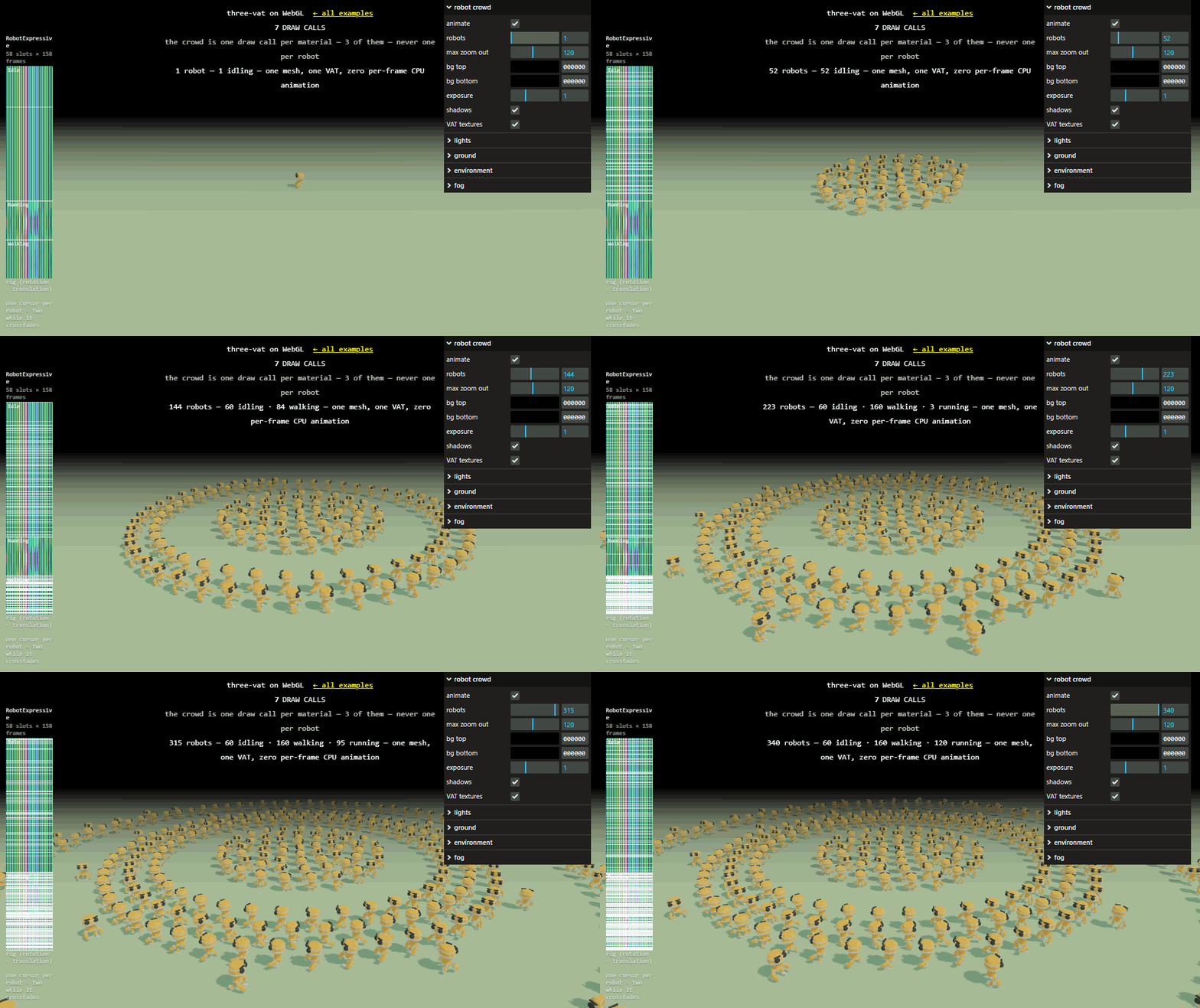
Open the live demo → and drag the count from 1 robot to 340. The draw calls do not move.
Bake a glTF AnimationClip into GPU textures and animate hundreds or thousands of instanced characters with zero per-frame CPU — one draw call per material, no SkinnedMesh per character. Works on WebGLRenderer and WebGPURenderer, from the same baked VAT.


Install
npm install three-vat threethree (>= 0.186) is a peer dependency.
One crowd, start to finish
import { GLTFLoader } from 'three/examples/jsm/loaders/GLTFLoader.js'
import { bakeVAT } from 'three-vat'
import { createVATMesh, getMaxTextureSize } from 'three-vat/webgl'
// WebGPURenderer? `from 'three-vat/tsl'` — that import is the only line that changes.

// The parts you already know — renderer, scene, camera, lights, clock — made
// however you usually make them. Nothing on this line is VAT-specific.
const { renderer, scene, camera, clock } = setUpYourScene()

const gltf = await new GLTFLoader().loadAsync('/robot.glb')

// Bake once, at load. Pass the subtree root — `gltf.scene` — and not a mesh
// inside it: the bake unit is the whole subtree, merged and recorded in root
// space. This same call takes
//   - a skinned character (Mixamo, Sketchfab, `Soldier.glb`)
//   - a morph-target mesh
//   - a hierarchy of rigid, node-animated parts (three's `RobotExpressive`)
//   - any mix of those in one subtree
// because a VAT records where a vertex ended up and never how it got there.
// Nothing to classify, and no variant of this call to go looking for.
const vat = bakeVAT(gltf.scene, gltf.animations, {
  fps: 30,
  maxTextureSize: getMaxTextureSize(renderer), // this GPU's real ceiling
})

// One entry per character: which clip it plays, when it started, its rate.
// Only `clip` and `startTime` are required — a clip baked from a configured
// `AnimationAction` carries its own loop, repetition count, end behaviour and
// speed, and an instance overrides only what it wants to differ.
const instances = Array.from({ length: 500 }, (_, i) => ({
  clip: vat.clips[i % vat.clips.length],
  startTime: -Math.random() * 2, // began a moment ago, so the crowd is not in lockstep
  speed: 0.9 + Math.random() * 0.2,
}))

// The crowd: one InstancedMesh, its geometry and materials already decoding the
// VAT, plus the clock that drives every instance.
const { mesh, time } = createVATMesh(vat, instances)
mesh.castShadow = mesh.receiveShadow = true
scene.add(mesh)

// Where each character stands is yours — the library never guesses a layout.
for (let i = 0; i < instances.length; i++) mesh.setMatrixAt(i, matrixFor(i))
mesh.instanceMatrix.needsUpdate = true
mesh.computeBoundingSphere() // or frustumCulled = false, if matrices move every frame

renderer.setAnimationLoop(() => {
  time.value = clock.getElapsedTime() // the whole per-frame cost of the animation
  renderer.render(scene, camera)
})
Two things worth knowing the first time:
- Render
vat.geometry, not your source mesh. The merged vertex ordering is the baker's, and the textures are indexed by it.createVATMeshdoes this for you; by hand, clone that geometry and no other. - Materials are never merged unless you ask. A 500-robot crowd with 3
materials is 3 draw calls — not 1, and not 500.
mergeFlatMaterials: truemakes flat colours one material, and the crowd one draw call.
A skinned character? The bake picks the rig encoding for it by itself: the
posed rig instead of the posed vertices, for two orders of magnitude less
texture, a bake in milliseconds, and a texture whose width is the rig's, not
the mesh's. Assets a rig cannot express fall back to vertices, and vat.fallback
says why. The rig encoding.
If GLTFLoader or FBXLoader loads it and it has an AnimationClip, yes — the
four shapes listed in the snippet above, and any mix of them, through that one
call. Run an FBX mesh's geometry through mergeVertices first: the loader never
indexes it (Loading FBX).
The bake unit is the subtree, not the mesh
(ADR-0008),
which is where the one real mistake lives: pass gltf.scene, or the node you
want animated, never a SkinnedMesh you fished out of it.
Positions bake exactly under any rig; normals match what three's own skinning
shader draws, which is approximate under non-uniform bone scale — bakeVAT
warns once and names the bone. A rest-pose track such as Mixamo's TPose bakes
to a frozen band and reports it as a near-zero clip.maxDelta: filter those out
of gltf.animations rather than spending texture rows on them, as you would
the empty Take 001 a Mixamo FBX carries.
bakeVAT takes an AnimationClip or an AnimationAction, in the same
array. Configure the action the way three already taught you, and every instance
of that clip inherits it — and overrides any field it names.
const death = mixer.clipAction(deathClip)
death.loop = THREE.LoopOnce

const vat = bakeVAT(gltf.scene, [walkClip, death, idleClip])loop, repetitions and timeScale are read; time and paused are ignored,
because a VAT has no playhead of its own to seed; a non-unit weight or an
additive blendMode throws, because one baked band cannot be several actions
blended at once.
Both inputs clamp, where three rewinds. clampWhenFinished defaults to
false in three, which means an untouched action says nothing about the end
either — and a crowd's answer to nothing is to hold the last frame, because a
corpse standing back up is the worse default. So the end mode is not read off
the action; an instance asks for three's rewind with endMode: EndMode.Rewind,
which is the finer grain anyway.
Declaring the defaults at the bake.
A negative rate plays a clip backwards, from the band already baked, with nothing extra in the texture. Two spellings:
- One instance:
speed: -1on its entry, or on asetVATInstancewrite. - Every instance of a clip:
action.timeScale = -1on the action handed tobakeVAT, the way three already spells it. An instance's ownspeedstill overrides it, in either direction.
A reversed one-shot starts on its last frame, with no action.time to move
first. Playing backwards.
The breaks that reach a 1.x caller, no shims — the package had no users on the 1.x playback contract, so 2.0 spells it one way rather than two. The full list is the CHANGELOG's 2.0.0 entry.
{ clip, timeOffset: 1.4, speed: 1 }  // 1.x — every field required
{ clip, startTime: -1.4 }            // 2.0 — desync is a start time in the past
timeOffset is gone (startTime: -timeOffset / speed), and with it
aTimeOffset. The pack moved into a playback texture, five texels a row
since 3.0 (clip, playback, crossfade, outgoing clip, outgoing playback), keyed
by the instance's logical index rather than the drawn slot. So
addInstancedVATAttributes is removed, createVATPlaybackTexture(instances)
replaces addVATInstanceAttributes, and setVATInstance(playback, id, instance)
takes that texture — createVATMesh returns it as playback — rather than a
geometry. A VAT texture's image.data is now opaque. Node 20, where
1.x said 18, and three >= 0.186, where batchIndirectIndex is exported;
browsers are unaffected.
New, and none of it breaking: per-instance loop modes, one-shots,
setVATInstance after the crowd is built, and a crowd on a BatchedMesh.
By hand, on either path.
A vertex-encoded VAT is one vertexCount × totalFrames texture pair, so both
axes hit the GPU's texture ceiling; a rig-encoded one is two texels a bone wide,
so in practice only its frames do. Always pass maxTextureSize: getMaxTextureSize(renderer)
as above: the default is a desktop-shaped guess, and mobile is often 4096.
The bake is CPU work done once at load. Under the vertex encoding that is about
100 ms for the demo's robot, and seconds for a 20k-vertex skinned character with
many clips; the rig encoding bakes several to a few hundred times faster. It
never touches the renderer, so bakeVATInWorker runs it in a Web Worker as-is.
Or bake once at build time, with three-vat bake --out, and loadVAT reads
the baked file back as the VAT bakeVAT would have returned:
import { loadVAT } from 'three-vat'

const vat = await loadVAT('/model.vat.glb')
const { mesh, time } = createVATMesh(vat, instances)
docs/usage.md has the measured bake-cost table, the
worker bake, baking at build time,
the draw-call arithmetic, and the primitives underneath createVATMesh for
when you are not rendering onto a plain InstancedMesh.
No LOD, no React/drei binding, glTF and FBX input only. Each is a decision
rather than a gap, and each is written up with its reasoning in
docs/usage.md, alongside the
trade-offs against SkinnedMesh and bone-texture instancing.
Both decode paths — GLSL on WebGLRenderer, TSL on WebGPURenderer — read one
shared instance-playback contract and export the same createVATMesh, so
nothing documented here is true on one renderer and false on the other. That the
two decode pixel-identically is a manual gate before every release
(docs/releasing.md).
pnpm i
pnpm run dev    # opens the demo — this and the line above are the whole setup
Three more verbs, and that is the table:
pnpm test       # every suite: the baker core, the release suite, the demo's own
pnpm typecheck  # all three tsconfigs: library, release suite, demo
pnpm build      # the published library (`pnpm run build:watch` to watch)
examples/ is the demo — one page per renderer, self-contained on purpose
(ADR-0011),
deployed from main on every push. Release steps are node invocations rather
than table entries, the parity gate among them and required
(docs/releasing.md). The suite is green on a fresh clone
with no network: real-asset tests skip when their asset is missing, so fetch it
before touching the baker (docs/test-assets.md).
Deeper: docs/ · CHANGELOG.md · live WebGPU demo
License
MIT