
three.augmented-console
v1.0.0
Published
Shows the vectors, matrices and materials of three.js as tables and pictures when they are logged to the console

Maintainers
 spite
Readme
THREE.AugmentedConsole.js
THREE.AugmentedConsole.js is a small tool to make development with three.js easier.
It augments console.log: when what you log is something of three.js, its contents are added after the line as a table, a color as a swatch, and a texture or a material as a picture.

Demos
- What it does, explained: every type, with the code and what the library adds to the console for it, running in the page
- A scene to inspect: click the commands, or type them in the console. What the library adds to the console is shown in the page too
2026 update
Disclaimer: this library is from 2015. three.js still has nothing like it built in, so it does what it did: a quick way to read a matrix or a vector while debugging. It's not something to ship with your page
The DevTools of the browsers can do something similar by themselves now, with custom formatters, a setting that is off by default. This library needs no setting, and works wherever console.table does.
The library has been updated for current three.js. What changed from the 2015 version:
- it's an ES module, and it doesn't need
THREEto be a global. It doesn't import three.js either: the types are told by the flags that three.js sets on its objects, so it works with any version and with more than one copy of three.js in the page - the line is logged as you wrote it, and what is added comes after it. Each argument used to be logged on its own, which broke the lines with several arguments or with format strings
- there are many more types. It had the vectors, two matrices, Euler and Ray. Now it has the rest of the math, lists, and the objects of a scene: meshes, cameras, lights, geometries, attributes, textures, materials, uniforms, render targets, the renderer, animations and curves
- colors are shown as swatches, and textures as pictures
- the pictures of the materials, which were an experiment in a second demo, are part of the library as a module of their own
console.infoandconsole.debugare augmented too- the table of an Euler is labeled Euler, it said Vector4
- you can add your own types, and there's
uninstall()to get the console back
How to use
Use npm to install it
npm i three.augmented-consoleand import it in your three.js project. The console will be automatically augmented
import 'three.augmented-console';It's a single file with no dependencies, src/THREE.AugmentedConsole.js, not even three.js, so it also works without npm or a bundler: copy it and import it by its path. From then on:
console.log( camera.position );
console.log( 'world matrix', mesh.matrixWorld );
The things you log from the console of the browser have to be reachable from there. The variables of a module are not, so put the ones you want to inspect in window:
Object.assign( window, { THREE, scene, camera } );What is augmented
The math:
- THREE.Vector2, THREE.Vector3, THREE.Vector4
- THREE.Matrix2, THREE.Matrix3, THREE.Matrix4, with their rows as rows
- THREE.Euler, THREE.Quaternion, THREE.Spherical, THREE.Cylindrical
- THREE.Color, with a swatch of the color
- THREE.Ray, THREE.Plane, THREE.Line3, THREE.Triangle
- THREE.Box2, THREE.Box3, THREE.Sphere, THREE.Frustum
- THREE.SphericalHarmonics3
- THREE.Layers, with the list of the layers that are enabled
- THREE.Raycaster
- the curves, the paths and the shapes: what they are, and 11 points along them
Lists:
- arrays of vectors, quaternions, eulers, colors, planes, spheres, rays, boxes, lines or triangles, as one table with a row for each
- the array of intersections that a THREE.Raycaster returns: the distance, the name or the type of the object, the point and the index of the face
console.log( [ camera.position, mesh.position, light.position ] );
console.log( raycaster.intersectObjects( scene.children ) );
A list with items of different types, or with something that is not supported, is left as it is.
The objects of a scene:
- THREE.Object3D and everything that extends it: what it is, its transform and its world position, and the objects under it as folded groups
- THREE.Mesh, THREE.Points, THREE.Line: also their geometry, number of vertices and material
- THREE.PerspectiveCamera, THREE.OrthographicCamera: also fov, near, far and the rest of what defines them
- the lights: also a swatch of their color, their intensity and their shadow
- THREE.Scene: also its background, environment and fog
- THREE.Fog, THREE.FogExp2
- THREE.BufferGeometry: a row for each attribute and the index, the groups, the draw range and its bounds if they have been computed
- THREE.BufferAttribute: its first 20 items, one in each row
- THREE.Texture: its picture, when it has an image, a canvas, a video or RGBA data, and its size, format, color space, wrapping and filters by name. A THREE.CubeTexture shows its six faces
- the materials: a swatch of each of their colors, and a table with the colors, the blending, the side, the depth settings, the values of their kind and the maps that are set. A THREE.ShaderMaterial also shows its uniforms
- an object of uniforms, like
{ time: { value: 0 } }: the type and the value of each one - THREE.WebGLRenderTarget: its size, format, type, samples and buffers
- THREE.WebGLRenderer: its size, pixel ratio, color space and tone mapping, and what the last frame took, from
renderer.info - THREE.AnimationClip and its tracks, THREE.AnimationMixer, THREE.Skeleton and its bones
console.log( mesh );
console.log( scene );
console.log( mesh.geometry );
console.log( mesh.material.map );
Nothing is computed or updated to show them. The world position of an object is the one of the last time that its matrices were updated, and the bounds of a geometry are only there if something computed them. The picture of a texture is at most 256 pixels wide or tall, and the textures of render targets and the compressed textures only get the table.
Pictures of materials and render targets
A material is shown as a table of its values. Import a second module to see a picture of it too. This one does need three.js, r155 or later, as three in your import map or bundler:
import 'three.augmented-console';
import 'three.augmented-console/materials';
From then on, logging a material also adds a picture of a sphere with that material, as it is at that moment:
mesh.material.roughness = .2;
console.log( mesh.material );
The sphere is rendered in a small scene of its own, with a couple of lights and something to reflect, so it shows the material and not the lighting of your scene. A material that needs something that a sphere doesn't have, like vertex colors or custom attributes, won't look right. The textures that haven't loaded yet are not in the picture.
The same module shows what a render target has, if you give it the renderer that can read it. The picture shows the linear values of the target the way the screen would, and works for the targets that are RGBA, in bytes, half floats or floats:
import { setRenderer } from 'three.augmented-console/materials';

setRenderer( renderer );

console.log( renderTarget );
The pictures are logged as the background of a line, which is all that a console allows. renderMaterial( material ) returns the picture of a material as a data URL, to use it somewhere else, and dispose() releases the renderer that makes them:
import { renderMaterial, dispose } from 'three.augmented-console/materials';

image.src = renderMaterial( mesh.material );
Your own types
To add a type, pass a function that tells if a value is of that type, and one that returns what console.table should show for it:
import { addSupportedType } from 'three.augmented-console';

addSupportedType(
  v => v instanceof Particle,
  v => ( { Particle: { x: v.x, y: v.y, age: v.age } } )
);
For something other than a table, addHandler takes the same test as addSupportedType and a function that is called with the value after it's logged. The ones added last go first, and one that returns true lets the next one that matches show the value too, which is how the picture of a material goes before its table. logImages( [ { url, width, height } ] ) logs pictures in a line, and pictureOf( image ) makes one from an image, a canvas, a video or { data, width, height }.
Removing it
To stop augmenting the console, and to start again:
import { install, uninstall } from 'three.augmented-console';

uninstall();
install();
console.warn and console.error are never touched.
The lines logged through the library show the library as their source in the console. To see where your code logged them, add the file to the ignore list of the DevTools.
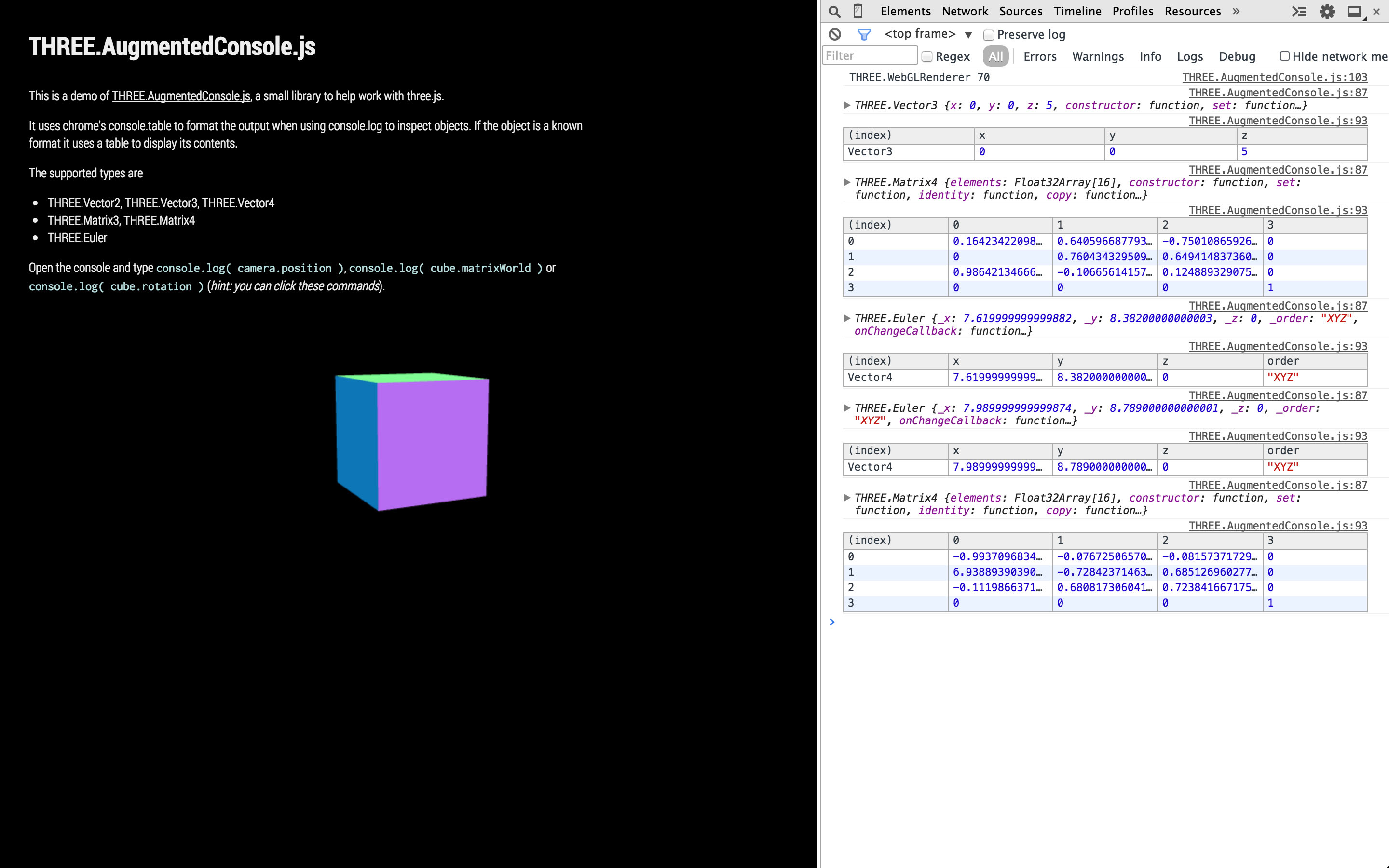
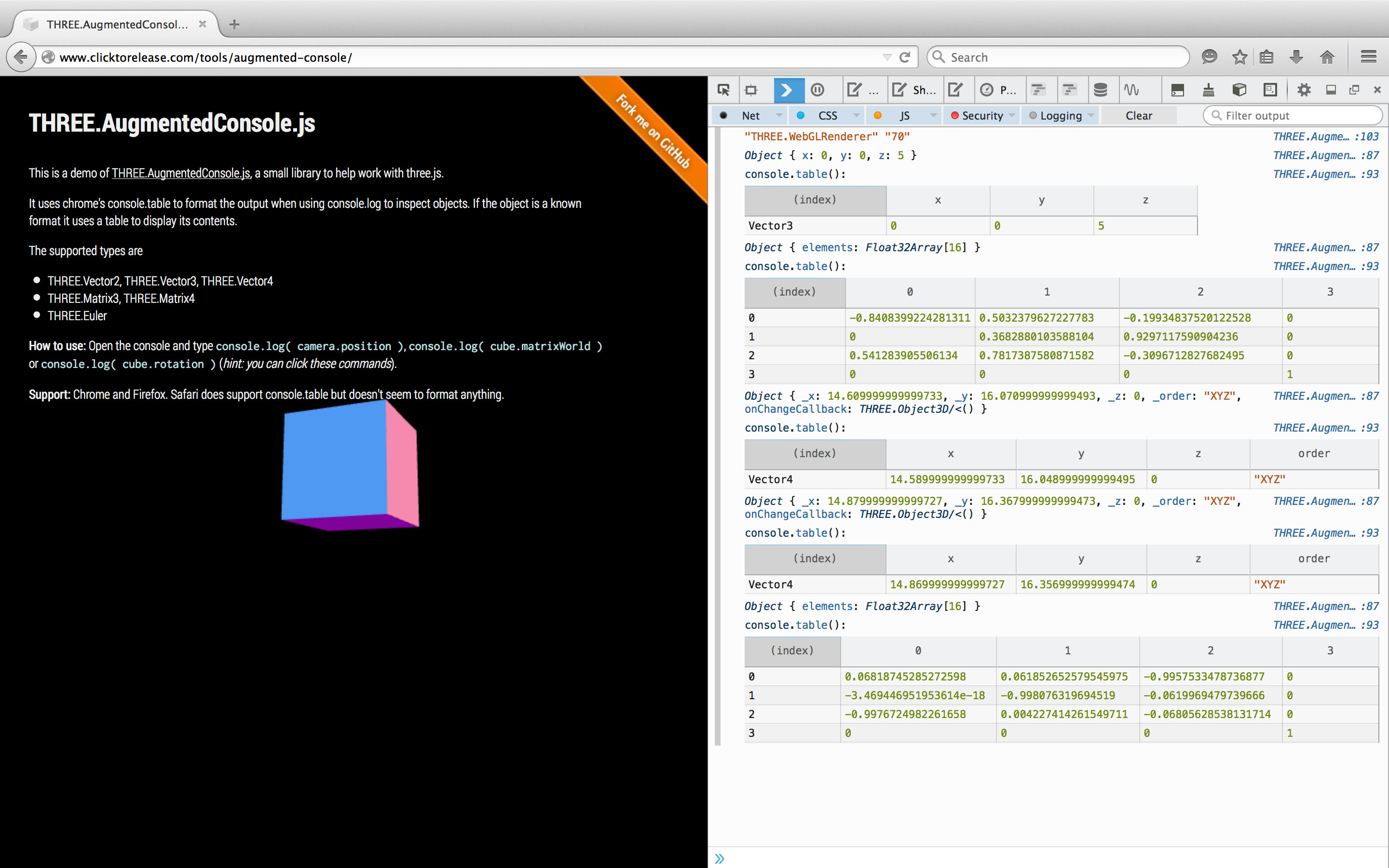
Snapshots
The 2015 version, on Chrome
 and on Firefox
Support
Chrome, Firefox, and Safari.
Check more stuff here: clicktorelease.com and twitter.
License
MIT