
tiergear
v0.2.1
Published
Let a decision model pick the model and reasoning effort for Claude Code sessions and Orca workers

Maintainers
 jang2162
Readme
tiergear
A plugin and CLI that lets a decision model (the judge) pick the model and reasoning effort for Claude Code sessions and Orca workers.
- First turn: the first prompt goes to the judge, which returns a tier (trivial, quick, standard, deep, max). Tables A and B turn that into a model and effort. The first turn has no cache to lose, so the model changes too.
- Later turns: by default the model stays and only effort changes. Raising is easy (confidence 0.5); lowering is hard (confidence 0.85 for 2 turns in a row), unless the optional instant switch is on and the judge is sure enough. With the model held, trivial is off after the first prompt: on one model it only repeats quick's effort, so lowering stops at quick and a trivial pick becomes quick. A session that starts on trivial stays there until it moves.
- Floor: the tier never drops below one step under the first decision. Sessions started with
tiergear launch/orca-spawnuse the launch tier itself as their floor, so a--min-tierholds for the whole session. - Ceiling: a session launched with
--max-tiernever rises above it, whether the judge asks for a harder tier or the session looks stuck. - Pick a tier, or manual, from the band: the band above the prompt has a button per tier and one for manual (see Status band). A picked tier is a starting point; the judge keeps moving it as usual. manual withdraws what tiergear applies until you pick a tier again.
- Manual changes stand, routing carries on: changing the model or effort yourself with
/modelor/effortmid-session keeps your values until the judge moves the tier; the move then works from the model you chose. Only manual stops routing. The change is spotted by comparing the session values the engine reports between turns, so tiergear's own changes don't count. If the engine switches to a fallback model from the first request of a turn, that can also look like a manual change.
If the judge is slow or fails, that turn proceeds untouched.
Which prompts are judged
Only prompts the user typed are judged: terminal input (composer), Remote Control (bridge), and the SDK or claude -p (sdk). Background task notifications, scheduled tasks and /loop, messages from other sessions or SendMessage, observers, auto-continue, plugin-sent prompts, and unknown origins (unclassified) pass through unjudged, and the tier and applied values stay as they are. Prompts that enter a running turn (including ones typed and queued while a turn runs) are not judged. Slash commands starting with / are not judged.
Example
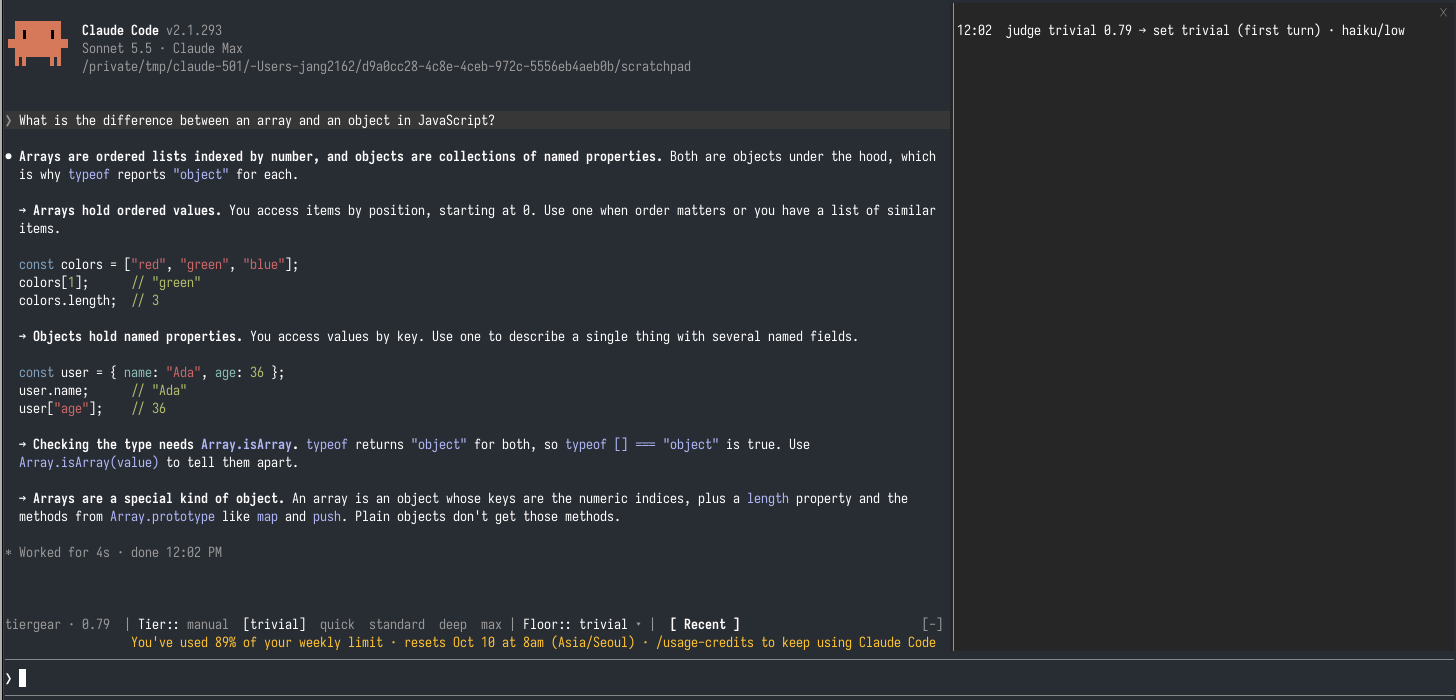
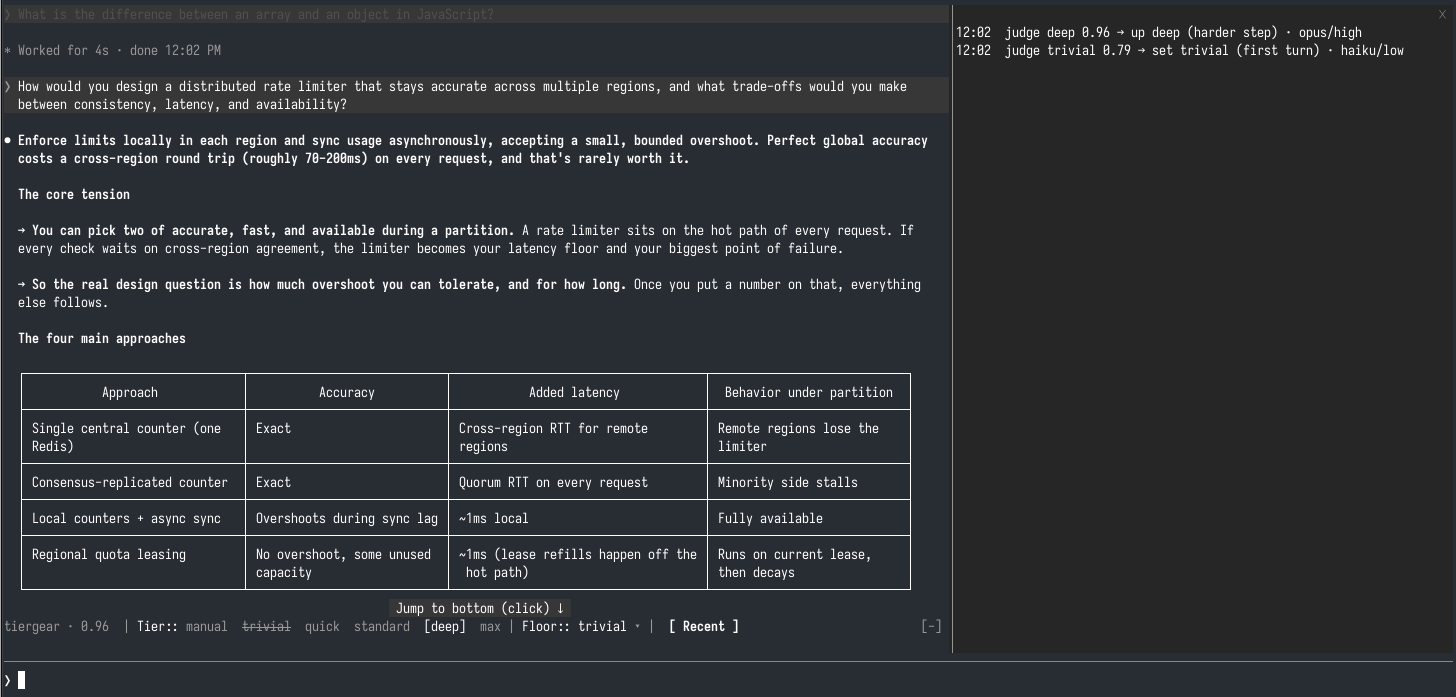
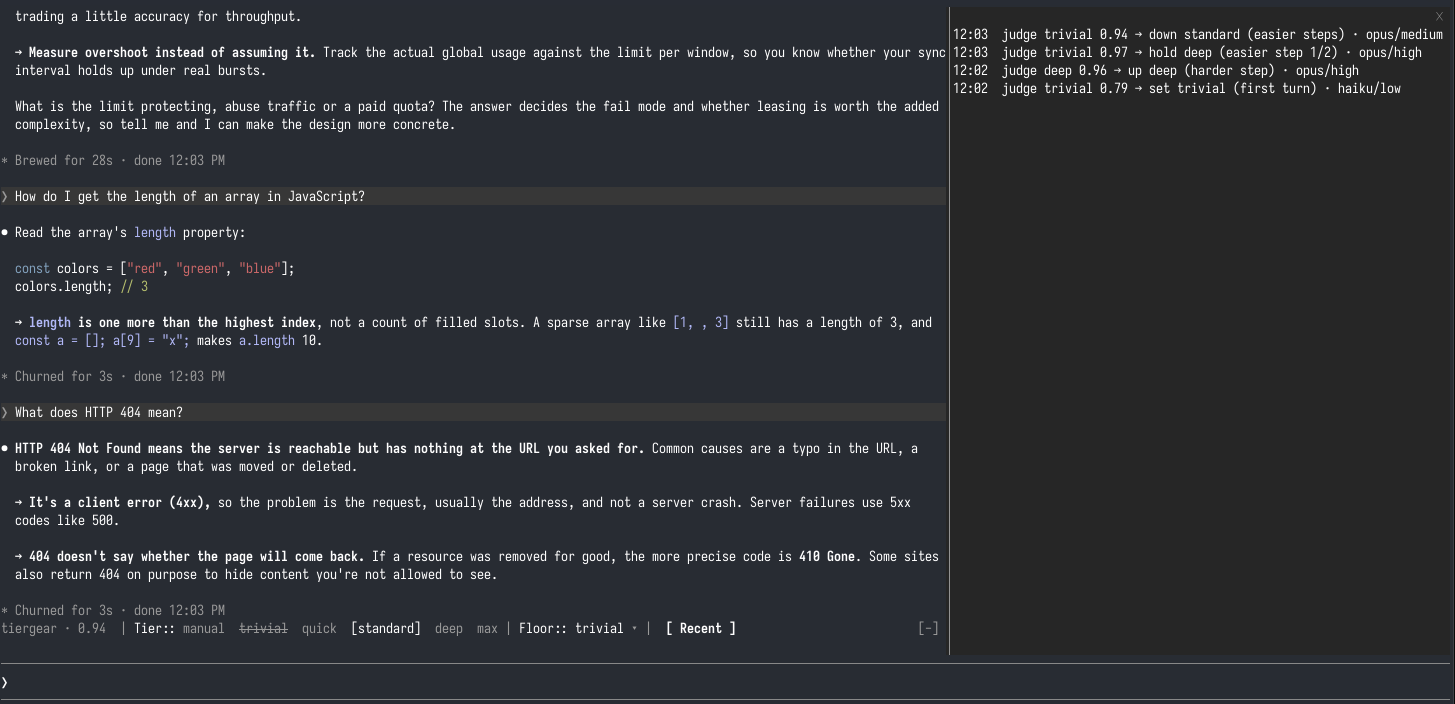
One session, three steps. The band above the prompt shows the tier in effect (bracketed), and [ Recent ] opens the pane on the right with each decision.
1. An easy first question starts small. The judge calls it trivial (0.79), so the first turn runs on haiku/low.
2. A hard question raises the tier at once. The next prompt is a distributed rate limiter design. The judge answers deep (0.96), and tiergear raises to deep, opus/high. Raising needs only a confidence of 0.5, so one prompt is enough. Haiku has no deep effort in Table B, so the model moves to opus here and the cache is lost once.
3. Easy questions bring it down slowly. Back to small questions, the first trivial answer (0.97) only counts as easier step 1/2 and the session holds on deep. The second one (0.94) lowers it one step to standard, opus/medium. The model stays on opus the whole time, so only the effort changes. Trivial is struck through: with the model held it would only repeat quick's effort, so lowering stops at quick.
Install
Requires Claude Code 2.1.289 or later. At the prompt of a Claude Code session:
/plugin marketplace add jang2162/tiergear
/plugin install tiergear@tiergear
Pick a scope when asked (user is first). The hooks run in that session at once and in every new session under that scope. /plugin lists it as tiergear@tiergear. The default judge, jev, needs a TypeSafe API key in TYPESAFE_API_KEY (your shell or user settings) or in the judgeApiKey option; without one it answers nothing and the [ Recent ] pane shows judge no API key for jev. Or pick a local judge (laya, kev) in the plugin options.
To update: claude plugin update tiergear@tiergear, then /reload-plugins.
CLI (optional)
tiergear launch, tiergear orca-spawn, tiergear stats and tiergear status are a separate command-line tool; the hooks don't need it. Requires Node 20 or later.
npm install -g tiergearwhich tiergear should print the CLI path.
From a clone (development)
To run the hooks and the CLI from a working copy instead, so /reload-plugins picks up edits without an update:
git clone https://github.com/jang2162/tiergear.git
cd tiergear
npm install && npm run build && npm link
mkdir -p ~/.claude/skills
ln -s "$PWD" ~/.claude/skills/tiergear
claude plugin list | grep -A3 tiergear
You should see tiergear@skills-dir and Status: ✔ loaded. If tiergear@tiergear is also installed, it takes precedence and the clone is not loaded (claude plugin list says so); uninstall it with claude plugin uninstall tiergear@tiergear to run from the clone.
Judges
All three judges use TypeSafe's <baseUrl>/v1/systemone contract. The default is jev.
| Preset | Address | Model | Key env var | Timeout (first turn / later) |
| --- | --- | --- | --- | --- |
| jev | https://api.typesafe.ai | jev-latest | TYPESAFE_API_KEY (required) | 2000ms / 1200ms |
| laya | http://localhost:11435 | laya | OLLAYA_API_KEY (optional) | 3000ms / 2500ms |
| kev | http://localhost:8009 | kev-latest | KEV_API_KEY (optional) | 3000ms / 2000ms |
- jev needs a key and sends data to TypeSafe's servers.
- laya runs locally with
ollaya run laya. - kev points at a server you run locally or on Modal (change the address with
judgeBaseUrl). - A judge address must be
https, orhttpto this machine (localhost,127.0.0.1,[::1]), since prompts travel in the request. Any other address is refused and the turn goes on untouched. - A preset's key goes only to that preset's own address. Point
judgeBaseUrl(or the CLI's--judge-url) elsewhere and set the key for it explicitly withjudgeApiKey(CLI:TIERGEAR_JUDGE_API_KEY);TYPESAFE_API_KEYand the like are not sent there. - A key that a repository's
.claude/settings.jsonsupplies (inenv) is ignored, so a cloned repo can't route your prompts to its own account. Keys in your user settings,.claude/settings.local.jsonor your shell are used. - After 3 judge failures in a row, the session skips the judge for 5 minutes and keeps its current state instead of falling back to the tables.
Tables A and B
Table A: the model each tier starts on
| Tier | Claude | Codex | | --- | --- | --- | | trivial | haiku | gpt-5.6-luna | | quick | sonnet | gpt-5.6-terra | | standard | sonnet | gpt-5.6-terra | | deep | opus | gpt-5.6-terra | | max | fable | gpt-5.6-terra |
Claude's trivial tier uses haiku. Claude Code's auto mode may not run on haiku, so a haiku session could stop to ask for approval on commands. If that happens, see Sonnet for trivial.
Table B: effort per model (- means no effort is sent; the haiku row applies to trivial, the default, and to any tier you move to haiku)
| Model | trivial | quick | standard | deep | max | | --- | --- | --- | --- | --- | --- | | haiku | low | medium | high | - | - | | sonnet | low | low | medium | high | max | | opus | low | low | medium | high | max | | fable | low | low | medium | high | xhigh | | gpt-5.6-luna (Codex) | low | low | medium | high | high | | gpt-5.6-terra (Codex) | low | low | medium | xhigh | max |
On Codex, deep and max both use gpt-5.6-terra; only the effort differs (xhigh vs max).
A session on a model without effort can't be raised through effort alone, so raising the tier switches to that tier's model even when switchModelMidSession=false (the whole cache is lost once, since each model has its own cache).
Customizing the tables
Put only the cells you want to change in ~/.config/tiergear/tables.json; they are merged over the defaults.
{ "claude": { "effort": { "opus": { "deep": "max" } } } }Model cells go under models, as in {"claude":{"models":{"deep":"opus"}}}. A model must be a plain id (letters, digits, ., _, -, :, / and brackets as in opus[1m]), since it ends up in a launch command a shell reads. Effort values are low, medium, high, xhigh, max, or null. If any value or the JSON itself is invalid, the whole file is ignored and the default tables are used (this is noted in the hook log). Hooks read the file once, the first time it's needed after session start, so open a new session after editing it.
Sonnet for trivial (auto mode users)
If you rely on auto mode and find trivial sessions stop to ask for approval, put sonnet back with one cell:
{ "claude": { "models": { "trivial": "sonnet" } } }Permission checks can be turned off in two ways:
One session:
claude --dangerously-skip-permissions.Every session, including the workers
orca-spawnstarts: in~/.claude/settings.json,{ "permissions": { "defaultMode": "bypassPermissions" } }
Use the settings file if you start workers with tiergear. tiergear launch prints a command with only --model and --effort, orca-spawn starts the agent with that command, and inside a Run Orca's worker-start builds the command itself, so none of them adds the flag. With only the flag, a haiku worker may ask for approval again.
Bypass mode runs every tool call without asking. Use it only where you accept that, such as a sandbox or a throwaway worktree.
Plugin options
Change these in /config (plugin options).
| Option | Default | Description |
| --- | --- | --- |
| judge | jev | Judge preset: one of jev, laya, kev (shown as a list in /config). An unknown value falls back to jev and is noted once in the hook log |
| judgeBaseUrl | preset | Leave empty for the preset's address. Must be https, or http to localhost |
| judgeModel | preset | Leave empty for the preset's model |
| judgeApiKey | preset env var | Leave empty to use TYPESAFE_API_KEY, OLLAYA_API_KEY, or KEV_API_KEY, which only go to the preset's own address (sensitive) |
| switchModelMidSession | false | Also change the model after the first turn. Off: only effort changes. A model change always loses the whole cache, since each model has its own; an effort change keeps it on Opus 5.5, Sonnet 5.5, Haiku 5.5 and Fable 5.1 (see Cost) |
| instantSwitchConfidence | off | Confidence · instant switch: a lower tier the judge is at least this sure of applies at once, straight to that tier (never under the floor), skipping downgradeStreak. Leave unset or 0 to keep it off |
| minDowngradeConfidence | 0.85 | Confidence · lower: minimum confidence for a turn to count toward lowering |
| minUpgradeConfidence | 0.5 | Confidence · raise: minimum confidence to raise the tier |
| stuckConfidence | 0.6 | Confidence · stuck: raise one step when the judge's stuck probability is at or above this |
| downgradeStreak | 2 | Consecutive turns needed to lower one step |
| stuckFailures | 3 | Raise one step after this many identical tool failures in a row |
| firstTurnTimeoutMs | preset | First-turn latency budget. At most 8000ms (the whole hook budget is 10s, so larger values are cut to 8000) |
| turnTimeoutMs | preset | Later-turn latency budget. At most 8000ms |
| showRecentButton | true | Show the [ Recent ] button above the prompt. Off: /tiergear still opens the pane |
| showPrefix | true | Start the band with tiergear |
| showStatusText | true | Show the line's parts below (all four at once). Turn it off when a status line tool shows them (see Status line tools) |
| showTier | true | The tier, deep |
| showConfidence | true | The judge's confidence, 0.91 (n/d without one) |
| showModelEffort | true | The model and effort in effect, opus/high (→ opus/high when tiergear just applied them) |
| showReason | true | Why nothing changed, unchanged (same tier) |
| showTierButtons | true | Show the manual and tier buttons above the prompt |
| showFloor | true | Show the floor picker above the prompt |
Status band
tiergear shows its state in one row just above the prompt: a line, the Tier picker (manual and a button per tier), the Floor picker, and [ Recent ]. The choice in effect is bracketed; the others are dim.
tiergear · deep 0.91 → opus/high | Tier:: manual ~~trivial~~ quick standard [deep] max | Floor: quick | [ Recent ]It doesn't use the status line below the prompt. Before anything is decided the line reads just tiergear and no button is bracketed.
The line starts with tiergear · and shows the model and effort the session is running on as model/effort; a model without effort shows -.
- Applied:
tiergear · deep 0.91 → opus/high. - Unchanged:
tiergear · standard 0.62 · sonnet/medium · unchanged (<reason>). When tiergear isn't overriding anything (low confidence, manual), this is the session's own model and effort. - The line is set when a prompt is judged, then refreshed with the values the engine reports when the turn starts. Before the session's first turn the values may not be known yet: an unchanged line then leaves them out, and an applied line shows only the effort if tiergear isn't setting the model.
unsetappears when no tier has been decided yet, andn/dtakes the place of the confidence when the judge gave no answer (as after a pick from the band).
Reasons for no change: no answer (no judge response), low confidence, same tier, manual (manual is chosen), manual tier (the first prompt runs on a tier picked before it), manual change (you changed the model or effort with /model or /effort), floor set (the floor was changed by hand), at floor (can't go lower), at ceiling (can't go higher than the launch's --max-tier), easier step N/M (Nth lowering candidate, M needed), stuck at max.
Tier buttons and floor
Floor picks the lowest tier the session may go to. A tier above the current one raises the session to it at once. A tier under the floor is struck through and can't be clicked; lower the floor first. With the model held (
switchModelMidSession=false), trivial is struck through after the first prompt. A floor above a launch's--max-tierstops at it. Set before the first prompt, the first decided tier starts no lower than it. The floor picker is a select: click or focus it, then use the arrow keys and Enter.One click picks. A tier applies from the next request, even in the middle of a running turn. Mid-session only the effort changes (from the session model's column in table B), unless
switchModelMidSessionis on. The judge goes on from the picked tier by the usual rules. A pick below the floor lowers the floor to it. A pick may go above a launch's--max-tier, but the judge still won't raise past it.Picked before the first prompt, a tier works like a launch tier: the first turn runs on its table A model and effort without asking the judge, and the judge takes over from the second prompt.
manual withdraws the model and effort tiergear applies, so the session runs on its own (startup flags,
/model,/effort), and stops asking the judge.[manual]stays bracketed until you pick a tier.Picking a tier while manual turns tiergear back on at that tier, on the session's own model with the effort from the tier, and the judge is asked again from the next prompt. That prompt becomes the task the judge reads.
Recent decisions
Press [ Recent ] to open a pane listing this session's decisions, newest first, and press it again to close it. /tiergear opens the pane too. To hide the button, turn off showRecentButton in the plugin options. Each part of the band has its own option (showPrefix, showStatusText and the line's parts, showTierButtons, showFloor, showRecentButton); with all of them off the band draws nothing.
12:11  judge quick 0.44 → hold deep (low confidence) · opus/high
11:16  judge deep 0.52 → up deep (harder step) · opus/high
Each line is: time, what the judge proposed and its confidence, what tiergear did and the resulting tier (with the reason), and the model/effort tiergear applied (session when it applied nothing). judge skipped means the judge wasn't asked (a launch floor, a picked tier, manual, a paused judge); a failure shows its reason, like judge timed out after 2000ms. A pick from the band (a tier or manual) reads manual instead, as in manual → set quick (manual tier) · opus/low. The pane reads the decision log, so it still works after a plugin reload; the line comes back with the next judged prompt.
Status line tools (ccstatusline)
Claude Code's status JSON reports the session's own model and effort, not what tiergear applies per request, so a status line built from it misses tiergear's changes. The hook writes what the band shows to ~/.local/state/tiergear/status/<session>.json, and tiergear status prints it:
tiergear status [tier|state|model|effort] [--session <id>] [--json] [--format <template>]- The session is
--session, else thesession_idof the status JSON piped on stdin (what a status line command receives), else the session updated last. - Before tiergear has a value for the session (a new session, the first turn), the model and effort come from the status JSON on stdin, the session's own; the tier stays empty. A value tiergear doesn't know yet is filled the same way.
- Default output:
deep · opus/high,manual · sonnet/mediumwhen manual; nothing (exit 0) when neither tiergear nor the status JSON on stdin has a value, so a widget hides. The stdin fallback applies only without--session. - A field prints that value alone, for a widget of its own:
tiergear status modelprintsopus,tiergear status effortprintshigh,tiergear status tierprintsdeep,tiergear status stateprintsautoormanual. An unknown value prints nothing. A field wins over--jsonand--format. --formatfills{tier},{model},{modelName}(as Claude Code names it,Opus 5.5),{effort},{state}(autoormanual) and{line}(the band's text); an unknown value is-(unsetfor the tier), and a template with no known value in it prints nothing.--jsonprints the whole record, ornull.
With the line shown there, turn off showStatusText to keep the band to its buttons.
In ccstatusline, add a Custom Command widget with the command tiergear status, or one widget per value (tiergear status model, tiergear status effort, ...) to color them apart (the CLI must be installed, see CLI). It runs in about 50ms, well within the widget's default 1000ms timeout. The value follows a pick or a judged prompt at the next status line refresh.
CLI
tiergear launch "<brief>" [--agent claude|codex] [--worktree <path>] [--min-tier <tier>] [--max-tier <tier>] [--judge jev|laya|kev] [--judge-url <url>] [--judge-model <name>]
tiergear orca-spawn "<brief>" --name <task> [--agent claude|codex] [--repo <dir>] [--base-branch <ref>] [--min-tier <tier>] [--max-tier <tier>] [--judge ...]
tiergear stats [days]
tiergear status [tier|state|model|effort] [--session <id>] [--json] [--format <template>]launch: judges the brief and prints the command to run (e.g.claude --model opus --effort high). With Claude,--worktreewrites a floor for that path. The path is stored as an absolute real path (symlinks resolved), so a relative path still works for a session opened in that folder. With--agent codex, floors are Claude-only, so none is written and a one-line note is printed instead.orca-spawn: needs Orca, the multi-agent IDE, with itsorcaCLI on your PATH (or named byORCA_CLI_COMMAND). It creates an Orca worktree, writes the floor, and starts the agent there with the judged model and effort. Prints the result as JSON.--base-branchpicks the ref the worktree starts from; without it Orca uses the repo's default base, which may be a remote branch behind your local one. A brief that starts with!or/(which the agent's prompt would run as a shell or slash command) or holds control characters other than line breaks and tabs is refused before the judge is asked.- Inside an orchestration Run (run from the coordinator terminal after
orca orchestration run-create): starts the agent withorca orchestration worker-start, so the worker gets Orca's lifecycle preamble and reportsworker_doneto the Run. The JSON includesdispatch(runId,taskId,dispatchId,handle). A failedworker-startexits non-zero with Orca's error; don't rerun it blindly, since Orca may have left resources behind. - Without a Run: creates a terminal, waits for the agent, then types the brief as is (no preamble,
dispatchisnull). If Claude asks whether to trust the folder,orca-spawndoes not approve it for you. Approve it yourself in Orca within 120 seconds. If the agent isn't ready, the brief is not sent (exit code 1) and a fallback shell may be left in the worktree. - The floor is written before the agent's first prompt in both cases. Without it, the first turn would be judged on Orca's preamble, which usually gives low confidence.
- Inside an orchestration Run (run from the coordinator terminal after
stats: number of recorded decisions, counts by change type, and response rate and average latency per judge (default 7 days).status: what a session runs on now, for status line tools; see Status line tools.--min-tier <tier>and--max-tier <tier>(either or both; trivial, quick, standard, deep or max) bound the launch. The judge's tier is clamped into the range, and tables A and B pick the model and effort from the clamped tier. The floor written for the session holds the clamped tier as its floor and--max-tieras its ceiling, so later turns stay in the range too. An unknown tier or a minimum above the maximum exits 2 before the judge is asked or a worktree is created. With--agent codexthe range sets the starting tier only (floors are Claude-only), and a one-line note says so.- Both commands report the judge's tier beside the one applied.
launchprintstiergear: judged <tier>, applied <tier>on stderr (judged nonewhen the judge decided nothing); stdout stays the command alone.orca-spawn's JSON hastier, the tier applied after the range, andjudgedTier, the judge's tier before it (nullwhen the judge failed, gave no tier, or had confidence under 0.5). - Without a range, a floor is written only when the judge actually decided. If the judge failed, didn't answer, or had low confidence and standard was used instead, no floor is written and a warning is printed. With
--min-tieror--max-tier, standard is clamped into the range and the floor is written anyway, since the range is yours, not the judge's. So with only--max-tierand a failed judge, the session's floor is standard (or--max-tier, if lower). - The CLI's judge timeout is 5000ms.
The CLI can't read plugin options, so it looks up settings from flags, then environment variables, then the preset.
| Variable | Meaning |
| --- | --- |
| TIERGEAR_JUDGE | Judge name (default jev) |
| TIERGEAR_JUDGE_URL | Judge address |
| TIERGEAR_JUDGE_MODEL | Judge model |
| TIERGEAR_JUDGE_API_KEY | Key (falls back to the preset's key env var, only for the preset's own address) |
| ORCA_CLI_COMMAND | The orca executable orca-spawn runs (default orca on your PATH) |
Where things are stored
| What | Location |
| --- | --- |
| Tables | ~/.config/tiergear/tables.json |
| Floors (valid 24 hours) | ~/.local/state/tiergear/floors/<fnv1a(worktree)>.json |
| Decision log (1000 lines per file; one file per session, not removed) | ~/.local/state/tiergear/decisions/<name>.jsonl |
| Status for status line tools (one small file per session, not removed) | ~/.local/state/tiergear/status/<session>.json |
| Session records (kept 7 days, newest 200) | Plugin $.store under session:<id> (the first prompt is truncated to 2000 characters, and dropped while a session is manual) |
Raw prompt text is never written to the logs.
Cost
- A model change always loses the whole cache. Each model has its own cache, so the next request reads the full history with no hits, even if the content is identical (Claude Code docs).
- An effort change usually keeps it. On Opus 5.5, Sonnet 5.5, Haiku 5.5 and Fable 5.1 with an API key or a Claude subscription, Claude Code changes effort without losing the cache. On other models, on Amazon Bedrock, Google Cloud's Agent Platform or a Claude apps gateway, with
CLAUDE_CODE_DISABLE_EXPERIMENTAL_BETASset, or under a HIPAA configuration, it still loses the messages cache (Claude Code docs, API docs). This is the documented behavior for effort set by Claude Code itself; whether tiergear's override of a request's effort is treated the same hasn't been verified, so checkPrompt cache (main)in/usage. - Nothing is lost on the first turn, or once the cache has expired (one hour for the main conversation on a Claude subscription, five minutes with an API key or a cloud provider).
- That's why the default mid-session change is effort only, and lowering only happens after repeated high-confidence turns, to keep changes rare. It's also why the haiku column in Table B has quick and standard filled in: trivial can rise there without leaving haiku.
- Raising from a model without effort switches the model and loses the cache once.
- The judge call itself adds cost and latency to every judged prompt (within the timeouts above).
Data sent to the judge
- First turn: the first prompt (only the start and end if long).
- Later turns: the next prompt, the last 3 exchanges, the first prompt (up to 500 characters), the number of files edited, the repeated failure count, and the current tier and effort.
- An exchange is one prompt, the assistant's last words before the next prompt, and the names of the tools it used. Tool calls and their results are folded into it, so a busy turn doesn't push the conversation out of view.
- Recent text gets more room: the reply the next prompt answers is sent up to 1500 characters, keeping mostly its end, where a question usually sits. Prompts and older replies get 400 characters each. Longer text keeps its start and end.
- jev sends data externally (TypeSafe). laya and kev stay on your local server (if you run kev on Modal, data goes there).
- Prompts that aren't judged (see "Which prompts are judged" above) never go to the judge as the prompt being judged, but one can still appear among the recent exchanges: a task notification or a message from another session is a prompt in the conversation too. Nothing is masked, so with jev that text leaves your machine.
Limitations
- Codex gets its model and effort only at launch (
launch/orca-spawn). Mid-session adjustment works only in Claude Code. - Hooks are an early-access feature, so the contract can change with Claude Code updates.
- The confidence thresholds (0.5, 0.85, 0.6) are tuned for Jev. For other judges, check response rate and latency with
tiergear statsand adjust the options. - Subagent requests are left alone; only main-loop requests are changed.
Development
npm test, npm run typecheck and npm run validate:plugin check a working copy. types/claude-code.d.ts is the hook API declaration Claude Code 2.1.289 generated; after a Claude Code update, replace it with the .claude-plugin/types/claude-code/index.d.ts the engine writes next to a loaded plugin.
To release, set the same version in package.json and .claude-plugin/plugin.json, push, then publish a GitHub release tagged v<version> (gh release create v<version> --generate-notes). .github/workflows/publish.yml tests it and publishes it to npm through npm trusted publishing, with no token stored.
License
MIT