
timeline-calendar-react
v0.0.5
Published
A timeline calendar component for React, built with TypeScript and Vite.
Downloads
8

Maintainers
 shinenkov
Readme
Timeline Calendar React
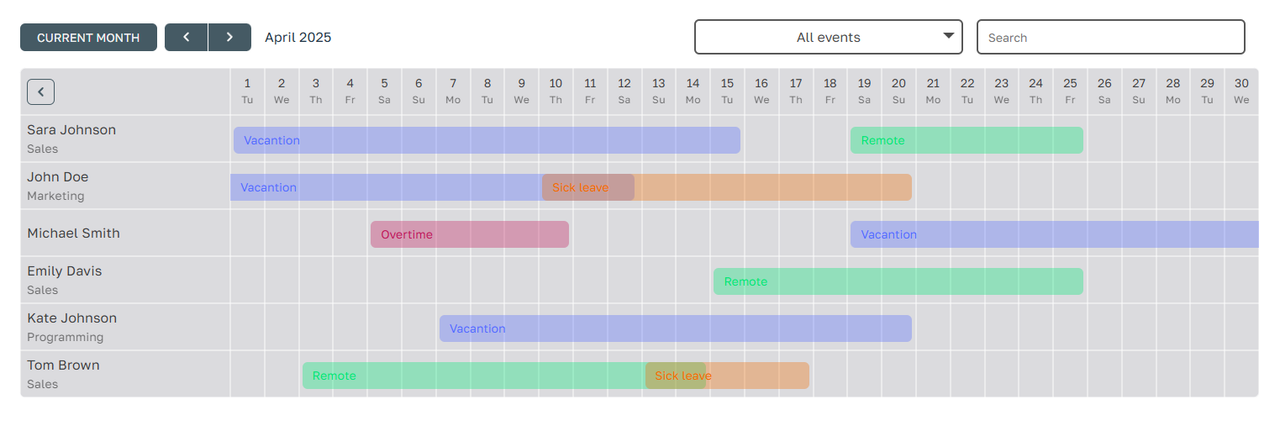
timeline-calendar-react is a customizable React library for displaying timeline-based calendars. It supports features like user ranges, events, statuses, and more, with a flexible and responsive design.
Demo on vercel
Installation
Install the library using npm:
npm install timeline-calendar-reactUsage
Here is an example of how to use the TimelineCalendar component in your project:
import TimelineCalendar from 'timeline-calendar-react';
// ....
export const mockUsers = [
  { id: 1, name: 'John Doe', department: 'Sales' },
  { id: 2, name: 'Jane Smith', department: undefined },
];

export const mockRanges = [
  {
    id: 1,
    userId: 1,
    eventType: 1,
    statusType: 1,
    startDate: '2025-04-01',
    endDate: '2025-04-05',
  },
  {
    id: 2,
    userId: 2,
    eventType: 2,
    statusType: 2,
    startDate: '2025-04-10',
    endDate: '2025-04-15',
  },
];

export const mockEvents = [
  { id: 1, label: 'Vacation' },
  { id: 2, label: 'Sick leave' },
];

export const mockStatuses = [
  { id: 1, label: 'Approved' },
  { id: 2, label: 'Pending' },
];

const App = () => {

  return (
    <TimelineCalendar
        ranges={mockRanges}
        users={mockUsers}
        events={mockEvents}
        statuses={mockStatuses}
    />
  );
};

export default App;
Props
TimelineCalendarProps
| Prop Name | Type | Required | Default | Description |
|------------------|-------------------------------|----------|---------------|-----------------------------------------------------------------------------|
| ranges | RangeType[] | Yes | - | Array of ranges to display on the calendar. |
| users | User[] | Yes | - | Array of users to display in the sidebar. |
| departments | Department[] | No | undefined | Array of departments to display under user names. |
| events | EventType[] or string[] | No | undefined | Array of events to display with custom labels and colors. |
| statuses | StatusType[] or string[] | No | undefined | Array of statuses to display with custom labels and colors. |
| options | TimelineOptions | No | undefined | render Options |
TimelineOptions
| Prop Name | Type | Required | Default | Description |
|-----------------|--------------------------------|----------|---------------|-----------------------------------------------------------------------------|
| theme | "dark" or "light" | No | "light" | Theme of the calendar. |
| cellSize | string | No | undefined | Size of each calendar cell (e.g., '40px'). If undefined is Flexible |
| accentColor | string | No | '#a7bac3' | Accent color for buttons and highlights. |
| sidebarWidth | number | No | 200 | Width of the sidebar in pixels. |
| lang | "en" or "ru" | No | "en" | Language for the calendar (English or Russian). |
| currentDate | string (format "YYYY-MM-DD") | No | today | Current date to display (e.g., '2025-04-01'). |
| openedSidebar | boolean | No | true | Whether the sidebar is open by default. |
| hideFilters | boolean | No | false | Whether to hide the filters section. |
Types
TimelineCalendarProps
type TimelineCalendarProps = {
  ranges: RangeType[];
  users: User[];
  // if specified, then displayed under the user name
  departments?: Department[];
  // if specified, then displayed instead of the base colors with the specified labels
  events?: EventType[] | string[];
  // if specified, then displayed instead of the base colors with the specified labels
  statuses?: StatusType[] | string[];
  options: {
    theme?: Theme; // 'dark' | 'light'  [default: 'light']
    cellSize?: string; // f.e. '40px' [default: flexible]
    accentColor?: string; // f.e. '#FF0000' [default: '#a7bac3']
    sidebarWidth?: number; // f.e. 240 [default: 200]
    lang: Locale; // 'en' | 'ru' [default: 'en']
    currentDate?: string; // f.e. '2020-12-30' [default: today]
    openedSidebar: boolean; // true | false  [default: true]
    hideFilters: boolean; // true | false  [default: false]
  } as TimelineOptions;
};
RangeType
type RangeType = {
  id: number | string;
  startDate: string;
  endDate?: string;
  userId: number | string;
  eventType?: string | number;
  statusType?: string | number;
  comment?: string;
};
User
type User = {
  id: number;
  name: string;
  department?: string | number;
};
Department
type Department = {
  id: number;
  manager?: string;
  name: string;
};
EventType
type EventType = {
  id: number;
  label: string;
  // TODO: will appear in the future
  icon?: JSX.Element | string;
  color?: string;
};
StatusType
type StatusType = {
  id: number;
  label: string;
  // TODO: will appear in the future
  icon?: JSX.Element | string;
  color?: string;
};
TimelineOptions
type TimelineOptions = {
  theme?: Theme;
  cellSize?: string;
  lang?: Locale;
  accentColor?: string;
  sidebarWidth?: number;
  openedSidebar?: boolean;
  currentDate?: string;
  hideFilters?: boolean;
}
Features
- Customizable Themes: Choose between light and dark themes.
- Event and Status Management: Display events and statuses with custom labels and colors.
- Responsive Design: Adjust cell sizes and sidebar widths for different screen sizes.
- Localization: Supports English (
en) and Russian (ru) languages.
License
This project is licensed under the MIT License. See the LICENSE file for details.
Contributing
Contributions are welcome! Please open an issue or submit a pull request for any improvements or bug fixes.
Support
If you encounter any issues, feel free to open an issue on the GitHub repository.