
timermcp
v1.2.0
Published
TimerMCP — a millisecond-precision talking stopwatch for Claude via MCP. Voice-start, voice-stop, latency-cancelling math, gamified live wall dashboard (XP, ranks, achievements, streaks), personal bests, speedrun splits, shareable result cards.

Maintainers
 julan
julanReadme
TimerMCP ⏱ — the talking stopwatch for Claude
A millisecond-precision MCP timer server. Say "start the timer" to Claude — the clock starts on the server's monotonic nanosecond clock, a live wall display lights up in your browser, and when you say "stop," Claude announces the official time like a track announcer.
🏁 STOP THE CLOCK! 'ship the landing page' finishes in 4:07.312!
🏆 NEW PERSONAL BEST — 18.455 faster than the old record!
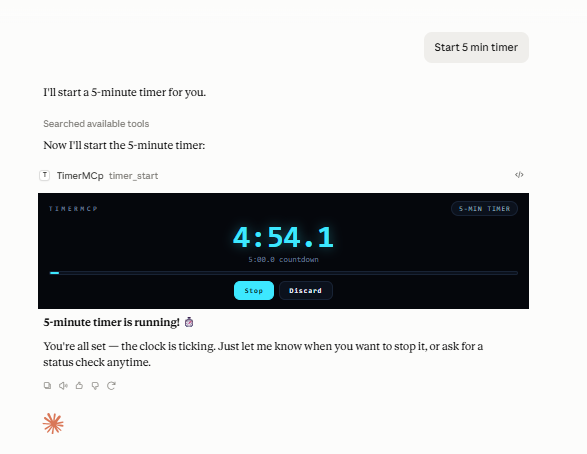
With the free cloud connector (timermcp.com), countdowns render as a live ticking card right in the chat — desktop and mobile:
Why the milliseconds are honest (the latency math)
You say "start" at t₀; the command reaches the server after delay d₁ (typing + model + transport). Server stamps S₁ = t₀ + d₁. You say "stop" at t₁, stamped S₂ = t₁ + d₂.
reported = S₂ − S₁ = (t₁ − t₀) + (d₂ − d₁)Both timestamps are taken server-side, so the constant part of the pipeline delay cancels. Only the difference between start-side and stop-side latency can leak in — and for symmetric calls that's small. All math runs on process.hrtime.bigint() (monotonic nanoseconds), immune to NTP jumps and DST.
If you believe your pipeline is asymmetric, bias it out: timer_config accepts start_offset_ms / stop_offset_ms, subtracted from every result. raw_elapsed_ms (pure monotonic) is always returned alongside the adjusted elapsed_ms.
Setup
Prerequisite: Node.js ≥ 18 (node --version).
TimerMCP is on npm — no clone or build needed.
Claude Code (one command):
claude mcp add timermcp -- npx -y timermcp
claude mcp list   # should show timermcp ✓ connected
Claude Desktop — edit claude_desktop_config.json:
- macOS:
~/Library/Application Support/Claude/claude_desktop_config.json - Windows:
%APPDATA%\Claude\claude_desktop_config.json - Linux:
~/.config/Claude/claude_desktop_config.json
{
  "mcpServers": {
    "timermcp": {
      "command": "npx",
      "args": ["-y", "timermcp"]
    }
  }
}
git clone https://github.com/julanbasnet/timermcp.git
cd timermcp
npm install && npm run build
node dist/index.js --version # prints banner and exits
npm run smoke # full 18-assertion suite
claude mcp add timermcp -- node /absolute/path/to/timermcp/dist/index.jsOn Windows use forward slashes or escaped backslashes in config paths: "C:/tools/timermcp/dist/index.js".
After adding, fully quit and reopen the client (Desktop: quit from the menu/tray, not just close the window). Say "start the timer" and open http://localhost:5717 — the wall display.
Inspector (optional): npx @modelcontextprotocol/inspector npx -y timermcp for an interactive tool console.
Talk to it
| You say | Tool | What happens |
|---|---|---|
| "start the timer" | timer_start | Monotonic start stamp + announcer call |
| "start a 25-minute pomodoro" | timer_start (target_ms) | Countdown mode; stop reports over/under |
| "race me vs the build: start alice and bob" | timer_start ("alice,bob") | Both start on the same nanosecond |
| "split — hero section done" | timer_split | LiveSplit-style lap, delta vs PB pace 🟢🔴 |
| "how long so far?" | timer_status | Live server-side reading |
| "stop the clock" | timer_stop | Official ms, PB check, SVG result card |
| "false start, cancel it" | timer_cancel | Discards without touching history |
| "what's my record?" | timer_history | PBs, recent runs, lifetime totals |
| "switch announcer to drill sergeant" | timer_config | hype · zen · sergeant · sports · minimal |
The viral bits
- Live wall display — electric-cyan timing console at
localhost:5717, streams every millisecond over SSE. Put it on a second monitor or your phone; it reacts the instant Claude acts. Buttons + keyboard (space = split, enter = start/stop) work from the browser too, including a countdown-target field for browser-started pomodoros. - Countdown chime — flip the 🔔 Sound toggle on the wall and every countdown rings out loud the moment it hits zero. (Off by default; browsers require one click before a page may play audio.)
- XP, levels & achievements — every finished run and tracked minute earns XP. Ten ranks from ROOKIE to TIME LORD, a day-streak counter, and a 12-medal achievement shelf (PHOTO FINISH, RECORD BREAKER, BULLSEYE, MIDNIGHT OIL, RACE DAY…), all derived from your local history. Level-ups and unlocks fire toasts + confetti on the wall.
- Personal bests & speedrun splits — every named timer keeps a PB. Splits compare against the same checkpoint on your PB run, LiveSplit-style: "1.204 AHEAD of PB pace 🟢". Confetti on new records.
- Race mode — comma-separated names start on one shared nanosecond stamp (measured Δ in tests: 0.003ms).
- Result cards — every stop writes a 1200×630 SVG finish card (
~/.timermcp/cards/, also served at/card/{id}). Screenshot-ready for X/LinkedIn. - Announcer personalities — hype race-caller by default; zen, drill sergeant, broadcast, or minimal.
- Crash-safe — state persists to
~/.timermcp/state.json; timers running across a restart recover on wall-clock precision (flagged asrecovered).
Environment
| Var | Default | |
|---|---|---|
| TIMERMCP_PORT | 5717 | Dashboard port |
| TIMERMCP_HOST | 127.0.0.1 | Set 0.0.0.0 to view from other devices on your LAN (no auth — trusted networks only) |
| TIMERMCP_HOME | ~/.timermcp | State + cards directory |
| TIMERMCP_NO_DASHBOARD | unset | 1 disables the HTTP server |
Troubleshooting
- Tools don't appear in Claude → the config path must be absolute; fully quit and relaunch the client. Server logs (stderr) land in the client's MCP logs — macOS:
~/Library/Logs/Claude/mcp-server-timermcp.log, Windows:%APPDATA%\Claude\logs\. - Dashboard won't load / "port taken" in logs → another TimerMCP instance owns 5717. Claude Desktop and Claude Code each spawn their own server process; timers still work in both, but give the second one
TIMERMCP_PORT=5718(and its ownTIMERMCP_HOMEif you want separate PBs — otherwise state.json is last-write-wins between them). node dist/index.jsseems to hang → normal; stdio servers wait for a client. Use--versionto sanity-check.- Times look ~equal but off by a constant → that's differential latency; set
start_offset_ms/stop_offset_msviatimer_config(see latency math above).
Test
npm run smoke # 19 assertions: protocol, timing accuracy, offsets, race Δ, dashboard, cardsMIT.