
tinypng-enhanced
v3.0.0
Published
TinyPNG Compressor with multiple API keys support and concurrent processing

Maintainers
 linkary
Readme
TinyPNG 压缩器
支持多个 API 密钥的TinyPNG CLI及模块工具。


English | 简体中文
特性
高级 API 密钥管理
- 支持多个 API 密钥并自动轮换
- 最少使用策略,实现最佳负载均衡
- 从 API 响应实时追踪配额
- 接近限制时智能警告
全面的图片处理
- 🗜️ 图片压缩(PNG、JPEG、WebP、AVIF)
- 🔄 格式转换(PNG ↔ JPEG ↔ WebP ↔ AVIF)
- 📐 智能调整大小(scale、fit、cover、thumb)
- 🎯 批量处理与进度追踪
安装
作为 CLI 工具(全局)
npm install -g tinypng-enhanced作为库
npm install tinypng-enhanced快速开始
CLI 使用
首次设置:
# 配置你的 API 密钥
tinypng config
压缩图片:
# 单个文件(默认命令)
tinypng image.png

# 或者使用显式命令
tinypng compress image.png
tinypng c image.png

# 多个文件(自动显示进度条)
tinypng *.png *.jpg

# 整个目录
tinypng ./photos/

# 带调整大小
tinypng banner.jpg -r -m fit --width 1920 --height 1080
转换格式:
# 转换为 WebP
tinypng convert *.png -f webp

# 转换为 AVIF(最佳压缩)
tinypng cv images/*.jpg -f avif
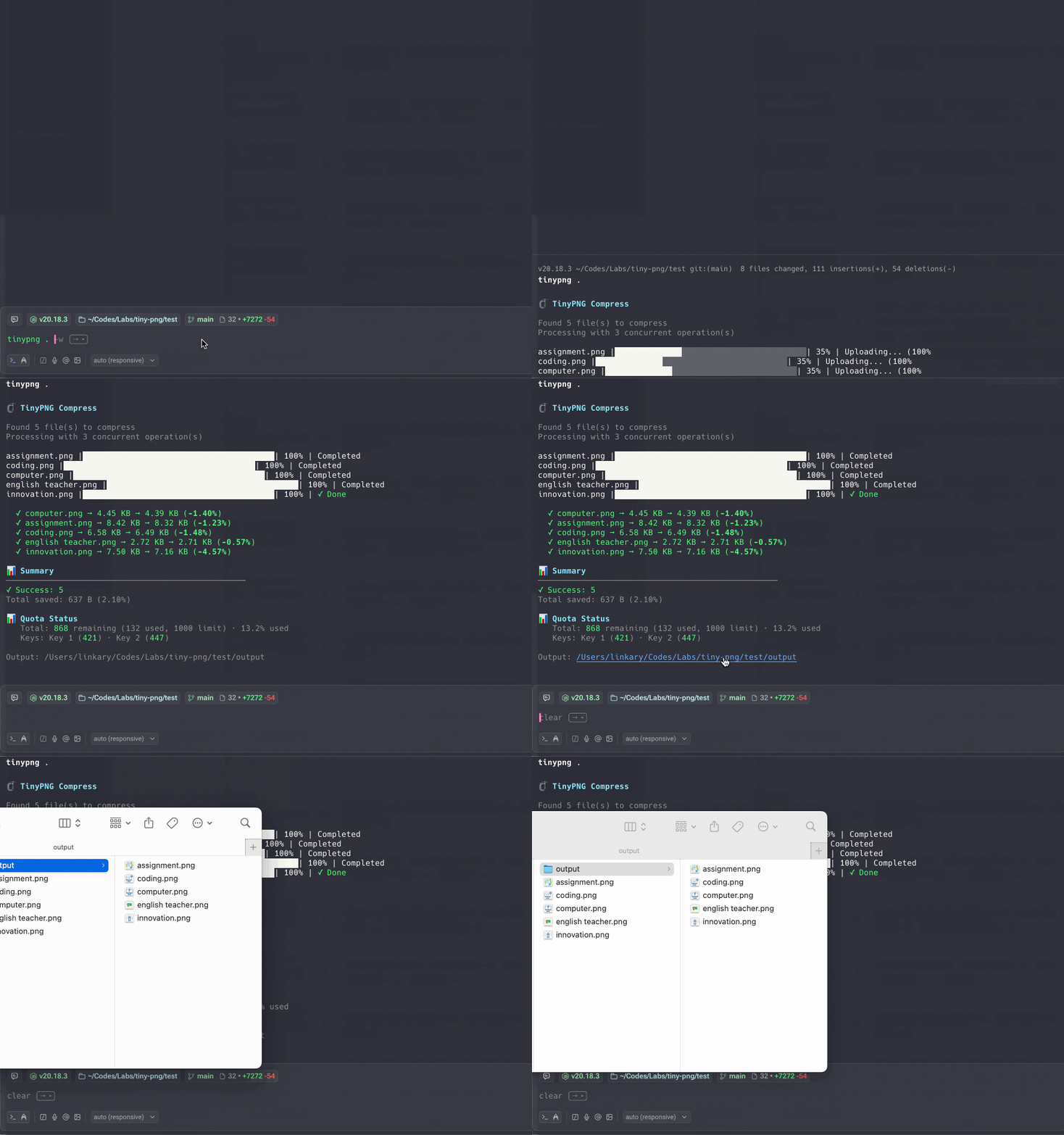
示例:
- 覆盖原图
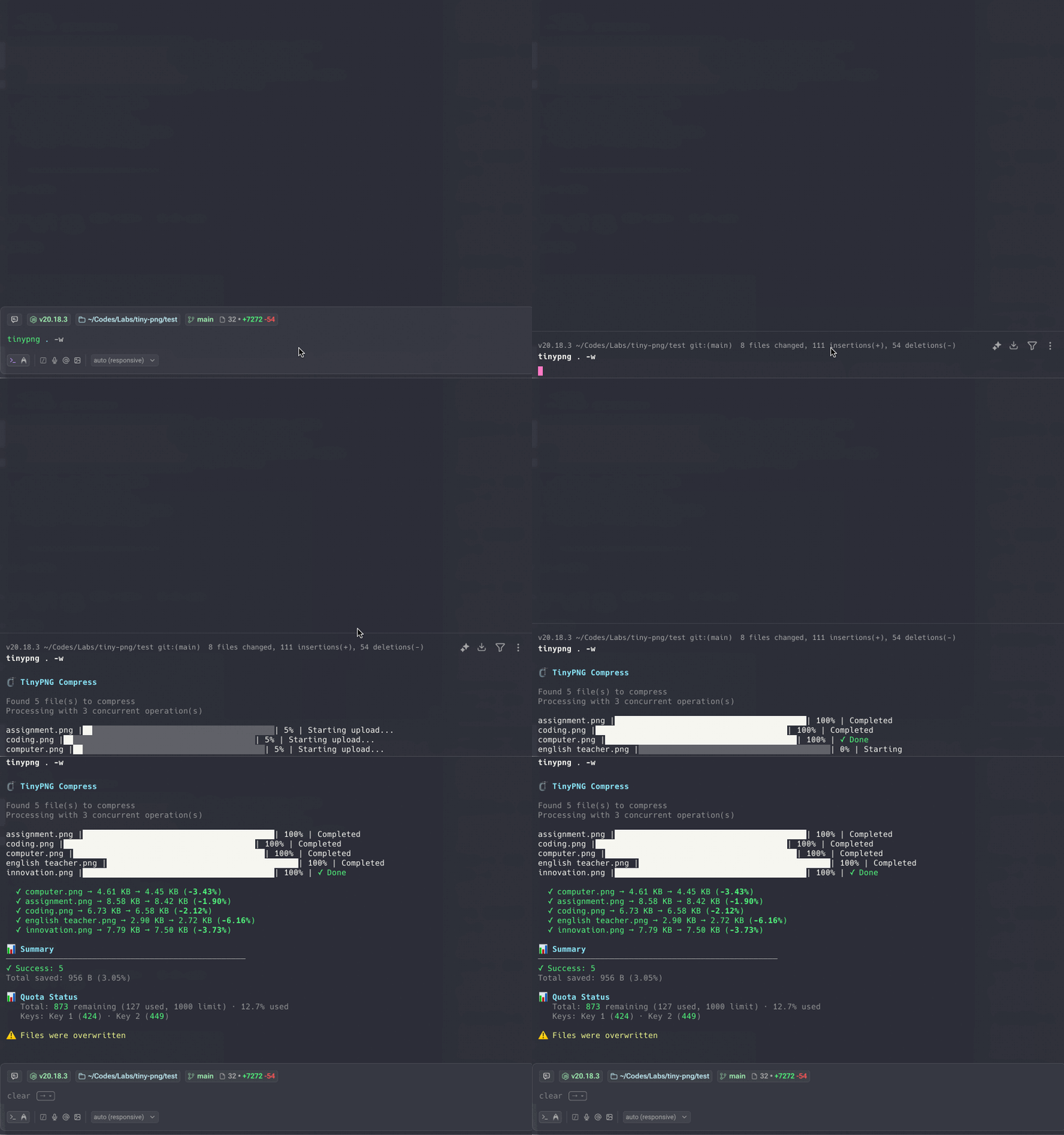
- 不覆盖原图
库使用
import { TinyPNGCompressor } from 'tinypng-enhanced'
import { readFileSync, writeFileSync } from 'fs'

// 使用 API 密钥初始化
const compressor = new TinyPNGCompressor({
  apiKey: ['key1', 'key2', 'key3'], // 多个密钥实现无限压缩
})

// 压缩图片
const inputBuffer = readFileSync('input.png')
const result = await compressor.compress(inputBuffer)

// 保存压缩后的图片
writeFileSync('output.png', result.output)

console.log(`节省 ${result.savedBytes} 字节 (${result.savedPercent}%)`)

// 获取配额信息
const summary = compressor.getSummary()
console.log(`配额已用: ${summary.totalUsed}/${summary.totalLimit}`)
CLI 文档
命令
默认命令(压缩)
⚡ v2.0 新功能: tinypng <files> 现在默认执行压缩操作!
# 新的快捷方式(v2.0+)
tinypng image.png

# 等同于
tinypng compress image.png
tinypng c image.png
tinypng compress(别名:c)
压缩图片,可选调整大小。
tinypng compress <files...> [选项]
# 或简写
tinypng <files...> [选项]

选项:
  -k, --key <keys...>     API 密钥 - 多个密钥用空格或逗号分隔
  -o, --output <path>     输出目录或文件(默认: <input-dir>/output/)
  -w, --overwrite         覆盖原始文件
  -r, --resize            启用调整大小
  -m, --method <method>   调整大小方法(scale、fit、cover、thumb)
  --width <width>         目标宽度
  --height <height>       目标高度
📊 进度显示:
- 单文件: 使用旋转加载器显示状态
- 多文件(2+): 自动显示进度条,实时显示百分比和文件计数
调整大小方法:
| 方法 | 描述 | 必需参数 |
| ------- | ------------------------ | --------------- |
| scale | 按比例缩放图片 | width 或 height |
| fit | 缩放以适应尺寸 | width 和 height |
| cover | 缩放和裁剪以完全填充尺寸 | width 和 height |
| thumb | 智能裁剪用于缩略图 | width 和 height |
示例:
# 基础压缩
tinypng c image.png

# 多个文件并指定输出目录
tinypng c *.png -o compressed/

# 调整大小并压缩
tinypng c banner.jpg -r -m fit --width 1920 --height 1080

# 覆盖原始文件(小心!)
tinypng c *.png -w

# 多个 API 密钥
tinypng c images/*.png -k key1 key2 key3
tinypng convert(别名:cv)
将图片转换为不同格式。
tinypng convert <files...> [选项]

选项:
  -k, --key <keys...>     API 密钥
  -f, --format <format>   目标格式(webp、png、jpeg、avif)【必需】
  -o, --output <path>     输出目录或文件(默认: ./output/)
  -w, --overwrite         覆盖原始文件
支持的格式:
| 格式 | 扩展名 | 透明度 | 最适合 |
| ---- | ------- | ------ | -------------------- |
| PNG | .png | ✅ 是 | 截图、图形 |
| JPEG | .jpg | ❌ 否 | 照片 |
| WebP | .webp | ✅ 是 | 现代网络,优秀的压缩 |
| AVIF | .avif | ✅ 是 | 下一代格式,最小文件 |
示例:
# 转换为 WebP
tinypng cv *.png -f webp

# 转换为 AVIF 并自定义输出
tinypng cv images/*.jpg -f avif -o converted/

# 转换并覆盖
tinypng cv *.jpg -f webp -w
tinypng config(别名:cfg)
管理 API 密钥配置。
tinypng config [选项]

选项:
  -s, --show    显示当前配置(密钥已遮罩)
  -r, --reset   重置配置
示例:
# 交互式设置
tinypng config

# 显示当前配置
tinypng cfg -s

# 重置配置
tinypng cfg -r
参数简写
| 完整形式 | 简写 | 描述 |
| ------------- | ----- | ------------ |
| compress | c | 压缩图片 |
| convert | cv | 转换格式 |
| config | cfg | 管理配置 |
| --overwrite | -w | 覆盖原文件 |
| --resize | -r | 启用调整大小 |
| --format | -f | 目标格式 |
| --method | -m | 调整大小方法 |
| --output | -o | 输出路径 |
| --key | -k | API 密钥 |
多个 API 密钥
TinyPNG 为每个 API 密钥每月提供 500 次免费压缩。使用多个密钥实现无限压缩:
设置:
# 交互式(逗号分隔)
tinypng config
输入你的 TinyPNG API 密钥: key1, key2, key3

# 命令行(空格分隔)
tinypng c images/*.png -k key1 key2 key3
配置文件
API 密钥存储在 ~/.tinypngrc:
{
  "apiKey": ["key1", "key2", "key3"]
}
库 API
构造函数
import { TinyPNGCompressor } from 'tinypng-enhanced'

const compressor = new TinyPNGCompressor(options)
选项:
| 选项 | 类型 | 默认值 | 描述 |
| ------------------ | -------------------- | ------ | ------------------------ |
| apiKey | string \| string[] | - | TinyPNG API 密钥【必需】 |
| compressionCount | number | 500 | 每个密钥的月度限制 |
示例:
const compressor = new TinyPNGCompressor({
  apiKey: ['key1', 'key2', 'key3'],
  compressionCount: 500, // 默认值
})
方法
compress(source, options?)
压缩图片。
参数:
source:Buffer | string | ReadableStream- 图片数据或文件路径options.resize:Object- 可选的调整大小选项method:'scale' | 'fit' | 'cover' | 'thumb'width:numberheight:number
返回: Promise<CompressResult>
{
  output: Buffer // 压缩后的图片数据
  input: Buffer // 原始图片数据(如果作为 Buffer 提供)
  inputSize: number // 原始大小(字节)
  outputSize: number // 压缩后大小(字节)
  savedBytes: number // 节省的字节
  savedPercent: string // 节省的百分比(例如 "65.23")
}
示例:
// 从 buffer
const buffer = readFileSync('input.png')
const result = await compressor.compress(buffer)

// 从文件路径
const result = await compressor.compress('input.png')

// 从流
const stream = createReadStream('input.png')
const result = await compressor.compress(stream)

// 带调整大小
const result = await compressor.compress(buffer, {
  resize: {
    method: 'fit',
    width: 1920,
    height: 1080,
  },
})

// 保存结果
writeFileSync('output.png', result.output)
convert(source, format)
转换图片格式。
参数:
source:Buffer | string | ReadableStream- 图片数据或文件路径format:'image/webp' | 'image/png' | 'image/jpeg' | 'image/avif'- 目标格式
返回: Promise<Buffer> - 转换后的图片数据
示例:
const buffer = readFileSync('input.png')
const webp = await compressor.convert(buffer, 'image/webp')
writeFileSync('output.webp', webp)
getStats()
获取每个 API 密钥的统计信息。
返回: PublicKeyStat[]
{
  keyIndex: number // 密钥索引(从 0 开始)
  compressionCount: number // 当前使用计数
  monthlyLimit: number // 月度限制
  remaining: number // 剩余压缩次数
  percentUsed: string // 使用百分比
  lastUpdated: number // 最后更新时间戳
  disabled: boolean // 密钥是否禁用
  lastError: string | null // 最后的错误消息
}
示例:
const stats = compressor.getStats()
stats.forEach((stat, i) => {
  console.log(`密钥 ${i + 1}: ${stat.remaining} 剩余`)
})
getSummary()
获取所有密钥的汇总统计信息。
返回: KeySummary
{
  totalKeys: number // 密钥总数
  activeKeys: number // 活动密钥数
  disabledKeys: number // 禁用密钥数
  totalUsed: number // 总已用压缩次数
  totalLimit: number // 总月度限制
  totalRemaining: number // 总剩余压缩次数
}
示例:
const summary = compressor.getSummary()
console.log(`配额: ${summary.totalUsed}/${summary.totalLimit}`)
console.log(`剩余: ${summary.totalRemaining}`)
resetCounts()
重置压缩计数(在每月开始时调用)。
示例:
compressor.resetCounts()事件
压缩器会发出事件用于进度追踪:
// 初始化
compressor.on('init', data => {
  console.log(`使用 ${data.keyCount} 个密钥初始化`)
})

// 压缩开始
compressor.on('compress-start', data => {
  console.log(`使用密钥 ${data.keyIndex} 开始压缩`)
})

// 压缩成功
compressor.on('compress-success', data => {
  console.log(`节省 ${data.savedBytes} 字节 (${data.savedPercent}%)`)
})

// 压缩错误
compressor.on('compress-error', data => {
  console.error(`错误: ${data.error.message}`)
})

// 进度(用于流)
compressor.on('progress', data => {
  console.log(`进度: ${data.percentage}%`)
})

// 配额更新
compressor.on('quota-update', data => {
  console.log(`配额: ${data.used}/${data.limit}`)
})
配置
API 密钥优先级
API 密钥按以下顺序解析:
- 命令行选项:
-k key1 key2 key3 - 配置文件:
~/.tinypngrc - 交互式提示: 如果以上都没有
示例
压缩目录中的所有图片
import { TinyPNGCompressor } from 'tinypng-enhanced'
import { readdir, readFile, writeFile, mkdir } from 'fs/promises'
import { join } from 'path'

const compressor = new TinyPNGCompressor({
  apiKey: process.env.TINYPNG_API_KEY,
})

const files = await readdir('./images')
await mkdir('./compressed', { recursive: true })

for (const file of files) {
  if (!/\.(png|jpg|jpeg|webp)$/i.test(file)) continue

  const input = await readFile(join('./images', file))
  const result = await compressor.compress(input)
  await writeFile(join('./compressed', file), result.output)

  console.log(`${file}: 节省 ${result.savedPercent}%`)
}

const summary = compressor.getSummary()
console.log(`总配额已用: ${summary.totalUsed}/${summary.totalLimit}`)
批量转换为 WebP
import { TinyPNGCompressor } from 'tinypng-enhanced'
import { readdir } from 'fs/promises'
import { basename, extname } from 'path'

const compressor = new TinyPNGCompressor({
  apiKey: ['key1', 'key2', 'key3'],
})

const files = await readdir('./images')

for (const file of files) {
  if (!/\.(png|jpg|jpeg)$/i.test(file)) continue

  const webp = await compressor.convert(`./images/${file}`, 'image/webp')
  const outputName = basename(file, extname(file)) + '.webp'
  await writeFile(`./webp/${outputName}`, webp)

  console.log(`已转换 ${file} → ${outputName}`)
}
带进度追踪
const compressor = new TinyPNGCompressor({ apiKey: 'your-key' })

compressor.on('progress', ({ percentage }) => {
  process.stdout.write(`\r进度: ${percentage.toFixed(1)}%`)
})

compressor.on('compress-success', ({ savedPercent }) => {
  console.log(`\n节省 ${savedPercent}%`)
})

const result = await compressor.compress('./large-image.png')
生成响应式图片
const sizes = [
  { name: 'mobile', width: 640, height: 960 },
  { name: 'tablet', width: 1024, height: 768 },
  { name: 'desktop', width: 1920, height: 1080 },
]

for (const size of sizes) {
  const result = await compressor.compress('hero.jpg', {
    resize: {
      method: 'cover',
      width: size.width,
      height: size.height,
    },
  })

  await writeFile(`hero-${size.name}.jpg`, result.output)
  console.log(`${size.name}: ${result.savedPercent}% 节省`)
}
测试
# 运行所有测试
npm test

# 监视模式运行测试
npm run test:watch

# 运行测试并生成覆盖率报告
npm run test:coverage
测试结构:
src/
├── service.test.mjs         # 服务层测试
├── tinypng.test.mjs         # 主 API 测试
├── key-manager.test.mjs     # 密钥管理测试
└── utils/
    ├── file-info.test.mjs   # 文件工具测试
    ├── multipart.test.mjs   # Multipart 测试
    └── progress-tracker.test.mjs  # 进度测试
运行集成测试:
集成测试需要有效的 API 密钥:
export TINYPNG_API_KEY="your-api-key"
npm test
跳过集成测试:
npm test -- --grep -Integration项目结构
tiny-png/
├── bin/
│   └── tinypng.mjs          # CLI 入口点
├── src/
│   ├── tinypng.mjs          # 主 TinyPNGCompressor 类
│   ├── service.mjs          # TinyPNG API 服务层
│   ├── key-manager.mjs      # API 密钥管理
│   ├── constant.mjs         # 常量
│   └── utils/
│       ├── file-info.mjs    # 文件信息工具
│       ├── multipart.mjs    # Multipart 表单数据
│       └── progress-tracker.mjs  # 进度追踪
├── test/                    # 测试图片和输出
├── package.json
├── vitest.config.mjs
└── README.md