
toastjs-notifications
v1.16.0
Published
Una librería moderna, ligera y elegante para notificaciones toast en aplicaciones web. Incluye animaciones suaves, múltiples posiciones y diseño responsive.

Maintainers
 urian-viera
Readme
🎉 ToastJS Notifications

ToastJS Notifications es la librería de notificaciones toast más elegante y minimalista para tu aplicación web. Con animaciones suaves, diseño moderno y una experiencia de usuario excepcional.
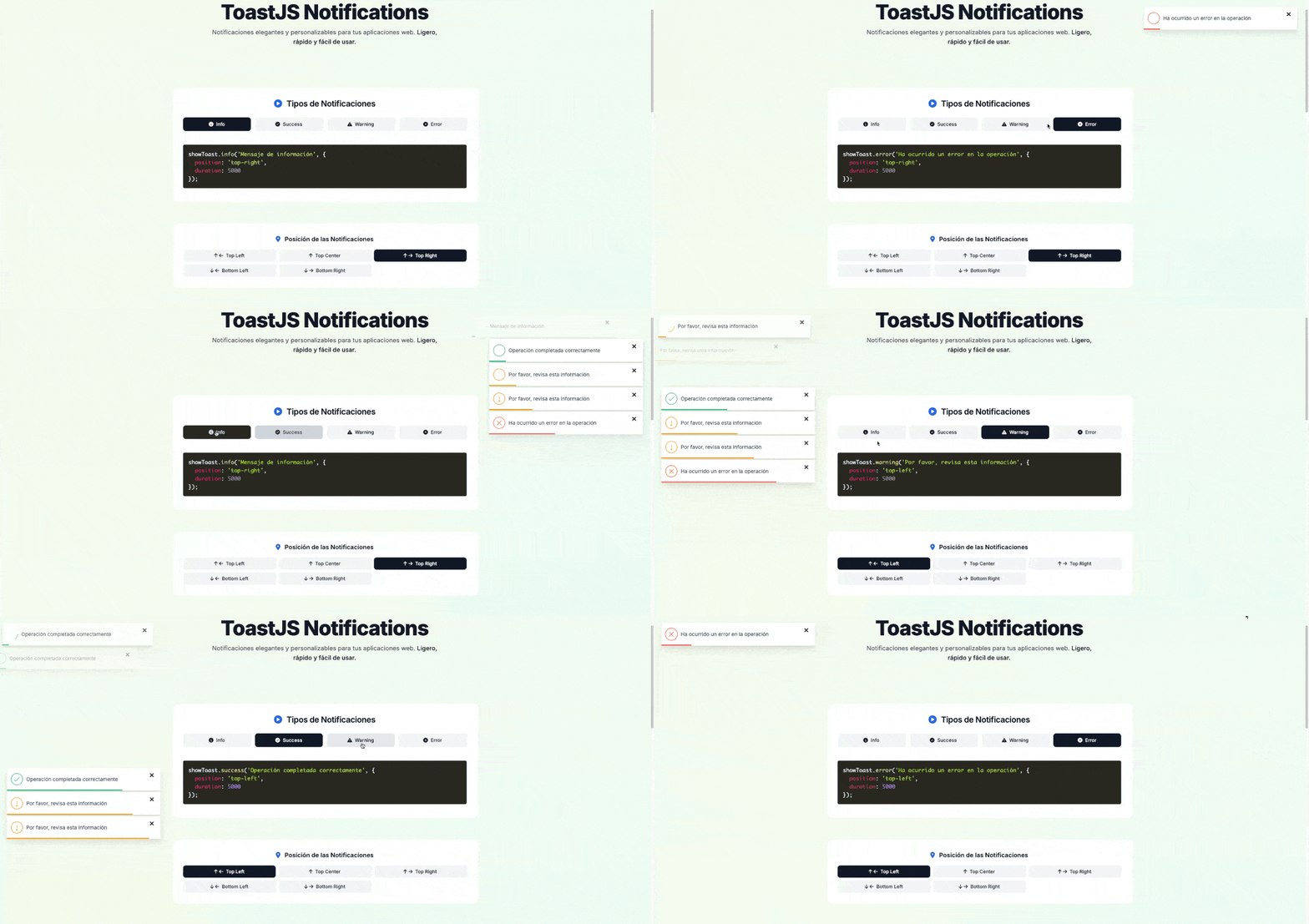
📦 Instalación a través de CDN
Puedes instalar ToastJS Notifications a través de CDN, a continuación se muestra un ejemplo completo.
Ejemplo Completo de Uso de ToastJS Notifications
<!DOCTYPE html>
<html lang="es">
  <head>
    <meta charset="UTF-8" />
    <meta name="viewport" content="width=device-width, initial-scale=1.0" />
    <title>ToastJS Notifications - Demo</title>
  </head>
  <body>
    <!-- Botón de demostración que muestra un toast de éxito -->
    <button id="show-toast">Mostrar Toast</button>

    <!-- Incluimos la librería ToastJS desde el CDN -->
    <script src="https://cdn.jsdelivr.net/npm/toastjs-notifications@latest/toast-notifications.min.js"></script>

    <!-- Código de inicialización -->
    <script>
      document.getElementById("show-toast").addEventListener("click", () => {
        // Mostramos un mensaje de bienvenida 8 segundos después de que la página cargue
        showToast.success("¡Bienvenido a ToastJS Notifications! 🎉", {
          duration: 8000, // Duración en milisegundos
          position: "top-right", // Posición del toast
        });
      });
    </script>
  </body>
</html>
Tipos de Notificaciones
ToastJS Notifications ofrece diferentes tipos de notificaciones para adaptarse a tus necesidades:
info: Notificación de información.success: Notificación de éxito.warning: Notificación de advertencia.error: Notificación de error.
Puedes usar ToastJS Notifications de la siguiente manera:
// Mostrar diferentes tipos de notificaciones
showToast.info("Mensaje de información"); // Notificación de información
showToast.success("¡Éxito!"); // Notificación de éxito
showToast.warning("Advertencia"); // Notificación de advertencia
showToast.error("Error"); // Notificación de error
Posiciones disponibles:
Estas son las posiciones disponibles para los ToastJS Notifications:
top-lefttop-centertop-right(por defecto)bottom-leftbottom-right
Posicionamiento Dinámico
Ahora puedes definir la posición directamente desde el objeto de opciones en cada llamada:
showToast.error("Error crítico", {
  position: "top-center",
});

showToast.success("Guardado exitoso", {
  position: "bottom-right",
});
Duración Personalizada por Toast
Puedes personalizar la duración de cada toast individualmente. Por defecto, el toast se cierra después de 3 segundos.
// Toast con duración de 2 segundos
showToast.warning("Duración personalizada", {
    duration: 2000
  }
);

// Toast persistente (requiere cierre manual)
showToast.info("Este mensaje no se cierra solo", {
    duration: 0
  }
);
Opciones disponibles por toast
Puedes controlar el comportamiento en cada llamada usando estas opciones:
duration(number): tiempo en milisegundos. Si es0, el toast es persistente.position(string): posición del toast. Por defectotop-right.closeOnClick(boolean): si estrue, el toast se cierra al hacer clic en cualquier parte del toast (además del botón “×”). Por defectofalse.
Ejemplo usando closeOnClick:
showToast.success("Guardado exitoso", {
  duration: 3000,
  position: "top-center",
  closeOnClick: true,
});
Barra de progreso
Cada toast muestra una barra de progreso que refleja su duración:
- Si estableces
duration, la barra avanza en ese tiempo y luego el toast se cierra automáticamente. - Si
durationes0(persistente), el toast no se cierra automáticamente. La barra puede animarse con un valor por defecto visual, pero la notificación permanece hasta que la cierres manualmente.
🤝 Únete y Contribuye
Recuerda que ToastJS Notifications es una librería de código abierto. Si encuentras algún error, tienes alguna sugerencia o deseas contribuir, ¡no dudes en abrir un issue o pull request en GitHub!
👨💻 Desarrollador
Urian Viera
🌐 urianviera.com
📺 YouTube
💌 [email protected]
☕ Apóyame en PayPal
🪪 Licencia
MIT © 2025 Urian Viera

🙌 Agradecimientos
Gracias a todos los Devs 👨💻 que han usado y apoyado ToastJS Notifications. Tu feedback es clave para mejorar la librería.