
tosr0x
v1.0.0
Published
A nodejs lib for controlling a tosr0x board via USB port
Downloads
24


Readme
node tosr0x
A nodejs lib for controlling a tosr0x board via USB port.
TL;DR
- Installation
- Requirements
- End user projects
- API Usage
- Promise usage
- API
- Inspiration/References
- Credits
- Disclaimer
Installation
npm i tosr0x --saveRequirements
- node v0.10+
- Being able to compile serial port
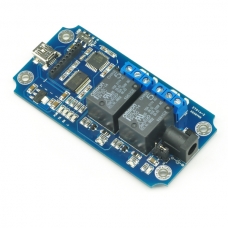
- A Tosr0x USB board from TinySine (TOSR02, TOSR04, TOSR08)
End user projects
This current project only contains an API. End users might want to try those projects in order to directly control the board with nodejs without having to code anything.
- node-tosr0x-cli a command line tool (ideal for cron jobs)
- node-tosr0x-server a web server that connects to a local board to offer remote control (mobile friendly!)
API Usage
Usage is pretty strait forward: You either create a Tosr0x instance or request one.
var Tosr0x = require('tosr0x').Tosr0x;
// when you know the usb port uri
var board = new Tosr0x(uri);
// when you do not know it
Tosr0x.fromPortScan().then(function (board) {});
// when you get input from a random variable that might be empty
// hit: this ALWAYS returns a Promise :)
Tosr0x.create(uri).then(function (board) {});
Promise usage
The api is 99% built on promises but most methods also accepts callbacks. Callbacks should respect the node convention and always have this signature:
function callback(err, returnValue) { ... }The promise implementation currently used is rsvp.js. This document assume your are familiar with thenable operations in Promise/A+.
Resolving promises always get back the current instance of Tosr0x. If there is a return value, a hash containing both is pass onto the resolver function.
API
Optional parameters are inclosed [in brackets]
Tosr0x(uri, [options]);
The Tosr0x constructor. Initialises the Tosr0x object.
- uri: string - the port uri locating the usb device.
- options: object - options for configuring the
Tosr0xobject.
Static methods
These are the method you call directly on the Tosr0x object.
Tosr0x.fromPortScan([options,] [device,] [callback]) returns Promise
Scans all serial ports and try to find a match, according to the device parameter.
- options: object - options for configuring the
Tosr0xobject. - device: object - device serial fingerprint.
- callback: function - get calls once, with the found device or error.
Tosr0x.create([uri,] [options]) returns Promise
Wraps Tosr0x.fromPortScan() and new Tosr0x() into a single operation that always returns a Promise. Also uses the default device fingerprint.
- uri: string - the port uri locating the usb device.
- options: object - options for configuring the
Tosr0xobject.
Static members
These are the members you can access directly on the Tosr0x object.
Tosr0x.defaults {}
Default values for the options parameter.
{
    // serial port specific
    baudRate: 9600,
    dataBits: 8,
    parity: 'none',
    stopBits: 1,
    flowControl: false,

    // Tosr0x specific
    debug: false, // outputs usefull things in stdout
    relayCount: 2, // may be 4 or 8
    timeout: 1500 // in ms
};
Note: serial port specific options should not be change unless you know what your are doing.
Tosr0x.device {}
Default values for device fingerprinting. This should not need to change as they sould remain constant across all boards.
{
    // serial port specific, usign FTDI values
    vendorId: '0x0403',
    productId: '0x6001',

    // Tosr0x specific
    moduleId: 15 // used for version command
};
Tosr0x.commands {}
Default values for Tosr0x binary commands. Note that string values are ASCII chars and integer values are bytes. This should not neet to change and are here for reference only. Please use them in your code (Tosr0x.commands.X) when sending commands.
{
    version    : 'Z',
    states     : '[',
    voltage    : ']',
    temperature: 'b',
    on         : 100,
    off        : 110
};
Instance methods
These are the methods you call on the instance of Tosr0x you get by calling new or any of the factory methods.
.open([callback]) returns Promise
Opens the communication channel with the serial port. This operation is required before attemping to send any commands to the board.
- callback: function - get calls once, after the communication with the serial port is established.
.connected() returns boolean
Getter for the connected state of the instance. Returns true if the communication channel is open, false otherwise.
.options() returns {}
Getter for the current options values are.
.state([relay]) returns {}|boolean
Getter for the internal state representation of a relay. If the relay parameter is undefined, all states are returned.
- relay: integer|string - The relay position [1,n] requested.
.close([callback]) returns Promise
Closes the communication channel with the serial port and releases any resources held.
- callback: function - get calls once, after the communication with the serial port is closed.
.closeImmediate([callback]) returns undefined
Closes the communication channel with the serial port and releases any resources held without waiting for the response of the board.
- callback: function - get calls once, after the communication with the serial port is closed.
.send(cmd, [callback]) returns Promise
Send immediately the value specified as a cmd. May be a valid ASCII char or bytes.
- cmd: chars|bytes - The bytes to send on the serial port
- callback: function - get calls once, after the drain has occured
.receive(callback, [buffer]) returns undefined
This method is primarly a internal function (this is why it does not returns a Promise). It should only be used to get notified when a read event occurs.
- callback: function - get calls once, with the buffer as first argument.
- buffer: boolean - indicated to buffer data until EOL before calling callback.
.switch(relay, on, [callback]) returns Promise
Send a command to put the realy into the on position.
- relay: integer|string - The relay position [1,n] to control. 0 means all.
- on: boolean - Turn the relay on (true) or off (false)
- callback: function - get calls once, after the drain has occured
Alias for .send(Tosr0x.commands.on/off + relay, callback);
.on(relay, [callback]) returns Promise
Send the command to switch the relay to on.
- relay: integer|string - The relay position [1,n] to control. 0 means all.
- callback: function - get calls once, after the drain has occured.
Alias for .switch(relay, true, callback);
.off(relay, [callback]) returns Promise
Send the command to switch the relay to off.
- relay: integer|string - The relay position [1,n] to control. 0 means all.
- callback: function - get calls once, after the drain has occured.
Alias for .switch(relay, false, callback);
.toggle(relay, [callback]) returns Promise
Send the command to switch toggle the relay, i.e., invert the current state. Note make sure that the internal state representation is up to date with the state of the board. Try calling .states().then(function () { .toggle() }) instead.
- relay: integer|string - The relay position [1,n] to control. 0 means all.
- callback: function - get calls once, after the drain has occured.
.states([callback]) returns Promise
Send the command to get the current state of all the relays on the board. The return value is a hash object in the form {'1': true, '2': false}, true meaning that the relay is on.
- callback: function - get calls once, after receiving the data.
.refreshStates([callback]) returns Promise
Old name of .states();
.version([callback]) returns Promise
Send the command to get the current version of the embedded software.
- callback: function - get calls once, after receiving the data.
.voltage([callback]) returns Promise
Send the command to get the current voltage powering the board. Should be 5 Volts.
- callback: function - get calls once, after receiving the data.
.temperature([callback]) returns Promise
Send the command to get the current temperature mesure with the external temperature probe (not included in the board). This method will always timeout if the probe is not present.
- callback: function - get calls once, after receiving the data.
Inspiration/References
- http://jimter.net/controlling-a-tosr0x-usb-relay-module-using-python/
- https://github.com/amorphic/tosr0x
- https://github.com/jlopex/relay-remote-ctrl
Credits
Made with love in Montréal by https://deuxhuithuit.com
Licensed under the MIT License: http://deuxhuithuit.mit-license.org
Disclaimer
We are not affiliate with any sort with the usb boards manifacturer or reseller. Please refer to the license of the projet and the licenses emitted by the board manufacturer for all information.