
trace-avatar
v0.1.14
Published
Turn a list of steps into a smooth, human-looking ghost-cursor walkthrough on your real page. Element-anchored, zero dependencies.

Maintainers
 saidiadegoke
Readme
trace-avatar


Show your users how, or do it for them. One trace, two modes, on your real page:
- Show me: a smooth, human-looking ghost cursor walks through the steps over the page, with captions. It never touches the app. Docs, onboarding, demos, bug repros.
- Do it for me: the same cursor really clicks, types, picks options and submits, while the viewer watches. Demo accounts, sandbox set-up, "fill this in for me" helpers.
Element-anchored, so it survives layout changes. Zero dependencies. Record a trace by using your app.
| Show me | Do it for me |
|---|---|
| 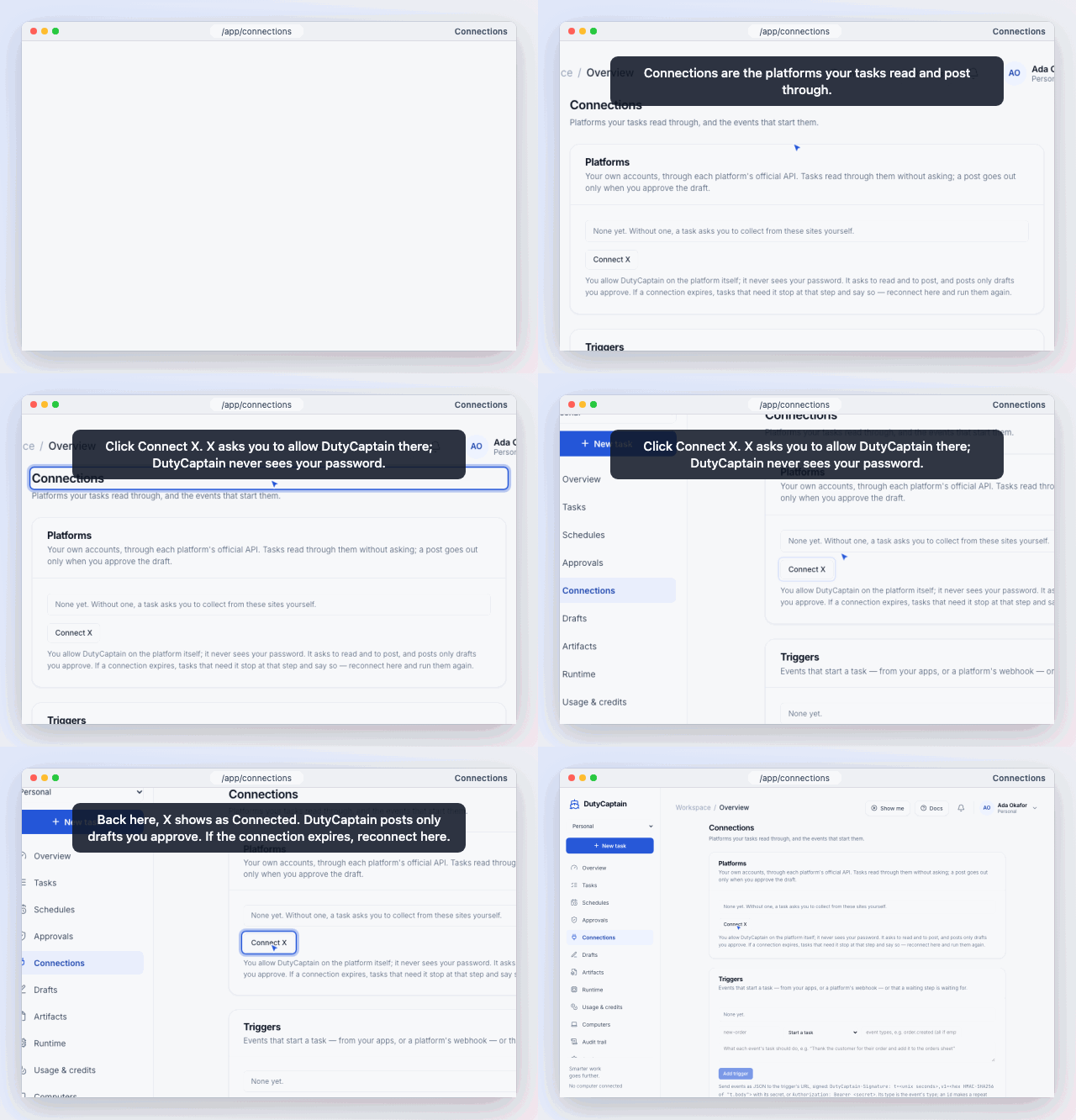 |
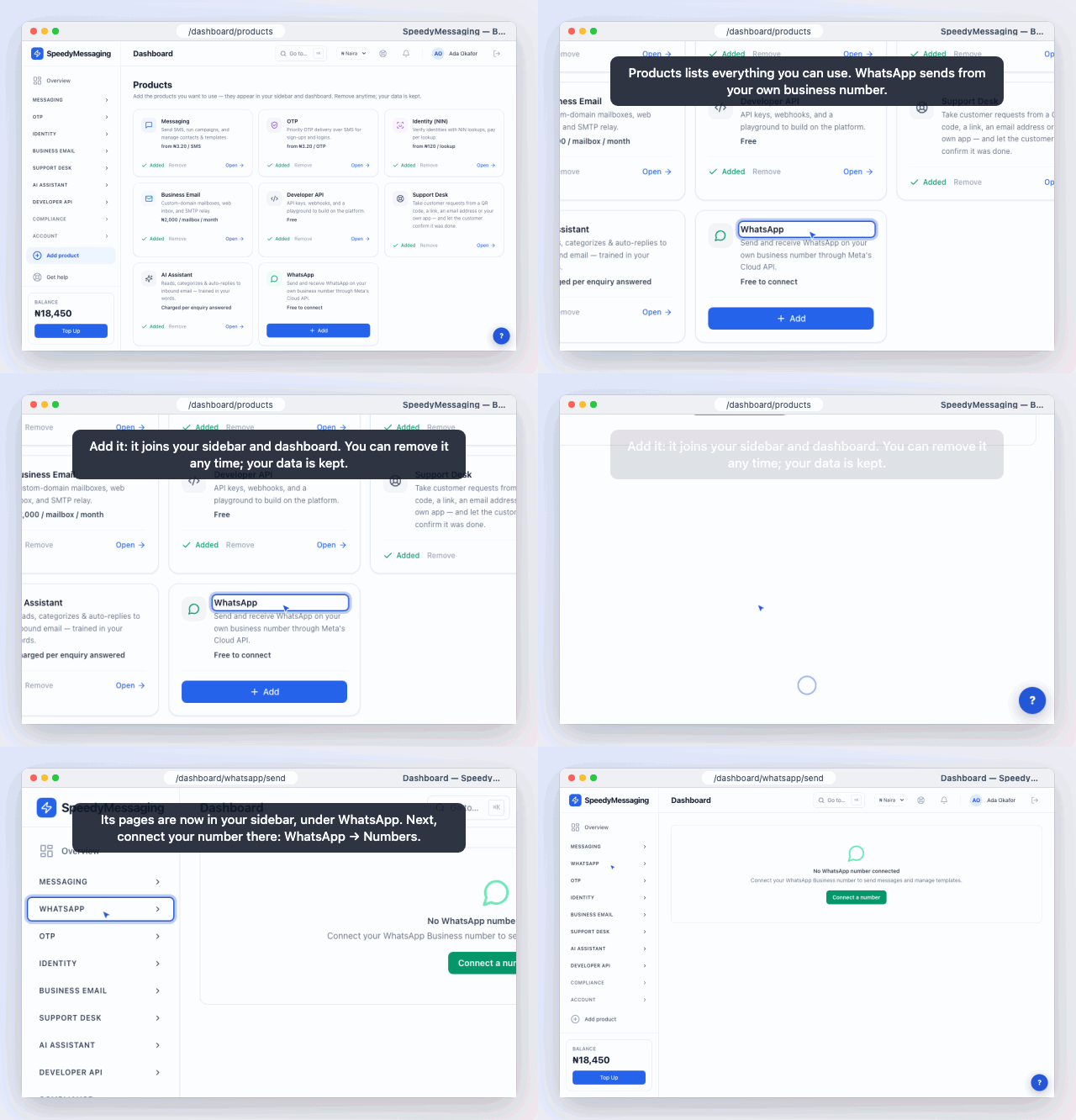 |
Rendered from examples/vanilla-html with trace-avatar-render.
Show me:
<script src="https://cdn.jsdelivr.net/npm/trace-avatar/dist/trace.min.js"></script>
<script>
  TraceAvatar.createTrace({
    trace: {
      version: 1,
      avatar: { name: 'Sarah · Sales' },
      steps: [
        { type: 'click', target: { role: 'button', name: 'New invoice' }, say: 'Start from New invoice.' },
        { type: 'type',  target: { role: 'textbox', name: 'Customer' }, text: 'Ada Stores' },
        { type: 'click', target: { text: 'Send invoice' }, say: 'Send it — done.' },
      ],
    },
    controls: true,
    autoplay: true,
  });
</script>
Do it for me: the trace-perform build acts on the page, and also plays Show me when you pass mode: 'overlay'.
<script src="https://cdn.jsdelivr.net/npm/trace-avatar/dist/trace-perform.min.js"></script>
<button id="do-it">Do it for me</button>
<script>
  document.getElementById('do-it').onclick = () =>
    TraceAvatar.createTrace({ trace: '/tours/invoice.trace.json', controls: true, autoplay: true });
</script>
Try the playground →: edit a trace, record your own, and play it as Show me or Do it for me.
Try it locally: npm i && npm run build && npm run serve, then open
http://127.0.0.1:4173/examples/vanilla-html/ (switch between the two modes at the bottom left),
/examples/guides-html/ (a whole app's guides from one script tag), or /playground/.
| | Show me (mode: 'overlay') | Do it for me (mode: 'perform') |
|---|---|---|
| Import | trace-avatar · trace.min.js | trace-avatar/perform · trace-perform.min.js |
| Touches the app | never: click-through overlay | clicks, types, presses keys, hovers |
| Typed text | shown in a chip | typed into the field (React/Vue/Svelte see it) |
| Masked fields | shown as ••• | handed to the viewer: "Your turn: type in “Password”" |
| Viewer steps in | pauses; play resumes where it was | pauses; play resumes at the next checkpoint |
| Use it on | any page | sandbox or demo data |
Everything else is shared: the trace format, the recorder, captions, controls, pages and navigation, waits,
prepare, resumeKey, events, React and the custom element.
Why it's different
- Anchored to elements, not pixels. Each step finds its element by CSS selector, then role + accessible name, then visible text, and only last by recorded pixels (scaled to the screen). A trace recorded on a 1440px laptop lands correctly on a 1280px one and in a 390px mobile layout.
- Moves like a person. Gentle curves at a human pace (seeded, so the same trace always moves the same way), or the real recorded pointer path re-anchored to today's page.
- Lives on your live page. The overlay is isolated in a shadow root and follows elements as the page or a panel scrolls. It brings each element into view, but never pulls back a viewer who has scrolled away to read on. Viewers can pause, take over, then resume the guide.
- Does real work, safely. Do it for me sets values the way frameworks notice, never learns a password (the viewer
types masked fields), waits for the app (
until: { text: 'Saved' }) instead of racing it, and survives full page loads. - Never fails silently. A missing element makes the step wait with "Looking for “Save”…", then report
stalled. - Accessible. Respects
prefers-reduced-motion, announces captions in anaria-liveregion, keyboard controls.
Install
npm i trace-avatarimport { createTrace } from 'trace-avatar'; // Show me
const guide = createTrace({ trace: '/tours/invoice.trace.json', controls: true });
guide.on('step', ({ index, element }) => console.log('step', index, element));
guide.on('stalled', ({ index, reason }) => console.warn('step', index, reason));
guide.play();import { createTrace } from 'trace-avatar/perform'; // Do it for me (mode: 'perform' is the default here)
const helper = createTrace({
trace: '/tours/invoice.trace.json',
navigate: (path) => router.push(path), // go to the pages the trace needs
prepare: async (requires) => requires.includes('signed-in') ? isSignedIn() : true,
onReset: () => resetSandbox(), // before a restart
});
helper.on('handoff', ({ step }) => console.log('viewer types', step.target?.name));
helper.play();React
import { TraceAvatar, useTrace } from 'trace-avatar/react';
import { createPerformer } from 'trace-avatar/perform';   // only for Do it for me

// Show me
<TraceAvatar trace={tour} autoplay controls onEnd={() => track('tour_done')} />

// Do it for me
<TraceAvatar trace={tour} mode="perform" performer={createPerformer} autoplay controls
             navigate={router.push} onHandoff={({ step }) => toast(`Your turn: ${step.target?.name}`)} />

// or drive it yourself
const guide = useTrace({ trace: tour, controls: true });
<button onClick={() => guide?.play()}>Show me how</button>
See examples/react-demo/App.tsx for a Show me / Do it for me switch.
Any framework, or none: the custom element
<script type="module" src="https://cdn.jsdelivr.net/npm/trace-avatar/dist/element.js"></script>
<trace-avatar src="/tours/invoice.trace.json" controls autoplay avatar-name="Sarah"></trace-avatar>
For Do it for me, add mode="perform" and give it hands (and any hooks) through the hooks property:
import { createPerformer } from 'trace-avatar/perform';
document.querySelector('trace-avatar').hooks = { performer: createPerformer, navigate: (p) => router.push(p) };
Attributes: src, controls, autoplay, rate, loop, captions, takeover, scroll, keyboard, avatar-name, avatar-image, avatar-color,
mode, resume-key. Events: trace-step, trace-stalled, trace-page, trace-handoff, trace-blocked,
trace-state, trace-end, trace-error.
Guides for your whole app: one script tag
<script src="https://cdn.jsdelivr.net/npm/trace-avatar/dist/trace-auto.min.js"
        data-guides="/guides/index.json" data-perform="true" defer></script>

<button data-trace-guide="create-invoice">Show me how</button>
<button data-trace-guide="create-invoice" data-trace-mode="perform">Do it for me</button>
A small round button in the corner lists the guides for the page the viewer is on: "Show me · Do it for me". Any
element with data-trace-guide="id" starts one, including elements your framework renders later. While a guide
plays, the corner button becomes Stop guide. A guide carries on after a full page load. The player is fetched
on the first play, so until then the page pays about 5 KB.
/guides/index.json lists the guides (schema: trace-avatar/guides.schema.json):
{
  "version": 1,
  "guides": [
    { "id": "create-invoice", "title": "Create an invoice", "trace": "create-invoice.trace.json",
      "modes": ["overlay", "perform"], "pages": ["/app/invoices", "/app"] }
  ]
}
| Script attribute | Default | |
|---|---|---|
| data-guides | — | the manifest URL (trace URLs in it are relative to it) |
| data-launcher | bottom-right | bottom-left, or off to hide the corner button and use your own buttons |
| data-perform | false | true allows Do it for me, for guides whose modes include "perform" (both must agree) |
| data-links | on | overlay: links play Show me only; off: links are ignored |
Without pages a guide is offered on every page. Only guides in the manifest can play, by id.
Links. https://your.app/app/invoices?trace=create-invoice opens the page and plays the guide; add
&trace-mode=perform for Do it for me (or use #trace=… if your server drops unknown parameters). The launcher has
Copy link on every guide, and guides.link(id, { mode, path }) builds one.
- The parameter is removed from the address on arrival, so a reload doesn't replay it.
- If your
preparehook says the viewer must sign in first, the link waits through the sign-in (even a full page reload) for up to 10 minutes and plays once the guide can start. - A link can only name a guide id from your manifest, never a trace or a trace URL, so nobody can put their own guide on your app by sending a link.
- Do it for me from a link always asks first ("Do it for me: Create an invoice — Start · Show me instead · Cancel"). A link alone never makes your app act.
From npm, with your router and hooks:
import { mount } from 'trace-avatar/auto';

const guides = mount({
  guides: '/guides/index.json',
  perform: true,
  navigate: (path) => router.push(path),
  prepare: async () => isSignedIn(),
  launcher: 'bottom-left',           // or false
});
guides.play('create-invoice', { mode: 'perform' });
guides.on('error', (e) => console.warn(e.message));   // unknown ids, refused modes, load failures
React: <TraceGuides guides="/guides/index.json" perform navigate={router.push} /> from trace-avatar/react.
Custom element: <trace-guides src="/guides/index.json" perform launcher="bottom-left"> from
trace-avatar/element (events guides-ready, guides-play, guides-end, guides-stop, guides-error).
Try it: examples/guides-html/.
Record guides in the app (the studio). Let the people you choose record guides where they work, with no JSON:
mount({
  guides: '/guides/index.json',
  record: {
    allowed: () => user.role === 'owner',              // checked before the studio loads
    save: (trace, entry, { from }) => api.saveGuide(trace, entry, from), // default: a .trace.json download
    requires: ['signed-in'],
  },
});
"● Record a guide" appears in the launcher, Alt+Shift+R starts recording (shortcut changes it, false turns it
off) and so does ?trace-record=1, all only when allowed() says yes. The studio (about 14 KB) is loaded then, never
before.
- While recording, a bar shows the time and the steps: Pause, + Caption (on the last step), Wait for… (click an element: wait until it shows some text, or until it's gone, so Do it for me waits for your app), Mask / Reveal (click a field; passwords, card numbers and codes can never be revealed), Stop, and ⇅ to move the bar between the bottom and the top of the page. The recording carries on across full page loads and sign-ins.
- After Stop, a review panel lists the steps in words ("Click "Save"", "Wait for "Saved""): edit captions, move
or delete steps, mark checkpoints and pauses, set the title, id, modes and pages. ▶ Show me and ▶ Do it for
me test it right there (Do it for me can cross page loads). Save hands
savethe trace and its manifest entry; Download and Copy JSON are always there, and the raw JSON is under "Advanced". - To change a saved guide,
guides.edit(id)(or a?trace-edit=idlink) opens it in the same review, again only whenallowed()says yes. Its save gets{ from: id }as a third argument, and so does a save from Fix this step; a new recording gets{}. So your API can tell "replace this guide" from "a new guide whose id may already be taken". - Saving is your app's job (your API, a CMS, a pull request); trace-avatar hosts nothing.
Without the loader: import { createStudio } from 'trace-avatar/studio' (CDN: trace-studio.min.js, global
TraceAvatarStudio), then createStudio({ save }).start(). The playground's Record button uses it.
The trace format
A trace is plain JSON (version: 1). The schema ships at trace-avatar/schema.json.
{
  "version": 1,
  "meta": { "title": "Create an invoice", "viewport": { "w": 1440, "h": 900 }, "seed": 7 },
  "avatar": { "name": "Sarah · Sales", "image": "/sarah.png", "color": "#2456d8" },
  "steps": [
    { "type": "click", "target": { "sel": "[data-testid=new-invoice]" }, "say": "Start here." },
    { "type": "wait",  "target": { "sel": "#customer" }, "timeout": 5000 },
    { "type": "type",  "target": { "role": "textbox", "name": "Customer" }, "text": "Ada Stores" },
    { "type": "key",   "keys": "Mod+Enter", "say": "Save with ⌘↵." },
    { "type": "hover", "target": { "text": "Total" }, "hold": 1200, "pause": true }
  ]
}
| Step | Shows | Fields |
|---|---|---|
| move | cursor travels to the element | target |
| click / dblclick | travel, press, ripple, ring | target |
| type | travel, text appearing in a chip | target, text, mask?, value? |
| upload | travel, ring; Do it for me attaches the files | target, files |
| key | a shortcut chip (⌘↵, Ctrl+Enter) | keys, target? |
| scroll | scrolls the page or the element | to or by, target? |
| hover | travel, then stay | target, hold? |
| wait | holds until the element exists, or until a condition holds | target, until?, timeout? |
| note | a caption only | say, hold? |
Any step may carry say (caption), highlight (ring), pause (stop after this step), t (ms from start; omit it
and the step follows the previous one), page (the page it happens on, see below), and checkpoint (where perform mode resumes after the viewer steps in). Targets take any of sel, role + name, text, xy, plus at: { rx, ry }
to aim at a point inside the element. An optional path ([[t, x, y], …]) replays a real pointer path.
validate(trace) returns every problem with a path to it, and createTrace throws a TraceError for an invalid trace.
Guides across pages
A step can name the page it happens on: "page": "/app/tasks/new", with * for one path segment (/app/tasks/*).
Later steps keep that page until another step names one. The recorder fills it in for you, with record ids as *.
- On the wrong page the guide doesn't search, since a lookalike element on another page is not the one meant. It waits with "Open /app/tasks/new to continue" and carries on when the viewer gets there. It never gives up.
- Give it your router and it goes there itself:
createTrace({ trace, navigate: (path) => router.push(path) }). Only pages without*are navigated to; thepageevent ({ index, want, at }) tells you about every one. - If the viewer clicks through ahead of the guide, it catches up to the first later step on their page. It never skips its own start.
- Older traces without
pageplay exactly as before.
Waiting for the app
A wait step holds until its element exists. With until it holds until something has happened. It works in both
modes: Show me waits for the viewer's own click to take effect, Do it for me waits for its own.
{ "type": "wait", "until": { "text": "Saved" }, "say": "Saving…" }                       // the page shows "Saved"
{ "type": "wait", "target": { "sel": "#status" }, "until": { "text": "Running" } }        // that element does
{ "type": "wait", "target": { "sel": ".spinner" }, "until": { "gone": true }, "timeout": 60000 }  // it went away
The check runs at most every 250 ms, and only after the page has changed. It times out after timeout ms (default
5 s, at most 10 minutes) with a stalled event (reason: 'until-timeout').
Do it for me (perform mode)
{
  "version": 1,
  "meta": { "title": "Start a task", "requires": ["signed-in"] },
  "steps": [
    { "type": "click", "page": "/app", "target": { "role": "link", "name": "New task" } },
    { "type": "type",  "page": "/app/tasks/new", "target": { "role": "textbox", "name": "Objective" }, "text": "Check prices" },
    { "type": "type",  "target": { "role": "textbox", "name": "Budget code" }, "text": "•••", "mask": true },
    { "type": "click", "target": { "role": "button", "name": "Start task" }, "checkpoint": true },
    { "type": "wait",  "page": "/app", "target": { "sel": "#status" }, "until": { "text": "Running" }, "say": "Starting…" }
  ]
}
import { createTrace } from 'trace-avatar/perform'; // CDN: trace-perform.min.js (TraceAvatar global)
createTrace({ trace, autoplay: true, navigate: (path) => router.push(path), prepare: () => isSignedIn() });The same trace plays as Show me with mode: 'overlay' (or from trace-avatar). In Do it for me the guide really clicks, types, presses keys and hovers. Point it at sandbox or demo data: a trace can click
anything the page lets it.
- Inputs: values are set the way React, Vue and Svelte notice (native setter, then
input); a select picks the option whose text you typed; rich-text editors getinsertText; Enter in a form field submits the form. - It does what it can by default. It types every value it knows, passwords and amounts included, and attaches
every file the trace carries. Turn on
securityto hold some of that back (below). - Values at play time: a recorded password is always masked, so a demo passes it when the guide plays:
values: { password: 'demo-pass' }. A value is matched by the step'svaluename, its target's label, or the field's own name, id or label, in any case. It stands in even with security on: the host chose it. - Files: an
uploadstep'sfileswithurl(https:, relative ordata:) ortextare samples: Do it for me attaches them to the file input (the step's element, the input inside it or beside it) as a real pick would, so the app getsinputandchange. No picker opens. - The viewer's turn: what it can't or may not do, it hands over: a masked field with no value, a file with no
sample, a field security holds back, a frame (a payment form) it can't reach. The guide stops, focuses the field,
rings it, shows a Your turn card ("Type in “Password”, then press Enter.") with a Done button, and emits
handoffwithwhy('masked','secret','money','file','no-file','frame'). It carries on by itself when they press Enter (one-line fields; the form isn't sent) or Tab in the field, choose a file or an option, or press Done. - The viewer steps in: real input pauses the guide. When they press play, it goes on from the next step marked
checkpoint: true, since the page may have moved on. It never seeks backwards; restart starts over. - What it can't do: browsers ignore synthetic events for fullscreen, the clipboard, payment and other cross-origin iframes. A step on a frame is the viewer's turn.
Security
Default: nothing held back, since Do it for me is for demos and sandboxes. security limits it:
createTrace({ trace, security: true });                  // all of the below
createTrace({ trace, security: ['secrets', 'money'] });  // or some
| Guard | Do it for me | Recording |
|---|---|---|
| 'secrets' | passwords, card numbers and codes are the viewer's | (always masked, security or not) |
| 'money' | amount and price fields are the viewer's | masked |
| 'files' | no file is attached: the viewer chooses | no file content is kept |
| any guard | | typed text is masked unless a field is data-trace-reveal |
values still stand in. On the loader: mount({ security }), data-security="secrets,money" on the script tag,
<trace-guides security> / <trace-avatar security> (empty or true for all).
| Option | |
|---|---|
| mode | 'overlay' (default in trace-avatar) or 'perform' (default in trace-avatar/perform) |
| prepare(requires, trace) | runs before every start: sign into the sandbox, check the session. Return true, or false / { ok: false, say } to show the message and stay put (blocked event); play tries again |
| onReset() | perform mode: put the app back before a restart |
| resumeKey | carry on after a full page load: the step is kept in sessionStorage, and a guide created with the same key on the next page (within 10 minutes) picks up from there |
| performer | the hands, for the main entry, React or the custom element: performer: createPerformer from trace-avatar/perform |
| security | what it leaves to the viewer: true, or 'secrets', 'money', 'files' (see Security). Default none |
| values | values to type, by name or field label: { password: 'demo-pass' } |
meta.requires (e.g. ["signed-in"]) tells prepare what the guide needs; the recorder's requires option fills it
in. In React, pass onHandoff / onBlocked; on <trace-avatar mode="perform" resume-key="…">, set the hooks
property ({ performer, prepare, onReset, navigate, currentPath, values }) and listen for trace-handoff / trace-blocked.
Options
| Option | Default | |
|---|---|---|
| trace | — | a trace object, or the URL of a .trace.json |
| root | document | where elements are looked up |
| avatar | trace's | { name, image, color } override |
| controls | false | a small play/pause/step/speed/restart bar |
| autoplay | false | |
| rate | 1 | 0.25–4 |
| loop | false | |
| captions | 'bubble' | 'bubble', 'bar' or 'none' |
| takeover | 'pause' | what real viewer input does while playing: 'pause' or 'ignore' |
| keyboard | false | Space/K play-pause, ←/→ steps (outside form fields) |
| scroll | 'auto' | may a step scroll the page to its element? 'auto': yes, until the viewer scrolls the page (wheel or touch); then not until they next play, pause or step. 'always', or 'never' for a guide embedded in a page people read on. Authored scroll steps always scroll |
| reducedMotion | 'auto' | follows prefers-reduced-motion |
| seed | trace's | changes the shape of authored paths |
| navigate | — | (path) => void: go to a page the trace needs (e.g. router.push); without it the guide waits |
| currentPath | location.pathname | where the viewer is, for apps that route without the address bar |
| mode | 'overlay' | 'perform' acts on the page (see Do it for me) |
| prepare / onReset / resumeKey | — | see Do it for me; prepare and resumeKey work in overlay mode too |
| locators | — | your own element finders, tried first: (target, root, step) => Element \| null |
Events (on(name, fn)): step, stalled, page, handoff, blocked, state, end, error.
Controller: play(), pause(), toggle(), stop(), seek(ms), next(), prev(), setRate(r), on(event, fn),
state, index, time, duration, trace, ready, destroy().
Recording a trace
import { createRecorder } from 'trace-avatar/record';   // or the CDN build: TraceAvatarRecord

const rec = createRecorder({ title: 'Create an invoice', avatar: { name: 'Sarah' } });
rec.start();
// … use the page …
const trace = rec.stop(); // a valid trace.json, or null if nothing happened- Clicks, double-clicks, typing (one step per field), shortcuts (
Mod+K, Enter, Esc, Tab), page and panel scrolls, and the pointer path (sampled at ~30 Hz, simplified, capped in memory). - Pauses over 4 s play back as 1.5 s (
maxGapMs, 0 keeps real time). Scrolls the player does anyway (it scrolls each target into view) are dropped;scrolls: 'all'keeps them. - Each element is described by its most stable selector (
data-testid, a human id, name, aria-label, then a short path), plus role + name, text and the pixel point, so it can be found again after the page changes. Addresses with record ids are skipped, a link in two places is scoped by its landmark (nav a[href=…]), a card is named by its title, and a field is never described by what was typed in it. - The pixel point is the last resort: while a step's element is missing, the guide waits ("Looking for …"), so a viewer can click along through a multi-page app.
- Typed text is kept; secrets never are. Passwords, card, one-time-code and other secret fields are always
masked. With
securityon, everything typed is masked unless a field isdata-trace-reveal, and the'money'guard masks amounts whatever the default (maskByDefaultsets the default yourself).data-trace-ignorehides anything from the recorder. - Files: choosing a file records an
uploadstep with each file's name, type and size, and its content as adata:URL when it is 256 KB or less (keepFileBytes; none under the'files'guard). When the input is hidden behind a button, the step is on the button that opened the picker. - Across page loads. Give the recorder a
persistKey(createRecorder({ persistKey: 'app' })) and create it on every page: a recording that was going on the last page carries on, in the same tab, for up to 30 minutes (persistMs). The page load itself counts as a pause. Coming back from another site (a sign-in) adds a pause step, "Sign in, then press play.", andsigned-intometa.requires.rec.restoredtells you it carried on. - For authors in your app, use the studio (above): it adds captions, waits and mask choices while recording, and a review panel after.
- The recorder's own API for tools:
caption(say),waitFor(el, { text } | { gone: true }),mark(el, 'mask' | 'reveal' | null),elapsed,destroy({ keep: true })(stop listening, keep the recording for the next page).
AI suggestions (optional)
The studio can ask an AI for captions, waits (for the texts the app showed after a step, such as "Saved")
and a title. Each suggestion shows as before → after with Accept and Reject; nothing changes until the author
accepts. With no ai, nothing calls a model.
mount({ guides: '/guides/index.json', record: { allowed, save, ai: (task, input, schema, o) =>
  fetch('/api/guide-ai', { method: 'POST', body: JSON.stringify({ task, input, schema, instructions: o.instructions }) }).then((r) => r.json()) } });
ai is any function returning JSON for the schema. In a page, make it call your backend; never put a model key in
a page. On the server (or anywhere a key is safe), trace-avatar/assist has two ready-made providers:
import { suggest, apply, openAiCompatible, gemini, gateway } from 'trace-avatar/assist';
const ai = openAiCompatible({ baseUrl: 'https://api.deepseek.com', key: process.env.DEEPSEEK_API_KEY, model: 'deepseek-chat', visionModel: 'deepseek-flash' });
// any OpenAI-compatible server works: OpenAI, Ollama (http://localhost:11434/v1), OpenRouter, vLLM…
// Gemini's own API: gemini({ key, model: 'gemini-2.5-flash' })
// an AI gateway that forwards each provider's own calls: gateway({ url, key }) tries DeepSeek (usually the
// cheapest; deepseek-flash for images), then Gemini, then OpenAI. Or gateway({ provider: 'gemini', model }).
const { suggestions } = await suggest('captions', trace, { ai, tone: 'terse' });
const next = apply(trace, suggestions);   // or only the ones a person accepted
Failed calls are retried twice (a 429, a 5xx or no answer; following Retry-After). A gateway's own refusal, such
as a model not on the key's list, is not retried; the AssistError says which models are allowed and carries the
gateway's request id. firstOf(a, b, …) tries providers in turn for your own chains.
What is sent: step types, the role and accessible name of each step's element, page paths, existing captions
and timing; for waits, the short texts that appeared after each step. Never: what was typed (masked or not, unless
you pass sendTyped: true, and never a masked field's), selectors, or text inside fields, masked areas and
[data-trace-blur]. preview(task, trace) returns the exact payload; the studio shows it under "What's sent".
Answers are checked: a caption is at most 140 characters, a wait only uses a text the page really showed, and the
trace must stay valid, or the suggestion is left out. trace-avatar-render adds a visual check of rendered frames
(--qa) and alt text (--alt).
Repairing a broken guide
When the app changes and a step can't find its element ("Looking for 'Save'…"), trace-avatar/repair lists what
the step could mean on the page now. chooseRepair (in trace-avatar/assist) picks one: code scores the
candidates first, and an AI is asked only when no candidate is a clear winner. The chosen element is re-recorded
the way the recorder does it, and checked with the player's own resolver. The fix is a suggestion that apply()
takes once a person agrees.
import { candidatesOf, targetFor, resolvesTo, elementOf } from 'trace-avatar/repair';
import { chooseRepair, repairSuggestion, apply } from 'trace-avatar/assist';
const list = candidatesOf(document);                                   // [{ id, role, name, text, near }]
const choice = await chooseRepair(trace, stalledIndex, list, { ai });  // { id, by: 'score' | 'ai' | 'none', top }
const target = targetFor(choice.id);                                   // as if a person had just clicked it
if (resolvesTo(target, elementOf(choice.id))) next = apply(trace, [repairSuggestion(trace, stalledIndex, target)]);
A field's value is never read. Hidden, [data-trace-ignore] and [data-trace-blur] areas are never offered; a
masked field is offered by its label (a step may well mean the password box), never by what is in it. The AI gets the step, its neighbours and the best 30 candidates: no ids or test ids, and nothing that
contains a value typed in the guide. trace-avatar-render's --repair does all of this when a render stalls, and plays
the guide again to verify the fix.
A wait whose text changed. A guide recorded when the app said "Saved" stalls (reason: 'until-timeout') once
the app says "Changes stored". textsOf lists the short texts (2 to 60 characters) where the wait looks (its
element, or the page), plus the texts that showed while it waited, which the stalled event carries as seen:
a message that came and went is still offered, marked recent and gone. Fields, buttons, links and other
controls, masked, ignored and blurred areas, and any text holding a value typed in the guide are never offered.
chooseWait scores them (texts that just showed count a little more) and asks an AI only when unsure; an AI's
answer must be one of the texts sent, or a part of one. guessWait is what to offer when nothing is sure.
import { textsOf, scopeFor } from 'trace-avatar/repair';
import { chooseWait, guessWait, waitSuggestion, apply } from 'trace-avatar/assist';
const texts = textsOf(scopeFor(step.target), { seen: stalled.seen });     // [{ id, text, recent?, gone? }]
const best = guessWait(await chooseWait(trace, i, texts, { ai }), texts); // { id, text, guess } | null
if (best) next = apply(trace, [waitSuggestion(trace, i, best.text)]);      // until: { text: best.text }
Fix this step, in the app
With mount({ record: { allowed, save } }), an author who meets a guide that can't find its element gets a card
where it stalled: "Step 2 can't find button “Save invoice”." Fix this step · Stop.
- Fix this step looks at the page and shows its best guess with a ring: "Is it this? (button “Store invoice”)"
Yes · No, I'll point at it · Cancel.
record.aiis asked only when the scores are unsure. - Pointing: the next click picks the element and never reaches the app (presses are held back too); Esc goes back. A pick the player couldn't find again on its own is refused ("can't be told apart"), so a fix always works.
- The guide carries on from that step with the fixed trace, in the same mode. Then Save the guide hands the
fixed trace and its manifest entry to
record.save(or downloads<id>.trace.json), or Just this time keeps the fix for this session only.
A wait whose text never showed gets the same card: "Step 3 waited for “Saved”, which never showed." Fix this step · Remove this wait · Stop. Fix this step asks "Is it “Changes stored”?" (adding "(seen while waiting)" for a message that has gone), and pointing picks the text to wait for. Remove this wait drops the step, for an app that no longer needs one; its caption moves on to the next step when that has none. A wait for something to go away offers Remove and Stop only.
People who may not record see nothing new, and the fix code (trace-avatar/fix, CDN trace-fix.min.js, about 8 KB)
is loaded only when an author meets a stalled step.
Theming
:root {
  --ta-color: #2456d8;      /* cursor, ring, chips */
  --ta-badge-bg: #111827;   --ta-badge-fg: #f9fafb;
  --ta-caption-bg: #111827; --ta-caption-fg: #f9fafb;
  --ta-font: system-ui, sans-serif;
  --ta-z: 2147483000;
}
Dark-mode colours apply automatically unless you set your own.
GIFs and videos of a guide
trace-avatar-render plays a trace on your real app in headless Chromium and writes a GIF or an MP4. Long waits (loading, saving) are cut, a stalled guide fails the render (so a docs GIF that no longer matches the app fails CI), and masked fields only ever get dots.
npx trace-avatar-render invoice.trace.json --url http://localhost:3000/app --out invoice.gifThe GIFs at the top of this page are made that way from examples/vanilla-html (?mode=off loads it with no
guide running, for the renderer to bring its own). It can also put the app in a browser window, zoom in on each
action, burn in captions, and write VTT captions, a poster and title cards.
Save as video, in the browser
No server needed: trace-avatar/export records the guide playing on the page itself. The browser asks to share
the tab, the guide plays from step 1, and you get a GIF or a video (WebM, or MP4 in Safari). Long waits are cut the
same way as the renderer cuts them.
import { saveVideo } from 'trace-avatar/export';

const v = await saveVideo(controller, {
  format: 'gif',                              // or 'video'
  area: document.querySelector('#app'),       // what to keep; default the whole viewport
  onProgress: (p) => console.log(p.phase),    // 'asking' | 'recording' | 'encoding'
});
v.download();                                 // "send-an-invoice.gif", from the trace's title
Without a bundler: <script src="https://unpkg.com/trace-avatar/dist/trace-export.min.js"> and
TraceAvatarExport.saveVideo(controller, …). It rejects with an ExportError whose reason is unsupported,
denied (sharing refused), cancelled (sharing stopped, or signal aborted), stalled or failed. The GIF
encoder (gifenc, bundled) loads only for a GIF and runs in a worker; a page
whose Content-Security-Policy restricts workers needs worker-src blob:. A guide that changes pages with a full
page load can't be saved this way (the page doing the recording goes away); use trace-avatar-render for those. The
playground has a "Save as video" button.
What it does not do (yet)
- Import rrweb recordings. Planned.
- Cross-origin iframes. A page script cannot see into them.
Size
About 15.5 KB min+brotli for the player (locators, overlay, controls, validation, pages, waits, the viewer's
turn); perform mode is a separate 18.5 KB entry (player + hands + security), the recorder a separate 10 KB one, the studio about 15.5 KB (loaded only for authors), the guides loader about
6 KB until its first play, Save as video 2.5 KB (plus 5 KB for the GIF encoder, loaded only for a GIF), repair 3.2 KB, and AI suggestions 3.8 KB in a page (5.5 KB with the server-side providers; the studio's Suggest section, 4.8 KB, loads only when opened). size-limit guards each in CI.
Contributing
See CONTRIBUTING.md. Every function and feature has a test: unit tests for the pure core and Playwright tests on Chromium, Firefox and WebKit for the page. If this saves you time, a ⭐ helps others find it.
License
MIT