
tracebeam
v1.3.1
Published
Lightweight TypeScript tracing SDK with async measurements, runtime event tracking, custom transports, and a browser debug overlay.

Maintainers
 sanjaverse
Readme
Tracebeam ⚡
Local-first realtime tracing and debugging toolkit for frontend and Node.js applications.
Tracebeam helps developers inspect realtime events, traces, sessions, errors, and performance metrics locally — without complex cloud setup.
Architecture
Client App ↓ Tracebeam SDK Go Ingestion Server ↓ WebSocket Tracebeam Studio Dashboard
Demo
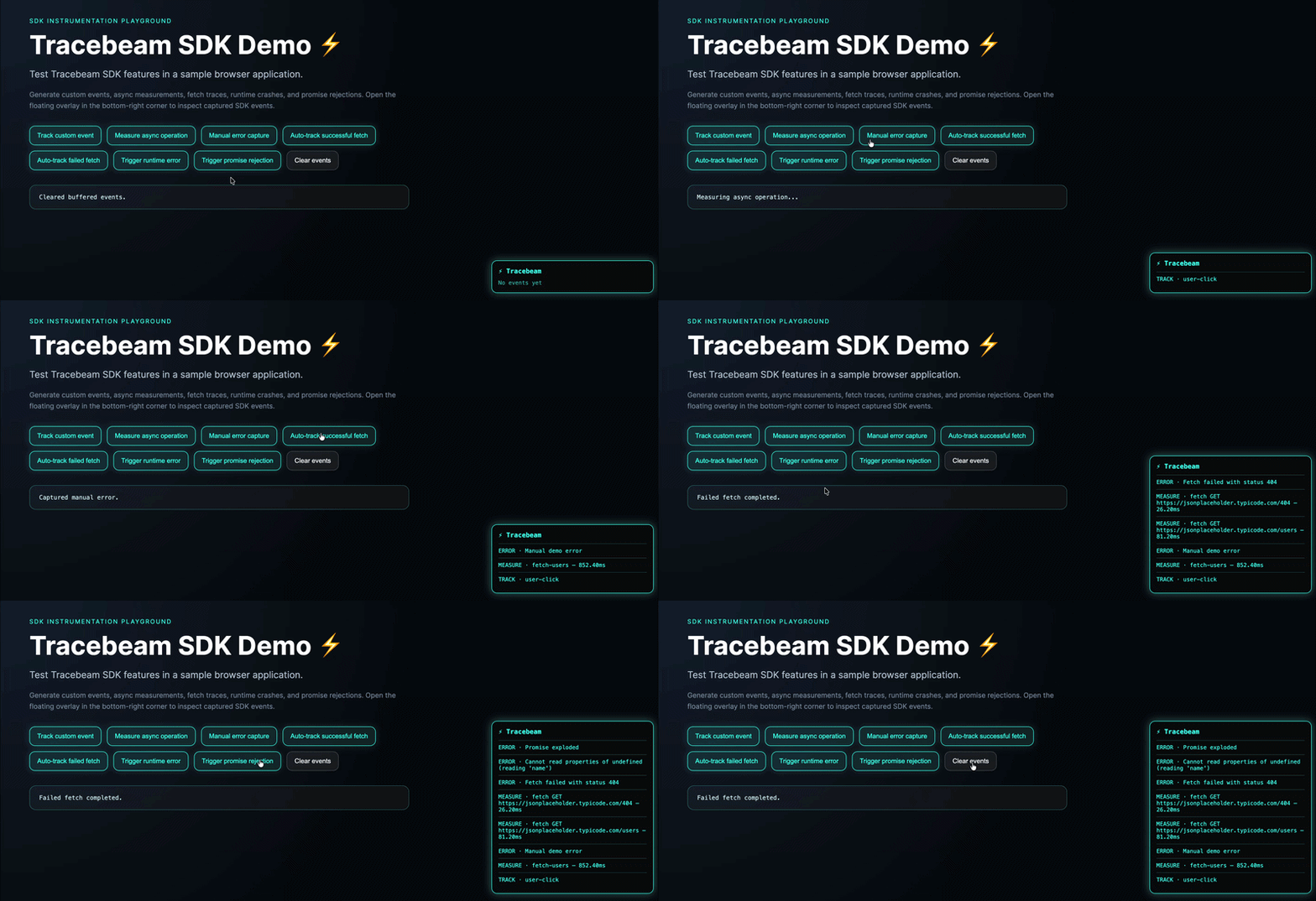
Demo below shows Tracebeam running inside a sample browser app. The floating overlay is provided by the SDK.
Features
- ⚡ Lightweight
- 🧠 TypeScript-first
- 📦 ESM + CommonJS support
- ⏱ Async performance measurements
- 🚨 Error tracking
- 🖥 Browser debug overlay
- 🗂 Optional in-memory event buffering
- 🚀 Custom transport support
- 🔍 Developer-friendly tracing utilities
- 🧩 Automatic session IDs
- ✅ Global error instrumentation
- 🌐 Fetch instrumentation
Installation
npm install tracebeamUsage
Configure Tracebeam
import { configure } from "tracebeam";

configure({
  bufferEvents: true,

  transport: async (event) => {
    await fetch("/api/trace-events", {
      method: "POST",
      headers: {
        "Content-Type": "application/json",
      },
      body: JSON.stringify(event),
    });
  },
});
Track custom events
import { track } from "tracebeam";

await track("user-login", {
  provider: "google",
});
Measure async operations
import { measure } from "tracebeam";

const users = await measure("fetch-users", async () => {
  const response = await fetch("/api/users");
  return response.json();
});
Capture runtime errors
import { captureError } from "tracebeam";

try {
  throw new Error("Something failed");
} catch (error) {
  await captureError(error as Error, {
    source: "auth-flow",
  });
}
Enable automatic global error tracking
import { enableGlobalErrorCapture } from "tracebeam";

enableGlobalErrorCapture();
This automatically captures:
- uncaught runtime errors
- unhandled promise rejections
Enable fetch instrumentation
import { enableFetchInstrumentation } from "tracebeam";

enableFetchInstrumentation();
Tracebeam will automatically measure browser fetch requests and capture failed requests as errors.
Captured metadata includes:
- URL
- HTTP method
- status code
- duration
Read buffered events
import { getEvents } from "tracebeam";

console.log(getEvents());
Clear buffered events
import { clearEvents } from "tracebeam";

clearEvents();
Enable browser debug overlay
import { enableOverlay, disableOverlay } from "tracebeam";

enableOverlay();

// later, if needed
disableOverlay();
The overlay displays the latest tracked events, measured async operations, and captured errors directly in the browser.
Session tracking
Tracebeam automatically attaches a sessionId to every event.
You can also provide a custom session ID:
import { configure } from "tracebeam";

configure({
  sessionId: "checkout-session-1",
});
Example Event
{
  "id": "d9f6c3...",
  "sessionId": "session_...",
  "name": "fetch-users",
  "timestamp": 1715950000000,
  "duration": 42.37,
  "type": "measure",
  "metadata": {
    "endpoint": "/api/users"
  }
}
Full Example
import {
  configure,
  enableOverlay,
  track,
  measure,
  captureError,
  getEvents,
} from "tracebeam";

configure({
  transport: async (event) => {
    await fetch("/api/trace-events", {
      method: "POST",
      headers: {
        "Content-Type": "application/json",
      },
      body: JSON.stringify(event),
    });
  },
});

enableOverlay();

await track("app-start");

await measure("fetch-data", async () => {
  await fetch("https://api.example.com/data");
});

try {
  throw new Error("Something exploded");
} catch (error) {
  await captureError(error as Error);
}

console.log(getEvents());
API
enableOverlay()
Enables the browser debug overlay.
disableOverlay()
Removes the browser debug overlay.
configure(options)
Configures Tracebeam behavior.
Parameters
| Parameter | Type | |---|---| | bufferEvents | boolean | | transport | (event: TraceEvent) => void | Promise | | sessionId | string |
track(name, metadata?)
Tracks a custom event.
Parameters
| Parameter | Type | |---|---| | name | string | | metadata | Record<string, unknown> |
measure(name, fn, metadata?)
Measures async function duration.
Parameters
| Parameter | Type | |---|---| | name | string | | fn | () => Promise | | metadata | Record<string, unknown> |
captureError(error, metadata?)
Captures runtime errors.
Parameters
| Parameter | Type | |---|---| | error | Error | | metadata | Record<string, unknown> |
getEvents()
Returns buffered events from local runtime memory.
clearEvents()
Clears buffered events.
resetSession()
Resets the generated session ID.
enableGlobalErrorCapture()
Automatically captures:
- uncaught runtime errors
- unhandled promise rejections
enableFetchInstrumentation()
Automatically instruments browser fetch requests.
disableFetchInstrumentation()
Restores the original browser fetch implementation.
Roadmap
- Global error instrumentation ✅
- Fetch instrumentation
- Node.js integrations
- Express middleware
- Realtime local debugging tools
Motivation
Tracebeam was built as a lightweight developer tracing utility focused on simplicity, extensibility, performance visibility, and modern TypeScript workflows.
License
MIT