
tracebox
v0.2.0
Published
Local-first trace recorder for coding agent sessions — records what Claude Code actually did into an auditable timeline

Maintainers
 my_org_vic
Readme
tracebox
See what your coding agent actually did. tracebox records every Claude Code session — tools called, files touched, commands run, tokens spent — into an auditable timeline, and flags where the agent claimed an edit that never landed.


100% local. Zero telemetry. Your session data never leaves your machine.
Install
Requires Node.js ≥ 20.
npm install -g tracebox

tracebox install   # registers hooks in ~/.claude/settings.json
tracebox list      # your past sessions are already there
tracebox ui        # open the web UI
Or run without installing:
npx tracebox listFrom source
git clone https://github.com/VictorLG98/tracebox.git && cd tracebox
npm install && npm run build && npm link
Commands
| Command | What it does |
|---|---|
| tracebox install | Register collection hooks (Claude Code) |
| tracebox list | Recent sessions: project, started, events, tokens |
| tracebox show <id> | Timeline of one session |
| tracebox stats | Token usage by day and by project |
| tracebox dashboard | Fleet-wide metrics summary in the terminal |
| tracebox ui | Open the local web UI (Ctrl-C to stop) |
Web UI
tracebox ui ingests the latest data, starts a local server on 127.0.0.1
(no auth, no network — it binds loopback only), and opens your browser. It
serves a small single-page app with three views:
- Dashboard (home) — fleet-wide metrics (sessions, tokens, files, average duration, discrepancy rate, active-day streak), a GitHub-style activity calendar (one cell per day, shaded by session count or token volume, hover for the daily breakdown, click a day to jump into that day's sessions), plus token-by-project and top-tool breakdowns. Filter everything by project and time range.
- Session list — project, date, duration, tokens, files touched, and a badge on sessions with a claims-vs-reality discrepancy.
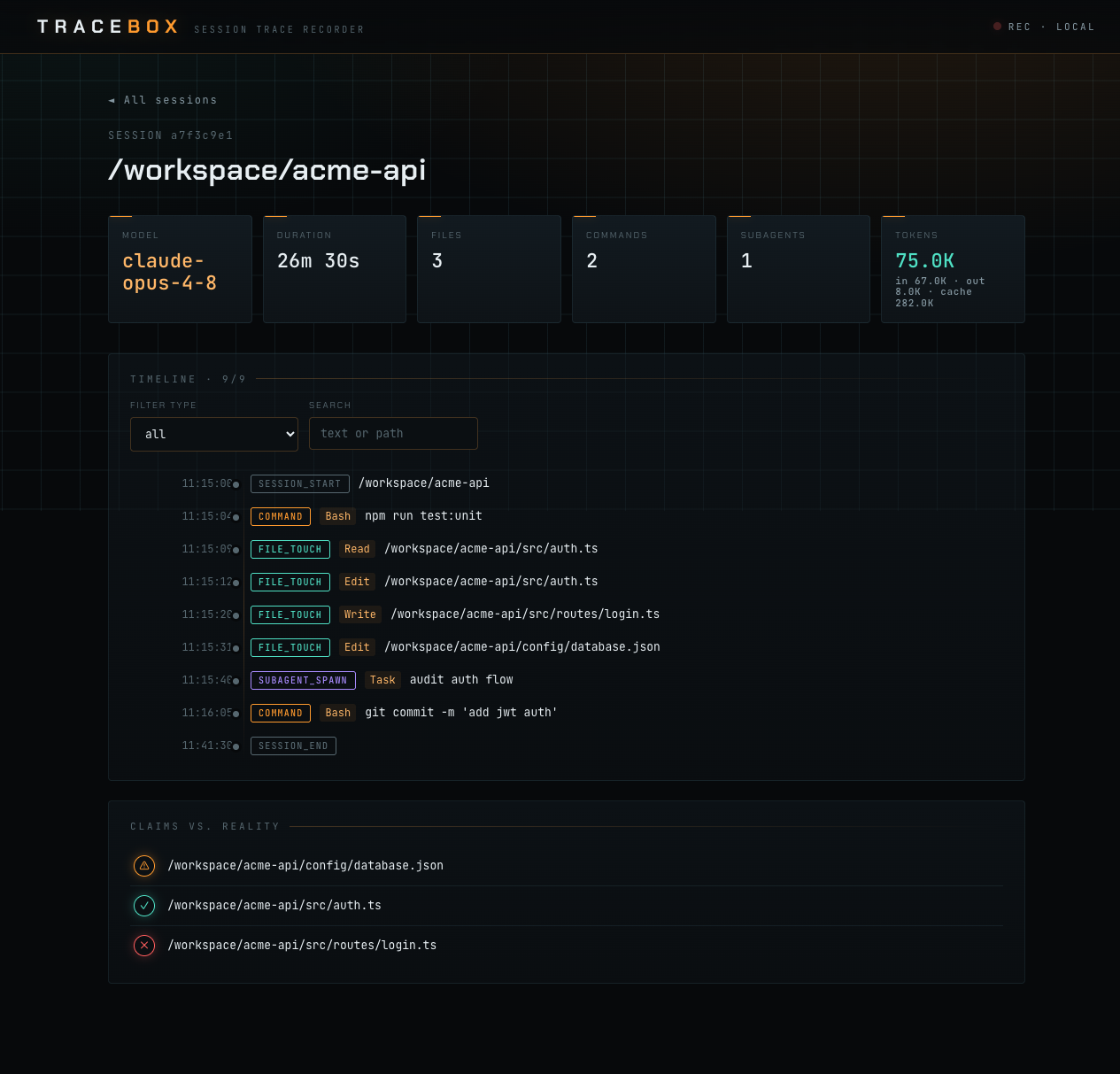
- Session view — three zones: a summary header, a filterable/searchable timeline (subagent events nested), and a claims-vs-reality panel.
Claims vs. reality
For each file the agent tried to edit, the panel shows whether the edit
succeeded (✓), failed (✗), or was attempted with no recorded
outcome (⚠). This is a structural, deterministic comparison — attempts come
from the agent's Edit/Write calls, outcomes come from the hook results.
No text analysis, no guessing.
The "reality" signal requires hooks (tracebox install). Sessions recorded
before hooks were installed still show attempted edits, marked ⚠ with a
"hooks not installed" note — never a blank screen.
How it works
Claude Code hooks append raw events to ~/.tracebox/raw/ (the collector
never fails and never slows your session). Transcripts under
~/.claude/projects/ are parsed on demand for token usage — which is why
sessions from before you installed tracebox show up too. Everything is
normalized into SQLite at ~/.tracebox/db.sqlite.
Status
MVP: Claude Code only. The ingestion layer is adapter-based — other agents are on the roadmap.