
trailphysics
v0.1.3
Published
Route geometry and pace physics for cycling, hiking and running: power-based bike speed, DIN/SAC hiking times, Minetti running pace, noise-filtered ascent and max incline, sunrise and sunset.
Downloads
369

Maintainers
 ehilzinger
Readme
trailphysics



Route geometry and pace physics for cycling, hiking and running, in JavaScript. It powers the route planning and arrival times in Hatchure, and it has a Swift port held to the same numbers by shared test vectors.
Try it in the browser → Move the sliders for a rider, a hike or a run, and see the call that produces each figure.
- Rider physics. Speed comes from power rather than a flat table: air drag (with air thinning by altitude), rolling resistance, gravity and drivetrain loss, solved per segment and summed as time, plus fatigue on long days.
- Foot pace. Hiking time from DIN 33466 signpost times, scaled by the SAC hiking scale. Running pace follows Minetti's metabolic cost of running on a gradient, with a switch to power-hiking on the steepest ground.
- Elevation. Ascent filtered against elevation-model noise (5 m climb filter), the steepest sustained incline over a 200 m window with lone bad heights removed, the gradient at a point, incline bands for colouring a profile, and a profile thinned for drawing or storing.
- Geometry. Haversine distance, great-circle interpolation, bearings, cumulative distance, points along a line by distance, and projection of a point onto a line.
- Sun. Sunrise, sunset and the sun's position (NOAA).
Plain ES modules with no dependencies, no DOM and no global state. Runs in
Node 18+ and every current browser, with TypeScript declarations included.
Points are [lat, lng] in degrees throughout.
What it computes
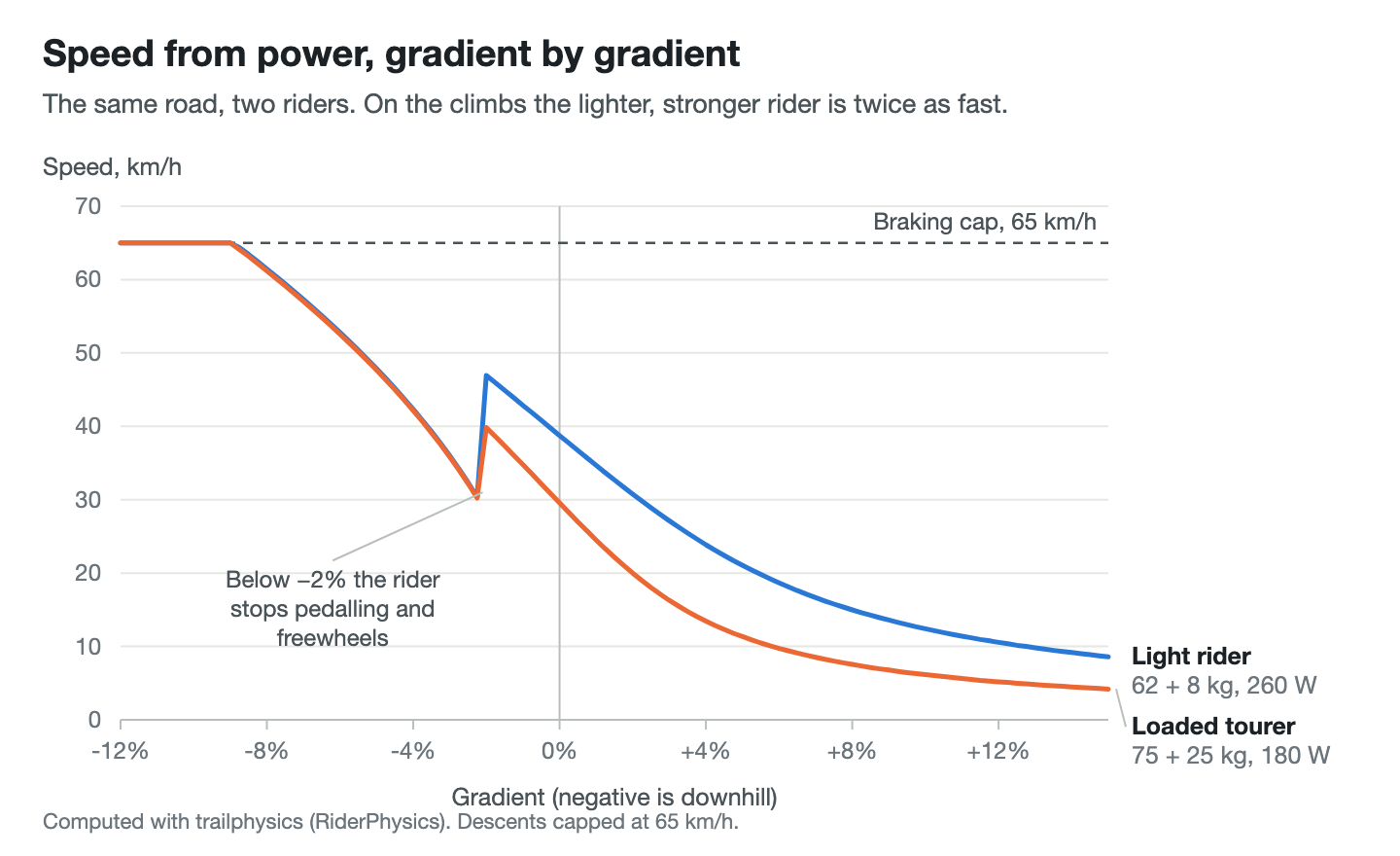
Speed for two riders on the same road, gradient by gradient. Below −2% the model has the rider stop pedalling and freewheel, which is the step in both curves, and descents are capped at 65 km/h.
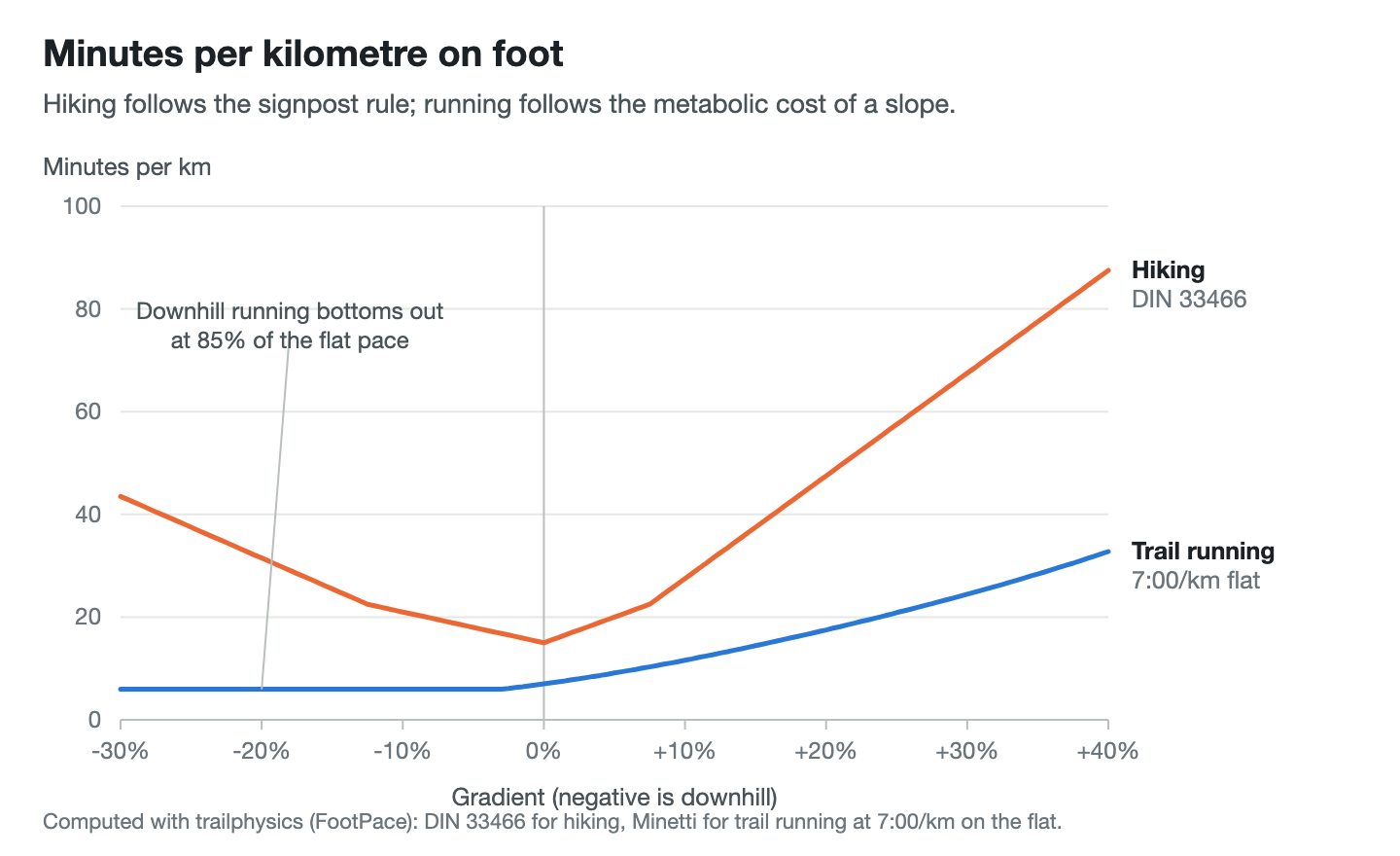
Minutes per kilometre on foot: hiking by the DIN 33466 signpost rule, trail running by Minetti's cost of running on a slope, never faster downhill than 85% of the flat pace.
Install
npm install trailphysicsExample
import {
  detailedSpeedKmh, footRouteSeconds, ascentFrom, maxInclinePct,
  cumulativeDistances, fractionAlong, sunTimes
} from 'trailphysics';

// Three points about 135 m apart, climbing 30 m.
const latlngs = [[46.000, 7.000], [46.001, 7.001], [46.002, 7.002]];
const elevations = [1200, 1215, 1230];

// How fast a 75 kg rider on an 18 kg bike at 180 W covers it, in km/h.
const kmh = detailedSpeedKmh({ riderKg: 75, bikeKg: 18, watts: 180 }, latlngs, elevations);

// How long it takes to hike, in seconds.
const seconds = footRouteSeconds({ latlngs, elevations }, 'hiking');

// Metres climbed, filtered for noise, and the steepest sustained incline.
const climbed = ascentFrom(elevations);
const steepest = maxInclinePct(latlngs, elevations);

// Where a GPS fix sits along the line, 0..1.
const fraction = fractionAlong([46.0012, 7.0011], latlngs, cumulativeDistances(latlngs));

// When the sun sets at the start today.
const { sunset } = sunTimes(new Date(), 46.0, 7.0);
Each module can also be imported on its own: trailphysics/rider-physics,
trailphysics/foot-pace, trailphysics/elevation, trailphysics/geometry,
trailphysics/earth and trailphysics/sun.
Modules
| Module | What it holds |
| --- | --- |
| rider-physics | normalizeRider, solveSpeed, speedForGradient, estimateSpeedKmh (from distance and ascent), detailedSpeedKmh (along the profile), airDensityAt, defaultCdA, fatigue |
| foot-pace | footSectionSeconds, footSections, footRouteSeconds, footRouteTimeline, sacHikeFactor, gradeFactor (Minetti), formatPace |
| elevation | ascentFrom, ascentBetween, maxInclinePct, despiked, gradeAt, elevationAt, inclineBandIndex, sample, profileForStorage |
| geometry | distanceM, interpolate, bearing, bearingDelta, cumulativeDistances, lengthKm, pointAtMetres, pointAtFraction, fractionAlong |
| earth | earthDistanceM (also takes { lat, lng }), EARTH_RADIUS_M |
| sun | sunTimes, sunPosition |
The foot-pace model takes a profile id: 'hiking', 'trailrun' or
'roadrun'. Incline bands take a sport: 'ride', 'hike' or 'run'.
Every function answers null rather than a guess when there is nothing to
measure, so a caller can tell "no data" from "zero".
Tests
npm install
npm test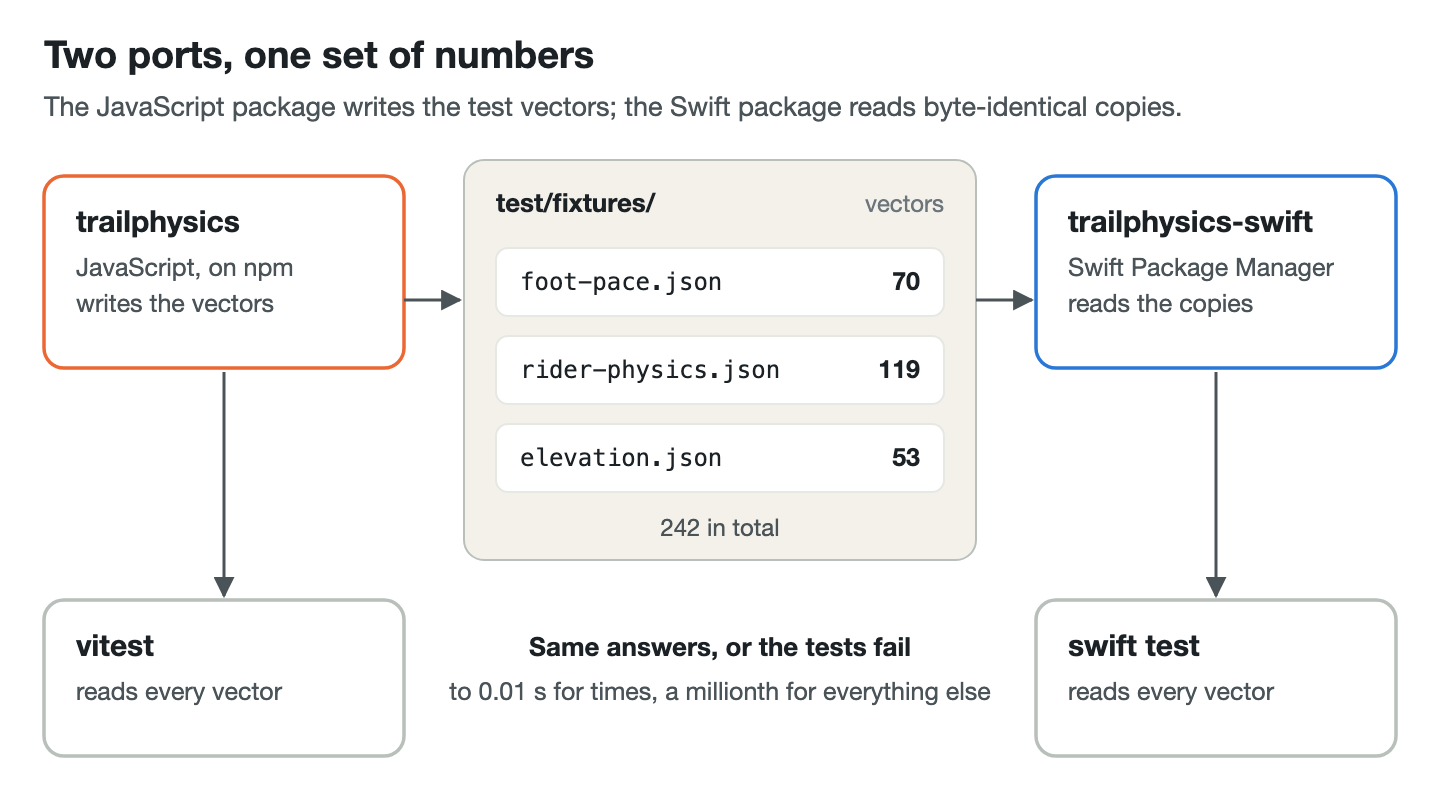
The vectors in test/fixtures/ (foot pace, rider physics, elevation) are
the master copies of the numbers both ports are held to: the Swift package
reads byte-identical copies and checks every one. npm run fixtures
regenerates them; a change that moves a number there is a change to both
ports.
Licence
Copyright 2026 Enzo Hilzinger.
Licensed under the Apache License, Version 2.0. See LICENSE.