
triage-review
v0.1.1
Published
A risk-ranking pre-reviewer for git diffs. Instead of adding more review noise, it tells a human the exact order to read a diff — must-read vs. safe-to-skim — using blast radius, bug-fix history, test-coverage gaps, change complexity, and sensitive-path d

Maintainers
 galzant
Readme
triage




A risk-ranking pre-reviewer for git diffs. It doesn't add more review comments — it tells a human the order to read a diff: what to read carefully, and what's safe to skim.
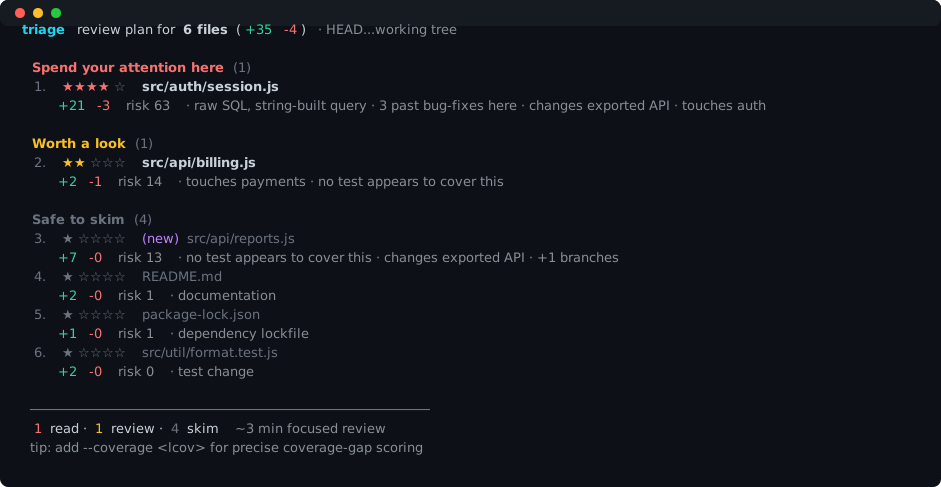
triage  review plan for 6 files (+35 -4)  · HEAD...working tree

  Spend your attention here (1)
  1.  ★★★★☆  src/auth/session.js
        +21 -3  risk 63  · raw SQL, string-built query · 3 past bug-fixes here · changes exported API · touches auth

  Worth a look (1)
  2.  ★★☆☆☆  src/api/billing.js
        +2 -1  risk 14  · touches payments · no test appears to cover this

  Safe to skim (4)
  3.  ★☆☆☆☆  (new) src/api/reports.js   +7 -0   risk 13  · changes exported API · no test covers this
  4.  ★☆☆☆☆  README.md                  +2 -0   risk 1   · documentation
  5.  ★☆☆☆☆  package-lock.json          +1 -0   risk 1   · dependency lockfile
  6.  ★☆☆☆☆  src/util/format.test.js    +2 -0   risk 0   · test change

  1 read · 1 review · 4 skim   ~3 min focused review
Reproduce it yourself:
node examples/demo.mjs
Zero dependencies. Fully local. No LLM, no API keys, no telemetry. Runs on any git repo with plain node.
Why
AI made writing code cheap, but reviewing it didn't get cheaper. Merge volume is up ~98% while review time is up ~91%, AI-authored changes carry measurably more defects, and most developers don't read every line before approving. The funded tools respond by generating more review comments — and reviewers now complain about "review slop" on top of code slop.
Triage takes the opposite bet: the bottleneck isn't more feedback, it's attention allocation. Given a finite amount of focus, which 3 of these 20 files actually deserve it? Triage answers that, deterministically, from signals already sitting in your repo.
What it measures
Every signal is computed locally from git and the diff — no model in the loop:
| Signal | What it captures |
|---|---|
| Blast radius | How many other files import the changed file (fan-in). A change to a widely-imported module can break many call sites. (JS/TS import graph in v1.) |
| Bug-fix history | How often this file has been fixed (git log subject analysis). Frequently-fixed files are empirically defect-prone. |
| Coverage gap | Fraction of the file's changed executable lines not covered by tests. Precise with an LCOV report; otherwise a heuristic "is there a related test?" |
| Change complexity | Net new branching (if/for/&&/?: …) introduced by the diff. |
| Sensitive paths | Whether the change lives in auth, payments, crypto, access-control, data/SQL, or infra paths. |
| Sensitive content | Risky constructs introduced: raw SQL, eval/exec, unsafe deserialization, dangerous DOM, hardcoded secrets, disabled safety checks. |
| API surface | Whether an exported/public symbol changed (ripples to callers). |
| New dependencies | Packages added to package.json. |
| Change size | Raw added/removed volume. |
These combine into a transparent 0–100 risk score; every point is attributable to a named component (see --json). Files are then bucketed into read carefully / review / skim and listed in descending risk. Docs, lockfiles, generated files, and snapshots are capped at "skim"; a sensitive code change is never silently skimmed (floored to at least "review").
Install
No build step. With Node 18+:
git clone <this repo> && cd triage
npm link            # or: npm install -g .
triage --help
Or run it directly without installing:
node /path/to/triage/bin/triage.js --since mainUsage
triage                      # review this branch vs. its base (see base resolution below)
triage main                 # review the working tree vs. `main`
triage main...HEAD          # review only what's committed on the branch
triage --staged             # pre-commit: review what you're about to commit
triage --coverage coverage/lcov.info     # precise coverage-gap scoring
triage --md > review.md     # Markdown checklist to paste into a PR
triage --json | jq          # full structured output for tooling
triage --fail-over 80       # exit 1 if any file scores >= 80 (CI gate)
By default, triage reviews your working tree against a sensible base and includes untracked new files (the ones git diff hides because you haven't git add-ed them yet). Note: --staged and an explicit A..B/A...B range review committed/indexed snapshots and therefore do not include untracked files.
Base resolution. When you don't pass a base, triage picks the first ref that exists, in order: the current branch's upstream, then origin/main, origin/master, main, master, develop, origin/develop, and finally HEAD~1. The chosen base is shown in the output header, and a ... range means "since the merge-base" (what's new on your branch), not a raw two-point diff.
As a CI gate
# fail the job if a high-risk file slipped in without a second look
- run: npx triage-review main...HEAD --fail-over 80
As a PR summary
triage main...HEAD --md >> "$GITHUB_STEP_SUMMARY"Output formats
- default — a colored terminal "review plan", grouped and ranked.
--md— a Markdown checklist in review order, for a PR description.--json— the complete result, including each file's score, tier, importers, coverage, signals, and the per-component score breakdown.
Options
-s, --since <ref>     Base ref to compare against
    --staged          Review staged changes
-c, --coverage <f>    LCOV file (auto-detected at coverage/lcov.info)
    --json            Structured JSON output
    --md              Markdown checklist
    --top <n>         Limit the review/skim lists to n entries
    --fail-over <n>   Exit 1 if any file scores >= n
    --no-graph        Skip blast-radius scanning (faster on huge repos)
    --no-color        Disable ANSI color
    --cwd <path>      Run as if started in <path>
-h, --help            Help
-v, --version         Version
Programmatic API
import { analyzeDiff } from 'triage-review';

const result = await analyzeDiff({
  cwd: process.cwd(),
  diffArgs: ['main'],            // any `git diff` args
  rangeLabel: 'main...working tree',
  options: { includeUntracked: true },
});

for (const u of result.units) {
  console.log(u.tier, u.score, u.file.path, u.reasons);
}
How scoring works
Each signal contributes up to a fixed maximum number of points via a saturating
curve (so the 10th importer matters less than the 1st). The weights sum above 100
on purpose — a file rarely maxes every axis — and the total is clamped to 0–100.
The model is intentionally simple and transparent: you can read the entire thing
in src/score.js, and --json shows exactly which signal earned
each point. No black box, no training data, no surprises.
Limitations (v1)
- Blast radius is JS/TS only. Import-graph fan-in currently resolves JavaScript/TypeScript relative imports. Other languages still get every other signal (history, coverage, complexity, sensitive paths/content); their blast radius is just reported as 0.
- Heuristics, not proofs. Bug-fix detection reads commit subjects; sensitive content uses pattern matching. They're tuned to be useful, not infallible — triage orders your attention, it doesn't replace judgment.
- Coverage precision needs a report. Without an LCOV file, the coverage signal falls back to "does a related test exist?"
Roadmap
- Tree-sitter-backed call-graph blast radius across more languages
- Per-hunk (not just per-file) ranking for very large files
- A GitHub/GitLab App that posts the read-order as a single check (still no inline noise)
- Learned weights from "where reviewers actually found bugs"
License
MIT