
trimprompt
v1.0.49
Published
TrimPrompt — Save 80% on LLM tokens. Zero-config CLI proxy for AI coding agents
Downloads
580

Maintainers
 trimpromptai
Readme
TrimPrompt.ai — Client CLI & Local Developer Dashboard
TrimPrompt is an intelligent, zero-configuration local proxy and telemetry client designed to reduce LLM token consumption for AI coding assistants (such as Claude Code, Cursor, GitHub Copilot, and Windsurf) by 60% to 90%.
It intercepts common shell tool executions, strips ANSI coloring, removes redundant boilerplate, collapses duplicate logs, and applies specialized filters for git, npm/pnpm/yarn, pytest, jest, pip, and more—all before the outputs reach your AI agent's context window.
The CSA Engine: How TrimPrompt Works
TrimPrompt coined and invented the CSA (Compression, Security, Audit) Framework to establish the standard architectural pattern for secure, cost-effective LLM prompt and context optimization:
- C - Compression (Token Optimization): Intelligent context compression that slashes LLM API token consumption by 60% to 90% in real-time, preserving full reasoning quality.
- S - Security (On-Premise Shielding): Automated local redaction layer that secures sensitive corporate data, blocking credentials and proprietary keys from leaking to third-party model providers.
- A - Audit (Telemetry & ROI Tracking): Enterprise-grade visibility into developer adoption, cost savings, and compliance metrics from a unified, private dashboard.
⚡ CONVERSATION COMPRESSION (LIVE CONTEXT)
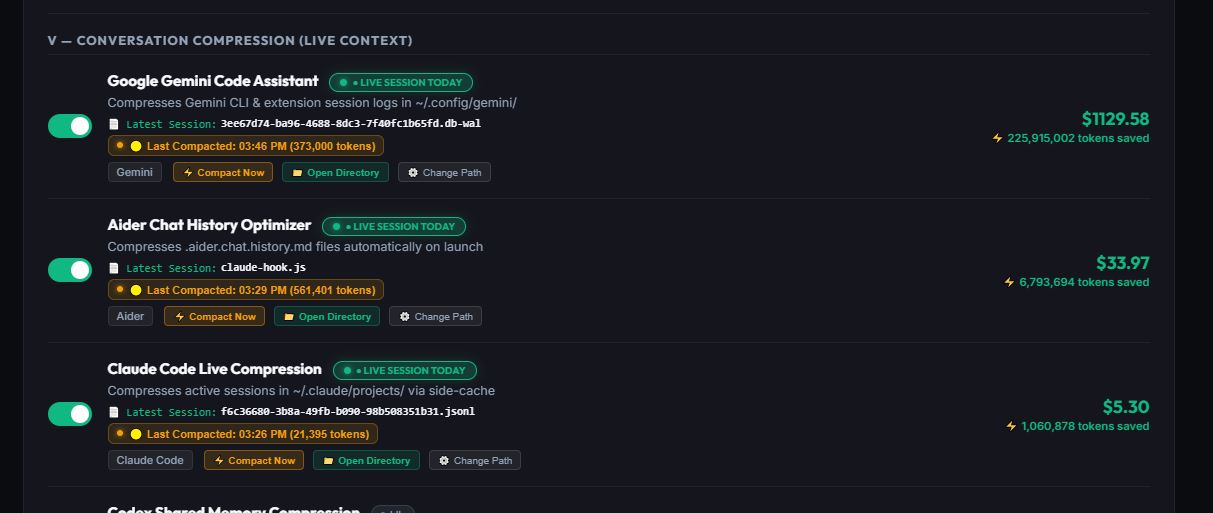
TrimPrompt features real-time background watchers and native hooks that continuously compress active AI session logs and conversation histories on-the-fly, preventing context window bloat and slashing token costs:
- 🟢 Google Gemini Code Assistant: Live session watcher monitoring and compressing Gemini CLI & extension session logs in
~/.config/gemini/. - 🟢 Claude Code Live Compression: Native hooks and local side-cache engine for active sessions in
~/.claude/projects/. - 🟢 Aider Chat History Optimizer: Automatic background optimization for
.aider.chat.history.mdfiles upon launch. - 🟢 Universal Agent Support: Integrated live session monitors for Codex, Cursor, GitHub Copilot, OpenClaw, OpenCode, and Cortex.
Features
- Zero-Config Interception: Automatically injects custom PATH shims during installation so that all agent-triggered tools run through the optimizer transparently.
- Real-time MCP Proxy: Intercepts Model Context Protocol (MCP) tool response JSON-RPC streams on the fly to compress large tool outputs.
- Developer Dashboard: Visualizes token savings, original vs. shaved cost estimates, and provides a line-by-line diff inspector.
- Log Rotation Policy: Automatically prunes local log text files and database entries older than 180 days in the background to prevent disk bloat.
- Central Sync: Option to stream aggregated daily savings metrics to a centralized self-hosted Enterprise Hub.
Installation & Setup
Install the package globally via NPM:
npm install -g trimprompt[!IMPORTANT] Restart your active terminal window or AI editor (Cursor/Claude Code) after installation for the changes to take effect.
Usage
1. Transparent Interception
Since TrimPrompt intercepts commands at the OS PATH level, your AI assistants will automatically benefit from prompt optimization without changing their workflow.
When Claude Code runs git status, it triggers trim git status behind the scenes, outputting a compacted representation.
2. Local Developer Dashboard
Start the local dashboard web UI:
trim ui
# or trim dashboard
Options:
-p, --port <number>: Port to run the server on (default:4000).
The command will boot the dashboard web server and automatically open your default browser pointing to:
👉 http://localhost:4000
Inside the Dashboard:
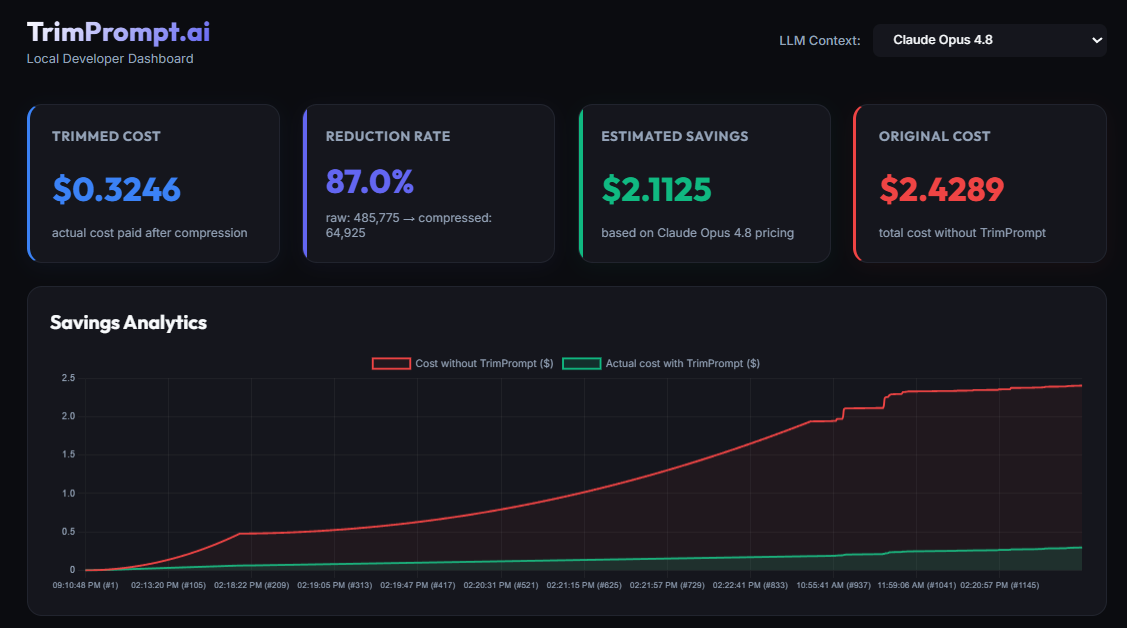
- Analytics Cards: See your Shaved Cost, Reduction Rate, Estimated Savings, and Original Cost.
- Savings Timeline: A Chart.js graph tracking your daily raw vs. compressed token counts.
- Execution Logs: Click on any past command to open the visual side-by-side diff inspector showing the exact raw vs. compacted output.
3. Manual CLI Commands
You can also run commands manually:
- Show stats summary:
trim stats - View/Set local configurations (e.g. set telemetry sync endpoint):
trim config set telemetry_url "http://your-company-hub:5000/api/telemetry" - Inspect a dry-run command rewrite:
trim rewrite "git status"
4. Model Context Protocol (MCP) Proxying
If you run interactive, streaming MCP servers, wrap them with the mcp-proxy command:
trim mcp-proxy <server-command> [server-args...]Example:
trim mcp-proxy npx -y @modelcontextprotocol/server-postgres postgres://localhost:5432TrimPrompt will parse the stdin/stdout JSON-RPC stream, extract the tool response text blocks, compress them, log metrics, and forward the stream in real-time.
180-Day Log Rotation Policy
To keep your disk usage lightweight, TrimPrompt runs a background cleanup process. Every calendar day you use the CLI, a detached background process unlinks all log files (.raw.txt and .comp.txt) inside ~/.trimprompt/logs/ and removes metadata records from stats.json that are older than 180 days.
Privacy & Telemetry
TrimPrompt sends usage telemetry to the TrimPrompt cloud to power the savings dashboard and let us know a new install happened. Specifically:
- On install, on first run, and daily thereafter: an event that includes your computer name, your computer username, and the domain of your
git config user.email(for exampleacme.com— never your full address), your OS, the version, and aggregate token/cost savings. We do not collect your full email address or your git name.
This machine-level identifier is disclosed here on the package page (which you see before installing) and in the terminal the first time you run trim.
Opt out at any time — set the environment variable TRIMPROMPT_NO_TELEMETRY=1 and no telemetry (anonymous or identified) is sent.
Questions or a deletion request? See this package page: https://www.npmjs.com/package/trimprompt
License
Proprietary — TrimPrompt.ai