
trompt
v1.0.1
Published
Modern CLI questionary library with TypeScript support

Maintainers
 nickeltobias
Readme
Trompt



🚀 Modern CLI questionnaire library - Interactive terminal prompts with style!
A modernized, ES module-compatible CLI prompt library similar to inquirer, with support for various input types and validation.
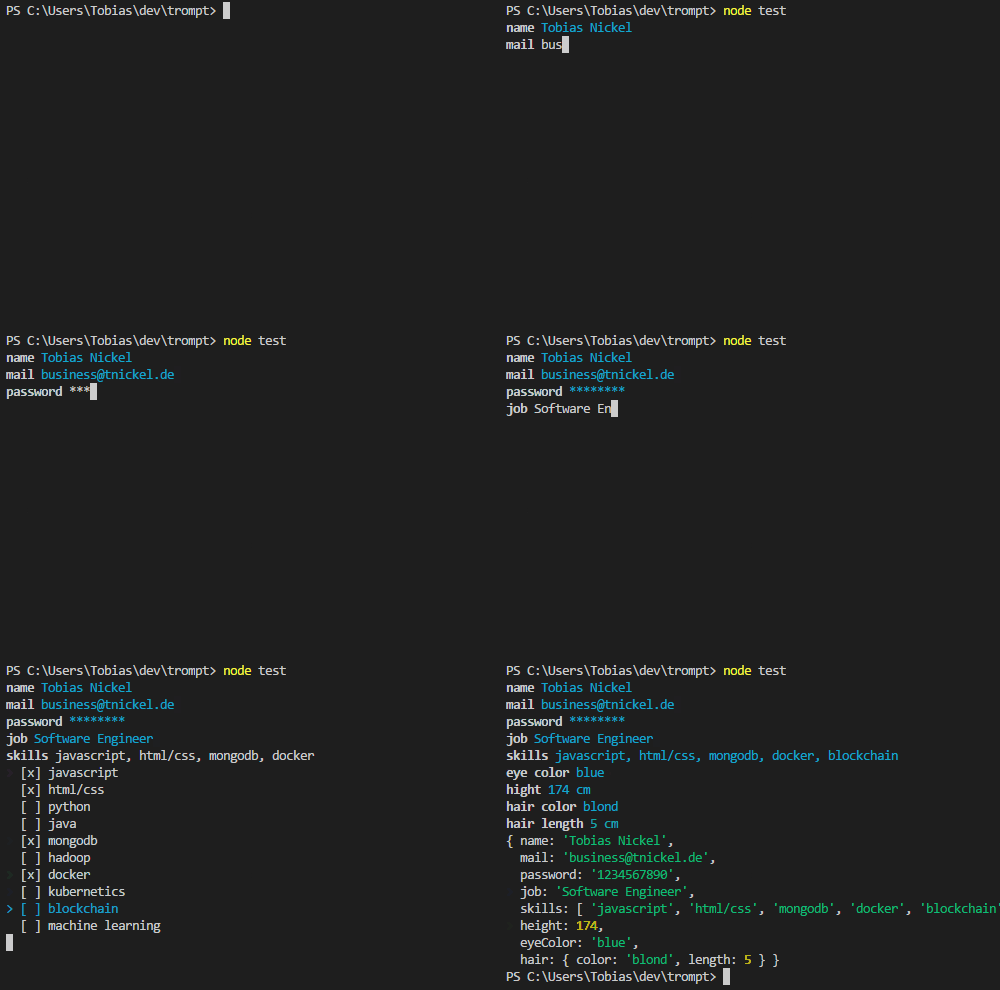
✨ Features
- ES Modules - Modern JavaScript with full ES module support
- TypeScript Support - Complete TypeScript definitions with full type safety
- IntelliSense Ready - Excellent IDE support with comprehensive type definitions
- Multiple Input Types - Text, password, number, select, checkbox
- Validation - Built-in and custom validation support
- Inquirer Compatible - Drop-in replacement API available
- Zero Dependencies* - Only essential dependencies for terminal interaction
📦 Installation
npm install tromptRequirements: Node.js ≥ 16.0.0
🚀 Quick Start
import { prompt } from 'trompt';

const name = await prompt('What is your name?');
console.log(`Hello, ${name}!`);
📚 API Reference
Basic Usage
import { prompt } from 'trompt';

// Simple text input
const answer = await prompt('Enter your name:');

// Configured prompt
const age = await prompt({
  type: 'number',
  question: 'Enter your age:',
  min: 0,
  max: 150,
  validate: (value) => value > 0
});
Prompt Types
Input (default)
const name = await prompt('Your name:');
const email = await prompt({
  type: 'input',
  question: 'Email:',
  validate: (value) => value.includes('@')
});
Password
const password = await prompt({
  type: 'password',
  question: 'Enter password:'
});
Number/Integer
const height = await prompt({
  type: 'number',
  question: 'Height:',
  suffix: 'cm',
  min: 0,
  max: 300
});

const count = await prompt({
  type: 'integer', // or 'int'
  question: 'How many items?'
});
Select (Single Choice)
const framework = await prompt({
  type: 'select', // or 'list'
  question: 'Choose framework:',
  choices: ['React', 'Vue', 'Angular', 'Svelte'],
  default: 0 // index of default choice
});
Checkbox (Multiple Choice)
const skills = await prompt({
  type: 'checkbox',
  question: 'Select skills:',
  choices: [
    'JavaScript',
    'Python',
    'React',
    { text: 'Node.js', value: 'nodejs' },
    { text: 'TypeScript', value: 'ts', selected: true }
  ]
});
Inquirer Compatibility
import { inquirer } from 'trompt';

const answers = await inquirer.prompt([
  {
    name: 'username',
    question: 'Username:',
    type: 'input'
  },
  {
    name: 'framework',
    question: 'Framework:',
    type: 'select',
    choices: ['React', 'Vue', 'Angular']
  }
]);

console.log(answers.username, answers.framework);
🎯 Complete Example
import { prompt } from 'trompt';

async function collectUserData() {
  // Basic information
  const name = await prompt('What is your name?');
  const email = await prompt({
    type: 'input',
    question: 'Email address:',
    validate: (value) => value.includes('@') ? true : 'Please enter a valid email'
  });

  // Secure input
  const password = await prompt({
    type: 'password',
    question: 'Create a password:'
  });

  // Numeric input with validation
  const age = await prompt({
    type: 'number',
    question: 'Your age:',
    min: 13,
    max: 120,
    validate: (value) => value >= 13 ? true : 'Must be 13 or older'
  });

  // Single selection
  const role = await prompt({
    type: 'select',
    question: 'Select your role:',
    choices: [
      'Developer',
      'Designer',
      'Product Manager',
      'Other'
    ]
  });

  // Multiple selection
  const technologies = await prompt({
    type: 'checkbox',
    question: 'Technologies you use:',
    choices: [
      'JavaScript',
      'TypeScript',
      'Python',
      'React',
      'Node.js',
      'Docker'
    ]
  });

  return {
    name,
    email,
    password,
    age,
    role,
    technologies
  };
}

const userData = await collectUserData();
console.log('User data:', userData);
🎯 TypeScript Support
Trompt includes comprehensive TypeScript definitions for full type safety and excellent IntelliSense:
import { prompt, inquirer, type InquirerQuestion } from 'trompt';

// Type-safe prompts with automatic return type inference
const name: string = await prompt('Your name:');

const age: number = await prompt({
  type: 'number',
  question: 'Your age:',
  min: 0,
  max: 150,
  validate: (value: number): boolean | string => {
    return value > 0 ? true : 'Age must be positive';
  }
});

const colors: string[] = await prompt({
  type: 'checkbox',
  question: 'Favorite colors:',
  choices: ['Red', 'Green', 'Blue']
});

// Inquirer-style with typed questions
const questions: InquirerQuestion[] = [
  {
    name: 'username',
    type: 'input',
    question: 'Username:',
    validate: (value: string) => value.length > 0
  },
  {
    name: 'framework',
    type: 'select',
    question: 'Framework:',
    choices: ['React', 'Vue', 'Angular']
  }
];

const answers = await inquirer.prompt(questions);
// answers.username and answers.framework are properly typed
Type Definitions
All prompt configurations are fully typed:
InputPromptConfig- Text input promptsPasswordPromptConfig- Hidden password inputNumberPromptConfig- Number/integer input with validationSelectPromptConfig- Single selection from choicesCheckboxPromptConfig- Multiple selection from choicesInquirerQuestion- Inquirer-style question objects
🔧 Configuration Options
| Option | Type | Description |
|--------|------|-------------|
| type | string | Prompt type: input, password, number, integer, select, checkbox |
| question | string | The question to display |
| message | string | Alias for question (inquirer compatibility) |
| default | any | Default value |
| validate | function | Validation function (value) => boolean \| string |
| choices | array | Array of choices for select/checkbox |
| min | number | Minimum value for numbers |
| max | number | Maximum value for numbers |
| suffix | string | Suffix to display after number input |
✅ What's New in v1.0
- 🎯 ES Modules - Full ES module support with proper exports
- 📝 Modern JavaScript - Updated to use modern JS features and best practices
- 🛡️ Better Error Handling - Improved error messages and validation
- 📚 TypeScript Ready - Comprehensive JSDoc annotations
- 🔧 Enhanced API - More consistent and intuitive configuration
- ⚡ Performance - Optimized for better performance and memory usage
- 🎨 Better UX - Improved visual feedback and interaction