
tryfeature
v0.0.7
Published
Try Feature as Ability and Usage. Track consumptions.
Downloads
34

Maintainers
 w99910
Readme
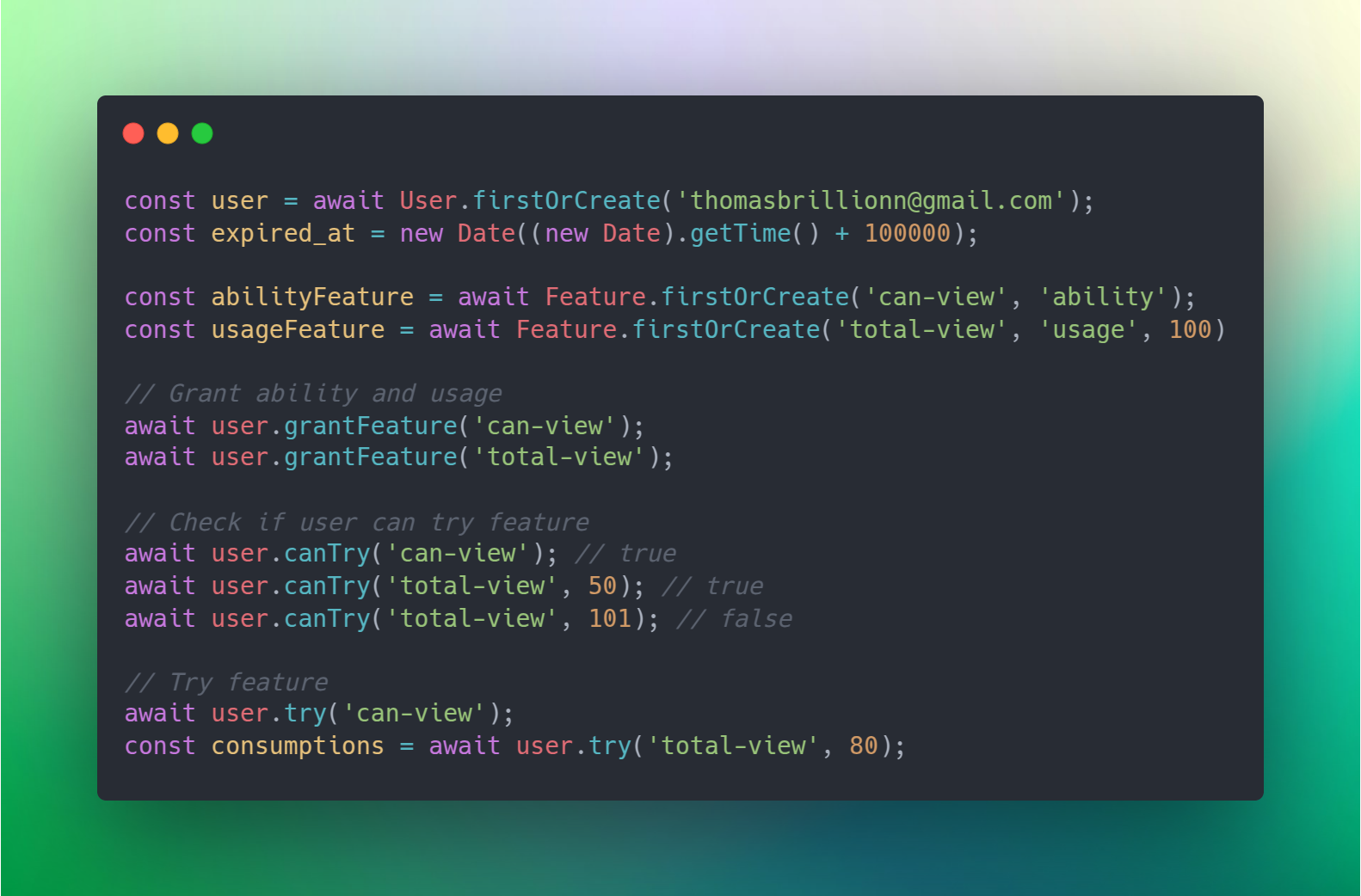
TryFeature is an easy-to-use library for managing users and their associated features. It provides a simple, yet flexible API to handle both ability-typed features (e.g., permissions) and usage-typed features (e.g., quota-based actions). Use this library to easily migrate your data models, create users, define features, organize them into groups, and control feature grants, revocations, and consumption.
TryFeature is inspired by Laravel package called UseIt, and under the hood, sutando is used to interact with database.
📝 Table of Contents
✨ Features
Feature Management
- Create features with
Feature.firstOrCreate. - Support for two feature types:
- Ability-typed features: Represent permissions or capabilities.
- Usage-typed features: Represent quota-based actions (requires a specified quantity).
- Error handling for incorrect feature setup (e.g., missing quantity for usage features).
Feature Grouping
- Create feature groups with
FeatureGroup.firstOrCreate. - Add and remove features from groups using
featureGroup.addFeaturesandfeatureGroup.removeFeatures. - Grant all features of a feature group by name or object using
user.grantFeatureGroup
Granting/Revoking Feature Or Feature Group
- Grant feature using
user.grantFeatureoruser.grantFeatureGroup - Revoke feature using
user.revokeFeatureoruser.revokeFeatures
Usage Consumption
- Consume usage-based features with
user.try. - Track every consumption of an usage.
And more
- Include migrations for all core models such as User, Feature, Ability, FeatureGroup, Usage, and Consumption.
- Easy to extend
🤔 How it works
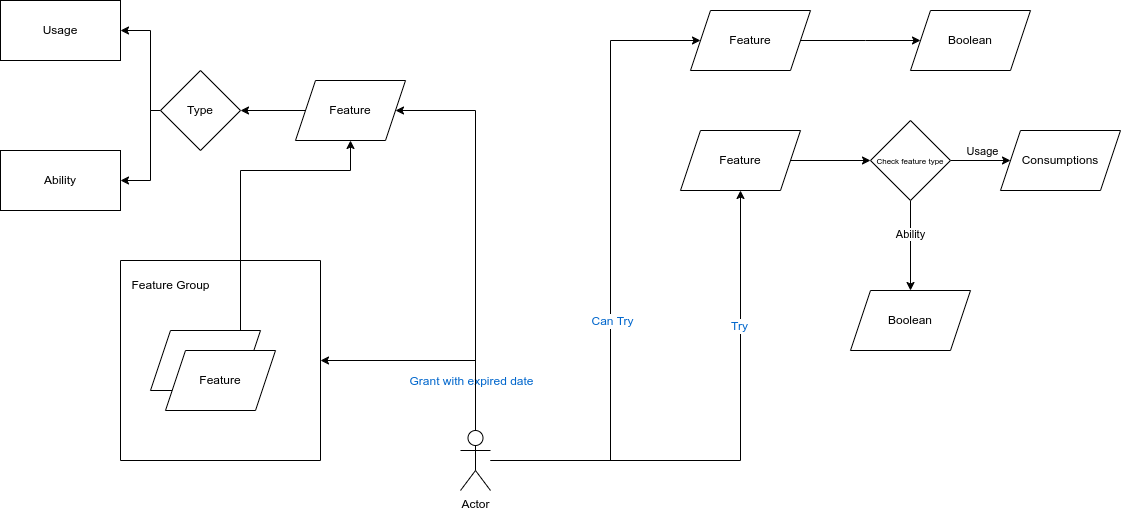
🔌 Installation
npm i tryfeature
# or
pnpm i tryfeature
# or
yarn add tryfeature
👋 Getting started
Migration
Before we get started, we need to migrate required tables first.
- Connection: Since sutando is used under the hood, we need to setup database connection first. Please consult its documentation page for more details.
// Example
import { sutando } from 'sutando';

sutando.addConnection({
    client: 'sqlite3',
    connection: {
        filename: ":memory:"
    },
    useNullAsDefault: true,
});- Migrate Tables: In order to save time, you can use migration helper function
migrateof each models. You can passprefixfor the table in case there is already existing table.
You can also reference this sql file.
// set up connection
// ...
// migrate
const prefix = ''
await User.migrate(prefix);
await Feature.migrate(prefix);
await Ability.migrate(prefix);
await FeatureGroup.migrate(prefix);
await Usage.migrate(prefix);
await Consumption.migrate(prefix);
By default,
migratefunction checks if there is already existing table. If exists, it skips the migraiton. Passfalseas second parameter inmigratefunction such as
const skipOnExist = false;
await User.migrate('', skipOnExist)
User Model
By default, User model has the following schema structure. In order to add more columns, please extend the model and add more columns in migrate function.
table.increments('id').primary();
table.string('email').unique();
table.timestamps();
To create an user, you can use User.firstOrCreate async function.
import { User } from 'tryfeature';

const email = '[email protected]'

const user = await User.firstOrCreate(email);
Feature Model
Schema structure:
table.increments('id').primary();
table.string('name').unique();
table.enum('type', ['ability', 'usage']);
table.text('description').nullable();
table.bigInteger('quantity').nullable();
table.timestamps();
To create a feature, you can use Feature.firstOrCreate. It has four parameters.
Feature.firstOrCreate(name: string, type: FeatureType, quantity?: number, description?: string)// Examples
import { Feature, FeatureType } from 'tryfeature';
const abilityFeature = await Feature.firstOrCreate('can-view', FeatureType.ability);
const usageFeature = await Feature.firstOrCreate('api-call', FeatureType.usage, 100);Feature Group Model
Feature and Feature Group has many-to-many relationship type. Schema structure:
table.increments('id').primary();
table.string('name').unique();
table.text('description').nullable();
table.timestamps();
To create a feature group, you can use FeatureGroup.firstOrCreate. It has two parameters.
FeatureGroup.firstOrCreate(name: string, description?: string)// Examples
import { FeatureGroup } from 'tryfeature';
const basicUser = await FeatureGroup.firstOrCreate('basic-user');To add feature to feature group, you can use either FeatureGroup.addFeature or FeatureGroup.addFeatures.
import { Feature, FeatureGroup } from 'tryfeature';

const feature = await Feature.query().first();

await FeatureGroup.addFeature(feature);

await FeatureGroup.addFeatures([feature]);
To remove feature from feature group, use FeatureGroup.removeFeature.
import { Feature, FeatureGroup } from 'tryfeature';

const feature = await Feature.query().first();

await FeatureGroup.removeFeature(feature);
🔎 Usage
Granting Feature
You can grant a user to a feature by passing feature name or feature object and expire date.
import { User } from 'tryfeature';

const user = await User.firstOrCreate('[email protected]')

await user.grantFeature('can-view', new Date((new Date).getTime() + 10000));

await user.grantFeature('api-call', new Date((new Date).getTime() + 10000));
In order to grant a feature group,
import { User } from 'tryfeature';

await user.grantFeatureGroup('basic-user');
Revoking Feature
Like granting feature, you can pass feature name or feature object.
import { User } from 'tryfeature';

const user = await User.firstOrCreate('[email protected]')

await user.revokeFeature('can-view');

await user.revokeFeatureGroup('basic-user');
Checking if you can try feature
Before you actually use feature, especially usage typed feature, you can check whether you can try feature.
import { User } from 'tryfeature';

const user = await User.firstOrCreate('[email protected]')

await user.canTry('can-view'); // return boolean

await user.canTry('api-call', 10); // return boolean
Please pass
amountto be consumed as second parameter for usage typed feature.
Trying feature
- Ability feature: Trying the feature returns
boolean. - Usage feature: Trying the feature returns an array of
Consumptionthat are consumed.
- Ability feature: Trying the feature returns
import { User } from 'tryfeature';

const user = await User.firstOrCreate('[email protected]')

await user.try('can-view'); // return boolean

await user.try('api-call', 10); // return boolean
When multiple usage entries exist, those expiring sooner will be prioritized for consumption.
Listing current available features
You can list current available abilities and usages.
await user.getAvailableFeatures();The method accepts three parameters:
ability: true or false to include ability typed featuresusage: true or false to include usage typed featuresinclude_expire: true or false to include expired features
// To get only ability typed features
await user.getAvailableFeatures(true);

// To get only usage typed features
await user.getAvailableFeatures(false, true);

// To include expired features
await user.getAvailableFeatures(true, true, true);
📄 License
MIT
💖 Show Your Support
Please support me on github if this project helped you.