
ts-insp
v0.0.4
Published
Tool to visualize typescript dependencies in a project


Readme
ts-insp
Console tool for inspecting typescript project imports.
This is meant for documenting existing code and it's dependencies. Just something I needed IRL and couldn't find suitable solutions. Asked some pointers from ChatGPT and seemed like a cool thing to do. So here we are...
The tool itself traverses a dependency tree starting from a single typescript or javascript file. It visualizes the dependency tree in some format. Currently output options are very limited but will be improved later with support for custom formats if someone needs some specific visualization. Current options:
- Console output - Just printing the dependencies to console. Simple
- JSON - Export to JSON file. If you just want to log the dependencies in JSON for future use, it is possible
- HTML - Export the dependency tree to HTML file. Currently only one HTML template is available that renders everything in tree shape.
- PNG - Same as HTML but the HTML output is rendered to png
- SVG - SVG output format generated with d3. Created based on the HTML output
- mermaid - Markdown file with mermaid chart
Examples
An visualisations (ts-insp is run against this github repository)
Dependency Tree as png
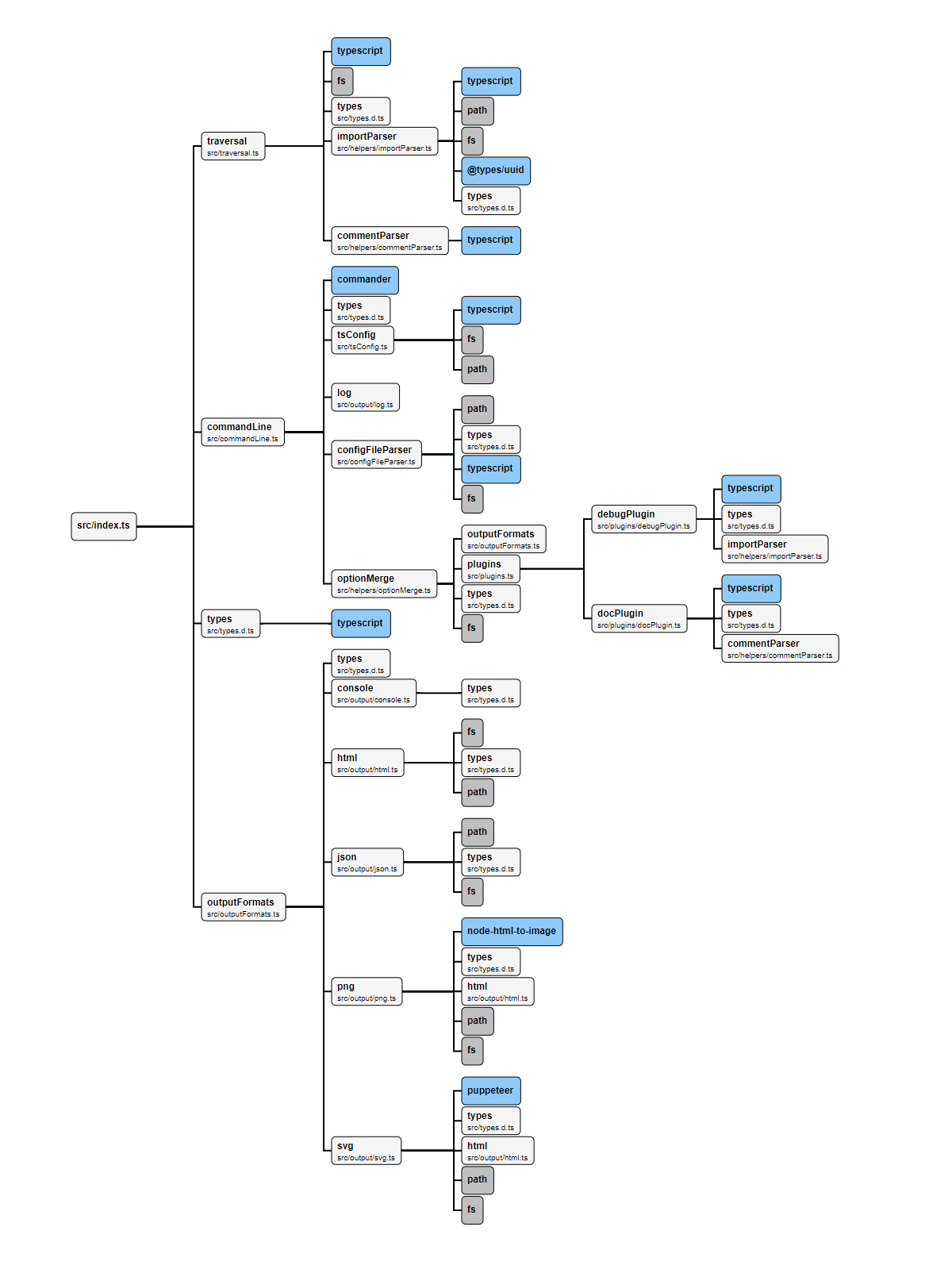
Dependency Tree as svg (experimental)

Dependency Graph as png

Dependency Tree as json
Dependency Tree of ts-insp tool as JSON
Dependency Tree as mermaid markdown
Dependency Tree of ts-insp tool as markdown
Installing and running
yarn
Install the dev dependency
yarn add -D ts-inspRun the script
yarn ts-insp --helpnpx
You can run the tool without installing dependency:
npx ts-insp --helpConfiguration
Create configuration file e.g. ./ts-insp.config.ts (javascript is possible too if you prefer the older brother more). All options are supported in the configuration file (except plugins at the moment).
Example:
import { InspOptions } from "ts-insp";

const config: Partial<InspOptions> = {
    // Debug logs
    verbose: false,
    // Supported types. js, ts, jsx, tsx ja d.ts files are officially supported. Some other typescript
    // friendly files might be too.
    supportedTypes: ["tsx", "ts", "d.ts"],
    // Entry point where traversing starts
    file: "App.tsx",
    // By default node modules are not traversed. Can be enabled but feature is experimental
    traverseNodeModules: false,
    // By default retraversing is disabled. This defines whether same module is processed again when
    // encountered during traversing. If the amount of iterations for traversing is too high
    // circular dependencies will be a problem. Use with caution.
    retraverse: false,
    // Skip imports that import only types. Not skipped by default.
    skipTypeImports: false,
    // Filter modules from results. Everything shown by default.
    filterModules: (node, parent) => true,
    // Output format. Supported types are console, json, png, html
    format: ["console", "png"],
    // html and png formatting options. More information later
    formatOptions: {
        png: {
            outputPath: "docs",
            outputName: "DependencyTree",
            template: "d3dependencyTree",
            customStyles: "body { width: 2200px !important; height: 100% !important; }",
            slugs: {
                diagramWidth: 2000,
                diagramHeight: 2000,
                maxRectWidth: 280,
            },
        },
    },
    // Not supported in config file. Experimental feature which can be enabled from command line.
    plugins: [],
};

export default config;
After the configuration file has been created you can run the tool with following command:
yarn ts-insp -c ts-insp.config.tsCommand line configuration instructions can be read with following command. Command line options will overwrite the configuration file options if provided.
yarn ts-insp --helpFuture improvements
Some features that will come in the future. But first the project needs to be improved to be more maintainable:
- Support for plugins. Ability to add custom inspection capabilities when traversing your dependencies? There are some experimental proof of concept plugins done but the whole concept needs to be built from the ground.
- Support for custom HTML templates. Don't like the current visualization you get? No worries, me neither! Wanna build your own? Just wait for it, it's coming :)
But as said, for now I'm concentrating on writing unit tests, writing documentation and making the repository public. More comes later.