
tskb
v0.7.13
Published
TS Knowledge Base. A TypeScript-native DSL for expressing architectural intent as typed declarations. Produces renderable docs/diagrams and a queryable knowledge graph, supporting type-checked snippet references, semantic relations, and constraints.

Maintainers
 mitk0936
Readme
tskb
A typed, compiler-validated knowledge graph for TypeScript codebases - authored in .tskb.tsx files, queryable from the CLI, explorable in the browser.


Your AI assistant authors the docs. You navigate them.
.tskb.tsx files are written by AI assistants during normal engineering work - humans use the explorer and the assistant itself to navigate the resulting graph. Documentation references real code via typeof import(), so renaming or removing a referenced symbol breaks the next tskb build - stale docs surface as a build failure rather than silent drift.
Preview
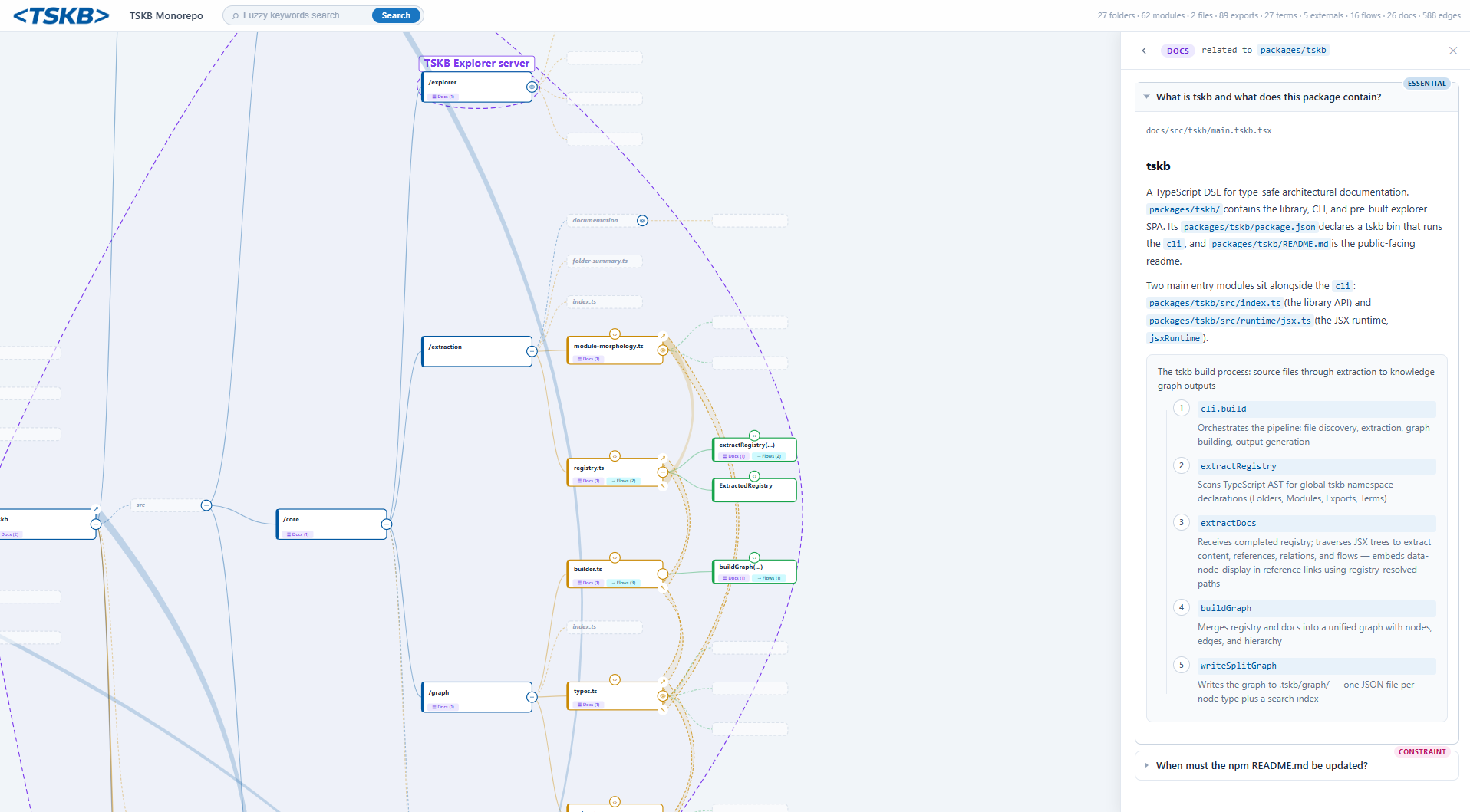
The graph for tskb itself is live at https://tskb-static-b3hqdl4xbq-ew.a.run.app/.
Quick start
npm install --save-dev tskb

npx --no -- tskb init      # scaffolds docs/, tsconfig, starter file, and an "npm run docs" script
npm run docs       # builds the knowledge graph
npx --no -- tskb explore   # opens the visual explorer
tskb init writes a starter docs/main.tskb.tsx and a docs/tsconfig.json. The graph starts empty and grows as you author docs alongside your code.
How it works
tskb is built around three layers:
- A type registry -
.tskb.tsxfiles declare folders, modules, exports, files, externals, and terms. References usetypeof import(), so the TypeScript compiler validates every link to source code. - A JSX document layer - each file exports a
<Doc>answering one question. References to registered nodes appear inline; the build verifies they exist. - A graph - the build compiles docs into a structured graph that the CLI and explorer query, and that AI assistants can navigate via generated skills.
Distributed authorship
The registry blocks in every .tskb.tsx file extend the same tskb global namespace - TypeScript merges them at compile time. There is no central manifest to coordinate on: each team declares the nodes for their area in the docs that live next to their code.
Cross-team references work the same way as in-team ones. When the billing team writes a doc that uses tskb.Exports["auth.service.login"], the compiler checks that key exists in the merged registry - which means the auth team can't silently rename the export without breaking billing's docs build. Each team owns its slice of the graph; the type system stitches the whole picture together into one queryable architecture.
Compared to alternatives
| | Source of truth | Refactor-aware | Queryable | Architecture-level | | --------------------- | -------------------- | -------------- | --------- | ------------------ | | Markdown / wikis | Prose | No | No | Yes | | TypeDoc | JSDoc comments | Partial | No | No (API-level) | | Diagrams (Mermaid, …) | Embedded text | No | No | Yes | | RAG over the repo | Snippets at query | Implicit | Yes | Variable | | tskb | Typed registry + JSX | Yes | Yes | Yes |
Authoring
.tskb.tsxsyntax is written by AI assistants, not by hand. The schema, registry primitives, and JSX components below exist so the assistant can produce structured, compiler-checked output - and so you can review what it wrote. Day-to-day, you describe what to document; the assistant writes the file, runs the build, and fixes broken references when the build fails. The sections below are reference material - useful for reviewing or occasionally hand-editing, but not a syntax you're expected to memorize.
A .tskb.tsx file has two parts: a registry block that declares structural anchors, and a <Doc> that describes them.
Registry primitives
| Primitive | Purpose |
| ---------- | ----------------------------------------------------------------------------- |
| Folder | A logical area of the codebase. boundary marks a distinct runtime. |
| Module | A source file - import path validates it exists. |
| Export | A named export - compiler validates it exists. Supports class methods. |
| File | Non-TS/JS files: configs, READMEs, specs. |
| External | npm packages, APIs, services outside the repo. |
| Term | A name from the area's vocabulary, declared once and reused across that area. |
JSX components
| Component | Purpose |
| -------------------------------- | ------------------------------------------------------------------------------- |
| <Doc> | Root component. Every file exports one. explains must be a real question. |
| <P> / <H1> / <H2> / <H3> | Content structure. |
| <List> / <Li> | Bulleted lists. |
| <Snippet> | Type-checked code example (an arrow function the compiler reads at build time). |
| <Relation> | Explicit semantic edge between two nodes. |
| <Adr> | Architecture Decision Record (accepted / proposed / deprecated / superseded). |
| <Flow> / <Step> | A named, ordered sequence of steps through the system. |
A full example
A complete docs/auth/login.tskb.tsx - registry declarations on top, the <Doc> below. Every typeof import(...) resolves to source code, every ref as tskb.X[...] is checked against the registry, and every snippet body is type-checked.
import type { Folder, Module, Export, External, Term } from "tskb";
import { Doc, H1, H2, P, List, Li, Snippet, Relation, Flow, Step, ref } from "tskb";

declare global {
  namespace tskb {
    interface Folders {
      auth: Folder<{ desc: "Authentication and session management"; path: "src/auth" }>;
    }
    interface Modules {
      "auth.service": Module<{
        desc: "Issues and validates session tokens";
        type: typeof import("../src/auth/service.js");
      }>;
      "auth.routes": Module<{
        desc: "HTTP routes for login and logout";
        type: typeof import("../src/auth/routes.js");
      }>;
    }
    interface Exports {
      "auth.service.login": Export<{
        desc: "Validates credentials and returns a signed JWT";
        type: typeof import("../src/auth/service.js").login;
      }>;
      "auth.service.verify": Export<{
        desc: "Verifies a JWT and returns the decoded session, or null";
        type: typeof import("../src/auth/service.js").verify;
      }>;
      "auth.routes.handleLogin": Export<{
        desc: "POST /login - parses body, calls login, sets cookie";
        type: typeof import("../src/auth/routes.js").handleLogin;
      }>;
    }
    interface Externals {
      jose: External<{
        desc: "JWT signing and verification";
        url: "https://github.com/panva/jose";
      }>;
      redis: External<{
        desc: "Revocation list keyed by session id";
        url: "https://redis.io";
      }>;
    }
    interface Terms {
      "session-token": Term<"Short-lived JWT issued on login; carried in an HttpOnly cookie">;
    }
  }
}

const AuthFolder = ref as tskb.Folders["auth"];
const AuthService = ref as tskb.Modules["auth.service"];
const Login = ref as tskb.Exports["auth.service.login"];
const Verify = ref as tskb.Exports["auth.service.verify"];
const HandleLogin = ref as tskb.Exports["auth.routes.handleLogin"];
const Jose = ref as tskb.Externals["jose"];
const Redis = ref as tskb.Externals["redis"];
const SessionToken = ref as tskb.Terms["session-token"];

export default (
  <Doc explains="How does login issue and validate session tokens?" priority="essential">
    <H1>Authentication</H1>
    <P>
      {AuthFolder} owns credential validation and the {SessionToken} lifecycle.
      {AuthService} signs tokens with {Jose} and tracks revoked ones in {Redis}.
    </P>

    <H2>Issuing a token</H2>
    <P>
      {HandleLogin} parses the request body, delegates to {Login}, and sets the resulting JWT as an
      HttpOnly cookie. Tokens are short-lived; clients refresh by logging in again.
    </P>
    <Snippet
      code={async () => {
        const { login } = await import("../src/auth/service.js");
        const token = await login({ email: "[email protected]", password: "secret" });
        return token; // signed JWT
      }}
    />

    <H2>Verifying a token</H2>
    <List>
      <Li>{Verify} decodes the JWT, checks the signature, and rejects revoked ids.</Li>
      <Li>Revoked ids live in {Redis} under a per-user set with the token's TTL.</Li>
      <Li>Callers receive the decoded session or `null` - never an exception.</Li>
    </List>

    <Relation from={Login} to={Redis} label="records session id on issue" />

    <Flow
      name="auth-login"
      desc="User submits the login form; the route validates credentials and returns a JWT cookie"
      priority="essential"
    >
      <Step node={HandleLogin} label="receives POST /login" />
      <Step node={Login} label="validates credentials" />
      <Step node={Jose} label="signs the JWT" />
      <Step node={Redis} label="records the session id" />
      <Step node={HandleLogin} label="sets HttpOnly cookie and responds" />
    </Flow>
  </Doc>
);
A few details worth calling out:
- Snippet bodies are real code. Rename
loginand the build fails - docs can't drift past their referent. - Flows are first-class graph nodes.
auth-loginshows up intskb flowsand renders as a lane in the explorer. - References are type-checked.
tskb.Exports["auth.service.login"]only compiles if that exact key was declared above; a missing or misspelled key fails the build. - Type-driven citations. Beyond
ref,valinlines a literal string the type system already knows -val as keyof Pkg["bin"],val as Extract<keyof Pkg["scripts"], "build">,val as typeof MyEnum.Member. Rename the underlying thing and the doc either auto-updates or fails to type-check. Full shapes in thetskb-update-syntaxskill.
Project setup
tskb init scaffolds the minimum needed to author docs:
docs/main.tskb.tsx- starter doc with an empty registry block.docs/tsconfig.json- a dedicated tsconfig withjsxImportSource: "tskb", NodeNext module resolution, andbaseUrl/rootDirpointing at the repo root sotypeof import("../src/…")resolves correctly."docs"script inpackage.json- runstskbagainstdocs/**/*.tskb.tsx.
The docs tsconfig is intentionally separate from your app's tsconfig: it only includes .tskb.tsx files, so the docs build doesn't affect (or get affected by) your runtime build. Point tskb build --tsconfig <path> at a different file if you keep yours elsewhere.
Monorepos
Place docs/ at the workspace root and let it reference every package via relative paths:
// docs/tsconfig.json
{
  "compilerOptions": {
    "jsx": "react-jsx",
    "jsxImportSource": "tskb",
    "module": "NodeNext",
    "moduleResolution": "NodeNext",
    "baseUrl": "../",
    "rootDir": "../",
    "paths": {
      "@scope/*": ["packages/*/src"],
    },
  },
  "include": ["**/*.tskb.tsx"],
}
One graph spans every workspace package. Use Folder<{ boundary: … }> on the top-level folder of each distinct runtime (server, browser, worker) so the explorer renders the boundaries.
Multi-repo
For a graph that spans multiple repositories, create a parent workspace folder that contains each repo as a subfolder - typically via git submodules or sibling checkouts - and place docs/ at the workspace root:
workspace/
├── docs/                  # tskb lives here
│   ├── tsconfig.json
│   └── **/*.tskb.tsx
├── repo-a/                # git submodule
├── repo-b/                # git submodule
└── repo-c/                # git submodule
Point baseUrl / rootDir at the workspace root so typeof import("../repo-a/src/…") resolves into each submodule. One graph spans every repo; use Folder<{ boundary }> on each repo's top-level folder to mark it as a distinct unit in the explorer.
CLI
The CLI is designed primarily for AI assistants during a session - search, pick, and context are how an assistant orients itself in the codebase without re-reading files. Humans usually reach for the explorer instead. The --plain flag on every query command exists to keep output token-efficient for that use.
Setup and build:
npx --no -- tskb init                                 # scaffold docs/, tsconfig, and the npm script
npx --no -- tskb build "<glob>" --project "<name>"    # compile .tskb.tsx files into a graph
npx --no -- tskb build "<glob>" --project "<name>" --watch          # rebuild on doc changes (Ctrl+C to stop)
npx --no -- tskb build "<glob>" --project "<name>" --watch --watch-path ./src   # also rebuild on changes under ./src
npx --no -- tskb explore                              # open the visual explorer
npx --no -- tskb explore --export ./public            # export the explorer as a static site
--watch watches the directories covered by the doc glob and rebuilds the graph on every change (logging which file changed); add one or more --watch-path <dir> to also rebuild when referenced source code changes.
Querying the graph:
npx --no -- tskb search "<query>"                     # fuzzy search across the entire graph (incl. docs and flows)
npx --no -- tskb pick "<id-or-path>"                  # detailed info on any node (by ID or repo path)
npx --no -- tskb context "<id-or-path>" --depth=2     # node + neighborhood + docs (BFS traversal)
npx --no -- tskb ls --depth=4                         # folder hierarchy
npx --no -- tskb docs [<query>]                       # list or search docs
npx --no -- tskb flows [<query>]                      # list or search flows
npx --no -- tskb registry [<query>] --type=module     # discover registered nodes; --type filters by primitive
context is the most efficient single call: it returns a node's children, modules, exports, and every referencing doc in one shot. Constraint docs are surfaced at the top.
Output flags (work on every query command):
--plain- token-efficient text output, suited to AI assistants--optimized- compact JSON (no whitespace)- Drop both for default JSON output
Explorer
The explorer is the primary surface for human developers - where you actually read what the AI documented, trace flows across the system, and check what changed. tskb explore launches a browser UI that renders the graph as nested folders, modules, exports, and flows. It is also exportable as a static site:
npx --no -- tskb explore --export ./publicThe explorer ships pre-built in the npm package - no separate install step.
AI assistant integration
tskb init can scaffold integration directories for AI assistants. After each npm run docs, the build regenerates skills/instructions from the current graph - so the assistant always sees the current architecture, not a snapshot.
Supported assistants:
- Claude Code - generates skills in
.claude/skills/ - GitHub Copilot - generates instruction files in
.github/instructions/
What gets generated
Four skills, each with a focused purpose. Reference sub-docs load on demand to keep the assistant's context window lean.
.claude/skills/
├── tskb-toc/              # repo map: folder tree, boundaries, externals,
│                          # flows, constraint rules - load this first
├── tskb/                  # CLI usage: search, pick, context, ls,
│                          # docs, flows, registry
├── tskb-update/           # workflow for writing & maintaining .tskb.tsx docs
│   └── references/        #   folder-layout, removing-areas, setup
└── tskb-update-syntax/    # authoring syntax: registry, JSX, snippets, flows
    └── references/        #   boundaries, class-methods, relations, snippets-advanced
| Skill | Use when |
| -------------------- | --------------------------------------------------------------------------------- |
| tskb-toc | Orienting in the repo - what exists, what's a separate runtime, what rules apply. |
| tskb | Querying the graph during a task (find related nodes, inspect, trace). |
| tskb-update | Adding or updating documentation - where things go, what to answer. |
| tskb-update-syntax | Hands-on-keyboard writing of a .tskb.tsx file. |
The Copilot instructions cover the same ground in a flatter format under .github/instructions/.
Status
0.7.x - the core workflow, authoring syntax, CLI, and explorer are stable for daily use.
Roadmap
- Richer architecture validation and constraint primitives
- Stale-knowledge detection beyond compile-time invalidation
- Additional AI assistant integrations
- Improved graph analysis in the explorer
License
MIT © Dimitar Mihaylov