
tt-cli-alerts
v1.1.0
Published
CLI Alerts with customizable design for success, info, warning, error, and custom alerts. Based on Ahmad Awais course.
Downloads
14


Readme
tt-cli-alerts
CLI Alerts with customizable design for
success,info,warning,error, andcustomalerts. Based on Ahmad Awais course.
👉 install
npm tt-cli-alerts👉 usage
provide message into the desired type of alert:
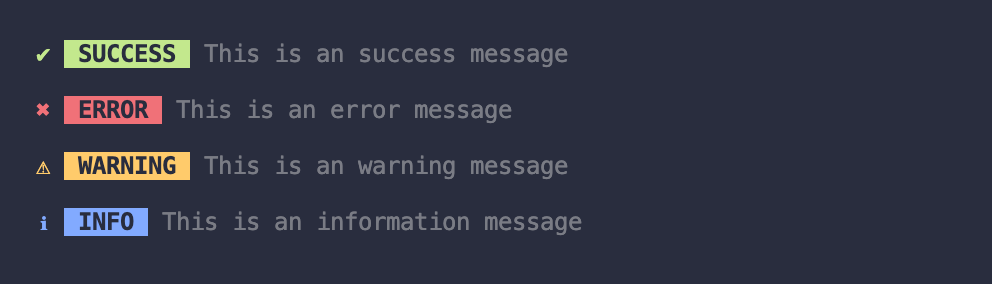
const alert = require('tt-cli-alerts')


alert.success('This is a success message')
//  ✔ SUCCESS  This is a success message

alert.error('This is an error message')
//  ✖ ERROR  This is an error message

alert.warning('This is a warning message')
//  ⚠ WARNING  This is a warning message

alert.info('This is an information message')
 // ℹ INFO  This is an information message
create your own alerts with the alertFactory:

const { alertFactory } = require('tt-cli-alerts')


// creating only alert name
const foo = alertFactory('foo')
foo('lorem ipsum dolor sit amet')

// creating alert name + color
const bar = alertFactory('bar', '#deaa00')
bar('lorem ipsum dolor sit amet')

// creating alert name + color + icon
const baz = alertFactory('baz', '#00a9bc', '🤟')
baz('lorem ipsum dolor sit amet')
👉 API
overriding styles
customize existing or your custom alerts.

const { warning } = require('tt-cli-alerts')

warning('lorem ipsum dolor sit amet')

warning('lorem ipsum dolor sit amet', {
  icon: '🔥',
  title: 'waaarning',
  color: '#ffa500',
  transparent: true,
})
options
> icon
type: string
default: '★'
> title
type: string
default: alertFactory given name
> color
type: string
default: #fff (HEX number)
> transparent
type: bool
default: false
> mesage
type: string
default: Message cannot be empty (Error message)