
ttsc
v0.30.4
Published
General-purpose TypeScript-Go compiler, runtime, plugin host, and LSP host.

Maintainers
 samchon
Readme
ttsc
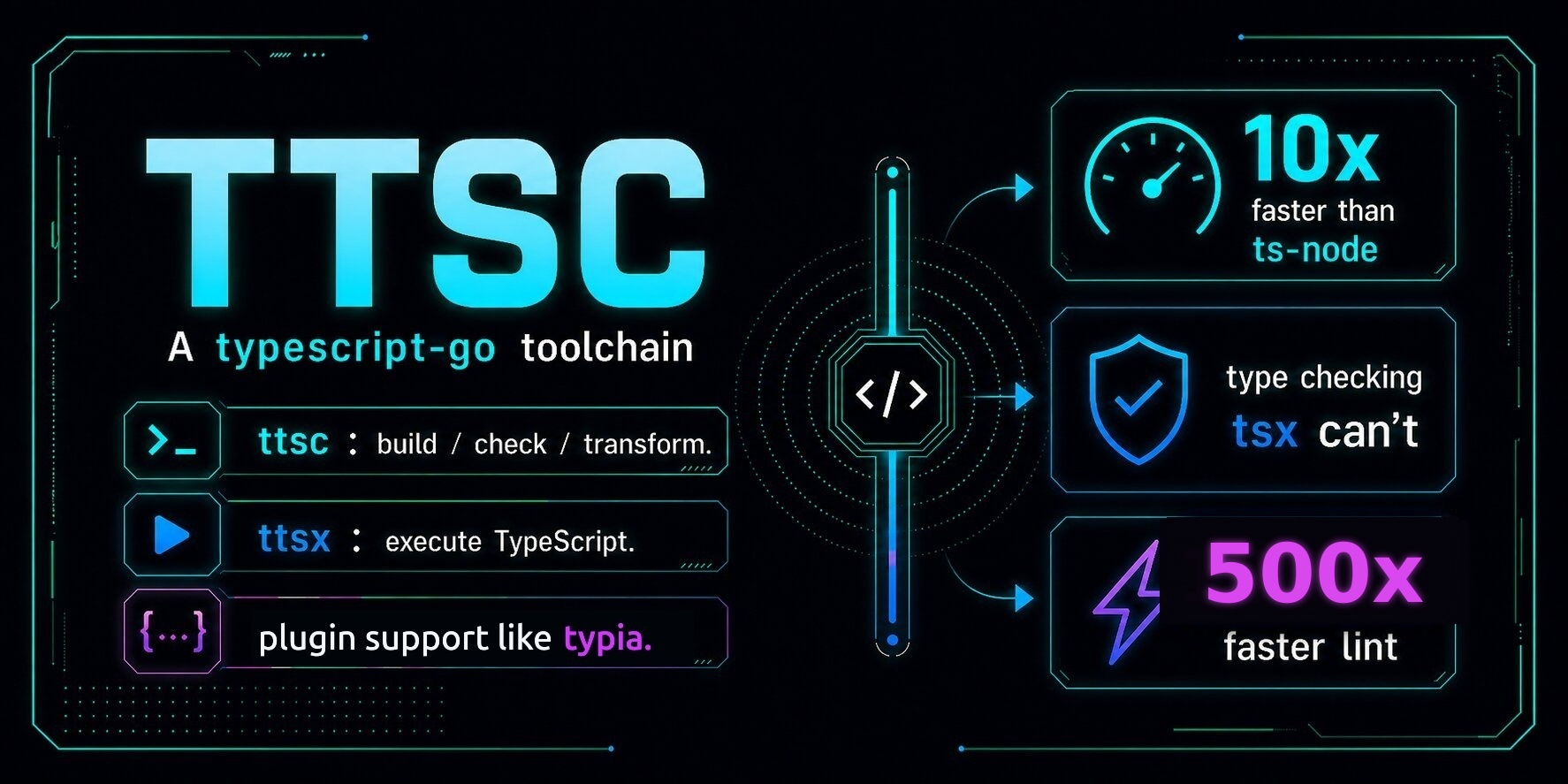






A typescript-go toolchain for compiler-powered plugins and type-safe execution.
ttsc: build, check, and transform.ttsx: execute TypeScript with type checking.@ttsc/lint: lint violations as compiler errors.@ttsc/evidence: 100% requirement coverage, or the build fails.@ttsc/graph: compiler knowledge graph that cuts agent tokens by 92%.- plugin support: compiler-powered libraries, such as
typia.
Setup
ttsc is a drop-in replacement for tsc. It reads the same tsconfig.json, takes the same flags, and emits the same JavaScript, then runs your plugins in the pass that type-checks the project.
npm install -D ttsc typescriptnpx ttsx src/index.ts # run a file, type-checked first
npx ttsc # build
npx ttsc --noEmit # check only
npx ttsc --watch # rebuild on savettsx runs a file the way tsx or ts-node does, but it type-checks the whole project first, so a type error stops the run before anything executes.
Preload the same checked runtime when Node or a test runner owns the process:
node --require ttsc/register src/index.ts
mocha --require ttsc/register --extension ts,tsx "test/**/*.ts"
ttsc/register discovers the nearest tsconfig.json for each TypeScript root, applies its plugins, and refuses to execute when the project does not type-check.
That covers the CLI. The integrations each have a short guide:
@ttsc/unplugin: Vite, Rollup, Rolldown, esbuild, webpack, Rspack, Next.js, Turbopack, Farm, and Bun.@ttsc/metro: React Native and Expo.@ttsc/vscode: live editor diagnostics.
Lint
Lint and format inside the type-check you already run. 720+ rules across 21 families, plus a formatter ported from Prettier.
// src/index.ts
var x: number = 3;
let y: number = 4;
const z: string = 5;
$ npx ttsc --noEmit
src/index.ts:3:7 - error TS2322: Type 'number' is not assignable to type 'string'.
3 const z: string = 5;
~
src/index.ts:2:5 - error TS17397: [prefer-const] Use const instead of let.
2 let y: number = 4;
~~~~~~~~~~~~~
src/index.ts:1:1 - error TS11966: [no-var] Unexpected var, use let or const instead.
1 var x: number = 3;
~~~~~~~~~~~~~~~~~~
Found 3 errors in the same file, starting at: src/index.ts:3Because both arrive in that one stream, the CI step that already runs ttsc --noEmit gates lint with no second job and no second parse. On vscode the rules run about 900 times faster inside that check than ESLint does as its own command.
npx ttsc fix applies autofixes and formatting; npx ttsc format only formats. Rules and every format key are in the Lint and Format guide.
Evidence Graph
Every specification becomes a compile-time obligation.
/**
 * @evidence docs/discount.md#coupon-stacking States the per-issuer stacking limit this section defines, in the buyer's words.
 * @evidence POST:/orders/{orderId}/coupons Explains the rejection this endpoint returns for an over-stacked coupon set.
 * @evidence {@link hooks.useCouponStacking} Renders the limit this hook resolves.
 * @evidence docs/principles.md#no-hard-coding Renders limits from props instead of branching on known issuer names.
 * @evidenceExclude docs/principles.md#fix-root-causes-not-symptoms No failure to fix.
 */
export function CouponStackingNotice(props: IProps): JSX.Element;
Each tag is a stated obligation, and the compiler audits every one, so no requirement and no principle goes unanswered.
You declare who owes what in lint.config.ts, and the guide document has every option.
$ npx ttsc
error TS16411: [evidence/graph] Missing acknowledgement for 'docs/discount.md#coupon-stacking'
  (Markdown H2 'Coupon Stacking' at docs/discount.md:3)
  in Claim 1 reference 1 (markdown, symbols: h2, h3).

...

Found 5 errors.
Without those @evidence tags, each unanswered obligation fails the build on its own, in the same stream as your type errors.
An agent cannot finish while one stands unanswered, so nothing it skipped stays invisible.
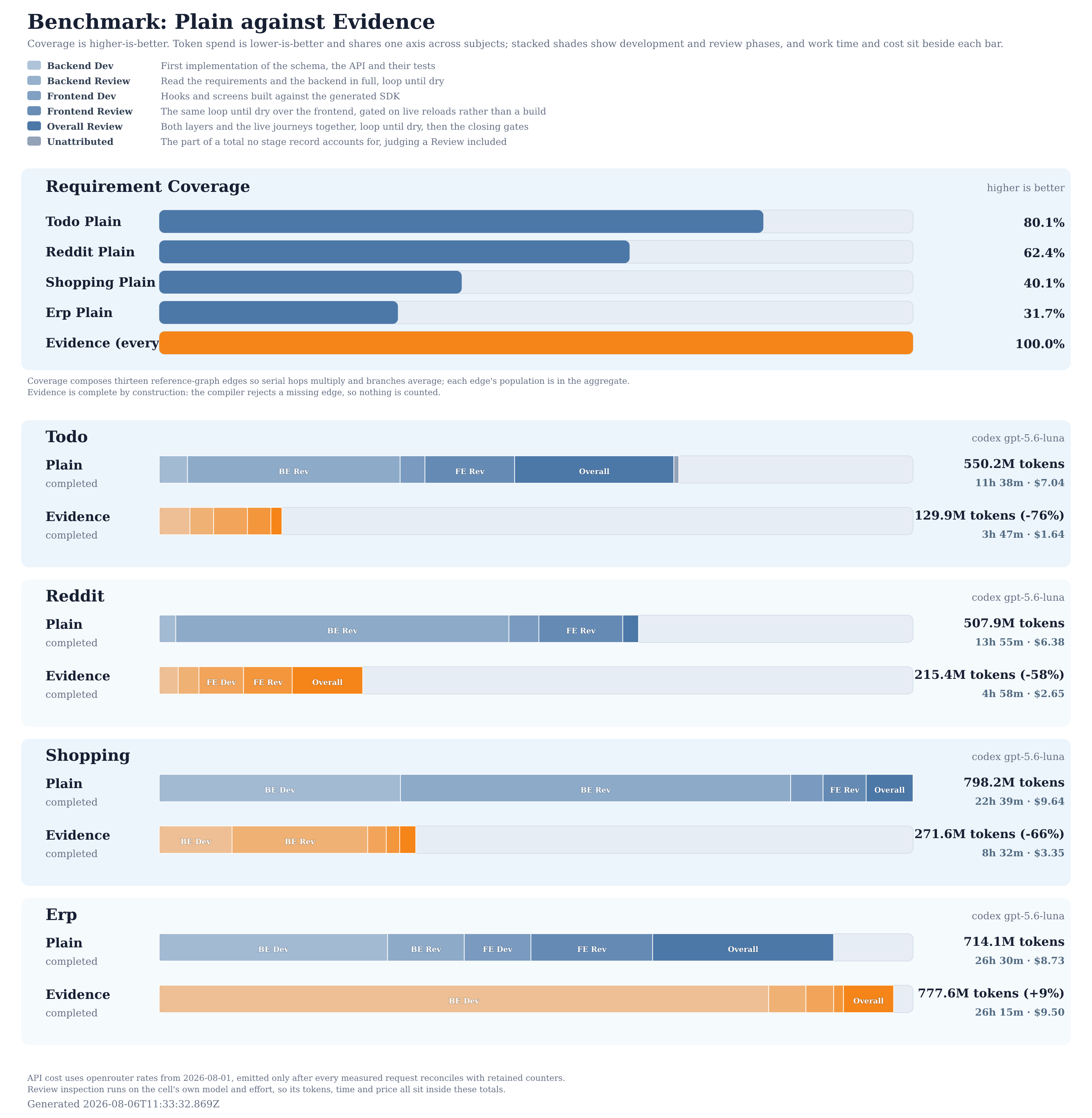
The result is 100% coverage on the first pass, at a fraction of the tokens and the time the same project costs without those obligations.
Compiler Knowledge Graph
Your coding agent answers from the compiler instead of grepping and re-reading files.
{
  "mcpServers": {
    "ttsc-graph": {
      "command": "npx",
      "args": ["-y", "@ttsc/graph"]
    }
  }
}
That server exposes one typed MCP tool over a graph the type checker resolved. Answers never carry file bodies, so repository size cannot inflate the response.
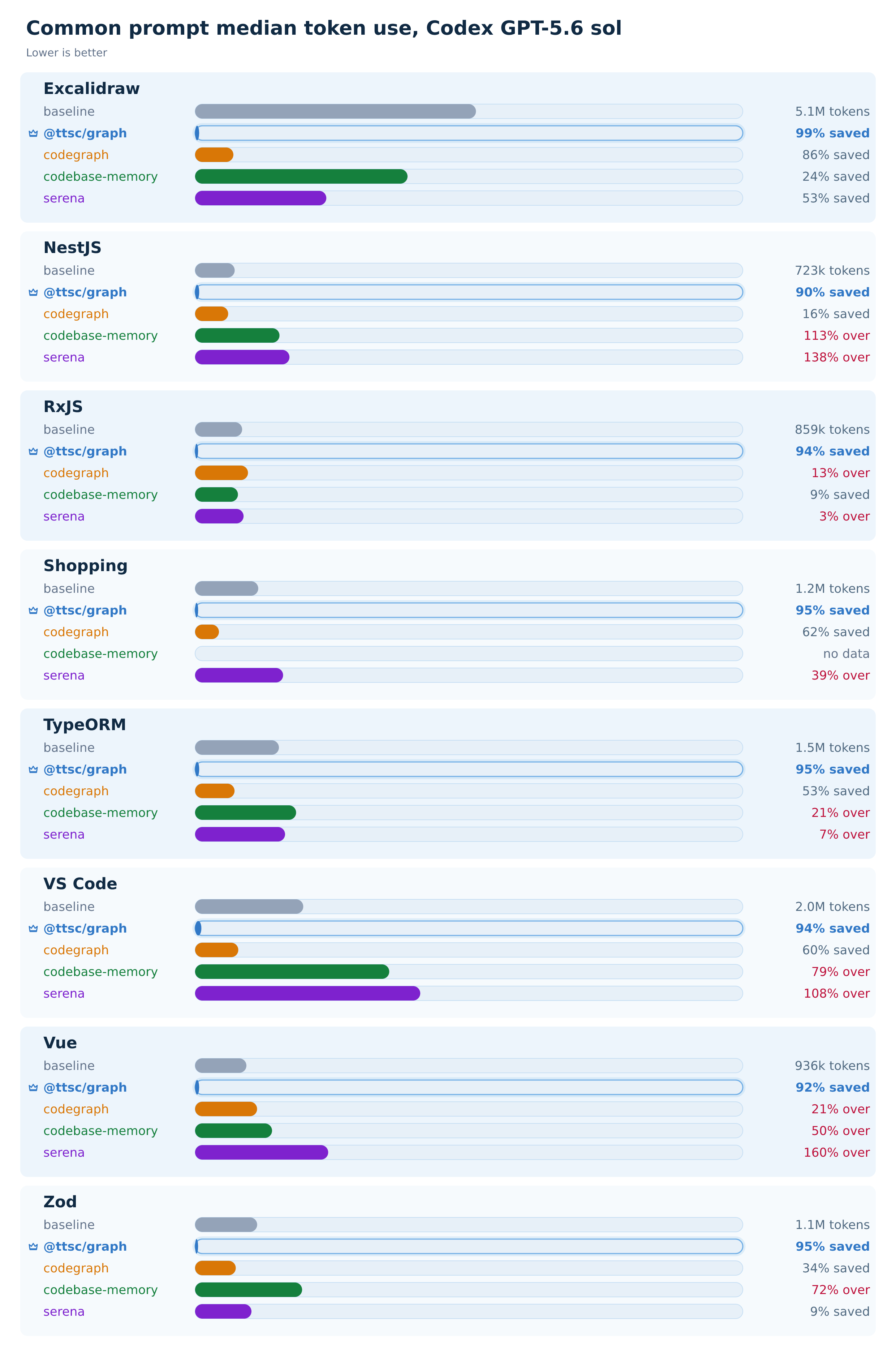
The median answer costs a fraction of the tokens and tool calls the same question takes without it. The design and the comparators are in @ttsc/graph.
Plugins
A plugin hooks the compile to add checks, transforms, or type-driven code generation, all driven by the types the checker has already resolved. It runs on every ttsc build and ttsx run, with no extra step.
typia is the canonical one. Ask it for a validator of any type, and the transform writes the implementation at build time:
import typia from "typia";

export const isStringArray = typia.createIs<string[]>();
No schema, no decorator. The call compiles to a plain function:
export const isStringArray = (() => {
  return (input) =>
    Array.isArray(input) && input.every((elem) => "string" === typeof elem);
})();
Utility plugins shipped in this repository:
@ttsc/banner: adds@packageDocumentationJSDoc banners.@ttsc/evidence: turns a requirement into a compile error until code, tests, or docs acknowledge it by name.@ttsc/graph: MCP server exposing a checker-resolved code graph to coding agents.@ttsc/lint: lints and formats TypeScript source.@ttsc/paths: rewrites source path aliases so JS and declaration emit receive relative imports.@ttsc/strip: removes configured calls anddebuggerstatements.@ttsc/unplugin: runsttscplugins inside bundlers supported byunplugin.@ttsc/metro: runsttscplugins inside Metro for React Native and Expo.
Ecosystem plugins; PRs adding yours are welcome:
nestia: generates NestJS routes, OpenAPI, and SDKs.typia: generates validators, serializers, and type-driven runtime code.
To write your own, start from Plugin Development.
Sponsors

Thanks for your support.
Your donation encourages ttsc development.