
tube-map
v0.1.3
Published
London Underground map with TfL train arrivals and service status

Maintainers
 ogme01
Readme
tube-map
The London Underground, live in your terminal. Watch trains move, check service disruptions, and explore the network without leaving the command line.
npx tube-map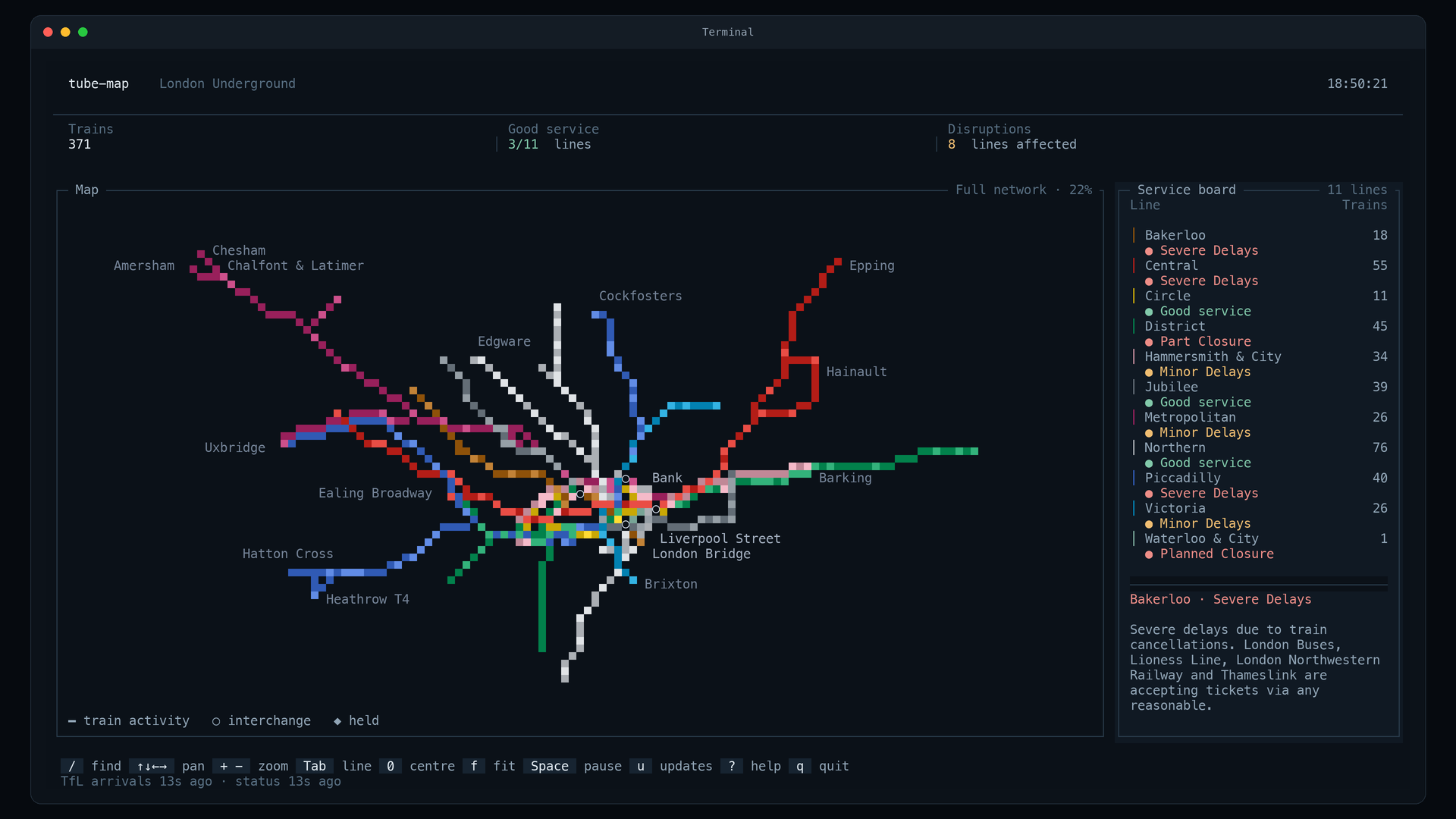
The full network and service board. Train positions are estimated from TfL arrival predictions.
Requires Node.js 18+ and a terminal with truecolour support. No API key, account, or runtime dependencies.
Get started
Run directly with npx, or install the command:
npm install -g tube-map
tube-map
Try an offline demo or open a particular line:
npx tube-map --sim --incident
npx tube-map --line victoria
Features
- Map. Line colours, train markers, interchanges, and station labels. A selected line stays bright against the rest of the network.
- Service status. Network totals, all eleven line statuses, per-line train counts on taller terminals, and wrapped disruption details. Press
uto read full alerts and browse changes recorded during the session. - Find a line or station. Press
/, type a name, choose a result, and press Enter. The camera fits the line or centres on the station. Search understands line abbreviations and station punctuation. - Fits your terminal. A side-by-side map and service board at 132 × 42 or larger. Shorter or narrower windows get a two-row header, a larger map, and a service strip; press
bto open the complete service board. At 80 × 24 the map has 16 rows. Manual zoom and position stay unchanged as you resize. Minimum size: 60 columns × 20 rows. - Updates. Only changed terminal cells are repainted. Pause the moving map while service feeds continue to update.
Keys
| Key | Action |
| --- | --- |
| / | Search lines and stations; ↑ / ↓ choose, Enter opens, Esc cancels |
| Arrows or W A S D | Pan |
| + / - | Zoom |
| 0 | Centre on central London |
| f | Fit the selected line or the whole network |
| Tab / Shift+Tab | Next / previous line (l, ], [ also work) |
| Esc | Clear selection and return to central London |
| Space | Pause / resume the map |
| n | Toggle station labels |
| b | Open the compact service board, or toggle the sidebar in larger windows |
| u | Service updates: ← / → browse, ↑ / ↓ scroll full details |
| ? or h | Keyboard help |
| x | In simulation: cycle incidents, then restore service |
| q or Ctrl+C | Quit and restore the terminal |
Live and simulation modes
Live data polls TfL arrival predictions every 30 seconds and line statuses every 60 seconds, without an API key. Positions are inferred from arrival predictions, not GPS coordinates. A train marked ◆ held has not visibly moved for 45 seconds; this is an estimate, not an official delay report. The screen shows feed age and warns when updates are delayed. Predictions expire after 150 seconds without a refresh.
Simulation runs trains along the cached network with headway spacing and station dwells. If the initial TfL connection fails, the app falls back to a clearly marked offline simulation. Use --sim (or TUBE_SIM=1) to start offline immediately. --incident includes a simulated signal failure; press x to cycle through Victoria, Central, District, Northern, and recovery.
npx tube-map --sim --line victoria
npx tube-map --frame --incident
COLUMNS=80 LINES=24 npx tube-map --frame
npx tube-map --help
--frame prints one simulated frame and exits. Redirected or piped output also produces a single simulated frame rather than starting an interactive session. At overview zoom, moving trains appear as brighter segments of the route; zoom in for individual markers. Nearby held trains share a marker at this scale. The UI uses truecolour ANSI and single-cell Unicode symbols in a monospaced terminal font.
Development
git clone https://github.com/og2701/tube-map.git
cd tube-map
npm start        # live TfL feeds
npm run demo     # offline simulation with a Victoria line incident
npm test         # renderer, layouts, controls, feed lifecycle, and CLI regressions
npm run preview  # reproducible visual fixtures in tools/out/preview.html
The preview uses the same terminal cell buffer and includes wide, compact, shallow-window overview, service drawer, minimum-size, line-focus, search, and help states. Its train positions and clock are fixed for visual comparison. No server or dependencies are needed; open the generated HTML locally.
data/network.json contains cached station and branch data. Rebuild it with node js/fetch_network.js. The renderer relaxes geographical coordinates into a schematic; distances on screen are not a journey-time estimate.