
turntable-selection
v1.1.14
Published
基于 Canvas 的转盘选择组件,支持触摸滑动旋转与点击选中,内置 rotate/select 事件上报,TypeScript 原生类型定义,高度自定义,输出 ESM/CJS/DTS 多格式

Maintainers
 eug620
Readme
turntable-selection
基于 Canvas 的转盘选择组件 — 滑动旋转 · 点击选择 · 事件上报
✨ 特性
- 🎨 Canvas 渲染 — 基于 HTML5 Canvas 2D,高性能绘制,自动适配高 DPI 屏幕
- 👆 丰富交互 — 支持触摸/鼠标滑动旋转、点击中心按钮选中
- ⚙️ 高度可配置 — 扇区数据、动画时长、按钮样式、标签样式、阴影效果、扇区阴影、扇区边框全部可自定义
- 📦 TypeScript 原生 — 完整的类型定义,开箱即用的智能提示
- 🎯 事件驱动 —
rotate旋转事件 /select选中事件,灵活对接业务逻辑 - 📐 响应式布局 — 容器尺寸变化自动适配(防抖 resize)
- 🔄 多格式输出 — ESM / CJS / DTS 三格式,兼容所有打包器和原生
<script>引入 - 🔧 模块化架构 — 类型、常量、工具、事件、绘制分层设计,职责单一
📸 Demo 预览
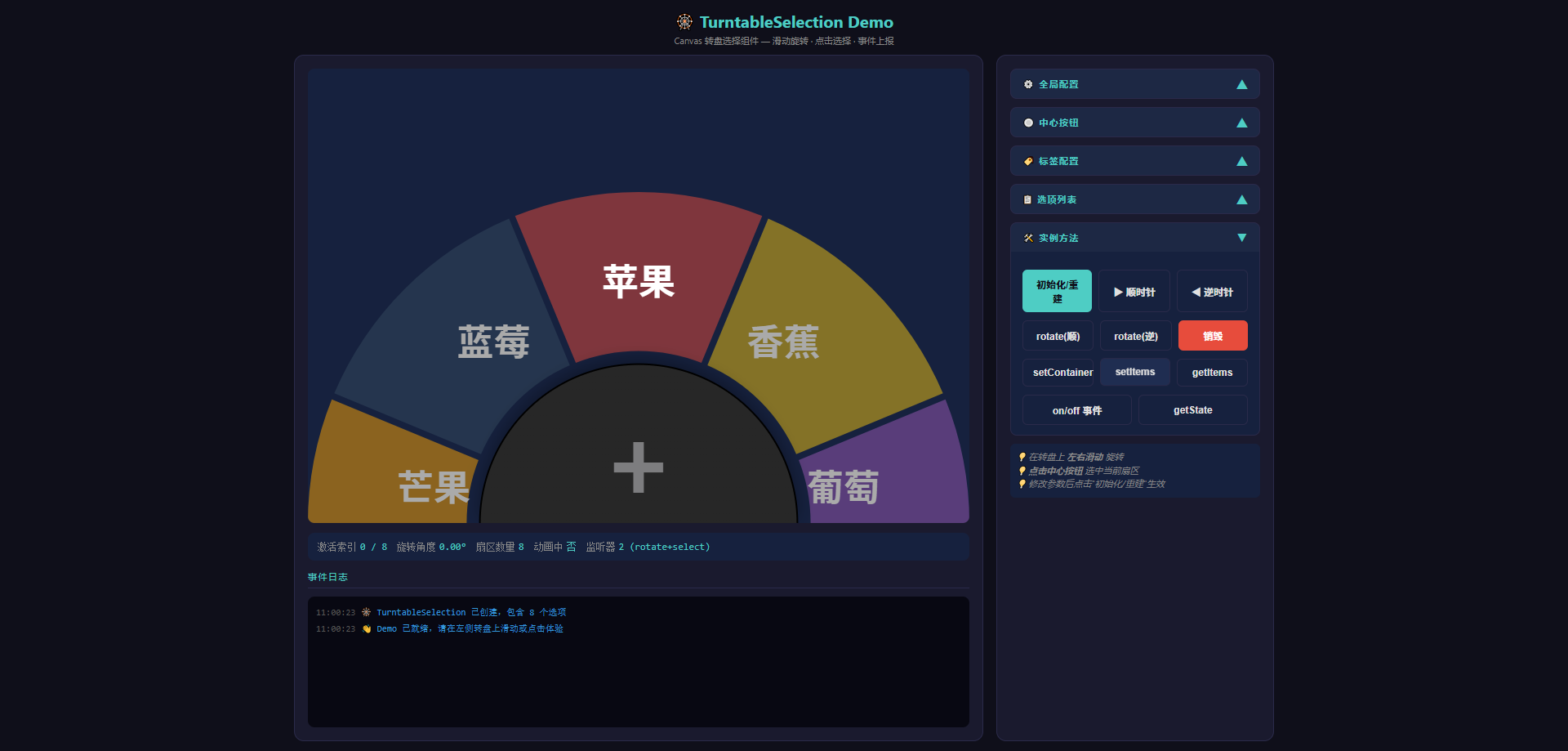
在线体验请参见项目根目录的 index.html。
📦 安装
npm
npm install turntable-selectionyarn
yarn add turntable-selectionpnpm
pnpm add turntable-selection通过 <script> 标签直接引入
<script src="./dist/index.js"></script>
<script>
  const tt = new TurntableSelection({ container: '#app', items: [...] });
</script>
🚀 快速开始
TypeScript / ES Module
import { TurntableSelection, type TurntableItem } from 'turntable-selection';

// 1. 准备数据
const items: TurntableItem[] = [
  { label: '苹果', color: 'rgba(231,76,60,0.5)', type: 'apple' },
  { label: '香蕉', color: 'rgba(241,196,15,0.5)', type: 'banana' },
  { label: '葡萄', color: 'rgba(155,89,182,0.5)', type: 'grape' },
  { label: '橙子', color: 'rgba(230,126,34,0.5)', type: 'orange' },
  { label: '西瓜', color: 'rgba(46,204,113,0.5)', type: 'watermelon' },
  { label: '草莓', color: 'rgba(255,99,132,0.5)', type: 'strawberry' },
  { label: '芒果', color: 'rgba(255,165,0,0.5)', type: 'mango' },
  { label: '蓝莓', color: 'rgba(52,73,94,0.5)', type: 'blueberry' },
];

// 2. 创建实例
const turntable = new TurntableSelection({
  container: '#turntable-container',
  items,
  duration: 450,
  onRotate: (data) => console.log('旋转:', data.direction, '当前:', data.currentItem?.label),
  onSelect: (data) => console.log('选中:', data.item.label),
});

// 3. 程序控制旋转
turntable.next();                          // 顺时针 → 下一扇区
turntable.prev();                          // 逆时针 → 上一扇区
turntable.rotate('clockwise');              // 指定方向旋转
turntable.rotate('counter-clockwise');     // 逆时针旋转
CommonJS (require)
const { TurntableSelection } = require('turntable-selection');

const tt = new TurntableSelection({
  container: '#turntable-container',
  items: [
    { label: '选项1', color: 'rgba(231,76,60,0.5)' },
    { label: '选项2', color: 'rgba(46,204,113,0.5)' },
    { label: '选项3', color: 'rgba(52,152,219,0.5)' },
  ],
});
在 HTML 中直接使用
<div id="turntable-container" style="width: 400px; height: 400px;"></div>

<script type="module">
  import { TurntableSelection } from './dist/index.mjs';

  const tt = new TurntableSelection({
    container: '#turntable-container',
    items: [
      { label: '选项1', color: 'rgba(231,76,60,0.5)' },
      { label: '选项2', color: 'rgba(46,204,113,0.5)' },
      { label: '选项3', color: 'rgba(52,152,219,0.5)' },
    ],
  });
</script>
容器高度自适应
转盘容器会自动填满父容器的剩余高度。只需确保父容器有明确的高度:
<style>
  .page { display: flex; flex-direction: column; height: 100vh; }
  .content { flex: 1; }
  #turntable-container { width: 100%; height: 100%; }
</style>

<div class="page">
  <header>标题</header>
  <div class="content">
    <div id="turntable-container"></div>
  </div>
</div>
⚙️ 配置项详解
构造函数选项 (TurntableSelectionOptions)
interface TurntableSelectionOptions {
  // ── 基础配置 ──────────────────────────────────
  container?: string | HTMLElement;
  items?: TurntableItem[];
  duration?: number;
  aspectRatio?: number;

  // ── 交互阈值 ──────────────────────────────────
  swipeThreshold?: number;
  tapThreshold?: number;

  // ── 外观配置 ──────────────────────────────────
  sectorGap?: number;
  innerRadiusRatio?: number;

  // ── 子配置 ────────────────────────────────────
  label?: TurntableLabelConfig;
  button?: TurntableCenterButtonConfig;
  sectorStyle?: SectorStyleConfig;

  // ── 即时回调 ──────────────────────────────────
  onRotate?: (data: RotateEventData) => void;
  onSelect?: (data: SelectEventData) => void;
}
配置项详细说明
| 配置项 | 类型 | 默认值 | 说明 |
|--------|------|--------|------|
| container | string \| HTMLElement | — | 容器选择器(CSS 选择器或 ID)或 DOM 元素。传入后立即挂载;不传可稍后通过 setContainer() 设置 |
| items | TurntableItem[] | [] | 转盘扇区数据,数组长度决定扇区数量(≥1)。每项包含 label 和 color |
| duration | number | 450 | 旋转动画完成一个扇区所需时间(毫秒)。值越大动画越慢、越平滑 |
| aspectRatio | number | 0.5 | 当容器无显式高度时,用 容器宽度 × aspectRatio 计算画布高度 |
| swipeThreshold | number | 30 | 水平滑动触发旋转的最小位移(像素)。滑动距离超过此值才会触发旋转 |
| tapThreshold | number | 15 | 判定为"点击"而非"滑动"的最大位移(像素)。点击距离小于此值视为点击操作 |
| sectorGap | number | 8 | 相邻扇区之间的间隙(像素)。设置为 0 可使扇区紧密相连无间隙 |
| innerRadiusRatio | number | 0.52 | 内圈半径占外圆半径的比例。0 = 实心圆盘,0.5 = 圆环,接近 1 = 几乎完全空心 |
| sectorStyle | SectorStyleConfig | — | 扇区样式配置,支持阴影和边框效果
扇区数据 (TurntableItem)
interface TurntableItem {
  label: string;           // 扇区上显示的文本
  color: string;           // 扇区背景色,支持所有 CSS 颜色格式
  type?: string;           // 可选的类型标识,用于业务分类
  [key: string]: unknown;  // 支持任意自定义字段 (如 price, id 等)
}
示例:
const items: TurntableItem[] = [
  { label: '苹果', color: 'rgba(231,76,60,0.5)', type: 'apple', price: 5.9, id: 1 },
  { label: '香蕉', color: 'rgba(241,196,15,0.5)', type: 'banana', price: 3.5, id: 2 },
  { label: '葡萄', color: 'rgba(155,89,182,0.5)', type: 'grape', price: 8.0, id: 3 },
];
标签配置 (TurntableLabelConfig)
interface TurntableLabelConfig {
  radiusRatio?: number;       // 标签所在半径占外圆的比例,默认 0.62
  fontSizeRatio?: number;     // 标签字体大小占外圆的比例,默认 0.11
  activeColor?: string;       // 当前激活扇区的标签颜色,默认 'rgba(255,255,255,1)'
  inactiveColor?: string;     // 非激活扇区的标签颜色,默认 'rgba(255,255,255,0.5)'
}
| 配置项 | 默认值 | 说明 |
|--------|--------|------|
| radiusRatio | 0.62 | 标签绘制位置所在的圆周半径比例。0 = 中心,1 = 外边缘。标签沿径向排列 |
| fontSizeRatio | 0.11 | 字体大小与外圆半径的比例。实际字号 = radius × fontSizeRatio |
| activeColor | 'rgba(255,255,255,1)' | 当前选中扇区的标签文字颜色(完全不透明白色) |
| inactiveColor | 'rgba(255,255,255,0.5)' | 未选中扇区的标签文字颜色(半透明白色) |
中心按钮配置 (TurntableCenterButtonConfig)
interface TurntableCenterButtonConfig {
  text?: string;               // 按钮显示文本,默认 '+'
  radiusRatio?: number;        // 按钮半径占外圆的比例,默认 0.48
  fontSizeRatio?: number;      // 按钮字体占按钮半径的比例,默认 0.6
  fontColor?: string;          // 按钮文字颜色,默认 '#7d7d7f'
  backgroundColor?: string;    // 渐变起始颜色,默认 '#272727'
  backgroundEndColor?: string; // 渐变终止颜色,默认 '#272727'
  borderColor?: string;        // 边框颜色,默认 'rgba(0,0,0,0.1)'
  borderWidth?: number;        // 边框宽度 (px),默认 2
  shadow?: ShadowConfig;       // 阴影配置 (见下方)
  hitTolerance?: number;      // 点击容差 (px),默认 10
}
| 配置项 | 默认值 | 说明 |
|--------|--------|------|
| text | '+' | 按钮中央显示的文字,支持任意字符串 |
| radiusRatio | 0.48 | 按钮半径与外圆半径的比例。值越大按钮越大,扇区越小 |
| fontSizeRatio | 0.6 | 按钮文字大小与按钮半径的比例。实际字号 = btnRadius × fontSizeRatio |
| fontColor | '#7d7d7f' | 按钮文字颜色 |
| backgroundColor | '#272727' | 按钮线性渐变起始色(左上 → 右下方向) |
| backgroundEndColor | '#272727' | 按钮线性渐变终止色 |
| borderColor | 'rgba(0,0,0,0.1)' | 按钮边框颜色 |
| borderWidth | 2 | 按钮边框宽度(像素) |
| shadow | 见下方 | 按钮阴影效果配置 |
| hitTolerance | 10 | 点击命中外扩像素数。增大可使按钮更容易点中(对移动端友好) |
阴影配置 (ShadowConfig)
interface ShadowConfig {
  color: string;       // 阴影颜色,默认 'rgba(0,0,0,0.35)'
  blur: number;        // 模糊半径 (px),默认 20
  offsetX?: number;   // 水平偏移 (px),默认 0
  offsetY?: number;   // 垂直偏移 (px),默认 -6(向上偏移,产生浮起感)
}
阴影示例:
button: {
  shadow: {
    color: 'rgba(0,0,0,0.5)',
    blur: 30,
    offsetX: 0,
    offsetY: -10,
  },
}
扇区样式配置 (SectorStyleConfig)
扇区样式配置支持为每个扇区添加阴影效果和边框描边,使转盘视觉效果更加丰富。
interface SectorStyleConfig {
  shadow?: SectorShadowConfig;   // 扇区阴影配置 (可选)
  border?: SectorBorderConfig;   // 扇区边框配置 (可选)
}
扇区阴影配置 (SectorShadowConfig)
interface SectorShadowConfig {
  color: string;       // 阴影颜色,默认 'rgba(0,0,0,0.3)'
  blur: number;        // 模糊半径 (px),默认 8
  offsetX?: number;   // 水平偏移 (px),默认 0
  offsetY?: number;   // 垂直偏移 (px),默认 2
}
| 配置项 | 默认值 | 说明 |
|--------|--------|------|
| color | 'rgba(0,0,0,0.3)' | 阴影颜色,支持所有 CSS 颜色格式 |
| blur | 8 | 阴影模糊半径。值越大阴影扩散范围越大 |
| offsetX | 0 | 水平偏移像素数。正值向右偏移,负值向左 |
| offsetY | 2 | 垂直偏移像素数。正值向下偏移,负值向上 |
扇区边框配置 (SectorBorderConfig)
interface SectorBorderConfig {
  color: string;       // 边框颜色,默认 'rgba(255,255,255,0.5)'
  width: number;       // 边框宽度 (px),默认 1
}
| 配置项 | 默认值 | 说明 |
|--------|--------|------|
| color | 'rgba(255,255,255,0.5)' | 边框颜色,支持所有 CSS 颜色格式 |
| width | 1 | 边框宽度像素数。值越大边框越粗 |
扇区样式示例:
const turntable = new TurntableSelection({
  container: '#turntable-container',
  items: [/* ... */],
  sectorStyle: {
    // 启用扇区阴影
    shadow: {
      color: 'rgba(0, 0, 0, 0.4)',
      blur: 10,
      offsetX: 0,
      offsetY: 3,
    },
    // 启用扇区边框
    border: {
      color: 'rgba(255, 255, 255, 0.6)',
      width: 2,
    },
  },
});
💡 提示: 阴影和边框可以单独启用,也可以同时启用。不传
sectorStyle或其内部字段时表示不启用对应效果,保持原有视觉效果。
📚 API 方法
事件 API
on(event, callback)
注册事件监听器。支持类型安全的事件名与回调签名。
// 监听旋转事件
turntable.on('rotate', (data: RotateEventData) => {
  console.log('旋转方向:', data.direction);       // 'clockwise' | 'counter-clockwise'
  console.log('激活索引:', data.activeIndex);     // 当前扇区索引
  console.log('当前项目:', data.currentItem);      // TurntableItem | null
  console.log('旋转角度:', data.rotation);         // 当前弧度
});

// 监听选中事件
turntable.on('select', (data: SelectEventData) => {
  console.log('选中索引:', data.index);           // 选中扇区的索引
  console.log('选中项目:', data.item);             // TurntableItem 对象
  console.log('点击位置:', data.clientX, data.clientY);
});
| 参数 | 类型 | 说明 |
|------|------|------|
| event | 'rotate' \| 'select' | 事件名 |
| callback | (data) => void | 事件回调函数,接收对应事件载荷 |
off(event, callback)
移除指定的事件监听器。仅移除引用相等的监听器。
const handler = (data) => { /* ... */ };
turntable.on('rotate', handler);
// 不再需要时移除
turntable.off('rotate', handler);
| 参数 | 类型 | 说明 |
|------|------|------|
| event | 'rotate' \| 'select' | 事件名 |
| callback | (data) => void | 要移除的回调函数引用 |
旋转控制
rotate(direction)
按指定方向旋转到下一个扇区。触发 rotate 事件。
turntable.rotate('clockwise');         // 顺时针旋转一扇
turntable.rotate('counter-clockwise'); // 逆时针旋转一扇
| 参数 | 类型 | 说明 |
|------|------|------|
| direction | 'clockwise' \| 'counter-clockwise' | 旋转方向 |
next()
顺时针旋转到下一个扇区(rotate('clockwise') 的简写)。
turntable.next();prev()
逆时针旋转到上一个扇区(rotate('counter-clockwise') 的简写)。
turntable.prev();容器与数据管理
setContainer(container)
设置或切换容器。支持 CSS 选择器、元素 ID 或 DOM 元素。如果传入字符串但元素尚未渲染,会自动等待 DOM 就绪。
turntable.setContainer('#new-container');                    // CSS 选择器
turntable.setContainer('my-container-id');                   // 元素 ID
turntable.setContainer(document.getElementById('xx'));        // DOM 元素
turntable.setContainer(document.querySelector('.turntable')); // 复杂选择器
| 参数 | 类型 | 说明 |
|------|------|------|
| container | string \| HTMLElement | CSS 选择器、元素 ID 或 DOM 元素 |
setItems(items)
更新转盘数据。重置旋转状态(索引归零、角度归零)并重新绘制。
turntable.setItems([
  { label: '新选项A', color: 'rgba(231,76,60,0.5)' },
  { label: '新选项B', color: 'rgba(46,204,113,0.5)' },
]);
| 参数 | 类型 | 说明 |
|------|------|------|
| items | TurntableItem[] | 新的扇区数据列表。数组长度决定扇区数量 |
getItems()
获取当前转盘数据的浅拷贝数组,避免外部修改内部数据。
const items = turntable.getItems();
// => [{ label: '苹果', color: 'rgba(...)', type: 'apple', ... }, ...]
返回值: TurntableItem[] — 当前扇区数据的浅拷贝数组
状态查询
getState()
获取组件当前状态的只读快照。
const state = turntable.getState();
// => {
//   rotation: -1.047,       // 当前旋转角度 (弧度)
//   activeIndex: 2,          // 当前激活扇区索引 (已规范化)
//   isAnimating: false,      // 是否正在播放旋转动画
//   isSpinning: false,       // isAnimating 的别名
//   sectorCount: 8,          // 扇区总数
// }
返回值: TurntableSelectionState
interface TurntableSelectionState {
  rotation: number;       // 当前旋转角度 (弧度)
  activeIndex: number;    // 当前激活扇区索引 (已规范化为 [0, count-1])
  isAnimating: boolean;   // 是否处于旋转动画中
  isSpinning: boolean;    // isAnimating 的别名,语义一致
  sectorCount: number;    // 扇区总数
}
资源清理
destroy()
销毁实例,释放所有资源。多次调用安全(已做幂等处理)。
turntable.destroy();释放的资源:
- 移除
window resize事件监听 - 移除
DOMContentLoaded事件监听 - 移除 canvas DOM 元素
- 清空所有事件监听器
- 重置所有内部引用(
ctx、container、canvas等置null)
📡 事件载荷
RotateEventData
interface RotateEventData {
  direction: 'clockwise' | 'counter-clockwise';  // 旋转方向
  delta: number;          // 旋转步长:+1 顺时针, -1 逆时针
  activeIndex: number;    // 旋转后激活扇区的索引 (已规范化)
  currentItem: TurntableItem | null;  // 激活扇区的数据对象,无数据时为 null
  rotation: number;       // 当前旋转角度 (弧度)
}
触发时机: 通过滑动或程序调用 (next/prev/rotate) 触发旋转时。
SelectEventData
interface SelectEventData {
  index: number;          // 选中扇区的索引
  item: TurntableItem;    // 选中扇区的数据对象
  clientX: number;        // 鼠标/触摸事件的 clientX (视口坐标)
  clientY: number;        // 鼠标/触摸事件的 clientY (视口坐标)
}
触发时机: 用户点击中心按钮且命中时(位移 < tapThreshold 且点击在按钮圆形区域内)。
🎮 交互方式
| 操作 | 说明 |
|------|------|
| 左右滑动 | 在转盘上水平滑动超过 swipeThreshold 像素 → 触发旋转动画 |
| 点击中心按钮 | 在中心按钮位置按下并抬起(位移 < tapThreshold) → 触发 select 事件 |
| 程序调用 | next() / prev() / rotate() 可随时触发旋转,与用户交互完全解耦 |
交互流程图
用户触摸/点击转盘
       │
       ▼
  记录起始位置 (pointerdown)
       │
       ▼
  抬起手指/鼠标 (pointerup)
       │
       ├── 位移 < tapThreshold (15px)?
       │         │
       │         ├── YES → 点击在按钮范围内?
       │         │         │
       │         │         ├── YES → 触发 select 事件
       │         │         └── NO  → 无操作
       │         │
       │         └── NO
       │
       └── |dx| > swipeThreshold (30px) 且 |dx| > |dy|?
                 │
                 ├── YES → 触发旋转 (方向由 dx 正负决定)
                 └── NO  → 无操作
🏗️ 架构设计
模块划分
项目采用分层架构,各模块职责单一,互不耦合:
┌─────────────────────────────────────────────────────────┐
│                    TurntableSelection                    │
│                    (index.ts) 主入口                     │
│  ┌─────────┐ ┌─────────┐ ┌─────────┐ ┌──────────────┐  │
│  │  types   │ │constants│ │  utils  │ │    events     │  │
│  │ 类型定义 │ │ 常量    │ │ 工具函数 │ │ EventEmitter  │  │
│  └─────────┘ └─────────┘ └─────────┘ └──────────────┘  │
│  ┌─────────────────────────────────────────────────┐    │
│  │                   drawing                       │    │
│  │            Canvas 绘图纯函数集合                │    │
│  └─────────────────────────────────────────────────┘    │
└─────────────────────────────────────────────────────────┘
各模块职责
| 模块 | 文件 | 职责 |
|------|------|------|
| 类型定义 | src/types.ts | 定义所有接口(TurntableItem、TurntableSelectionOptions、RotateEventData 等)和内部状态类型 InternalState |
| 常量与默认值 | src/constants.ts | 集中管理数学常量(HALF_PI、TAU)、缓动函数(easeOutCubic)、默认配置对象,以及 resolveDefaults() 合并函数 |
| 工具函数 | src/utils.ts | 纯函数集合:DOM 查询 (findElement)、Canvas 尺寸 (setupCanvasSize)、坐标转换 (clientToCanvas)、几何运算 (isPointInCircle)、索引规范化 (normalizeIndex)、防抖 (debounce) |
| 事件系统 | src/events.ts | 通用 EventEmitter<T> 实现,提供类型安全的 on / off / emit / removeAllListeners 接口,独立于 TurntableSelection 类 |
| Canvas 绘制 | src/drawing.ts | 纯函数集合:drawSectorArc(扇区弧形路径)、drawSectorLabel(扇区标签)、drawSemicircleButton(半圆中心按钮)、drawTurntable(主绘制入口) |
| 主入口 | index.ts | 组合各子模块,实现 TurntableSelection 类,对外暴露完整 API |
核心流程
- 构造 →
resolveDefaults()合并配置 → 初始化内部状态 → 注册即时回调 - 挂载 →
setContainer()→ 创建 Canvas →resize()设置尺寸/高 DPI →draw()首次绘制 - 交互 →
pointerdown/up→ 判定点击/滑动 → 触发rotate或select事件 - 动画 →
requestAnimationFrame循环 →easeOutCubic缓动 → 更新state.rotation→draw()重绘 - 销毁 →
destroy()→ 移除所有监听 → 清空 DOM → 释放资源
📂 项目结构
turntable-selection/
├── src/
│   ├── types.ts          # 所有接口与类型定义
│   ├── constants.ts      # 数学常量、默认配置、缓动函数
│   ├── utils.ts          # DOM/Canvas/几何/索引 工具函数
│   ├── events.ts         # 通用 EventEmitter 实现
│   └── drawing.ts        # Canvas 绘图纯函数集合
├── dist/
│   ├── index.js          # CJS 格式输出
│   ├── index.mjs         # ESM 格式输出
│   ├── index.d.ts        # TypeScript 类型声明
│   └── *.map             # Source Map 文件
├── screenshots/
│   └── demo.png          # Demo 截图 (1920×1280)
├── test/
│   └── turntable-selection.test.ts  # Jest 单元测试
├── index.ts              # 库主入口,TurntableSelection 类
├── demo.html             # 完整功能演示页面
├── package.json          # npm 包配置
├── tsconfig.json         # TypeScript 编译配置
├── tsup.config.ts        # tsup 构建配置
└── jest.config.js        # Jest 测试配置
🔨 脚本命令
| 命令 | 说明 |
|------|------|
| npm run clean | 清理 dist/ 目录 |
| npm run typecheck | TypeScript 类型检查 (tsc --noEmit) |
| npm test | 运行全部单元测试 |
| npm run test:watch | 监听模式运行测试 |
| npm run test:coverage | 运行测试并生成覆盖率报告 |
| npm run build | 构建 ESM + CJS + DTS |
| npm run build:esm | 仅构建 ESM 格式 |
| npm run build:cjs | 仅构建 CJS 格式 |
| npm run release:patch | 发布 patch 版本 (0.0.x) |
| npm run release:minor | 发布 minor 版本 (0.x.0) |
| npm run release:major | 发布 major 版本 (x.0.0) |
| npm run prepublishOnly | 发布前自动执行:clean → typecheck → test → build |
📄 License
MIT © 2026 turntable-selection