
tweakpane-plugin-thumbnail-grid
v1.0.3
Published
Plugin template for Tweakpane


Readme
Tweakpane plugin thumbnail grid
Thumbnail grid select binding plugin for Tweakpane.
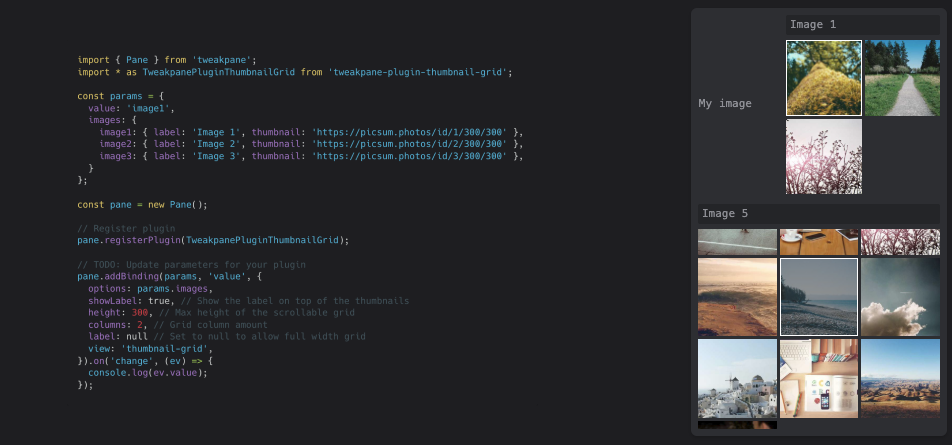
For plugin users
Installation
npm install tweakpane-plugin-thumbnail-gridUsage
import { Pane } from 'tweakpane';
import * as TweakpanePluginThumbnailGrid from 'tweakpane-plugin-thumbnail-grid';

const params = {
  value: 'image1',
  images: {
    image1: { label: 'Image 1', thumbnail: 'https://picsum.photos/id/1/300/300' },
    image2: { label: 'Image 2', thumbnail: 'https://picsum.photos/id/2/300/300' },
    image3: { label: 'Image 3', thumbnail: 'https://picsum.photos/id/3/300/300' },
  }
};

const pane = new Pane();

// Register plugin
pane.registerPlugin(TweakpanePluginThumbnailGrid);

// TODO: Update parameters for your plugin
pane.addBinding(params, 'value', {
  options: params.images,
  showLabel: true, // Show the label on top of the thumbnails
  height: 300, // Max height of the scrollable grid
  columns: 2, // Grid column amount
  label: null, // Set to null to allow full width grid
  view: 'thumbnail-grid',
}).on('change', (ev) => {
  console.log(ev.value);
});